

Provides a preview when hovering CSS easing functions in VS Code.
Hover over any CSS easing function to get a preview of the animation, comparing it to a linear easing (default).
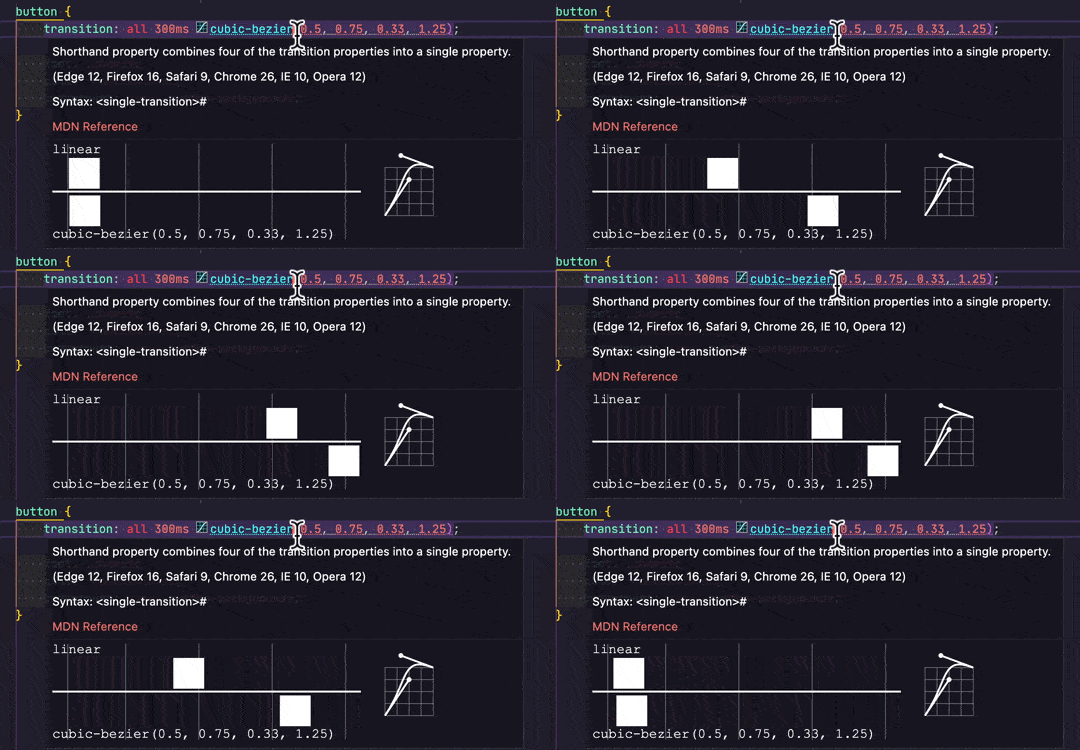
This extension has a few settings:
visubezier.defaulteasingfunction: Override the default comparison easing function with any valid easing function expressed as a keyword or acubic-bezier()function (default:linear).visubezier.defaultduration: Override the duration of the animation with any valid duration expressed as0.5sor500ms(default:1s).visubezier.defaultbackground: Override the background color for the preview area (default:#2d2d30).visubezier.defaultcolor: Override the foreground color for the preview elements (default:#d7d7d7).visubezier.defaultlanguages: Override the list of languages for which you want to activate the preview. (default:["css","sass","scss","less","postcss","stylus","xml","svg"]).
Paste this sample into VS Code after installing to see it in action:
button {
	transition-timing-function: ease;
	transition-timing-function: ease-in;
	transition-timing-function: ease-out;
	transition-timing-function: ease-in-out;
	transition-timing-function: cubic-bezier(0.4, -0.2, 0.42, 1.2);
	transition-timing-function: steps(7);
	transition-timing-function: steps(5, jump-none);
	transition-timing-function: steps(8, jump-both);
	transition-timing-function: steps(4, jump-start);
	transition-timing-function: steps(2, jump-end);
	transition-timing-function: step-start;
	transition-timing-function: step-end;
	transition-timing-function: linear(0, 0.25 25% 75%, 1);
	transition-timing-function: linear(0, 0.063, 0.25, 0.563, 1 36.4%, 0.812, 0.75, 0.813, 1 72.7%, 0.953, 0.938, 0.953, 1 90.9%, 0.984, 1 100% 100%);
	transition-timing-function: ease, steps(3), cubic-bezier(1, 0, 0, 1), linear(0 0%, -0.25, 1.25, 1 100%);
}- Easing functions (e.g.
cubic-bezier(...)andlinear(...)) containing any values other than numbers are currently ignored (e.g.calc()orvar()). - Points with negative values can cause the animation to fall out of the preview area.
linear()easing function animation preview falls back to rendering as a classiceaseeasing due to VS Code's internal rendering engine not handling the function notation (as of 2023-09-02).
- Fixed parsing of
linear()with negative values, and rendering oflinear()with a value greater than1which was previously clamped to1.
- Added support for
linear()syntax. Animation preview is not yet implemented in VS Code, but the SVG graph is correctly depicted (based on my interpretation of the spec, which I hope to be correct). - Added a licence file.
- Updated the underlying VS Code Extension required files to run with more modern code (Node 18, TypeScript 5, VS Code 1.76+, and other things I hardly understand).
- Updated the extension's package to patch vulnerabilities.
- Added a
defaultlanguagesconfiguration option to only run the extension in relevant languages, overridable by the user if needed. (thanks to @robole for the suggestion and to tjx666 for the example file!). - Patched a few package vulnerabilities.
- Added support for
steps()andstep-start/step-endsyntax. - Changed solid underline to a dotted underline.
- Updated comments/typings.
- Patch the security vulnerabilities for
url-parse.
- Added an icon before the timing functions that can be previewed. Updated the ignored files.
- Fixed the
easemapping and allow to detect more than one function per declaration.
- Patch the security vulnerabilities for
minimist.
- Fixed some greed in the detection regular expression.
- Updated icon and extension name
- Patch the security vulnerabilities for
braces,js-yamlandfstream.
- Patch the security vulnerabilities for
tarandnode.extend.
- Change the detection RegExp to be less greedy and not output false positives.
- Add a preview of the Bézier curve next to the animation.
- Initial release of VisuBezier. 🤘