NOTE: The full documentation for Logstory is at: https://chronicle.github.io/logstory/
Logstory is used to update timestamps in telemetry (i.e. logs) and then replay them into a Google Security Operations (SecOps) tenant. Each usecase tells an infosec story, a "Log Story."
The stories are organized as "usecases", which always contain events and may contain entities, reference lists, and/or YARA-L 2.0 Detection Rules. Each usecase includes a README.md file to describe its use.
Only the RULES_SEARCH_WORKSHOP is included with the PyPI package. Learning about and installing addition usecases is described in usecases.
Logstory has a command line interface (CLI), written in Python, that is most easily installed from the Python Package Index (PyPI):
$ pip install logstoryThe logstory CLI interface uses command groups and subcommands with arguments like so:
logstory replay usecase RULES_SEARCH_WORKSHOP
These are explained in depth later in this doc.
If you have uv installed, you can run logstory without explicitly installing it first:
# Run directly with uvx (one-time execution)
uvx logstory replay usecase RULES_SEARCH_WORKSHOP

# Use with custom .env file
uvx logstory usecases list-available --env-file .env

# Or install in a managed environment with uv
uv tool install logstory
uv tool run logstory replay usecase RULES_SEARCH_WORKSHOP
The uvx command automatically creates an isolated environment and runs the tool, making it convenient for occasional use without polluting your global Python environment.
After the subcommand, Logstory uses Typer for modern CLI argument and option handling. You can provide configuration in several ways:
logstory replay usecase RULES_SEARCH_WORKSHOP \
  --customer-id=01234567-0123-4321-abcd-01234567890a \
  --credentials-path=/usr/local/google/home/dandye/.ssh/malachite-787fa7323a7d_bk_and_ing.json \
--timestamp-delta=1dexport LOGSTORY_CUSTOMER_ID=01234567-0123-4321-abcd-01234567890a
export LOGSTORY_CREDENTIALS_PATH=/path/to/credentials.json
export LOGSTORY_REGION=US
export LOGSTORY_AUTO_GET=true # Auto-download missing usecases
logstory replay usecase RULES_SEARCH_WORKSHOPCreate a .env file in your working directory:
# .env
LOGSTORY_CUSTOMER_ID=01234567-0123-4321-abcd-01234567890a
LOGSTORY_CREDENTIALS_PATH=/path/to/credentials.json
LOGSTORY_REGION=US
LOGSTORY_USECASES_BUCKETS=gs://logstory-usecases-20241216,gs://my-custom-bucket
LOGSTORY_AUTO_GET=true  # Auto-download missing usecases (optional)
Then run commands without additional options:
logstory replay usecase RULES_SEARCH_WORKSHOPFor multiple environments, create separate .env files:
# .env.prod
LOGSTORY_CUSTOMER_ID=01234567-0123-4321-abcd-01234567890a
LOGSTORY_CREDENTIALS_PATH=/path/to/prod-credentials.json

# .env.dev
LOGSTORY_CUSTOMER_ID=98765432-9876-5432-dcba-098765432109
LOGSTORY_CREDENTIALS_PATH=/path/to/dev-credentials.json
Use them with the --env-file option:
logstory replay usecase RULES_SEARCH_WORKSHOP --env-file .env.prod
logstory replay usecase RULES_SEARCH_WORKSHOP --env-file .env.dev
Configuration Priority: Command line options > Environment variables > .env file values
Logstory can source usecases from multiple sources using URI-style prefixes. Configure sources using the LOGSTORY_USECASES_BUCKETS environment variable:
# Single bucket (default)
export LOGSTORY_USECASES_BUCKETS=gs://logstory-usecases-20241216

# Multiple sources (comma-separated)
export LOGSTORY_USECASES_BUCKETS=gs://logstory-usecases-20241216,gs://my-custom-bucket,gs://team-bucket

# Mix GCS and local file system sources
export LOGSTORY_USECASES_BUCKETS=gs://logstory-usecases-20241216,file:///path/to/local/usecases

# Local file system only
export LOGSTORY_USECASES_BUCKETS=file:///path/to/chronicle/usecases

# Backward compatibility (bare bucket names auto-prefixed with gs://)
export LOGSTORY_USECASES_BUCKETS=logstory-usecases-20241216,my-custom-bucket
Supported Source Types:
gs://bucket-name: Google Cloud Storage bucketsfile://path: Local file system directories- Future support planned:
[email protected]:user/repo.git,s3://bucket-name
Authentication:
- GCS public buckets: Accessed anonymously (no authentication required)
- GCS private buckets: Requires
gcloud application-default logincredentials - Local file system: No authentication required (uses file system permissions)
- The system automatically tries authenticated access first, then falls back to anonymous access
URI-Style Prefixes:
- Use
gs://prefix for explicit GCS bucket specification - Use
file://prefix for local file system directories (absolute paths required) - Bare bucket names automatically treated as GCS buckets (backward compatibility)
- Future Git support:
[email protected]:user/usecases.gitorhttps://github.com/user/usecases.git
Commands:
# List usecases from all configured sources
logstory usecases list-available

# Override source configuration for a single command
logstory usecases list-available --usecases-bucket gs://my-specific-bucket

# Download usecase (searches all configured sources)
logstory usecases get MY_USECASE

# Examples with different source types
logstory usecases list-available --usecases-bucket file:///path/to/local/usecases
logstory usecases get USECASE_NAME --usecases-bucket file:///path/to/local/usecases

# Future Git support (when supported)
logstory usecases list-available --usecases-bucket [email protected]:myorg/usecases.gitIf you're upgrading from a version without URI-style prefixes:
Before:
export LOGSTORY_USECASES_BUCKETS=logstory-usecases-20241216,my-bucketAfter (recommended):
# GCS buckets with explicit prefixes
export LOGSTORY_USECASES_BUCKETS=gs://logstory-usecases-20241216,gs://my-bucket

# Or mix with local file system
export LOGSTORY_USECASES_BUCKETS=gs://logstory-usecases-20241216,file:///path/to/local/usecases
Note: The old format still works (backward compatibility), but using explicit URI prefixes (gs://, file://) is recommended for clarity and future compatibility.
(Required) This is your Google SecOps tenant's UUID4, which can be found at:
https://${code}.backstory.chronicle.security/settings/profile
(Required) Logstory supports two ingestion APIs:
-
Legacy Malachite API (default for backward compatibility)
- Uses the Google Security Operations Ingestion API
- Download credentials from: https://${code}.backstory.chronicle.security/settings/collection-agent
-
New Chronicle REST API (recommended for new deployments)
- Uses the modern Chronicle v1alpha REST API
- Requires Google Cloud project ID
- Supports additional features like forwarder management and service account impersonation
Auto-Detection: Logstory automatically detects which API to use based on your credentials, or you can explicitly specify with --api-type=rest or --api-type=legacy.
Migration Guide: See REST_API_MIGRATION.md for detailed migration instructions.
Getting API authentication credentials
- Legacy API: "Your Google Security Operations representative will provide you with a Google Developer Service Account Credential to enable the API client to communicate with the API."[reference]
- REST API: Create a service account in Google Cloud Console with Chronicle API permissions
(Optional, default=1d) Updating timestamps for security telemetry is tricky. The .log files in the usecases have timestamps in many formats and we need to update them all to be recent while simultaneously preserving the relative differences between them. For each usecase, Logstory determines the base timestamp "bts" for the first timestamp in the first logfile and all updates are relative to it.
The image below shows that original timestamps on 2023-06-23 (top two subplots) were updated to 2023-09-24, the relative differences between the three timestamps on the first line of the first log file before (top left) and the last line of the logfile (top right) are preserved both interline and intraline on the bottom two subplots. The usecase spans an interval of 5 minutes and 55 seconds both before and after updates.
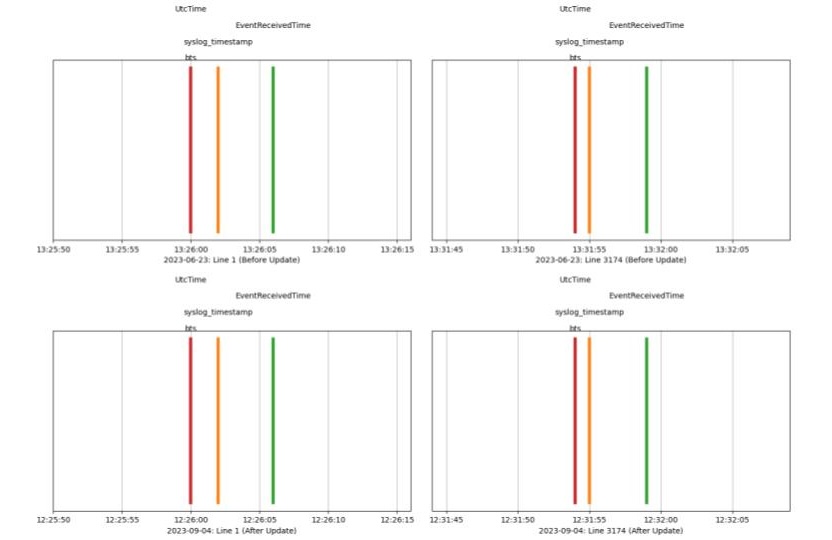
When timestamp_delta is set to 0d (zero days), only year, month, and day are updated (to today) and the hours, minutes, seconds, and milliseconds are preserved. That hour may be in the future, so when timestamp_delta is set to 1d the year, month, and day are set to today minus 1 day and the hours, minutes, seconds, and milliseconds are preserved.
Tip: For best results, use a cron jobs to run the usecase daily at 12:01am with --timestamp-delta=1d.
You may also provide Nh for offsetting by the hour, which is mainly useful if you want to replay the same log file multiple times per day (and prevent deduplication). Likewise, Nm offsets by minutes. These can be combined. For example, on the day of writing (Dec 13, 2024)--timestamp-delta=1d1h1m changes an original timestamp from/to:
2021-12-01T13:37:42.123Z1
2024-12-12T12:36:42.123Z1
The hour and minute were each offset by -1 and the date is the date of execution -1.
Logstory uses a modern CLI structure with command groups:
logstory replay logtype RULES_SEARCH_WORKSHOP POWERSHELL \
  --customer-id=01234567-0123-4321-abcd-01234567890a \
  --credentials-path=/path/to/credentials.json
That updates timestamps and uploads from a single logfile in a single usecase. The following updates timestamps and uploads only entities (rather than events):
logstory replay logtype RULES_SEARCH_WORKSHOP POWERSHELL \
  --customer-id=01234567-0123-4321-abcd-01234567890a \
  --credentials-path=/path/to/credentials.json \
  --timestamp-delta=0d \
  --entities
You can increase verbosity by prepending the python log level:
PYTHONLOGLEVEL=DEBUG logstory replay usecase RULES_SEARCH_WORKSHOP \
  --customer-id=01234567-0123-4321-abcd-01234567890a \
  --credentials-path=/path/to/credentials.json \
  --timestamp-delta=0d
The logstory CLI is organized into two main command groups:
# List locally installed usecases (names only)
logstory usecases list-installed
# Output: NETWORK_ANALYSIS
#         RULES_SEARCH_WORKSHOP

# List installed usecases with their logtypes
logstory usecases list-installed --logtypes
# Output: NETWORK_ANALYSIS
#           BRO_JSON
#         RULES_SEARCH_WORKSHOP
#           POWERSHELL
#           WINDOWS_DEFENDER_AV
#           ...

# List installed usecases with full details (includes markdown content)
logstory usecases list-installed --details

# Open a usecase's markdown file in VS Code for editing/viewing
logstory usecases list-installed --open NETWORK_ANALYSIS
# Requires VS Code with 'code' command in PATH

# List usecases available for download
logstory usecases list-available

# List usecases using custom .env file
logstory usecases list-available --env-file .env.prod

# Download a specific usecase
logstory usecases get EDR_WORKSHOP

# Download usecase using custom .env file
logstory usecases get EDR_WORKSHOP --env-file .env.prodAll replay commands require --customer-id and --credentials-path options.
# Replay all usecases
logstory replay all \
  --customer-id=01234567-0123-4321-abcd-01234567890a \
  --credentials-path=/path/to/credentials.json

# Replay a specific usecase
logstory replay usecase RULES_SEARCH_WORKSHOP \
  --customer-id=01234567-0123-4321-abcd-01234567890a \
  --credentials-path=/path/to/credentials.json

# Replay specific logtypes from a usecase
logstory replay logtype RULES_SEARCH_WORKSHOP POWERSHELL,WINEVTLOG \
  --customer-id=01234567-0123-4321-abcd-01234567890a \
  --credentials-path=/path/to/credentials.json

# Write logs to local files instead of API (no credentials required)
logstory replay usecase NETWORK_ANALYSIS --local-file-output

# Use custom directory for local file output
LOGSTORY_LOCAL_LOG_DIR=/tmp/my-logs logstory replay all --local-file-outputThe replay commands can automatically download missing usecases before replaying them:
# Download usecase if not already installed, then replay
logstory replay usecase OKTA --get \
  --customer-id=01234567-0123-4321-abcd-01234567890a \
  --credentials-path=/path/to/credentials.json

# Download ALL available usecases and replay them
logstory replay all --get \
  --customer-id=01234567-0123-4321-abcd-01234567890a \
  --credentials-path=/path/to/credentials.json

# Disable auto-download even if environment variable is set
logstory replay usecase OKTA --no-get \
  --customer-id=01234567-0123-4321-abcd-01234567890a \
  --credentials-path=/path/to/credentials.json
You can also enable auto-download globally using the LOGSTORY_AUTO_GET environment variable:
# Enable auto-download for all replay commands
export LOGSTORY_AUTO_GET=true  # or 1, yes, on

# Now replay will automatically download missing usecases
logstory replay usecase OKTA \
  --customer-id=01234567-0123-4321-abcd-01234567890a \
  --credentials-path=/path/to/credentials.json

# Or in .env file
echo "LOGSTORY_AUTO_GET=true" >> .env
This eliminates the need to run logstory usecases get separately before replaying a usecase.
--env-file: Path to .env file to load environment variables from (available on all commands)--timestamp-delta: Time offset (default: 1d). Examples: 1d, 1d1h, 1h30m--entities: Load entities instead of events--region: SecOps tenant region (default: US, env: LOGSTORY_REGION)--usecases-bucket: GCP bucket for additional usecases--logtypes: Show logtypes for each usecase--details: Show full markdown content for usecases--open: Open usecase markdown file in VS Code (requirescodecommand)--local-file-output: Write logs to local files instead of sending to API--get/--no-get: Auto-download missing usecases (env: LOGSTORY_AUTO_GET)
Logstory supports writing logs to local files instead of sending them to the SecOps API. This is useful for testing, debugging, or integrating with log forwarders.
# Write logs to local files instead of API
logstory replay usecase RULES_SEARCH_WORKSHOP --local-file-output

# Custom base directory using environment variable
LOGSTORY_LOCAL_LOG_DIR=/custom/path logstory replay all --local-file-output

# Combine with other options
logstory replay logtype NETWORK_ANALYSIS BRO_JSON --local-file-output --entitiesWhen using --local-file-output, logs are organized in a structured directory tree:
Default Base Directory: /tmp/var/log/logstory/
Environment Override: LOGSTORY_LOCAL_LOG_DIR
Directory Organization:
- Most log types write to the base directory:
/tmp/var/log/logstory/{LOG_TYPE}.log - Some log types use realistic subdirectories that mirror their typical filesystem locations:
- Zeek/BRO logs:
/tmp/var/log/logstory/usr/local/zeek/logs/current/BRO_JSON.log - PowerShell logs:
/tmp/var/log/logstory/Library/Logs/Microsoft/PowerShell/POWERSHELL.log - CrowdStrike logs:
/tmp/var/log/logstory/Library/CS/logs/CS_EDR.log - FireEye logs:
/tmp/var/log/logstory/opt/fireeye/agent/log/FIREEYE_HX.log
- Zeek/BRO logs:
# View the organized log structure
tree /tmp/var/log/logstory/

/tmp/var/log/logstory/
├── AUDITD.log
├── AWS_CLOUDTRAIL.log
├── GITHUB.log
├── Library/
│   ├── CS/
│   │   └── logs/
│   │       ├── CS_DETECTS.log
│   │       └── CS_EDR.log
│   └── Logs/
│       └── Microsoft/
│           └── PowerShell/
│               └── POWERSHELL.log
├── opt/
│   └── fireeye/
│       └── agent/
│           └── log/
│               └── FIREEYE_HX.log
├── usr/
│   ├── local/
│   │   ├── corelight/
│   │   │   └── logs/
│   │   │       └── CORELIGHT.log
│   │   └── zeek/
│   │       └── logs/
│   │           └── current/
│   │               └── BRO_JSON.log
│   └── var/
└── var/
    └── log/
        ├── chrome/
        │   └── CHROME_MANAGEMENT.log
        └── microsoft/
            └── mdatp/
└── WINDOWS_DEFENDER_ATP.log- Testing & Development: Test log processing without API credentials
- Log Forwarder Integration: Point Filebeat, Fluentd, or other forwarders at specific directories
- Debugging: Examine generated logs before sending to SecOps
- Offline Processing: Generate logs for later batch upload or analysis
Environment Variables:
LOGSTORY_CUSTOMER_ID: Your SecOps tenant UUID4LOGSTORY_CREDENTIALS_PATH: Path to JSON credentials fileLOGSTORY_REGION: SecOps tenant region (default: US)LOGSTORY_LOCAL_LOG_DIR: Base directory for local file output (default: /tmp/var/log/logstory)
If you're migrating from the old Abseil-based CLI:
| Old Command | New Command |
|---|---|
logstory usecases_list |
logstory usecases list-installed |
logstory usecases_list_logtypes |
logstory usecases list-installed --logtypes |
logstory usecases_list_available |
logstory usecases list-available |
logstory usecase_get X |
logstory usecases get X |
logstory usecases_replay |
logstory replay all |
logstory usecase_replay X |
logstory replay usecase X |
logstory usecase_replay_logtype X Y |
logstory replay logtype X Y |
For more usage details, see logstory --help or logstory COMMAND --help
Usecases are meant to be self-describing, so check out the metadata in each one.
Tip: It is strongly recommended to review each usecase before ingestion rather than importing them all at once.
As shown in the ReadMe for the Rules Search Workshop,
If your usecases were distributed via PyPI (rather than git clone), they will be installed in <venv>/site-packages/logstory/usecases
You can find the absolute path to that usecase dir with:
python -c 'import os; import logstory; print(os.path.split(logstory.__file__)[0])'
/usr/local/google/home/dandye/miniconda3/envs/venv/lib/python3.13/site-packages/logstory
We've chosen to distribute only a small subset of the available usecases. Should you choose to add more, you should read the metadata and understand the purpose of each one before adding them.
For the PyPI installed package, simply curl the new usecase into the <venv>/site-packages/logstory/usecases directory.
For example, first review the ReadMe for the EDR Workshop usecase: https://storage.googleapis.com/logstory-usecases-20241216/EDR_WORKSHOP/EDR_WORKSHOP.md
Then download the usecase into that dir. For example:
gsutil rsync -r \
gs://logstory-usecases-20241216/EDR_WORKSHOP \
~/miniconda3/envs/pkg101_20241212_0453/lib/python3.13/site-packages/logstory/usecases/
To make that easier:
❯ logstory usecases list-available

Available usecases in source 'gs://logstory-usecases-20241216':
- EDR_WORKSHOP
- RULES_SEARCH_WORKSHOP
For multiple sources:
❯ export LOGSTORY_USECASES_BUCKETS=gs://logstory-usecases-20241216,gs://my-private-bucket
❯ logstory usecases list-available

Available usecases in source 'gs://logstory-usecases-20241216':
- EDR_WORKSHOP
- RULES_SEARCH_WORKSHOP

Available usecases in source 'gs://my-private-bucket':
- CUSTOM_USECASE
- TEAM_ANALYSIS

All available usecases: CUSTOM_USECASE, EDR_WORKSHOP, RULES_SEARCH_WORKSHOP, TEAM_ANALYSIS
❯ logstory usecases get EDR_WORKSHOP
Downloading usecase 'EDR_WORKSHOP' from source 'gs://logstory-usecases-20241216'
Downloading EDR_WORKSHOP/EDR_WORKSHOP.md to [redacted]/logstory/usecases/EDR_WORKSHOP/EDR_WORKSHOP.md
Downloading EDR_WORKSHOP/EVENTS/CS_DETECTS.log to [redacted]/logstory/src/logstory/usecases/EDR_WORKSHOP/EVENTS/CS_DETECTS.log
Downloading EDR_WORKSHOP/EVENTS/CS_EDR.log to [redacted]/logstory/src/logstory/usecases/EDR_WORKSHOP/EVENTS/CS_EDR.log
Downloading EDR_WORKSHOP/EVENTS/WINDOWS_SYSMON.log to [redacted]/logstory/src/logstory/usecases/EDR_WORKSHOP/EVENTS/WINDOWS_SYSMON.log
❯ logstory usecases list
#
# EDR_WORKSHOP
#
...
This project uses automated releases triggered by GitHub Releases. Maintainers create releases through the GitHub interface, and automation handles building, testing, and publishing to PyPI.
For contributors: no special release actions needed - just submit quality pull requests.
For maintainers: see CONTRIBUTING.md - Releases for the release process.
Interested in contributing? Check out the contributing guidelines. Please note that this project is released with a Code of Conduct. By contributing to this project, you agree to abide by its terms.
See CONTRIBUTING.md for details.
Apache 2.0; see LICENSE for details.
This project is not an official Google project. It is not supported by Google and Google specifically disclaims all warranties as to its quality, merchantability, or fitness for a particular purpose.