This is a ROS simulation of soft landing of an object. In the ROS system we have two nodes: the first represents the dynamics and the second one is the controller.
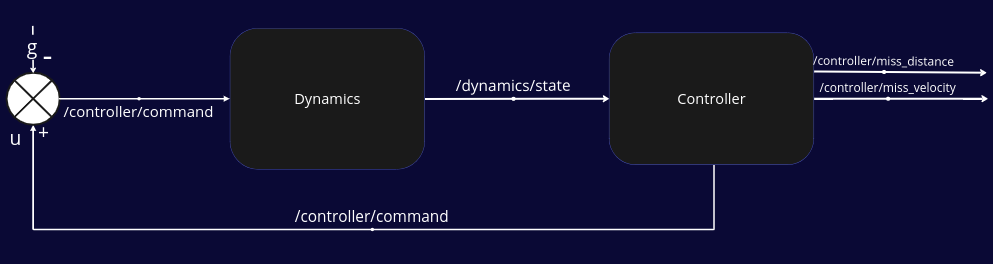
The system's equation of motion is the kinematic equation of a free body fall:
when u is the controller fedback , g is the gravity vector r0 , v0 is the initial conditions of the object.
Because we simulate a soft landing, we want that our object to land with the minimum velocity (
The controller is based on this paper:
S. Gutman, "Rendezvous and Soft Landing in Closed Form via LQ Optimization," 2019 27th Mediterranean Conference on Control and Automation (MED), Akko, Israel, 2019, pp. 536-540, doi: 10.1109/MED.2019.8798572.
Clone the repository from Github:
git clone [email protected]:citros-garden/soft_landing.gitThen open the repository in VSCode's devcontainer with reopen in container option.
Use predefined VSCode tasks to build.
Run by typing ctrl+p,in the drop-down menu type task build and then click on the enter button.
Also, you can do it manually by writing in the terminal of VSCode:
	colcon build
	source install/local_setup.bash
Run the example of an object with the initial condition:
And the goal is to land in the point:
On the moon,so to gravity is:
Use predefined VSCode tasks to run by typing ctrl+p, in the drop-down menu type task run and then click on the enter button.
Note that you can run the launch file manually by writing in the terminal of VSCode:
ros2 launch dynamics dynamics_controller.launch.pyYou are welcome to enhance the simulation by following the instructions provided in this guide.
FoxGlove Studio is a tool used for robotics visualization and debugging. It is capable of connecting to ROS 2 topics and retrieving the data published through them. With FoxGlove, we can view a graphical representation of the simulation.
To add a data source in FoxGlove, you need to follow these steps:
first, click on Open Connection and choose Rosbridge. Then, enter the URL "ws://localhost:9090" and click on Open.

Next, you need to load the soft landing layout. To do this, go to the Layout tab on the top panel, and click on the Import Layout From File button. Select the file soft landing layout.json from the foxglove_layouts folder.
Finally, Run the simulation to view the graphs on Foxglove.