
An easy to use and configurable logger for Go.
loggo/default exposes a Log instance to use for
really simple cases.
It logs levels <= Info to stdout and level >= Warning
to stderr.
package main

import (
  "github.com/claudetech/loggo"
  . "github.com/claudetech/loggo/default"
)

func main() {
  Log.SetLevel(loggo.Trace)
  Log.Trace("foobar")
  Log.Debug("foobar")
  Log.Info("foobar")
  Log.Warning("foobar")
  Log.Error("foobar")
  Log.Fatal("foobar")
}
will give the following output
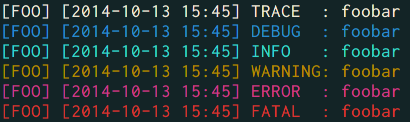
In most use cases, you will first create a logger and add some appenders, eventually with some filters.
For example, this logger will log everything to stdout and color the output.
package main

import (
  "github.com/claudetech/loggo"
)

func main() {
  logger := loggo.New("logger name")
  logger.SetLevel(loggo.Info)
  stdoutAppender := loggo.NewStdoutAppender()
  logger.AddAppender(stdoutAppender, loggo.Color)
  logger.Infof("logger started with level %s", logger.Level().String())
  logger.Debug("this is debug")
  logger.Fatal("this is fatal")
}
The Debug is be ignored as the level is set to Info.
In your application, you can get the logger anywhere by using
logger := loggo.Get("logger name")Get will return nil if the given name is not found.
Appenders work more or less like in log4j and company. To write the logs to a file, you could use the following
appender, err := loggo.NewFileAppender("/tmp/loggo.log")
if err != nil {
  fmt.Println(err)
  return
}
logger.AddAppender(appender, loggo.EmptyFlag)
This will log everything to /tmp/loggo.log
An Appender is only an interface with an Append method
that takes a Message and returns nothing.
For example, the NewStdoutAppender is defined as follow:
type writerAppender struct {
  writer io.Writer
}

func (w *writerAppender) Append(msg *Message) {
  _, _ = io.WriteString(w.writer, msg.String())
}

func NewWriterAppender(writer io.Writer) Appender {
  return &writerAppender{writer: writer}
}

func NewStdoutAppender() Appender {
  return NewWriterAppender(os.Stdout)
}
so you can easily add any appender.
When using AddAppender, the flags can be Color and/or Async.
Async is useful when the log can take some time,
for example when sending by HTTP.
Color is for a colored output in the terminal,
so mainly good for Stdout and Stderr appenders.
Not all appenders are used in the same conditions. For example, you may want to receive an email when a fatal error has occured, but not on every info log.
A Filter is an interface with a single ShouldLog(*Message) bool
method. For example, the default logger is defined as follow:
  log := loggo.New(name)
  stdoutFilter := &loggo.MaxLogLevelFilter{MaxLevel: loggo.Info}
  log.AddAppenderWithFilter(loggo.NewStdoutAppender(), stdoutFilter, loggo.Color)
  stderFilter := &loggo.MinLogLevelFilter{MinLevel: loggo.Warning}
  log.AddAppenderWithFilter(loggo.NewStderrAppender(), stderFilter, loggo.Color)
All messages with a level below or equal to Info are logged to stdout,
and all messages with a level above or equal to Warning are logged to stderr.
Almost everything in loggo is configurable.
One of the most common configuration is the format of the output.
loggo uses text/template to format the output, and the default format is
"[{{.NameUp}}] [{{.TimeStr}}] {{.LevelStr}}: {{.Content}}"
The available placeholders are:
NameUp: The upper cased name of the loggerName: The name of the loggerTimeStr: The formatted timeLevelStr: The string for the log levelContent: The content of the log messageFile: The file which the log comes fromLine: The line number which the log comes fromFuncName: The function from whichLoghas been called
The date is formatted using Time.Format(). You can change the date
format using logger.SetDateFormat(string).
For more information, please consult the documentation.