This addon was made for .env file consuming and creation in Godot Engine. 📁
As this project was recently created and isn't on Godot Asset Store yet, you have to 1) clone manually this repository and copy its contents of addons/ folder to your project's addons/ folder. And then 2) activate the plugin at Project Settings.
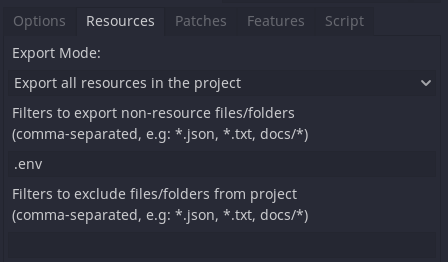
Obs.: Probably you want to also be able to read the .env file from the release binary, to do so you must add .env inside the filters to export field at the Resources tab of your export preset. Example below.
After installation, the plugin will add GodotEnv as one of your autoload/singleton scripts. The simple utilities are:
The .env file must be at your root project directory. (i.e. res://)
GodotEnv creates a new dotenv file if there's any as soon as the project start.
It will create a new variable_name=value line at your .env file.
If variable_name already exists inside your dotenv, it will be ignored and trigger a warning unless you pass overwrite parameter as true.
Returns the value of the requested environment variable. If it doesn't exists, a warning will be pushed and the zero-value "" will be returned.