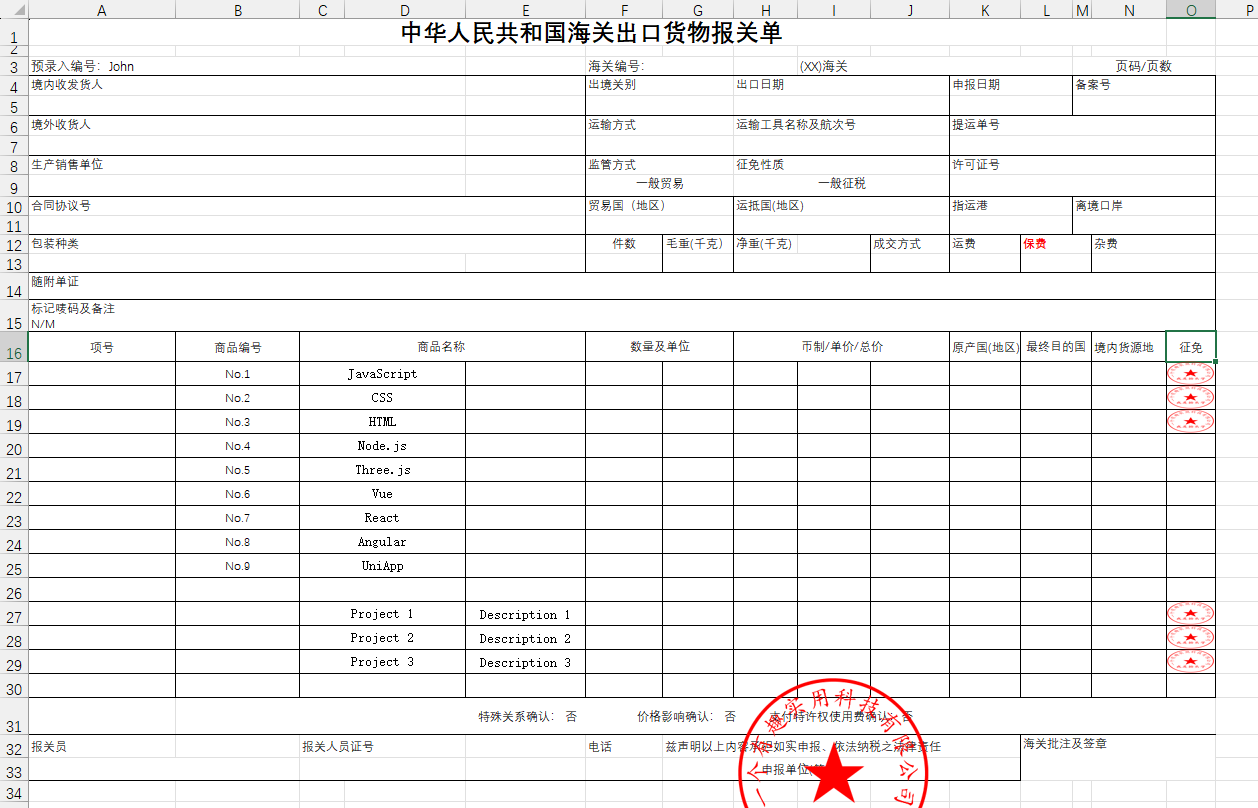
基于 exceljs 库的 .xlsx 模板文件填充引擎。理论上支持 exceljs 库的所有 api。
- 普通标签占位符格式:
{{xxx}}、{{xxx.xxx}} - 迭代标签占位符格式:
{{@@xxx.xxx}}
<script setup lang="ts">
import { BlobReader, BlobWriter, ZipWriter } from "@zip.js/zip.js"
import { fillTemplate, loadWorkbook, placeholderRange, renderXlsxTemplate } from "exceljs-xlsx-template"

function handleXlsxTemplate(isZip = false) {
  const xlsxFile = "https://raw.githubusercontent.com/cshaptx4869/exceljs-xlsx-template/refs/heads/main/test/assets/template.xlsx"
  const officialsealFile = "https://raw.githubusercontent.com/cshaptx4869/exceljs-xlsx-template/refs/heads/main/test/assets/officialseal.png"
  const imageUrl = "https://s2.loli.net/2025/03/07/ELZY594enrJwF7G.png"
  const data = [
    {
      name: "John",
      items: [
        { no: "No.1", name: "JavaScript" },
        { no: "No.2", name: "CSS" },
        { no: "No.3", name: "HTML" },
        { no: "No.4", name: "Node.js" },
        { no: "No.5", name: "Three.js" },
        { no: "No.6", name: "Vue" },
        { no: "No.7", name: "React" },
        { no: "No.8", name: "Angular" },
        { no: "No.9", name: "UniApp" }
      ],
      projects: [
        { name: "Project 1", description: "Description 1", image: imageUrl },
        { name: "Project 2", description: "Description 2", image: imageUrl },
        { name: "Project 3", description: "Description 3", image: imageUrl }
      ]
    },
    {
      invoice_number: "54548",
      user: {
        last_name: "Doe",
        first_name: "John"
      },
      phone: "00874****",
      invoice_date: "15/05/2008",
      items: [
        { name: "description", unit_price: 300 },
        { name: "HTML", unit_price: 400 }
      ],
      subtotal: 700,
      tax: 140,
      grand_total: 840
    }
  ]

  try {
    if (isZip !== true) {
      renderXlsxTemplate(xlsxFile, data, `${Date.now()}.xlsx`, {
        parseImage: true,
        async beforeSave(workbook) {
          // 获取工作表
          const worksheet = workbook.getWorksheet("新报关单")
          if (worksheet) {
          // 加载图片印章
            const officialsealRresponse = await fetch(officialsealFile)
            if (!officialsealRresponse.ok) {
              console.error(`Failed to download image file, status code: ${officialsealRresponse.status}`)
              return
            }
            const officialsealArrayBuffer = await officialsealRresponse.arrayBuffer()
            // 将图片添加到工作簿
            const imageId = workbook.addImage({
              buffer: officialsealArrayBuffer,
              extension: "png"
            })
            // 获取印章占位符位置信息
            const range = placeholderRange(worksheet, "{{#officialseal}}")
            if (range) {
            // 插入图片到表格中
              worksheet.addImage(imageId, {
                tl: { col: range.start.col, row: range.start.row - 4 },
                ext: { width: 200, height: 200 }
              })
            }
          }
        }
      })
    } else {
      loadWorkbook(xlsxFile).then(async (workbook) => {
        // 填充模板
        await fillTemplate(workbook, data, true)
        // 获取工作表
        const worksheet = workbook.getWorksheet("新报关单")
        if (worksheet) {
          // 加载图片印章
          const officialsealRresponse = await fetch(officialsealFile)
          if (!officialsealRresponse.ok) {
            console.error(`Failed to download image file, status code: ${officialsealRresponse.status}`)
            return
          }
          const officialsealArrayBuffer = await officialsealRresponse.arrayBuffer()
          // 将图片添加到工作簿
          const imageId = workbook.addImage({
            buffer: officialsealArrayBuffer,
            extension: "png"
          })
          // 获取印章占位符位置信息
          const range = placeholderRange(worksheet, "{{#officialseal}}")
          if (range) {
            // 插入图片到表格中
            worksheet.addImage(imageId, {
              tl: { col: range.start.col, row: range.start.row - 4 },
              ext: { width: 200, height: 200 }
            })
          }
        }
        const buffer = await workbook.xlsx.writeBuffer()
        const xlsxBlob = new Blob([buffer], { type: "application/vnd.openxmlformats-officedocument.spreadsheetml.sheet" })

        // 打包
        const zipWriter = new ZipWriter(new BlobWriter())
        // NOTE: 文件名不能包含 / 否则会当做目录分割符
        zipWriter.add(`${Date.now()}.xlsx`, new BlobReader(xlsxBlob))
        // 关闭压缩包
        const zipBlob = await zipWriter.close()

        // 下载
        const url = URL.createObjectURL(zipBlob)
        const a = document.createElement("a")
        a.href = url
        a.download = `${Date.now()}.zip`
        a.click()
        URL.revokeObjectURL(url)
      })
    }
  } catch (error) {
    console.error("Error processing Excel file:", error)
  }
}
</script>

<template>
  <div>
    <button type="button" @click="handleXlsxTemplate()">
      渲染xlsx模板
    </button>
    <button type="button" @click="handleXlsxTemplate(true)">
      渲染xlsx模板并打包
    </button>
  </div>
</template>