

A high-performance OpenAI-compatible API server for MLX models. Run text, vision, audio, and image generation models locally on Apple Silicon with a drop-in OpenAI replacement.
Note: Requires macOS with M-series chips (MLX is optimized for Apple Silicon).
See it in action! A local 27B model powering OpenAI Codex — fully local, fully private, on Apple Silicon.
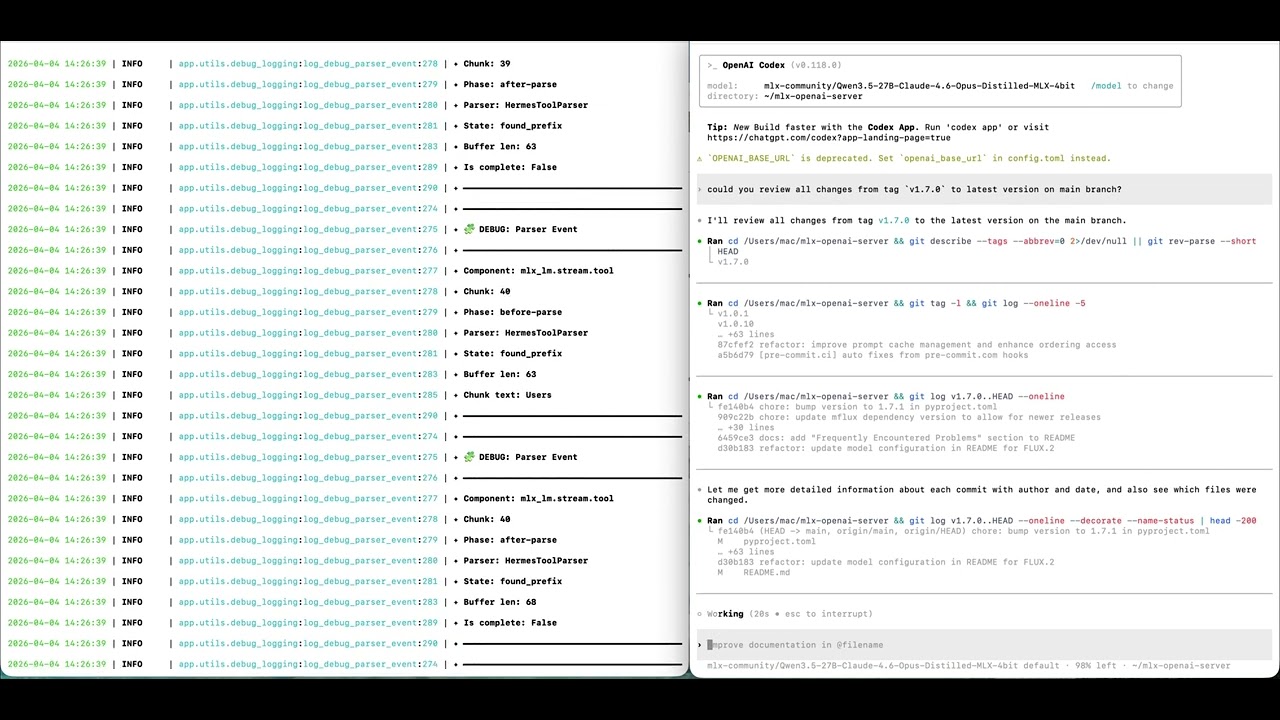
mlx-openai-server works as a drop-in local backend for tools like OpenAI Codex, giving you a fully local AI coding assistant with zero API costs.
OpenClaw AI Agent powered by Gemma 4 via mlx-openai-server (Zalo Demo) — Gemma 4 serving as the reasoning + tool-calling backend for an agent, running fully local on Apple Silicon.
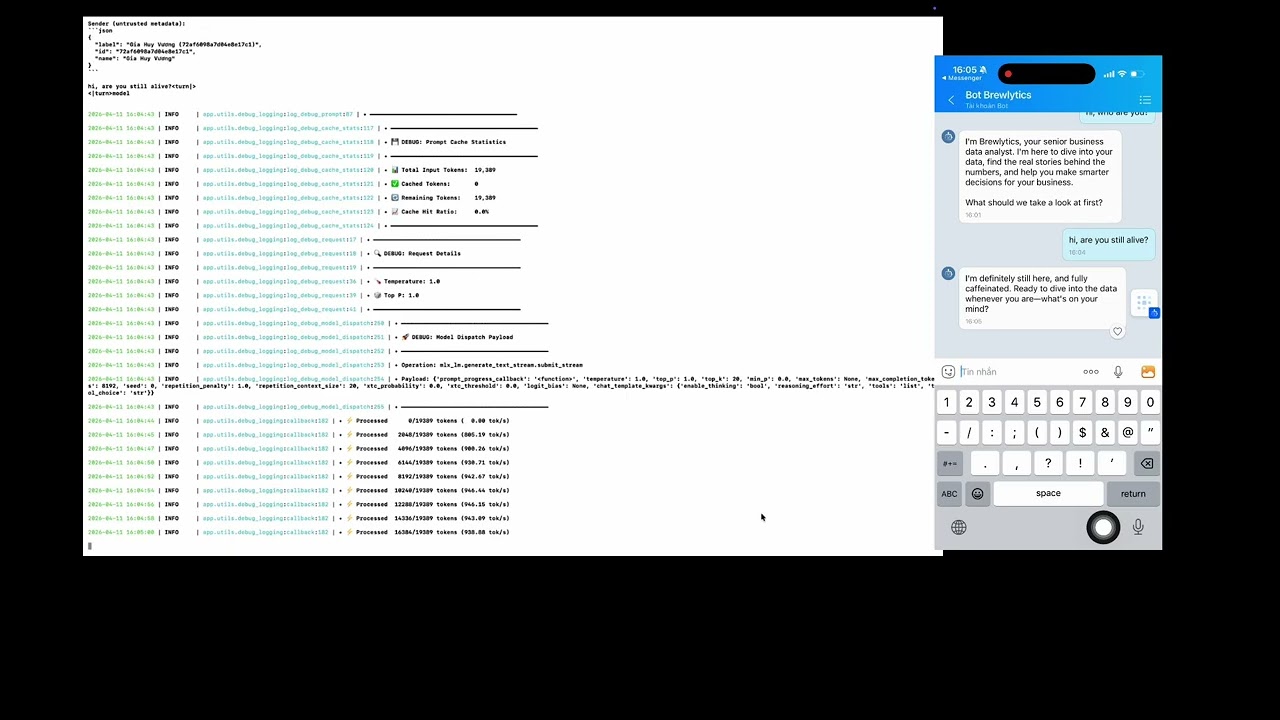
The agent in the demo is Brelytics, an open-source data analyst agent — source code at cubist38/openclaw-analyst.
Launch command used in the demo:
mlx-openai-server launch \
  --model-path mlx-community/gemma-4-26b-a4b-it-mxfp8 \
  --model-type lm \
  --reasoning-parser gemma4 \
  --tool-call-parser gemma4 \
--debugmlx-openai-server launch --model-path mlx-community/Qwen3-Coder-Next-4bit --model-type lmThen point your OpenAI client to http://localhost:8000/v1. For full setup, see Installation and Quick Start.
- 🚀 OpenAI-compatible API - Drop-in replacement for OpenAI services
- 🖼️ Multimodal support - Text, vision, audio, and image generation/editing
- 🎨 Flux-series models - Image generation (schnell, dev, krea-dev, flux-2-klein) and editing (kontext, qwen-image-edit)
- 🔌 Easy integration - Works with existing OpenAI client libraries
- 📦 Multi-model mode - Run multiple models in one server via a YAML config; route requests by model ID
- ⚡ Performance - Configurable quantization (4/8/16-bit), context length, and speculative decoding (lm)
- 🎛️ LoRA adapters - Fine-tuned image generation and editing
- 📈 Queue management - Built-in request queuing and monitoring
- macOS with Apple Silicon (M-series)
- Python 3.11+
# Create virtual environment
python3.11 -m venv .venv
source .venv/bin/activate

# Install core server from PyPI
uv pip install mlx-openai-server

# Or install from GitHub
uv pip install git+https://github.com/cubist38/mlx-openai-server.gitFor audio transcription models, install ffmpeg:
brew install ffmpeg# Text-only or multimodal models
mlx-openai-server launch \
--model-path <path-to-mlx-model> \
--model-type <lm|multimodal>
# Text-only with speculative decoding (faster generation using a smaller draft model)
mlx-openai-server launch \
--model-path <path-to-main-model> \
--model-type lm \
--draft-model-path <path-to-draft-model> \
--num-draft-tokens 4
# Image generation (Flux-series)
mlx-openai-server launch \
--model-type image-generation \
--model-path <path-to-flux-model> \
--config-name flux-dev \
--quantize 8
# Image editing
mlx-openai-server launch \
--model-type image-edit \
--model-path <path-to-flux-model> \
--config-name flux-kontext-dev \
--quantize 8
# Embeddings
mlx-openai-server launch \
--model-type embeddings \
--model-path <embeddings-model-path>
# Whisper (audio transcription)
mlx-openai-server launch \
--model-type whisper \
--model-path mlx-community/whisper-large-v3-mlx| Parameter | Required | Type | Default | Description |
|---|---|---|---|---|
| Required parameters | ||||
--model-path |
Yes | path | — | Path to MLX model (local or HuggingFace repo) |
--model-type |
Yes | string | — | lm, multimodal, image-generation, image-edit, embeddings, or whisper |
| Model configuration | ||||
--config-name |
No* | string | — | Image models: flux-schnell, flux-dev, flux-krea-dev, flux-kontext-dev, flux2-klein-4b, flux2-klein-9b, qwen-image, qwen-image-edit, z-image-turbo, fibo |
--quantize |
No | int | — | Quantization level: 4, 8, or 16 (image models) |
--context-length |
No | int | — | Max sequence length for memory optimization |
| Sampling parameters (used when API request omits them) | ||||
--max-tokens |
No | int | 100000 | Default maximum tokens to generate |
--temperature |
No | float | 1.0 | Default sampling temperature |
--top-p |
No | float | 1.0 | Default nucleus sampling (top-p) probability |
--top-k |
No | int | 20 | Default top-k sampling parameter |
--repetition-penalty |
No | float | 1.0 | Default repetition penalty for token generation |
| Speculative decoding (lm only) | ||||
--draft-model-path |
No | path | — | Path to draft model for speculative decoding |
--num-draft-tokens |
No | int | 2 | Draft tokens per step |
| Prompt cache (lm only) | ||||
--prompt-cache-size |
No | int | 10 | Maximum number of prompt KV cache entries to store |
--max-bytes |
No | int | (unbounded) | Maximum total bytes retained by prompt KV caches before eviction |
| Server options | ||||
--host |
No | string | 127.0.0.1 |
Host address to bind the server to |
--port |
No | int | 8000 |
Port to run the server on |
--served-model-name |
No | string | — | Override the model name returned by /v1/models and accepted in request model field |
| Advanced options | ||||
--lora-paths |
No | string | — | Comma-separated LoRA adapter paths (image models) |
--lora-scales |
No | string | — | Comma-separated LoRA scales (must match paths) |
--log-level |
No | string | INFO |
DEBUG, INFO, WARNING, ERROR, CRITICAL |
--no-log-file |
No | flag | false | Disable file logging (console only) |
*Required for image-generation and image-edit model types.
You can run several models in one server using a YAML config file. Each model gets its own handler; requests are routed by the served model name you use in the API (the model field in the request).
Video: Serving Multiple Models at Once? mlx-openai-server + OpenWebUI Test
mlx-openai-server launch --config config.yamlYou must provide either --config (multi-handler) or --model-path (single model). You cannot mix them.
Create a YAML file with a server section (host, port, logging) and a models list. Each entry in models defines one model and supports the same options as the CLI (model path, type, context length, queue settings, etc.).
| Key | Required | Description |
|---|---|---|
model_path |
Yes | Path or HuggingFace repo of the model |
model_type |
No | lm, multimodal, image-generation, image-edit, embeddings, whisper (default: lm) |
served_model_name |
No | ID used in API requests; defaults to model_path if omitted |
context_length |
No | Max context length (lm / multimodal) |
queue_timeout, queue_size |
No | Per-model queue settings |
prompt_cache_size |
No | Max prompt KV cache entries (lm only; default: 10) |
prompt_cache_max_bytes |
No | Max total bytes for prompt KV caches before eviction (lm only) |
on_demand |
No | Enable dynamic swapping — model is loaded on first request, unloaded after idle (default: false) |
on_demand_idle_timeout |
No | Seconds to wait before unloading an idle on-demand model (default: 60) |
Example config.yaml:
server:
  host: "0.0.0.0"
  port: 8000
  log_level: INFO
  # log_file: logs/app.log     # uncomment to log to file
  # no_log_file: true           # uncomment to disable file logging

models:
  # Language model
  - model_path: mlx-community/MiniMax-M2.5-4bit
    model_type: lm
    served_model_name: Minimax-M2.5    # optional alias (defaults to model_path)
    enable_auto_tool_choice: true
    tool_call_parser: minimax_m2
    reasoning_parser: minimax_m2

  - model_path: black-forest-labs/FLUX.2-klein-4B
    model_type: image-generation
    config_name: flux2-klein-4b
    quantize: 4
    served_model_name: flux2-klein-4b
    on_demand: true
    on_demand_idle_timeout: 120  # seconds before unloading (default: 60)
A full example is in examples/config.yaml.
Use --served-model-name to override the model identifier returned by /v1/models and accepted in the model request field:
mlx-openai-server launch \
  --model-path mlx-community/Qwen3-Coder-Next-4bit \
  --served-model-name my-local-model
Clients can then use "model": "my-local-model" in their requests. If omitted, the model path is used as the identifier.
This feature is only available in multi-model mode (
--config). It is not supported with--model-pathsingle-model launches.
For large models you don't want to keep in memory permanently, set on_demand: true in the YAML config. The model will appear in /v1/models but won't be loaded until a request arrives. After the request completes and the model is idle, it is automatically unloaded.
Only one on-demand model is loaded at a time — requesting a different on-demand model will unload the current one first.
# config.yaml
server:
  host: "0.0.0.0"
  port: 8000

models:
  # Always loaded at startup
  - model_path: mlx-community/GLM-4.7-Flash-8bit
    model_type: lm
    served_model_name: glm-4.7-flash

  # Loaded on first request, unloaded after 120s idle
  - model_path: black-forest-labs/FLUX.2-klein-4B
    model_type: image-generation
    config_name: flux2-klein-4b
    quantize: 4
    served_model_name: flux2-klein-4b
    on_demand: true
    on_demand_idle_timeout: 120
mlx-openai-server launch --config config.yamlNote: The first request to an on-demand model will be slower as the model needs to be loaded into memory. Subsequent requests (within the idle timeout) are served at normal speed.
In multi-handler mode, each model runs in a dedicated subprocess spawned via multiprocessing.get_context("spawn"). The main FastAPI process uses a HandlerProcessProxy to forward requests to the child process over multiprocessing queues.
This design prevents MLX Metal/GPU semaphore leaks on macOS. When MLX arrays or Metal runtime state are shared across forked processes, the resource tracker can report leaked semaphore objects at shutdown (ml-explore/mlx#2457). Using spawn instead of the default fork gives each model a clean Metal context, avoiding those warnings.
┌─────────────────────────────────────┐     ┌─────────────────────────────────────┐
│  Main Process (FastAPI)             │     │  Child Process (Handler)             │
│  ┌───────────────────────────────┐  │     │  ┌───────────────────────────────┐  │
│  │  HandlerProcessProxy          │  │     │  │  Concrete handler (e.g.       │  │
│  │  • request_queue ────────────┼──┼─────┼─>│    MLXLMHandler)              │  │
│  │  • response_queue <──────────┼──┼<────┼──│  • Model (MLX_LM)              │  │
│  │  • generate_*() forwards RPC  │  │     │  │  • InferenceWorker (thread)   │  │
│  └───────────────────────────────┘  │     │  └───────────────────────────────┘  │
└─────────────────────────────────────┘     └─────────────────────────────────────┘
The proxy exposes the same interface as the concrete handlers (generate_text_stream, generate_embeddings_response, etc.), so API endpoints work without changes. Requests and responses are serialized across the process boundary via queues; non-picklable objects (e.g. uploaded files) are pre-processed in the main process before being sent as file paths.
Set the model field in your request to the model name (the served_model_name from the config, or model_path if you did not set served_model_name). The server looks up the handler for that name and runs the request on the correct model.
import openai

client = openai.OpenAI(base_url="http://localhost:8000/v1", api_key="not-needed")

# Use the first model (glm-4.7-flash)
r1 = client.chat.completions.create(
    model="glm-4.7-flash",
    messages=[{"role": "user", "content": "Say hello in one word."}],
)
print(r1.choices[0].message.content)

# Use the second model (full path as served_model_name)
r2 = client.chat.completions.create(
    model="mlx-community/Qwen3-Coder-Next-4bit",
    messages=[{"role": "user", "content": "Say hello in one word."}],
)
print(r2.choices[0].message.content)- GET
/v1/modelsreturns all loaded models (their IDs). - If you send a
modelthat is not in the config, the server returns 404 with an error listing available models.
- Text-only (
lm) - Language models viamlx-lm - Multimodal (
multimodal) - Text, images, audio viamlx-vlm - Image generation (
image-generation) - Flux-series, Qwen Image, Z-Image Turbo, Fibo - Image editing (
image-edit) - Flux kontext, Qwen Image Edit - Embeddings (
embeddings) - Text embeddings viamlx-embeddings - Whisper (
whisper) - Audio transcription (requires ffmpeg)
Generation:
flux-schnell- Fast (4 steps, no guidance)flux-dev- Balanced (25 steps, 3.5 guidance)flux-krea-dev- High quality (28 steps, 4.5 guidance)flux2-klein-4b/flux2-klein-9b- Flux 2 Klein modelsqwen-image- Qwen image generation (50 steps, 4.0 guidance)z-image-turbo- Z-Image Turbofibo- Fibo model
Editing:
flux-kontext-dev- Context-aware editing (28 steps, 2.5 guidance)flux2-klein-edit-4b/flux2-klein-edit-9b- Flux 2 Klein editingqwen-image-edit- Qwen image editing (50 steps, 4.0 guidance)
| Use Case | One-liner Launch |
|---|---|
| Text generation | mlx-openai-server launch --model-type lm --model-path <path> |
| Vision Q&A | mlx-openai-server launch --model-type multimodal --model-path <path> |
| Image generation | mlx-openai-server launch --model-type image-generation --model-path <path> --config-name flux-dev |
| Image editing | mlx-openai-server launch --model-type image-edit --model-path <path> --config-name flux-kontext-dev |
| Audio transcription | mlx-openai-server launch --model-type whisper --model-path mlx-community/whisper-large-v3-mlx |
| Embeddings | mlx-openai-server launch --model-type embeddings --model-path <path> |
The server provides OpenAI-compatible endpoints. Use standard OpenAI client libraries.
Model name in requests: The
modelfield should be the model path you passed to--model-path(e.g.mlx-community/Qwen3-Coder-Next-4bit), the--served-model-nameyou set, or theserved_model_namefrom your YAML config. No API key is required — use any non-empty string (e.g."not-needed").
| Endpoint | Model Types | Description |
|---|---|---|
POST /v1/chat/completions |
lm, multimodal | Chat completions (streaming supported) |
POST /v1/responses |
lm, multimodal | OpenAI Responses API |
POST /v1/images/generations |
image-generation | Image generation |
POST /v1/images/edits |
image-edit | Image editing |
POST /v1/embeddings |
embeddings | Text embeddings |
POST /v1/audio/transcriptions |
whisper | Audio transcription |
GET /v1/models |
all | List available models |
import openai

client = openai.OpenAI(
    base_url="http://localhost:8000/v1",
    api_key="not-needed"
)

response = client.chat.completions.create(
    model="local-model",
    messages=[{"role": "user", "content": "What is the capital of France?"}]
)
print(response.choices[0].message.content)import openai
import base64
client = openai.OpenAI(base_url="http://localhost:8000/v1", api_key="not-needed")
with open("image.jpg", "rb") as f:
base64_image = base64.b64encode(f.read()).decode('utf-8')
response = client.chat.completions.create(
model="local-multimodal",
messages=[{
"role": "user",
"content": [
{"type": "text", "text": "What's in this image?"},
{"type": "image_url", "image_url": {"url": f"data:image/jpeg;base64,{base64_image}"}}
]
}]
)
print(response.choices[0].message.content)import openai
import base64
from io import BytesIO
from PIL import Image
client = openai.OpenAI(base_url="http://localhost:8000/v1", api_key="not-needed")
response = client.images.generate(
prompt="A serene landscape with mountains and a lake at sunset",
model="local-image-generation-model",
size="1024x1024"
)
image_data = base64.b64decode(response.data[0].b64_json)
image = Image.open(BytesIO(image_data))
image.show()import openai
import base64
from io import BytesIO
from PIL import Image
client = openai.OpenAI(base_url="http://localhost:8000/v1", api_key="not-needed")
with open("image.png", "rb") as f:
result = client.images.edit(
image=f,
prompt="make it like a photo in 1800s",
model="flux-kontext-dev"
)
image_data = base64.b64decode(result.data[0].b64_json)
image = Image.open(BytesIO(image_data))
image.show()import openai
client = openai.OpenAI(base_url="http://localhost:8000/v1", api_key="not-needed")
messages = [{"role": "user", "content": "What is the weather in Tokyo?"}]
tools = [{
"type": "function",
"function": {
"name": "get_weather",
"description": "Get the weather in a given city",
"parameters": {
"type": "object",
"properties": {
"city": {"type": "string", "description": "The city name"}
}
}
}
}]
completion = client.chat.completions.create(
model="local-model",
messages=messages,
tools=tools,
tool_choice="auto"
)
if completion.choices[0].message.tool_calls:
tool_call = completion.choices[0].message.tool_calls[0]
print(f"Function: {tool_call.function.name}")
print(f"Arguments: {tool_call.function.arguments}")import openai
client = openai.OpenAI(base_url="http://localhost:8000/v1", api_key="not-needed")
response = client.embeddings.create(
model="local-model",
input=["The quick brown fox jumps over the lazy dog"]
)
print(f"Embedding dimension: {len(response.data[0].embedding)}")The server exposes the OpenAI Responses API at POST /v1/responses. Use client.responses.create() with the OpenAI SDK for text and multimodal (lm/multimodal) models.
Text input (non-streaming):
import openai

client = openai.OpenAI(base_url="http://localhost:8000/v1", api_key="not-needed")

response = client.responses.create(
    model="local-model",
    input="Tell me a three sentence bedtime story about a unicorn."
)
# response.output contains reasoning and message items
for item in response.output:
    if item.type == "message":
        for part in item.content:
            if getattr(part, "text", None):
                print(part.text)
Text input (streaming):
response = client.responses.create(
    model="local-model",
    input="Tell me a three sentence bedtime story about a unicorn.",
    stream=True
)
for chunk in response:
    print(chunk)
Image input (vision / multimodal):
response = client.responses.create(
    model="local-multimodal",
    input=[
        {
            "role": "user",
            "content": [
                {"type": "input_text", "text": "What is in this image?"},
                {
                    "type": "input_image",
                    "image_url": "path/to/image.jpg",
                    "detail": "low"
                }
            ]
        }
    ]
)
Function calling:
tools = [{
    "type": "function",
    "name": "get_current_weather",
    "description": "Get the current weather in a given location",
    "parameters": {
        "type": "object",
        "properties": {
            "location": {"type": "string", "description": "The city and state"},
            "unit": {"type": "string", "enum": ["celsius", "fahrenheit"]}
        },
        "required": ["location", "unit"]
    }
}]

response = client.responses.create(
    model="local-model",
    tools=tools,
    input="What is the weather like in Boston today?",
    tool_choice="auto"
)
Structured outputs (Pydantic):
from pydantic import BaseModel

class Address(BaseModel):
    street: str
    city: str
    state: str
    zip: str

response = client.responses.parse(
    model="local-model",
    input=[{"role": "user", "content": "Format: 1 Hacker Wy Menlo Park CA 94025"}],
    text_format=Address
)
address = response.output_parsed  # Pydantic model instance
print(address)
See examples/responses_api.ipynb for full examples including streaming, image input, tool calls, and structured outputs.
import openai
import json

client = openai.OpenAI(base_url="http://localhost:8000/v1", api_key="not-needed")

response_format = {
    "type": "json_schema",
    "json_schema": {
        "name": "Address",
        "schema": {
            "type": "object",
            "properties": {
                "street": {"type": "string"},
                "city": {"type": "string"},
                "state": {"type": "string"},
                "zip": {"type": "string"}
            },
            "required": ["street", "city", "state", "zip"]
        }
    }
}

completion = client.chat.completions.create(
    model="local-model",
    messages=[{"role": "user", "content": "Format: 1 Hacker Wy Menlo Park CA 94025"}],
    response_format=response_format
)

address = json.loads(completion.choices[0].message.content)
print(json.dumps(address, indent=2))For models requiring custom parsing (tool calls, reasoning):
mlx-openai-server launch \
  --model-path <path-to-model> \
  --model-type lm \
  --tool-call-parser qwen3 \
  --reasoning-parser qwen3 \
  --enable-auto-tool-choice
Qwen3.5 models (multimodal):
mlx-openai-server launch \
  --model-path mlx-community/Qwen3.5-122B-A10B-4bit \
  --model-type multimodal \
  --reasoning-parser qwen3_5 \
  --tool-call-parser qwen3_coder
Available parsers: qwen3, qwen3_5, glm4_moe, qwen3_coder, qwen3_moe, qwen3_next, qwen3_vl, harmony, minimax_m2
Message converters are auto-detected from parser selection. When you set tool_call_parser (or reasoning_parser), the server uses the same name for message preprocessing when a compatible converter exists. You do not need to pass --message-converter.
Auto-detected converters: glm4_moe, minimax_m2, minimax, nemotron3_nano, qwen3_coder, longcat_flash_lite, step_35
mlx-openai-server launch \
  --model-path <path-to-model> \
  --model-type lm \
--chat-template-file /path/to/template.jinjaUse a smaller draft model to propose tokens and verify them with the main model for faster text generation. Supported only for --model-type lm.
mlx-openai-server launch \
  --model-path mlx-community/MyModel-8B-4bit \
  --model-type lm \
  --draft-model-path mlx-community/MyModel-1B-4bit \
--num-draft-tokens 4--draft-model-path: Path or HuggingFace repo of the draft model (smaller size model).--num-draft-tokens: Number of tokens the draft model generates per verification step (default: 2). Higher values can increase throughput at the cost of more draft compute.
Check the examples/ directory for comprehensive guides:
| Category | Notebooks | Description |
|---|---|---|
| Text & Chat | responses_api.ipynb, simple_rag_demo.ipynb |
Responses API (text, image, tools, streaming, structured outputs); RAG pipeline demo |
| Vision | vision_examples.ipynb |
Vision capabilities |
| Audio | audio_examples.ipynb, transcription_examples.ipynb |
Audio processing and transcription |
| Embeddings | embedding_examples.ipynb, lm_embeddings_examples.ipynb, vlm_embeddings_examples.ipynb |
Text, LM, and VLM embeddings |
| Images | image_generations.ipynb, image_edit.ipynb |
Image generation and editing |
| Advanced | structured_outputs_examples.ipynb |
JSON schema / structured outputs |
For models that don't fit in RAM, improve performance on macOS 15.0+:
bash configure_mlx.shThis raises the system's wired memory limit for better performance.
| Issue | Solution |
|---|---|
| Memory problems | Use --quantize 4 or 8 for image models; reduce --context-length for lm/multimodal. Run configure_mlx.sh on macOS 15+ to raise wired memory limits. |
| Model download issues | Ensure transformers and huggingface_hub are installed. Check network access; some models require Hugging Face login. |
| Port already in use | Use --port to specify a different port (e.g. --port 8001). |
| Quantization questions | For lm/multimodal, use pre-quantized models from mlx-community. For image models, use --quantize 4 or 8. |
| Metal/semaphore warnings | Use multi-handler mode (--config); each model runs in a spawned subprocess to avoid Metal context issues. |
If you see errors like "Received N parameters not in model" or weight/parameter mismatches when loading a newly released model, the most common cause is an outdated version of the underlying MLX model library. New models often require the latest architecture support from mlx-lm, mlx-vlm, or other backend packages.
Fix: Install the latest version directly from the source repository:
# For text models (lm)
uv pip install git+https://github.com/ml-explore/mlx-lm.git

# For multimodal models
uv pip install git+https://github.com/Blaizzy/mlx-vlm.git

# For embeddings
uv pip install git+https://github.com/Blaizzy/mlx-embeddings.git
The git versions often contain support for new model architectures before a PyPI release is published. After upgrading, restart the server and try loading the model again.
# Text (language model)
mlx-openai-server launch --model-type lm --model-path <path>

# Vision (multimodal)
mlx-openai-server launch --model-type multimodal --model-path <path>

# Image generation
mlx-openai-server launch --model-type image-generation --model-path <path> --config-name flux-dev

# Image editing
mlx-openai-server launch --model-type image-edit --model-path <path> --config-name flux-kontext-dev

# Embeddings
mlx-openai-server launch --model-type embeddings --model-path <path>

# Whisper (audio transcription)
mlx-openai-server launch --model-type whisper --model-path mlx-community/whisper-large-v3-mlxWant a frontier-style assistant on Apple Silicon without the usual heavyweight setup? mlx-community/MiniMax-M2.5-Uncensored-4bit is a 4-bit quantized, uncensored MiniMax-M2.5 release that pairs especially well with mlx-openai-server for coding, tool use, search, and agent-style workflows.
mlx-openai-server launch \
  --model-path mlx-community/MiniMax-M2.5-Uncensored-4bit \
  --model-type lm \
  --reasoning-parser minimax_m2 \
  --tool-call-parser minimax_m2 \
  --trust-remote-code
Once it is running, point your OpenAI client to http://localhost:8000/v1 and use it like any other chat-completions endpoint.
- 4-bit efficiency for lower memory use and faster local inference
- Uncensored behavior for research, creative, and less-filtered assistant use cases
- MiniMax-native parsing with
minimax_m2for cleaner reasoning and tool-call handling - Drop-in compatibility with OpenAI SDKs, OpenWebUI, and agent frameworks
Looking for a fast, uncensored reasoning model on Apple Silicon? mlx-community/glm-4.7-flash-abliterated-8bit is an 8-bit quantized MLX conversion of huihui-ai/Huihui-GLM-4.7-Flash-abliterated, offering strong reasoning and tool-calling capabilities with efficient memory usage.
mlx-openai-server launch \
  --model-path mlx-community/glm-4.7-flash-abliterated-8bit \
  --reasoning-parser glm47_flash \
  --tool-call-parser glm4_moe
Once it is running, point your OpenAI client to http://localhost:8000/v1 and use it like any other chat-completions endpoint.
- 8-bit quantized for a good balance between quality and memory efficiency on Apple Silicon
- Abliterated — fewer refusals for research, creative, and less-filtered use cases
- Built-in reasoning with dedicated
glm47_flashparser for chain-of-thought outputs - Tool calling via
glm4_moeparser for agent-style workflows - Drop-in compatibility with OpenAI SDKs, OpenWebUI, and agent frameworks
We welcome contributions! Please:
- Fork the repository
- Create a feature branch
- Make your changes with tests
- Submit a pull request
Follow Conventional Commits for commit messages.
- Documentation: This README and example notebooks
- Issues: GitHub Issues
- Discussions: GitHub Discussions
- Video Tutorials: Setup Demo, RAG Demo, Testing Qwen3-Coder-Next-4bit with Qwen-Code, Serving Multiple Models at Once? mlx-openai-server + OpenWebUI Test
MIT License - see LICENSE file for details.
Built on top of:
- MLX - Apple's ML framework
- mlx-lm - Language models
- mlx-vlm - Multimodal models
- mlx-embeddings - Embeddings
- mflux - Flux image models
- mlx-whisper - Audio transcription
- mlx-community - Model repository

