Tree building from single-cell sequencing data (scRNA-seq and scDNA-seq)
Important Note for Users:
PhyloSOLID is under active development, especially during its preprint stage. The software and its associated resources are continuously being updated and improved.
Our current priority is optimizing the runtime efficiency of the core tree-building pipeline, particularly for large datasets with high mutation counts. We are actively addressing performance bottlenecks while maintaining full model accuracy and all constraints.
If you encounter any issues, have feature requests, or need guidance, please do not hesitate to contact us. We are committed to providing timely support and would greatly appreciate your feedback to make PhyloSOLID better for the entire community. You can reach us at the emails provided in the Contact section.
PhyloSOLID takes your single-cell sequencing data and produces phylogenetic trees that reveal the evolutionary relationships among cells. Here's the complete output structure after running the pipeline:
your_results/
└── YOUR_SAMPLE/
    ├── 01_features/                # Feature extraction results
    │   ├── depth_in_spots/
    │   └── YOUR_SAMPLE.benchmark_patched.feature.txt
    │
    ├── 02_treeinput/               # Tree input files
    │   ├── treeinput/
    │   └── data/
    │
    ├── 03_tree_building/           # ★ Tree building results
    │   └── mutation_integrator/
    │       └── phylo/
    │           ├── final_cleaned_tree_node.txt                                        # ★ Mutation tree (indented node-list format)
    │           ├── final_cleaned_M_full_basedPivots.filtered_sites_inferred.CFMatrix  # ★ Conflict-free cell-by-mutation matrix
    │           ├── final_cleaned_I_full_withNA3_for_circosPlot.txt                    # Input genotype matrix for visualization
    │           ├── df_flipping_count_for_each_mut.txt                                 # Per-mutation flipping statistics
    │           └── df_total_flipping_count.txt                                        # Total flipping statistics
    │
    └── 04_visualization/           # ★ PhyloSOLIDvis output (recommended directory)
        ├── No_target.circle_tree_output_as_point.pdf        # ★ Circular phylogenetic tree (circos plot)
        ├── heatmap_and_histograms_for_our_tree.pdf          # ★ Mutation heatmap with histograms
        ├── legend_components.circos_annotation.pdf          # Circos annotation legend
        ├── legend_components.total_flipping_count.pdf       # Flipping count legend
        ├── sorted_cf_matrix.txt                             # Sorted mutation matrix
        ├── ordered_metadata_for_heatmap.txt                 # Heatmap ordering data
        └── phylo_tree.rds                                   # Phylogenetic tree object (RDS)
Two key outputs you'll work with:
03_tree_building/: Contains the phylogenetic tree (celltree.newick) and the conflict-free mutation matrix used to build it04_visualization/: Publication-ready circos plots and heatmaps generated by PhyloSOLIDvis
Visualization ready: Use the phylo/ directory (in 03_tree_building/) as input to PhyloSOLIDvis to generate publication-ready circos plots and mutation heatmap plots.
PhyloSOLID is a comprehensive pipeline for building phylogenetic trees from single-cell sequencing data. It supports both scRNA-seq and scDNA-seq modes, with features for mutation filtering, tree construction, and visualization.
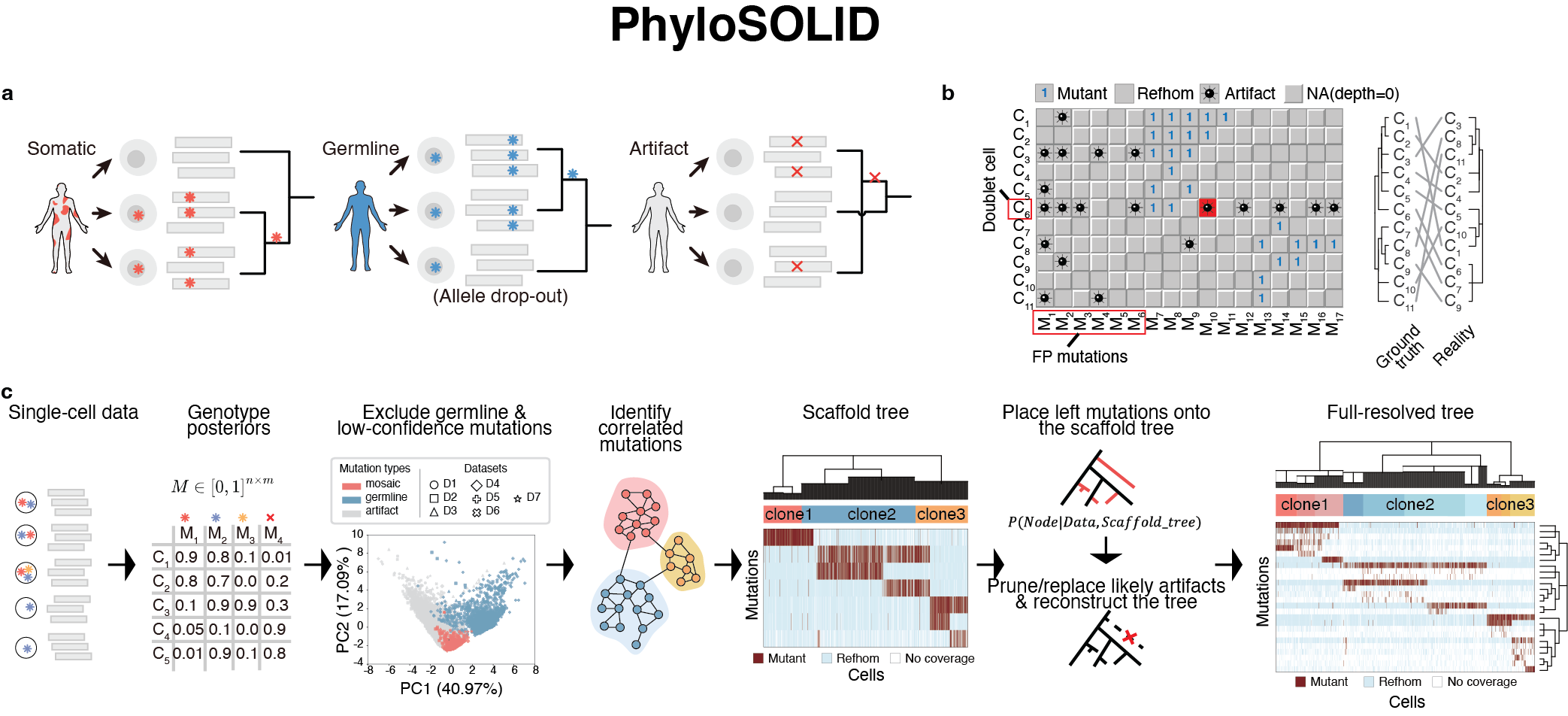
Figure 1: Overview of the PhyloSOLID pipeline
System Requirements: PhyloSOLID is primarily developed and tested on Linux. We recommend running it on Linux or macOS systems. Windows users can use WSL (Windows Subsystem for Linux).
- v3.4.0 (2026-09-03): Adaptive Leiden graph resolution and pruning confidence CV selection: automatic resolution tuning based on data sparsity; new
pruning_confidencecriterion prevents over-pruning by evaluatingpruning_ratio = (Ω_pre-QC - Ω_final) / Ω_final < 10.0; cleaner output structure with reduced file redundancy (changelog) - v3.3.1 (2026-08-21): Deterministic parallel CV search: fixed non-determinism where same CV threshold produced different results in parallel vs single-run mode (changelog)
- v3.3.0 (2026-08-20): Improved optimal tree selection with
Omega_finalcriterion and robust tie-breaking mechanism (changelog) - v3.2.1 (2026-08-20): Critical bug fixes for CV threshold search: fixed logger
NameError, eliminated duplicate mutation nodes in scaffold tree, standardized logger parameter passing (changelog) - v3.2.0 (2026-08-15): Parallel CV traversal, unified optimal selection, structured logging overhaul, full English localization (changelog)
- v3.1.1 (2026-08-08): Performance optimization: 4-33x speedup in penalty calculation with caching and vectorization (changelog)
- v3.1.0 (2026-07-28): CV threshold auto-search, organized output structure, new
full_tree_builder.pymodule (changelog) - v3.0.0 (2026-07-02): Smart conflict resolution, Leiden graph acceleration, multi-threaded data loading (changelog)
- v2.0.0 (2026-07-01): Major performance optimization (changelog)
- v1.0.0 (2026-02-27): Initial public release (changelog)
For complete release notes, visit the Releases page.
- Miniconda or Mambaforge (required)
- samtools, bedtools
- ANNOVAR (for variant annotation)
git clone https://github.com/douymLab/PhyloSOLID.git
cd PhyloSOLIDPhyloSOLID uses ANNOVAR for variant annotation. You need to install it separately:
-
Register and download ANNOVAR from the ANNOVAR Download Page (free for academic use).
-
Install ANNOVAR:
tar -xzvf annovar.latest.tar.gz -C /path/to/software/
cd /path/to/software/annovar- Download required databases (hg38 build):
# Create humandb directory
mkdir -p /path/to/software/annovar/humandb

# Download refGene database (required)
./annotate_variation.pl -downdb -buildver hg38 -webfrom annovar refGene humandb/

# Download additional databases (recommended)
./annotate_variation.pl -downdb -buildver hg38 -webfrom annovar cytoBand humandb/
./annotate_variation.pl -downdb -buildver hg38 -webfrom annovar snp138 humandb/All required resource files for running PhyloSOLID with the hg38 genome build are available on Figshare. Due to their large total size (~9.18 GB), these files are not included in the GitHub repository and must be downloaded separately.
Figshare URL: https://figshare.com/s/2aee3e878688722e9c6f
The Figshare repository contains the following files:
Reference and resource files (required for pipeline execution):
| File | Description | Size |
|---|---|---|
genome.fa.gz |
hg38 reference genome | 840.4 MB |
genome.fa.fai.gz |
FASTA index file for genome.fa | 2.13 KB |
wgEncodeGencodeExonSupportV44.sort.bed.gz |
Exon coordinates for variant annotation | 51.07 MB |
k24.umap.bedgraph.gz |
Mappability track for filtering (k-mer 24) | 2.57 GB |
k100.umap.bedgraph.gz |
Mappability track for filtering (k-mer 100) | 718.29 MB |
hg38_gnomad312_genome_only_af_all.txt.gz |
Population allele frequencies from gnomAD v3.1.2 | 4.65 GB |
COMBINED_RADAR_REDIprotal_DARNED_hg38_all_sites.bed.gz |
Curated RNA editing sites | 58.26 MB |
Demo data files (optional, for testing the pipeline):
| File | Description | Size |
|---|---|---|
demo_scrna.bam |
Demo BAM file for testing the pipeline | 52.06 MB |
demo_scrna.bam.bai |
BAM index file | 314.56 KB |
Download and Setup Instructions:
- Download all files from Figshare using the URL above
- Place the downloaded files in a dedicated directory on your system (e.g.,
/path/to/resource/) - Extract the reference and resource files:
# Navigate to your resource directory
cd /path/to/resource/

# Extract reference and resource files
gunzip genome.fa.gz
gunzip genome.fa.fai.gz
gunzip wgEncodeGencodeExonSupportV44.sort.bed.gz
gunzip k24.umap.bedgraph.gz
gunzip k100.umap.bedgraph.gz
gunzip hg38_gnomad312_genome_only_af_all.txt.gz
gunzip COMBINED_RADAR_REDIprotal_DARNED_hg38_all_sites.bed.gz
Important:
- The BAM file (
demo_scrna.bam) and its index (demo_scrna.bam.bai) are demo data for testing the pipeline. They are not required for running PhyloSOLID on your own data. - If you want to test the pipeline with the provided demo data, place the BAM files in the
demo/scrna/input/directory.
Copy the template configuration file and update it with your paths:
cp config/paths.yaml.template config/paths.yamlEdit config/paths.yaml to set the correct paths for:
- Conda environment (Python interpreter and environment path)
- ANNOVAR installation directory
- Reference files (genome FASTA, GFF3, etc.)
- Paths to the extracted resource files
Example config/paths.yaml configuration:
# Conda environment (required for Python scripts)
conda:
  python: "/path/to/phylosolid_env/bin/python"
  env_path: "/path/to/phylosolid_env"

# ANNOVAR configuration
annovar:
  script_dir: "/path/to/software/annovar"
  humandb: "/path/to/software/annovar/humandb"
  build: "hg38"

# Reference files (paths to extracted files)
reference:
  genome_fasta: "/path/to/resource/genome.fa"
  genome_fasta_index: "/path/to/resource/genome.fa.fai"
  gff3_file: "/path/to/resource/wgEncodeGencodeExonSupportV44.sort.bed"
  mappability_file: "/path/to/resource/k24.umap.bedgraph"
  gnomad_file: "/path/to/resource/hg38_gnomad312_genome_only_af_all.txt"
rna_editing_file: "/path/to/resource/COMBINED_RADAR_REDIprotal_DARNED_hg38_all_sites.bed"bash install.shThis script will:
- Create a conda environment with all Python/R dependencies
- Install the converTree R package from GitHub
conda activate phylosolid_env
pip install -e .# Check if ANNOVAR is properly configured
phylosolid check-annovar --config config/paths.yaml
# Run the test pipeline
cd demo
./run_demo.sh💡 Tip: One individual → one BAM file. Merge replicates with
samtools mergebeforehand.
For users who already have a binary mutation matrix, PhyloSOLID provides a direct mode that skips feature extraction and tree input generation:
# Basic usage
python -m cli.main binary-matrix --sampleid SAMPLE_ID --inputfile matrix.txt --outputpath output_dir

# Or using the installed command
phylosolid binary-matrix --sampleid SAMPLE_ID --inputfile matrix.txt --outputpath output_dir
Input format (tab-separated):
Rows: cells (first column contains cell barcodes/IDs) Columns: mutations (column headers are mutation IDs) Values: 1 (present), 0 (absent), NA (missing data)
Example (matrix.txt):
| cell_id | chr1_1000_A_G | chr2_2000_C_T | chr3_3000_G_A |
|---|---|---|---|
| Cell_1 | 1 | 0 | 1 |
| Cell_2 | 0 | 1 | NA |
| Cell_3 | 1 | 1 | 0 |
Output:
output_dir/
├── phylo/
│   ├── final_cleaned_M_scaffold_basedPivots.filtered_sites_inferred.CFMatrix
│   └── ...
├── processing/
│   ├── df_celltype.txt
│   └── ...
└── ...
PhyloSOLID now supports automatic CV threshold search to find the optimal threshold for coverage-based filtration. The --cv_rank_thresh parameter accepts the following formats:
| Format | Example | Description |
|---|---|---|
| Single value | --cv_rank_thresh 0.3 |
Run once with this value |
| Comma-separated | --cv_rank_thresh 0.3,0.5,0.7 |
Search over these values, select best |
| Range | --cv_rank_thresh 0.3-0.7:0.1 |
Search from 0.3 to 0.7 with step 0.1 |
| Auto | --cv_rank_thresh auto |
Use presets: [0.3, 0.4, 0.5, 0.6, 0.7] |
How the search works:
- For each CV threshold value, PhyloSOLID builds a complete phylogenetic tree
- Two metrics are computed for each tree:
- Ω (pre-QC): Discordance index before quality control (full data)
- Ω (final): Discordance index after QC (cleaned data)
- The optimal threshold is selected using the pruning confidence criterion:
- Pruning ratio:
pruning_ratio = (Ω_pre-QC - Ω_final) / Ω_final - Confident pruning:
pruning_ratio < 10.0(the "One-Tenth Rule") - If confident trees exist: select the one with lowest Ω (final)
- If no confident trees: fallback to lowest Ω (pre-QC)
- This prevents over-pruning while preserving biologically valid signal
- Pruning ratio:
Usage examples:
# Single value (default behavior)
phylosolid --workdir ./results scrna ... --cv_rank_thresh 0.3

# Search over multiple values
phylosolid --workdir ./results scrna ... --cv_rank_thresh 0.3,0.5,0.7

# Range search
phylosolid --workdir ./results scrna ... --cv_rank_thresh 0.3-0.7:0.1

# Auto mode
phylosolid --workdir ./results scrna ... --cv_rank_thresh auto
Output structure when searching:
your_results/
├── 01_classifier_filter/
├── 02_germline_filter/
├── 03_scaffold_builder/
│   ├── CV0_3/          # Scaffold outputs for CV=0.3
│   ├── CV0_4/          # Scaffold outputs for CV=0.4
│   └── CV0_5/          # Scaffold outputs for CV=0.5
├── 04_mutation_integrator/
│   ├── CV0_3/          # Complete tree outputs for CV=0.3
│   ├── CV0_4/          # Complete tree outputs for CV=0.4
│   └── CV0_5/          # Complete tree outputs for CV=0.5
├── 05_final_results/   # Best CV results only
└── cv_threshold_search_results.csv  # Summary of all CV values tested
Selection criteria summary:
| Metric | Description | What it tells you |
|---|---|---|
| Ω (pre-QC) | Discordance before QC | How well the initial tree fits all data |
| Ω (final) | Discordance after QC | How well the cleaned tree fits remaining data |
| Ω (reduced) | Ω_pre-QC - Ω_final | Amount of discordance removed by QC |
| pruning_ratio | Ω_reduced / Ω_final | Confidence of pruning; < 10.0 indicates confident pruning |
| Selection rule | If confident trees exist → lowest Ω_final; else → lowest Ω_pre-QC | Prevents over-pruning while preserving biological signal |
Pruning Confidence Criterion (v3.4.0+):
The pruning confidence criterion detects over-pruning by comparing the discordance removed by QC against the discordance that remains. A threshold of 10.0 was empirically determined through systematic benchmark analysis across eight datasets spanning a wide range of data quality (Ω_pre-QC from ~175 to ~2600), ensuring optimal balance between preserving biological signal and excluding over-pruned trees.
Basic usage:
phylosolid --workdir ./results scrna \
    --sample SAMPLE_ID \
    --mutation-list mutations.txt \
    --bam sample.bam \
    --barcode barcodes.txt \
    --read-len 120 \
    --cellnum 155
With all options:
phylosolid --workdir ./results scrna \
    --sample SAMPLE_ID \
    --mutation-list mutations.txt \
    --bam sample.bam \
    --barcode barcodes.txt \
    --metadata metadata.txt \
    --read-len 120 \
    --cellnum 155 \
    --threads 8 \
    --workdir ./results \
--config config/paths.yaml# Run only feature extraction
phylosolid --workdir ./results scrna --sample SAMPLE_ID ... --steps feature_extraction
# Run only tree input generation
phylosolid --workdir ./results scrna --sample SAMPLE_ID ... --steps tree_input
# Run only tree building
phylosolid --workdir ./results scrna --sample SAMPLE_ID ... --steps tree_building# Run feature extraction and tree input in parallel
phylosolid --workdir ./results scrna --sample SAMPLE_ID ... --parallelphylosolid --workdir ./results scdna \
--sample SAMPLE_ID \
--mutation-list mutations.txt \
--bam sample.bam \
--barcode barcodes.txt \
--read-len 120 \
--cellnum 155SpaceTracer mode is designed for users who want to directly build trees without running feature extraction and the classifier step. This mode:
- Skips the feature extraction step entirely
- Bypasses the mutation classifier
- Uses a dedicated tree building script
- Accepts the same input parameters as scRNA mode
Basic usage:
phylosolid --workdir ./results spacetracer \
    --sample SAMPLE_ID \
    --mutation-list mutations.txt \
    --bam sample.bam \
    --barcode barcodes.txt \
    --read-len 120 \
    --cellnum 155
With all options:
phylosolid --workdir ./results spacetracer \
    --sample SAMPLE_ID \
    --mutation-list mutations.txt \
    --bam sample.bam \
    --barcode barcodes.txt \
    --metadata metadata.txt \
    --read-len 120 \
    --cellnum 155 \
    --threads 8 \
--config config/paths.yamlchr1_1000_A_G
chr1_2000_C_T
chr2_3000_G_A
chr3_4000_T_C
Format: chromosome_position_reference_alt
AAACCTGAGAAACCAT-1
AAACCTGAGAAACCGG-1
AAACCTGAGAAACCTA-1
The metadata file is optional for tree building. If provided, it enables cell-type annotation layers in the final visualization.
Format: Tab-separated file with header:
| Column | Required | Description |
|---|---|---|
cell_barcode |
Yes | Cell barcode/ID matching the barcode file |
cell_type |
No | Cell type annotations (e.g., CD8+T, CD4+T, Monocyte) |
cluster_info |
No | Cell cluster assignments |
sample |
No | Sample identifiers |
tumor_score |
No | Numeric tumor scores |
B_cell_prop |
No | B cell proportions |
Example:
cell_barcode    cell_type   cluster_info    sample
AAACCTGAGAAACCAT-1  CD8+T   cluster1    sample1
AAACCTGAGAAACCGG-1  CD4+T   cluster2    sample1
AAACCTGAGAAACCTA-1  Monocyte    cluster1    sample2
Note: The metadata file is not required for tree construction. It is only used for visualization purposes when generating circos plots with PhyloSOLIDvis. If no metadata is provided, the tree and heatmap will still be generated without annotation layers.
PhyloSOLID provides a dedicated R package PhyloSOLIDvis for generating publication-ready circular (circos-style) phylogenetic tree visualizations.
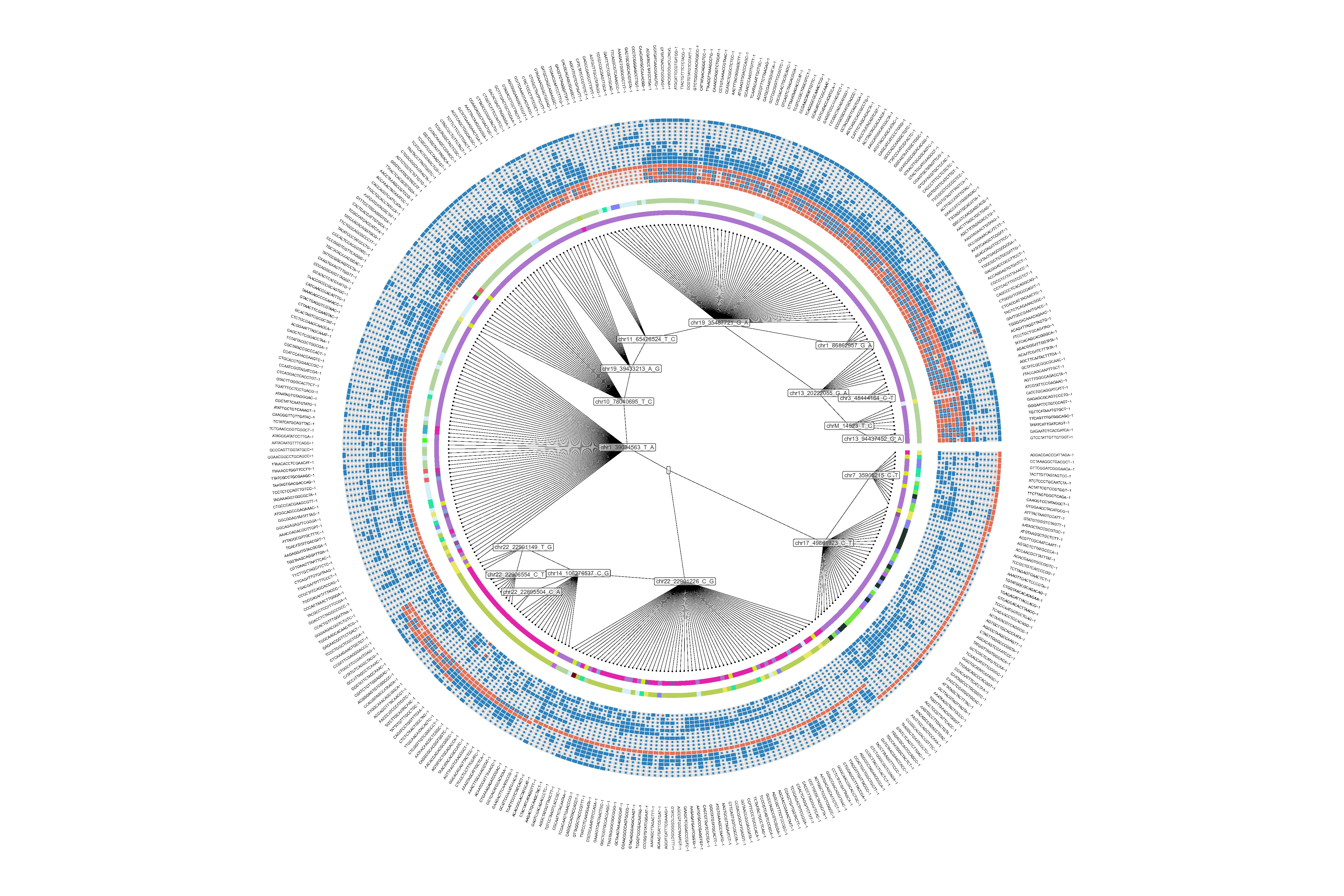
Figure 2: Example circos plot generated from PhyloSOLID output (351 cells, 17 mutations)
remotes::install_github("TsingYang1112/PhyloSOLIDvis", dependencies = TRUE)
⚠️ Important:ggplot2must be loaded beforePhyloSOLIDvisto avoid namespace conflicts.
library(ggplot2)
library(PhyloSOLIDvis)

# Run the complete pipeline
results <- run_all(
  inputpath = "path/to/workdir/sampleid/03_tree_building/mutation_integrator/phylo/",
  outputpath = "path/to/output/",
  annotation_file = "path/to/annotations.txt"
)After running the PhyloSOLID pipeline with --workdir ./results and --sample SAMPLE_ID, the required files are located in:
workdir/
└── SAMPLE_ID/
    └── 03_tree_building/
        └── mutation_integrator/
            └── phylo/
                ├── final_cleaned_I_full_withNA3_for_circosPlot.txt
                ├── final_cleaned_M_full_basedPivots.filtered_sites_inferred.CFMatrix
                ├── df_flipping_count_for_each_mut.txt
                └── df_total_flipping_count.txt
Set inputpath to this phylo/ directory.
| File | Description |
|---|---|
final_cleaned_I_full_withNA3_for_circosPlot.txt |
Input genotype matrix |
final_cleaned_M_full_basedPivots.filtered_sites_inferred.CFMatrix |
Conflict-free matrix |
df_flipping_count_for_each_mut.txt |
Per-mutation flipping statistics |
df_total_flipping_count.txt |
Total flipping statistics |
The annotation file (TSV format) should contain a barcode column matching cell IDs in the PhyloSOLID output. Optional columns include:
| Column | Description |
|---|---|
cluster_info |
Cell cluster assignments |
cell_type |
Cell type annotations |
sample |
Sample identifiers |
tumor_score |
Numeric tumor scores |
B_cell_prop |
B cell proportions |
Note: annotation_file is optional. If not provided, the plot will be generated without annotation layers (tree + heatmap only).
After running run_all() or plot_circos(), the following files are generated. We recommend organizing them in a 04_visualization/ directory:
| File | Description |
|---|---|
No_target.circle_tree_output_as_point.*.svg/pdf |
★ Main circular plot |
heatmap_and_histograms_for_our_tree.pdf |
★ Mutation heatmap with histograms |
legend_components.circos_annotation.svg/pdf |
Circos annotation legend |
legend_components.total_flipping_count.svg/pdf |
Flipping count legend |
sorted_cf_matrix.txt |
Sorted mutation matrix |
ordered_metadata_for_heatmap.txt |
Heatmap ordering data |
phylo_tree.rds |
Phylogenetic tree object |
Basic usage with annotation:
library(ggplot2)
library(PhyloSOLIDvis)

result <- plot_circos(
  inputpath = "results/demo_scrna/03_tree_building/mutation_integrator/phylo/",
  outputpath = "results/demo_scrna/04_visualization/",
  annotation_file = "data/annotations.txt"
)
With custom parameters:
library(ggplot2)
library(PhyloSOLIDvis)

result <- plot_circos(
  inputpath = "results/demo_scrna/03_tree_building/mutation_integrator/phylo/",
  outputpath = "results/demo_scrna/04_visualization/",
  annotation_file = "data/annotations.txt",
  target_mut = "chr11_65426524_T_C",
  tip_label_offset = 8,
  tip_label_size = 3,
  heatmap_width = 0.3,
  flipping_point_size = 1.3,
  plot_height = 12,
  plot_width = 18,
  verbose = TRUE
)
Complete pipeline (matrix ordering + circos plot + heatmap):
library(ggplot2)
library(PhyloSOLIDvis)

results <- run_all(
  inputpath = "results/demo_scrna/03_tree_building/mutation_integrator/phylo/",
  outputpath = "results/demo_scrna/04_visualization/",
  annotation_file = "data/annotations.txt",
  target_mut = "chr11_65426524_T_C",
  run_adjusted = TRUE,
  adjusted_tip_label_offset = 6,
  adjusted_flipping_point_size = 1.3,
  verbose = TRUE
)📘 For detailed parameter descriptions, advanced usage, and troubleshooting, please visit the PhyloSOLIDvis GitHub repository:
| Issue | Solution |
|---|---|
could not find function "plot_circos" |
Run library(ggplot2) then library(PhyloSOLIDvis) |
cannot open file '.../phylo/final_cleaned_I_...' |
Verify inputpath points to the exact phylo/ subdirectory |
Missing annotation_file column |
Ensure file has a barcode column matching cell IDs |
| Plot renders with overlapping labels | Adjust tip_label_offset (increase for more space) |
| Network issues during installation | Set CRAN/BioC mirrors and retry |
For interactive post-analysis and quality control, you can upload your PhyloSOLIDvis outputs to our dedicated web server:
Web Server: https://phylosolid.westlake.edu.cn
🔐 Access: Please register with your institutional email address (e.g., @edu.cn, @*.edu). Registration is free for academic users.
Features:
- Interactive Circos exploration with zoom and cell-level query
- Tree topology evaluation and quality control
- Genotype flip statistics for assessing tree reliability
- Optional upload of IGV snapshots and ANNOVAR annotation results
Required upload files:
| File | Location |
|---|---|
ordered_metadata_for_heatmap.txt |
04_visualization/ |
df_muts_corresponding_to_ordered_tiplabels_by_anticlockwise.txt |
04_visualization/ |
No_target.circle_tree_output_as_point.*.svg |
04_visualization/ |
legend_components.circos_annotation.svg |
04_visualization/ |
df_total_flipping_count.txt |
03_tree_building/mutation_integrator/phylo/ |
df_flipping_count_for_each_mut.txt |
03_tree_building/mutation_integrator/phylo/ |
A complete demo with test data is available in the demo/ directory.
Demo data files:
demo/scrna/input/demo_scrna.bam- BAM file (53.3 MB)demo/scrna/input/demo_scrna.bam.bai- BAM index file (315 KB)demo/scrna/input/identifier.txt- Mutation listdemo/scrna/input/barcodes.txt- Barcode listdemo/scrna/input/celltype.txt- Cell type metadata (optional)
To run the demo:
cd demo
./run_demo.sh
Note: The BAM files are not included in the GitHub repository due to their size. They must be downloaded from Figshare separately and placed in the demo/scrna/input/ directory before running the demo.
1. Feature extraction
phylosolid --workdir demo/scrna/output scrna \
    --sample demo_scrna \
    --mutation-list demo/scrna/input/identifier.txt \
    --bam demo/scrna/input/demo_scrna.bam \
    --barcode demo/scrna/input/barcodes.txt \
    --threads 4 \
    --read-len 120 \
    --cellnum 3319 \
    --steps feature_extraction
2. Tree input generation
phylosolid --workdir demo/scrna/output scrna \
    --sample demo_scrna \
    --mutation-list demo/scrna/input/identifier.txt \
    --bam demo/scrna/input/demo_scrna.bam \
    --barcode demo/scrna/input/barcodes.txt \
    --cellnum 3319 \
    --steps tree_input
3. Tree building
phylosolid --workdir demo/scrna/output scrna \
    --sample demo_scrna \
    --mutation-list demo/scrna/input/identifier.txt \
    --bam demo/scrna/input/demo_scrna.bam \
    --barcode demo/scrna/input/barcodes.txt \
    --celltype-file demo/scrna/input/celltype.txt \
    --steps tree_building
Complete pipeline with demo data
phylosolid --workdir demo/scrna/output scrna \
    --sample demo_scrna \
    --mutation-list demo/scrna/input/identifier.txt \
    --bam demo/scrna/input/demo_scrna.bam \
    --barcode demo/scrna/input/barcodes.txt \
    --celltype-file demo/scrna/input/celltype.txt \
    --threads 4 \
    --read-len 120 \
--cellnum 3319If you see "conda: command not found":
- Download and install Miniconda: https://docs.conda.io/en/latest/miniconda.html
- Or install Mambaforge: https://github.com/conda-forge/miniforge#mambaforge
- Restart your terminal after installation
If you see "ANNOVAR not found" error:
- Check that ANNOVAR is installed
- Verify the paths in config/paths.yaml
- Run
phylosolid check-annovarto diagnose
If you see errors about missing reference files:
- Download the resource files package from Figshare using the URL above
- Ensure files are extracted to the correct location
- Verify paths in config/paths.yaml point to the extracted files
- Check file permissions (ensure files are readable)
If you see warnings about read length:
- Check your BAM file's actual read length:
samtools view your.bam | head -n1 | awk '{print length($10)}'- Use the
--read-lenparameter to specify the correct value
If searching over multiple CV values is slow:
-
Reduce the number of values to test:
- Use a smaller range:
--cv_rank_thresh 0.3,0.5,0.7 - Or increase step size:
--cv_rank_thresh 0.3-0.7:0.2
- Use a smaller range:
-
Use the
automode which tests only 5 values:--cv_rank_thresh auto
-
For large datasets, consider running a single value first:
--cv_rank_thresh 0.3
If the search results file is empty:
- Check that you used a search format (comma-separated, range, or auto)
- Single value mode does not generate a search results file
- Ensure the pipeline completed successfully for all tested values
The search results CSV contains the following columns:
| Column | Description |
|---|---|
cv_value |
The CV threshold tested |
omega_pre_qc |
Discordance before QC (lower is better) |
omega_final |
Discordance after QC (lower is better) |
omega_reduced |
Ω_pre-QC - Ω_final (discordance removed by QC) |
pruning_ratio |
omega_reduced / omega_final (confidence of pruning) |
is_confident |
True if pruning_ratio < 10.0 (confident pruning) |
scaffold_count |
Number of scaffold mutations selected |
Interpretation:
- A
pruning_ratio < 10.0indicates confident pruning: QC removed noise without eliminating meaningful signal - A
pruning_ratio >= 10.0suggests over-pruning: QC may have removed too much biological signal - If
is_confidentis True for one or more CV values, the pipeline selects the one with lowestomega_final - If
is_confidentis False for all CV values, the pipeline falls back to the lowestomega_pre_qc
If your BAM files are large, extract only target sites before running:
samtools view -b large.bam -L target_sites.bed > mini.bamEnsure scripts are executable:
chmod +x scripts/scrna/**/*.sh
chmod +x scripts/scrna/**/*.py
chmod +x scripts/scrna/**/*.RIf you use PhyloSOLID in your research, please cite:
- Yang, Q. et al. PhyloSOLID: Robust phylogeny reconstruction from single-cell data despite inherent error and sparsity. (2026) doi:10.64898/2026.02.04.703905.
PhyloSOLID is licensed under the MIT License - see the LICENSE file for details.
The source code, documentation and examples are available on GitHub at https://github.com/douymLab/PhyloSOLID.
PhyloSOLID uses several third-party tools and libraries:
- ANNOVAR: Users need to install ANNOVAR separately (free for academic use, registration required)
- R packages: Various R packages under GPL/MIT licenses
- Python packages: See environment.yml for details
Please respect the licenses of these dependencies when using PhyloSOLID.
For questions and support, please contact:
Qing Yang: yangqing@westlake.edu.cn
Yanmei Dou: yanmeidou@westlake.edu.cn