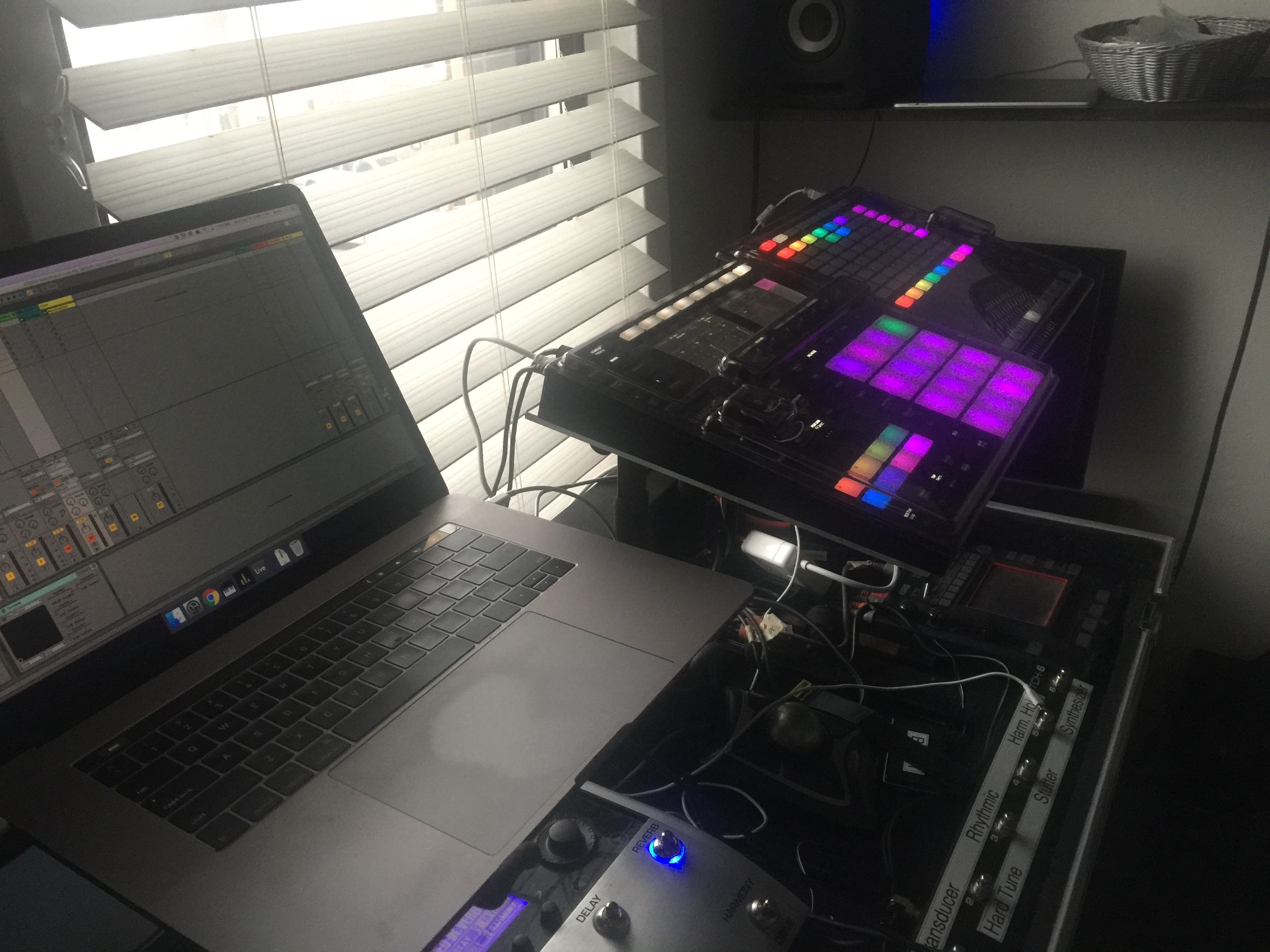
This is my rig for live improvisation. While my focus is mainly on drums and percussion, the rig relies heavily on Maschine. Therefore, you could focus on melodic instruments of many types with ease.
A single Maschine plugin inside Ableton Live produces all the sounds. I limit myself to 8 groups in Maschine to avoid paging, each of which comes to a separate output. Using MIDI Designer, I'm able to EQ those groups, send them to a delay return. From there, the sound is passed through a Master FX section and then out to the audience (1/2 on the audio interface).
In addition to the audience mix, there is a Cue Mix which goes to the cue output (3/4 on the audio interface). Any group may be easily sent to the Cue Mix instead of the audience mix. I've found group cueing inside Maschine to be too hard to reach, and I'm also avoiding Maschine's click. Instead I've a 1-bar (4/4) recording of Maschine's click, which goes out to the Cue Output and is always volume adjustable in MIDI Designer.
I've also got a MIDI clip in Live which powers a visual metronome on the MIDI Designer display, which is a nice little hack. It's awesome for orienting where the "one" is without having to crank the click volume.
Putting Maschine inside Ableton is a trade-off: I've given up transport and tempo controls, firstly. I've also chosen to ignore the Aux sends in Maschine, and the Master section (and meters on the Jam or Studio) are not being used. In exchange, I get a more flexible routing and sends wherever I want them. I also get to use Ableton's Simple Delay, Ping-Pong Delay and Grain Delay (the former two do pitch bending awesomely), and the 3-band Ableton EQ. I also put limiters wherever I see fit. I also suspect that Maschine performs better inside Ableton, but I haven't bothered to try to prove this yet.
One of the most altering goals of this rig is that I need to be able to load Maschine Groups from the Browser without losing pieces of the rig. That's why, aside from Group H, there are no macros assigned to group-level controls. I've also avoided having a Return Group (that routes back from Live and goes out to Maschine's master out). This allows me to solo any group without accidentally killing the entire mix.
Here's the current MIDI Designer screen, now consolidated to one (double) page.

The files included are the Ableton Project and the MIDI Designer layout. The rest is in the Dependencies.
- Maschine 2: Maschine 2 is the heart of this rig and the sole sound source. [ Native Instruments Maschine ]
- MIDI Designer Pro 2: Did I mention that I'm the software author of MIDI Designer? The whole point of this rig is to make music, and I've done many iterations of the rig without MDP2. Currently, I cannot do without it. However, you could conceivably recreate this rig using a hardware MIDI controller, Lemur, or something else.
- Ableton Live: While I'm using Ableton Live 9 Suite, I'm quite sure that I don't use any features that aren't in the Standard Edition. Here's the editions matrix.
- Sugar Bytes Turnado: I'm kind of in love with Turnado for stutters. Though I use the performance effects in Maschine quite a bit -- particularly the stutter -- I'm shoving the entire mix through Turnado and also provide a Wet knob which makes it very expressive and fun. [ Turnado ]
- Native Instruments Guitar Rig 5: I'm currently using the Studio Reverb and the Psychedelay. The former is offered in the NI Guitar Rig 5 Player, but for the Psychedelay you'll need Guitar Rig 5. It's great.
- DJM Filter by X-Fer Records: I use this in Group H. [ DJM Filter Free Download Page ]
- VU Plug by musicIO: Patrick did 90% of the work on this Power Trio plugin, and it's amazingly useful to send levels to a MIDI controller from your DAW. [ VUplug by Power Trio LLC ]
- musicIO MIDI: Make the MIDI connections between your iPad and your computer with this. While I'm part author of this one, I do prefer it to the built in MIDI stuff in iOS 10+. It's less fiddly once the software is running on both maschines. [ musicIO MIDI ]
- Macbook Pro: I run the fastest, latest MBP with 16GB of RAM and an SSD. I think you could get away with 8GB or RAM and a much older I7 (my 2013 was fun), but the SSD is essential. I've got a lot of stuff on an external SSD right now, which I'm not sure is a great choice.
- Check my article on my choice of external SSD [ Article ]
- Focusrite Scarlett 4 Pre: You need two stereo outs to play this rig. Otherwise you don't get a cue mix. You could use this rig quite well using the built-in audio interface on the Maschine MK3, too, since it's got two stereo outs (though you have to set it up using the Maschine hardware to send the audience mix to the cue as well). My feeling is that the Thunderbolt interface is much lower latency, but I'm unable to prove that hunch.
- iPad Pro 2017 10.5": I use an iPad exclusively to run MIDI Designer Pro 2. While this will run on any iPad 2 or greater, I really recommend an iPad Air 2 or greater. My current iPad is definitely overkill.
- Maschine Controllers: I'm using Maschine MK3 and a Maschine Jam (Jam on the right).

I don't think I'm using any of the features of the Extra Features Pack, so if somebody reminds me, I'll delete the photos that make this layout uneditable without the EFP. On the other hand, if you are reading this and send me a message, I could just send you a code for the EFP unlock.
I'm using a lot of kits that are either in Maschine Expansions or come from somewhere else. You can and should load a new kit into any slot except slot H!. Slot H is for longer playing loops and one-shots (particularly spoken word type of things), and it's got some cool Macro controls hooked up.
Maschine Studio has two mono inputs for Play and Record pedals. In this rig, there is no Maschine Studio and there's no need for a Play pedal. To get a Record pedal only, plug your pedal in halfway to Maschine MK3's pedal slot.
If you use the same computer with multiple Jam controllers, you might encounter this issue.
You may have noticed the other tracks on the Recording section: Nikki and Visitor. These are for my wife, Nikki, when she sings, and for a visitor. You should definitely use zero-latency routing to get these to the audience and the cue mixes before they go through the their A/D pass and come in to Ableton Live, however!