This plugin was created to remove all free tier labels, warnings, and enterprise upgrade reminders from the Mattermost free edition web interface. It is intended to support a clean, self-hosted experience free from branding or ads tied to the original platform. It has now also evolved to provided QOL fixes for some less updated plugins.
Initially, the idea was to allow custom user CSS branding via a plugin settings text box. However, this was discarded out of respect for the Mattermost team, as they've since implemented this feature in the enterprise edition.
To clarify, this plugin is not intended to undermine Mattermost's work. The paid editions are vital to the platform's continued development and the talented team behind it. If you can, consider supporting them. Instead, this plugin provides an alternative for those who cannot purchase a paid edition or are restricted by legal or branding requirements.
Feel free to raise issues for any areas you think the plugin should address but currently doesn't.
Here is a non-exhaustive showcase of some of the changes made by the plugin:
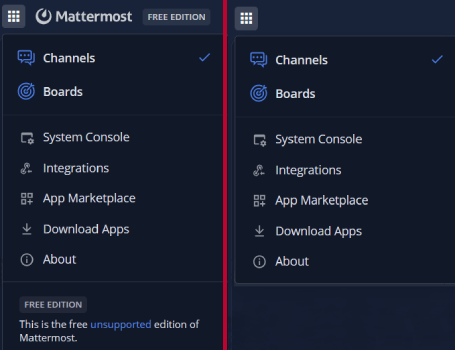
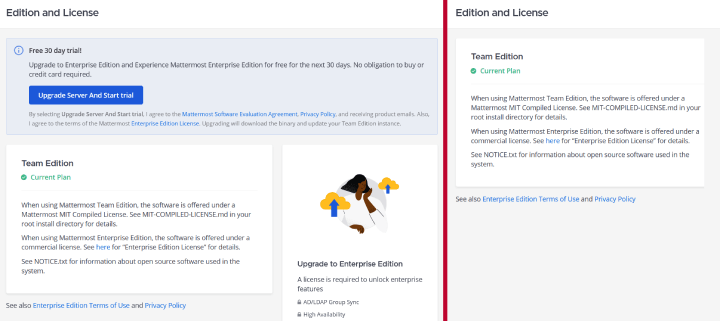
-
Enable custom plugin uploads in your configuration.
-
Install and enable the plugin using the admin console.
-
Most changes can be toggled through the plugin settings page.
The plugin has been tested with the following versions:
- 10.x
- 11.x
Any new version is likely also compatible out of the box, if not, please raise an issue.
The team, entry, professional and enterprise editions should all work with the plugin. Some of the features may only be revelant to
lower tier editions since the higher tiers already offer customization options.
See below for setting up a local workspace to work on the plugin, this section is targeted at developers.
The project structure here consists of a highly modified and optimized version of the mattermost-plugin-starter-template. Testing and development workflows have been removed to preserve plugin simplicity. This means the plugin must be rebuilt and manually uploaded into a Mattermost instance anytime you want to test it.
The plugin build version will be based on the version.txt file that automatically gets bumped by the CI pipeline when a release is made.
A docker-compose.yaml file is provided to quickly spin up two (team and enterprise) local Mattermost instances for testing. It is self-contained with dummy environment variables already set and usually requires no additional configuration.
-
-
Clone this repository.
-
Refer to each folder for instructions on that particular module.
-
Start instances for testing the plugin upload, using the provided
docker-compose.yamlfile:docker compose up --force-recreate
The enterprise edition instance will be available at
http://localhost:8065and the team edition athttp://localhost:8066.
-
-
-
Run the cross-platform build script to automatically create an installable plugin artifact:
python build.py
-
The resulting
tar.gzfile is in the format accepted by Mattermost. You can use the provideddocker-compose.yamlfile to quickly spin up a local Mattermost instance for testing. It is self-contained and requires no additional configuration.
-
-
-
Pre-commit hooks to run project formatting and linting:
# Needs the dependencies of all modules installed to run correctly!
pip install lefthook
lefthook install

# When using pre-commit hooks, git commands will fail if any files are checked with errors.
# These files must be added to the staging area and commited again after being fixed up.
-
-
- This repository is a heavily modded version of the official mattermost-plugin-starter-template, to simplify debugging and development.
