Beacon configuration
To configure the beacon, you need to install the IBKS Config Tool mobile APP and enable bluetooth on your device.
Find your beacon and select it. Like on the image below.
This password will be asked : 17000000000000000000000000000000 (17 and 30 * 0).

To configure the URL diffusion, toggle the EDDYSTONE SERVICE section, and open click in the section to access to the configuration window. Like below.

Here is the configuration windows :
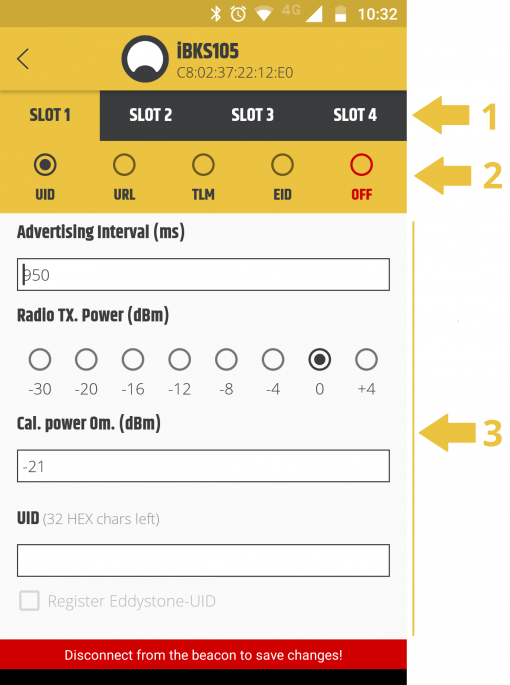
You can have until 4 slots on the same beacon (1). To configure the displayed url, select URL (2). - Advertising time correspond to the diffusion rate time in millisecond. - Radio TX. Power correspond to the diffusion area in dBm which equals to milliwatt value. Set -16 or -12 for a distance of 8-10m. - "Let the Cal. power 0m" to -21, it affects the diffusion area and the power from the signal. - URL need to be a "https://" to enabled the diffusion.
For more information, read the Constructor documentation.