


- Overview
- Problem Statement
- Solution
- Architecture
- Features
- Technology Stack
- Project Structure
- API Documentation
- Installation & Setup
- Docker Deployment
- Screenshots
- Contributing
Sokomob is a direct farm-to-consumer e-commerce platform designed to address food security challenges by connecting farmers directly with consumers, eliminating exploitative middlemen in the agricultural supply chain.
One of United Nation's Sustainable Development Goals is Zero Hunger (Goal 2). In Kenya, agriculture accounts for 20% of GDP and employs over 40% of the population (Central Bank of Kenya, 2022). Despite this significant contribution, farmers receive minimal profits due to intermediary exploitation.
Middlemen such as commission agents, traders, and wholesalers extract significant profits from farmers' produce, leaving farmers with insufficient returns for their hard work. This platform addresses this challenge by creating a direct connection between farmers and consumers.
Sokomob provides a comprehensive e-commerce solution featuring:
- Direct Farmer-Consumer Connection: Eliminates intermediaries
- Geolocation Services: Maps showing seller locations
- Multi-platform Access: Mobile and web applications
- Real-time Product Management: Dynamic inventory and pricing
The project follows a client-server architecture with clear separation of concerns:
┌─────────────────┐    HTTP/REST API    ┌─────────────────┐
│   Flutter App   │ ◄─────────────────► │  Django Server  │
│   (Frontend)    │                     │   (Backend)     │
└─────────────────┘                     └─────────────────┘
        │                                        │
        │                                        │
        ▼                                        ▼
┌─────────────────┐                     ┌─────────────────┐
│ Mobile/Web UI   │                     │ SQLite Database │
│   Components    │                     │   (Persistent   │
└─────────────────┘                     │    Storage)     │
                                        └─────────────────┘
- Python/Django: Chosen for its versatility and future ML integration capabilities
- Flutter: Selected for cross-platform development and rich UI widget ecosystem
- SQLite: Used for development simplicity and easy deployment
- Product catalog browsing
- Seller profiles and ratings
- Product search and filtering
- Shopping cart functionality
- Order tracking system
- Interactive maps showing seller locations
- City-based seller filtering
- GPS-enabled delivery tracking
- Address management system
- Seller registration and profiles
- Product inventory management
- Rating and review system
- Multi-location support for sellers
- Mobile applications (Android/iOS)
- Web application
- Responsive design
- Offline capability planning
| Component | Technology | Version | Purpose |
|---|---|---|---|
| Backend | Python | 3.9+ | Server-side logic |
| Django | 4.1.1 | Web framework | |
| Django REST Framework | 3.14.0 | API development | |
| SQLite | 3.x | Database | |
| Frontend | Dart | 2.17+ | Programming language |
| Flutter | 3.x | Mobile/Web framework | |
| HTTP | - | API communication | |
| Google Maps | - | Location services | |
| DevOps | Docker | - | Containerization |
| Docker Compose | 3.9 | Multi-container apps | |
| Development | Git | - | Version control |
| VS Code | - | IDE |
plp/
├── 📁 backend/                 # Django REST API
│   ├── 📁 api/
│   │   ├── 📁 base/           # Django project configuration
│   │   │   ├── settings.py    # Django settings
│   │   │   ├── urls.py        # Main URL routing
│   │   │   ├── wsgi.py        # WSGI configuration
│   │   │   └── asgi.py        # ASGI configuration
│   │   ├── 📁 products_api/   # Product management app
│   │   │   ├── models.py      # Product data models
│   │   │   ├── views.py       # Product API views
│   │   │   ├── serializers.py # Product serializers
│   │   │   ├── urls.py        # Product URLs
│   │   │   └── admin.py       # Admin interface
│   │   ├── 📁 sellers_api/    # Seller management app
│   │   │   ├── models.py      # Seller & Address models
│   │   │   ├── views.py       # Seller API views
│   │   │   ├── serializers.py # Seller serializers
│   │   │   ├── urls.py        # Seller URLs
│   │   │   └── admin.py       # Admin interface
│   │   └── manage.py          # Django management script
│   ├── 📁 db/                 # Database files
│   │   └── db.sqlite3         # SQLite database
│   ├── requirements.txt       # Python dependencies
│   └── ReadMe.md             # Backend documentation
├── 📁 frontend/               # Flutter application
│   ├── 📁 lib/
│   │   ├── 📁 common/         # Shared utilities
│   │   │   └── static_values.dart # Configuration constants
│   │   ├── 📁 data/           # Data layer
│   │   │   ├── 📁 model/      # Data models
│   │   │   └── 📁 services/   # API service classes
│   │   └── 📁 ui/             # User interface
│   │       ├── 📁 screens/    # App screens
│   │       └── 📁 components/ # Reusable UI components
│   ├── pubspec.yaml          # Flutter dependencies
│   └── README.md             # Frontend documentation
├── Dockerfile                # Docker configuration
├── docker-compose.yml        # Multi-container setup
└── README.md                 # This file
| Field | Type | Description |
|---|---|---|
| id | AutoField | Primary key |
| name | CharField(100) | Product name |
| imageUrl | URLField | Product image URL |
| summary | CharField(100) | Brief description |
| description | CharField(200) | Detailed description |
| quantity | CharField(100) | Available quantity |
| price | DecimalField(10,2) | Product price |
| rating | PositiveIntegerField | Product rating (0-5) |
| date_posted | DateTimeField | Creation timestamp |
| Field | Type | Description |
|---|---|---|
| id | AutoField | Primary key |
| name | CharField(100) | Seller name |
| product | ManyToManyField | Associated products |
| address | ManyToManyField | Seller addresses |
| join_date | DateField | Registration date |
| rating | PositiveIntegerField | Seller rating (0-5) |
| Field | Type | Description |
|---|---|---|
| id | AutoField | Primary key |
| city | CharField(100) | City name |
| name | CharField(100) | Address name/label |
| latitude | FloatField | GPS latitude |
| longitude | FloatField | GPS longitude |
http://YOUR_IP_ADDRESS:PORT_NUMBER/
| Method | Endpoint | Description | Parameters |
|---|---|---|---|
| GET | /products/ |
Get all products | - |
| GET | /products/?id={id} |
Get specific product | id: Product ID |
| POST | /products/ |
Create new product | JSON body with product data |
| PUT | /products/?id={id} |
Update product | id: Product ID, JSON body |
| DELETE | /products/?id={id} |
Delete product | id: Product ID |
| Method | Endpoint | Description | Parameters |
|---|---|---|---|
| GET | /sellers/ |
Get all sellers | - |
| GET | /sellers/?id={id} |
Get specific seller | id: Seller ID |
| GET | /sellers/?city=all |
Get all cities | - |
| GET | /sellers/?address={city} |
Get addresses by city | city: City name |
| POST | /sellers/ |
Create new seller | JSON body with seller data |
| PUT | /sellers/?id={id} |
Update seller | id: Seller ID, JSON body |
| DELETE | /sellers/?id={id} |
Delete seller | id: Seller ID |
[
  {
    "imageUrl": "https://example.com/image.jpg",
    "name": "Fresh Tomatoes",
    "summary": "Organic tomatoes from local farm",
    "description": "Fresh, organic tomatoes grown without pesticides",
    "price": "150.00",
    "rating": 4
  }
][
{
"id": 1,
"name": "Green Valley Farm",
"address": [
{
"name": "Main Farm",
"city": "Nairobi",
"latitude": -1.2921,
"longitude": 36.8219
}
],
"product": [
{
"imageUrl": "https://example.com/tomato.jpg",
"name": "Tomatoes",
"summary": "Fresh tomatoes",
"description": "Organic tomatoes",
"price": "150.00",
"rating": 4
}
],
"join_date": "2023-01-15",
"rating": 5
}
]- Python 3.9+
- Flutter SDK 3.x
- Git
- (Optional) Docker & Docker Compose
-
Clone the repository
git clone https://github.com/eddieogola/plp.git cd plp/backend -
Create virtual environment (recommended)
python -m venv .venv

# Activate virtual environment
# On Windows:
.venv\Scripts\activate
# On macOS/Linux:
source .venv/bin/activate
-
Install dependencies
pip install -r requirements.txt
-
Run database migrations
cd api python manage.py migrate -
Create superuser (optional)
python manage.py createsuperuser
-
Start development server
python manage.py runserver YOUR_IP_ADDRESS:8000
Note: Use your actual IP address instead of
localhostfor mobile device access
-
Navigate to frontend directory
cd ../frontend -
Configure API endpoint
// Edit lib/common/static_values.dart
static const String apiUrl = "http://YOUR_IP_ADDRESS:8000/";
-
Install Flutter dependencies
flutter pub get
-
Run the application
flutter run
For mobile device testing, ensure:
- Backend server uses your machine's IP address (not localhost)
- Mobile device and development machine are on the same network
- Firewall allows connections on the specified port
-
Build and start services
docker-compose up --build
-
Access the application
- Backend API:
http://localhost:8000 - Admin interface:
http://localhost:8000/admin
- Backend API:
-
Build the image
docker build -t sokomob-api . -
Run the container
docker run -p 8000:8000 sokomob-api
| Screen | Description | Key Features |
|---|---|---|
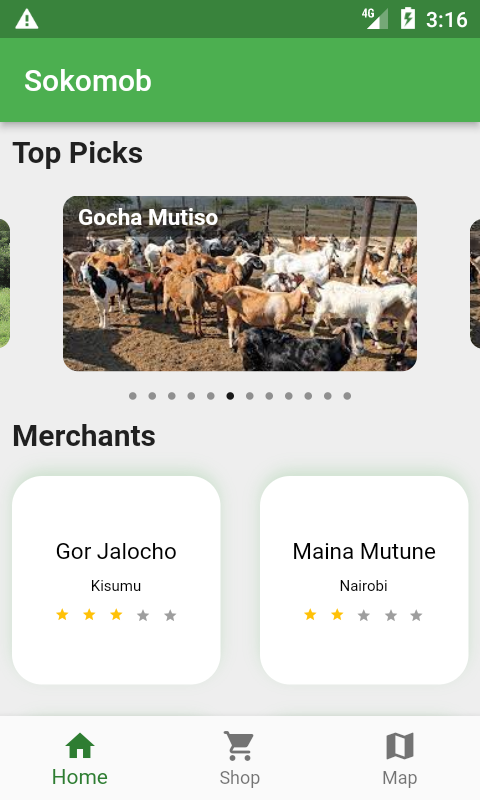
| Home Screen | Main dashboard | Seller carousel, featured products, navigation |
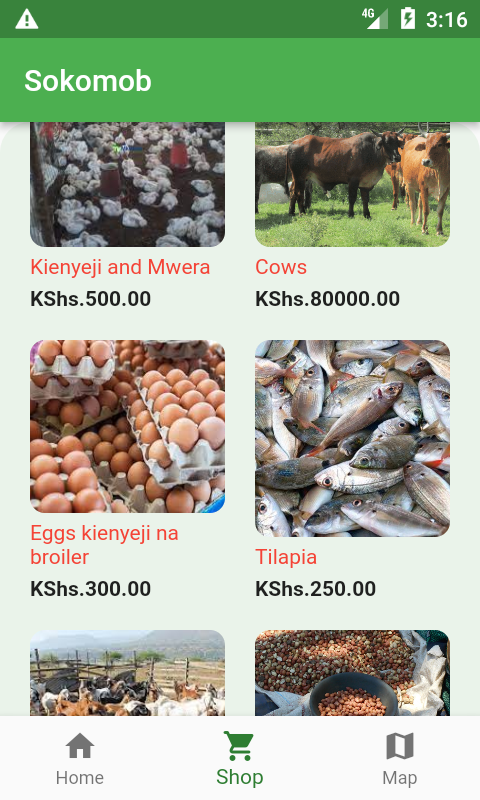
| Shop Screen | Product catalog | Product grid, search, filtering |
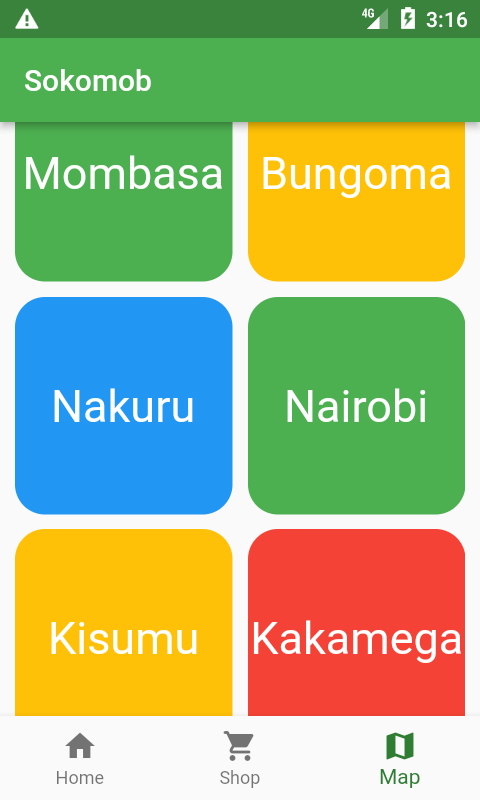
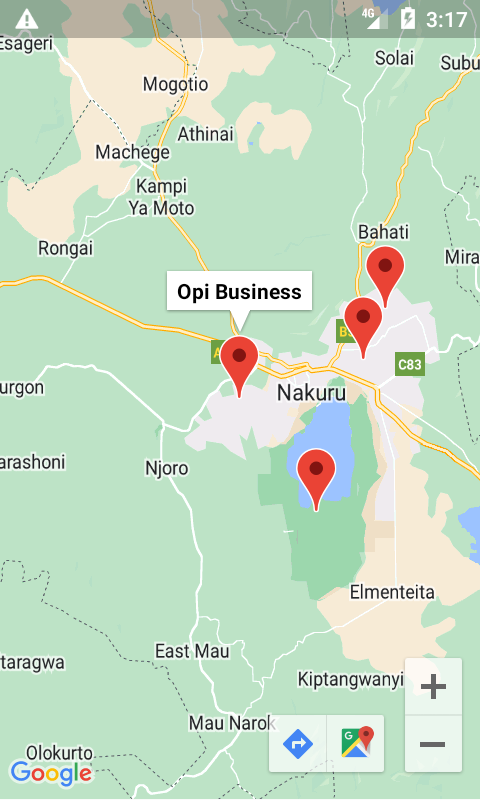
| Map Screen | Location services | City list, interactive maps, seller locations |
| Product Detail | Individual product | Full description, rating, seller info |
| Seller Detail | Seller profile | Products, location, contact info |
| Order Tracking | Delivery tracking | GPS tracking, delivery status |
| Package | Purpose | Version |
|---|---|---|
http |
API communication | Latest |
google_maps_flutter |
Maps integration | ^2.2.0 |
cached_network_image |
Image caching | ^3.2.2 |
carousel_slider |
Image carousel | ^4.1.1 |
shimmer |
Loading animations | ^2.0.0 |
get_storage |
Local storage | ^2.0.3 |
location |
GPS services | ^4.4.0 |



- Backend: Follow Django best practices with apps for different functionalities
- Frontend: Use feature-based folder structure with separation of concerns
- API: RESTful design with consistent error handling
- Database: Normalized schema with appropriate relationships
# Backend tests
cd backend/api
python manage.py test

# Frontend tests
cd frontend
flutter test- Python: Follow PEP 8 guidelines
- Dart: Follow official Dart style guide
- API: Use consistent naming conventions
- User authentication and authorization
- Payment gateway integration
- Real-time chat system
- Push notifications
- Advanced search and filtering
- ML-based recommendation system
- Multi-language support
- Offline mode capabilities
- PostgreSQL migration for production
- Redis caching implementation
- CI/CD pipeline setup
- Comprehensive testing suite
- API rate limiting
- Enhanced security measures
We welcome contributions! Please follow these steps:
- Fork the repository
- Create a feature branch (
git checkout -b feature/AmazingFeature) - Commit changes (
git commit -m 'Add AmazingFeature') - Push to branch (
git push origin feature/AmazingFeature) - Open a Pull Request
- Follow the installation guide above
- Create a new branch for your feature
- Make changes and test thoroughly
- Ensure code follows project style guidelines
- Submit a pull request with clear description
This project is licensed under the MIT License - see the LICENSE file for details.
Eddie Ogola
- GitHub: @eddieogola
- United Nations Sustainable Development Goals initiative
- Kenya's Big 4 Agenda for Food Security
- Flutter and Django communities
- Contributors and testers
Built with ❤️ to connect farmers directly with consumers and promote food security.