


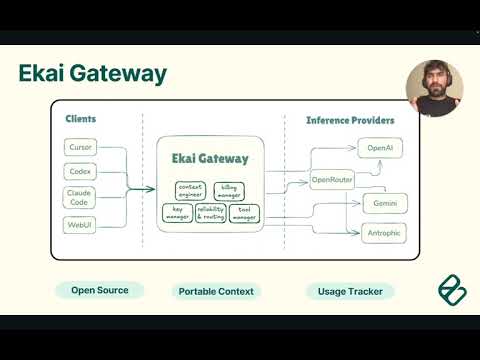
Multi-provider AI proxy with usage dashboard supporting Anthropic, OpenAI, Google Gemini, xAI, and OpenRouter models through OpenAI-compatible and Anthropic-compatible APIs.
Designed for self-hosted personal use - run your own instance to securely proxy AI requests using your API keys.
- 🤖 Multi-provider: Anthropic + OpenAI + Google (Gemini) + xAI + OpenRouter models
- 🔄 Dual APIs: OpenAI-compatible + Anthropic-compatible endpoints
- 🔀 Cost-optimized routing: Automatic selection of cheapest provider for each model
- 💰 Usage tracking: Track token usage and costs with visual dashboard
- 🗄️ Database storage: SQLite database for persistent usage tracking
- 📊 Analytics dashboard: Real-time cost analysis and usage breakdowns
Option 1: Using npm
# 1. Install dependencies
npm install

# 2. Setup environment variables
cp .env.example .env
# Edit .env and add at least one API key (see .env.example for details)

# 3. Build and start the application
npm run build
npm start
Option 2: Using Docker (published image)
# 1. Setup environment variables
cp .env.example .env
# Edit .env and add at least one API key (see .env.example for details)

# 2. Pull + start the latest GHCR image
docker compose up -d

# Optional: run without Compose
docker pull ghcr.io/ekailabs/ekai-gateway:latest
docker run --env-file .env -p 3001:3001 -p 3000:3000 ghcr.io/ekailabs/ekai-gateway:latest
Important: The dashboard is initially empty. After setup, send a query using your own client/tool (IDE, app, or API) through the gateway; usage appears once at least one request is processed.
Access Points:
- Gateway API:
http://localhost:3001 - Dashboard UI:
http://localhost:3000 - Detailed setup steps live in
docs/getting-started.md; checkdocs/for additional guides.
If you’re contributing changes or need a custom build:
docker build --target ekai-gateway-runtime -t ekai-gateway .
docker run --env-file .env -p 3001:3001 -p 3000:3000 ekai-gateway- Point your client/tool to the gateway (
http://localhost:3001orhttp://localhost:3001/v1), see integration guides below. - Send a query using your usual workflow; both OpenAI-compatible and Anthropic-compatible endpoints are tracked.
- Open
http://localhost:3000to view usage and costs after your first request.
Required: At least one API key from Anthropic, OpenAI, Google Gemini, xAI, or OpenRouter (see .env.example for configuration details).
Use the gateway with Claude Code for multi-provider AI assistance:
# Point Claude Code to the gateway
export ANTHROPIC_BASE_URL="http://localhost:3001"
export ANTHROPIC_MODEL="grok-code-fast-1"  # or "gpt-4o","claude-sonnet-4-20250514"

# Start Claude Code as usual
claude
📖 Complete Claude Code Guide →
Use the gateway with Codex for OpenAI-compatible development tools:
# Point Codex to the gateway
export OPENAI_BASE_URL="http://localhost:3001/v1"

# Start Codex as usual
codex🚧 This is a beta release - please report any issues or feedback!
Known Limitations:
- Some edge cases in model routing may exist
Getting Help:
- Check the logs in
gateway/logs/gateway.logfor debugging - Ensure your API keys have sufficient credits
- Test with simple requests first before complex workflows
ekai-gateway/
├── gateway/          # Backend API and routing
├── ui/              # Dashboard frontend
├── shared/          # Shared types and utilities
└── package.json     # Root package configuration
POST /v1/chat/completions  # OpenAI-compatible chat endpoint
POST /v1/messages          # Anthropic-compatible messages endpoint
POST /v1/responses         # OpenAI Responses endpoint
GET  /usage               # View token usage and costs
GET  /health              # Health check endpoint
# OpenAI-compatible endpoint (works with all providers)
curl -X POST http://localhost:3001/v1/chat/completions \
-H "Content-Type: application/json" \
-d '{"model": "gpt-4o", "messages": [{"role": "user", "content": "Hello"}]}'
# Use Claude models via OpenAI-compatible endpoint
curl -X POST http://localhost:3001/v1/chat/completions \
-H "Content-Type: application/json" \
-d '{"model": "claude-3-5-sonnet-20241022", "messages": [{"role": "user", "content": "Hello"}]}'
# Use xAI Grok models
curl -X POST http://localhost:3001/v1/chat/completions \
-H "Content-Type: application/json" \
-d '{"model": "grok-code-fast", "messages": [{"role": "user", "content": "Hello"}]}'
# Anthropic-compatible endpoint
curl -X POST http://localhost:3001/v1/messages \
-H "Content-Type: application/json" \
-d '{"model": "claude-3-5-sonnet-20241022", "max_tokens": 100, "messages": [{"role": "user", "content": "Hello"}]}'
# OpenAI Responses endpoint
curl -X POST http://localhost:3001/v1/responses \
-H "Content-Type: application/json" \
-d '{"model": "gpt-4o-mini", "input": "Say hi in one short sentence.", "temperature": 0.7, "max_output_tokens": 128}'
# Both endpoints support all models and share conversation context
# Client A uses OpenAI format, Client B uses Anthropic format - same conversation!
# Check usage and costs
curl http://localhost:3001/usageThe proxy uses cost-based optimization to automatically select the cheapest available provider:
- Special routing: Grok models (
grok-code-fast,grok-beta) → xAI (if available) - Cost optimization: All other models are routed to the cheapest provider that supports them
- Provider fallback: Graceful fallback if preferred provider is unavailable
Supported providers:
- Anthropic: Claude models (direct API access)
- OpenAI: GPT models (direct API access)
- xAI: Grok models (direct API access)
- OpenRouter: Multi-provider access with
provider/modelformat
Multi-client proxy: Web apps, mobile apps, and scripts share conversations across providers with automatic cost tracking and optimization.
npm run build  # Build TypeScript for production
npm start      # Start both gateway and dashboard
Individual services:
npm run start:gateway  # Gateway API only (port 3001)
npm run start:ui # Dashboard UI only (port 3000)npm run dev # Start both gateway and dashboard in development modeIndividual services:
cd gateway && npm run dev    # Gateway only (port 3001)
cd ui/dashboard && npm run dev # Dashboard only (port 3000)Contributions are highly valued and welcomed! See CONTRIBUTING.md for details.
Licensed under the Apache License 2.0.


