The big request: Please do not post links to the development versions of the ISOS or screenshots. And also do not write about what we are working on internal unless we have agreed to do so.
These files are not intended for real use, they can contain errors and lead to data loss.
If you want to contribute to testing upcoming ISO changes and help us iron the ISO and installer framework: Join testing by simply asking to get into the ISO devel group at the forum: https://forum.endeavouros.com/t/we-always-welcome-testers-for-the-iso-development
First of all, main testing for features and general install process can be done virtual in a virtual machine:
And to research on issues we need at least some logs:
general info about logs: wiki log page
Calamares installer log: ~/endeavour-install.log on the live session (if install failed best way to provide logs)
from installed system: /var/log/endeavour-install.log
Boot journal: journalctl -b -0
And others specific for some known issues to testing that we will inform you directly inside the post if needed.
You can use the EndeavourOS log tool that you find on the panel of the live session:
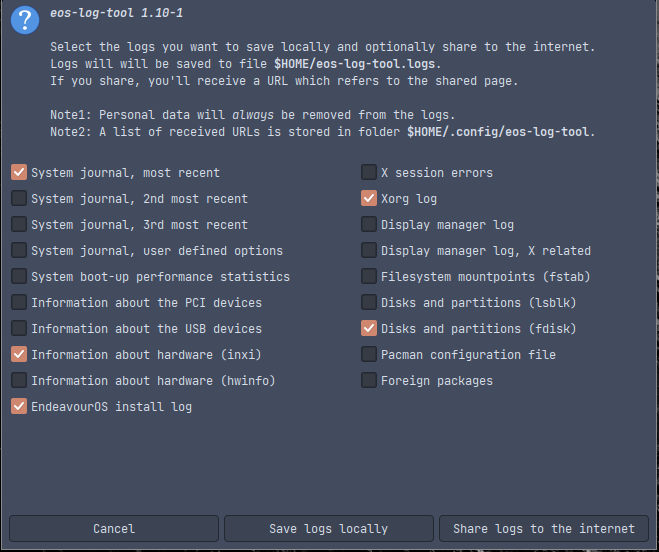
This makes it easy to share the logs as you can send directly to pastebin (send logs to internet) and share the URL in your post.
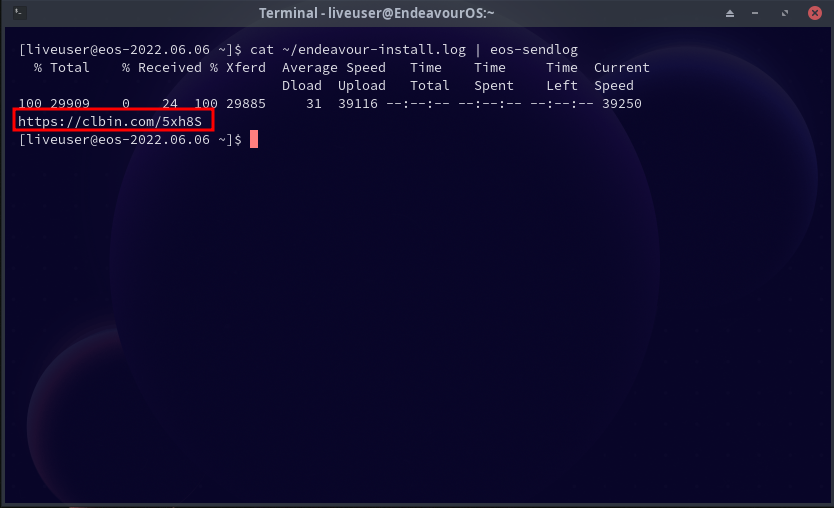
Or if you want also the cli version:
cat ~/endeavour-install.log | eos-sendlog
will give such output with the short URL you can share:
We will ask for specific tests in the related post.
It is always firmly requested to see test installs on real hardware if you can!
But as it can mess with your daily driver install you will need to be careful on the procedure.
In the best case, you have a dedicated device for such testing or at least you have a separate drive for test installs. So that you will be able to may also unplug your daily OS when doing tests, or you simply have a good backup.
We need real hardware testing on as many different machines as possible, special on Nvidia drivers we all know the game ;)
- installed DE/WM
- Partions:
- auto/manual
- Filesystem
- Encyption
- UEFI/Bios
If installed on real hardware the hardware info:
inxi -Fxxc0z
And info about the log pastebin URL you post:
installer log: https://clbin.com/5xh8S