
Generate animations of exoplanet transits with embedded sonification (audio representation of flux), primarily designed as an outreach tool for the blind and visually impaired community.
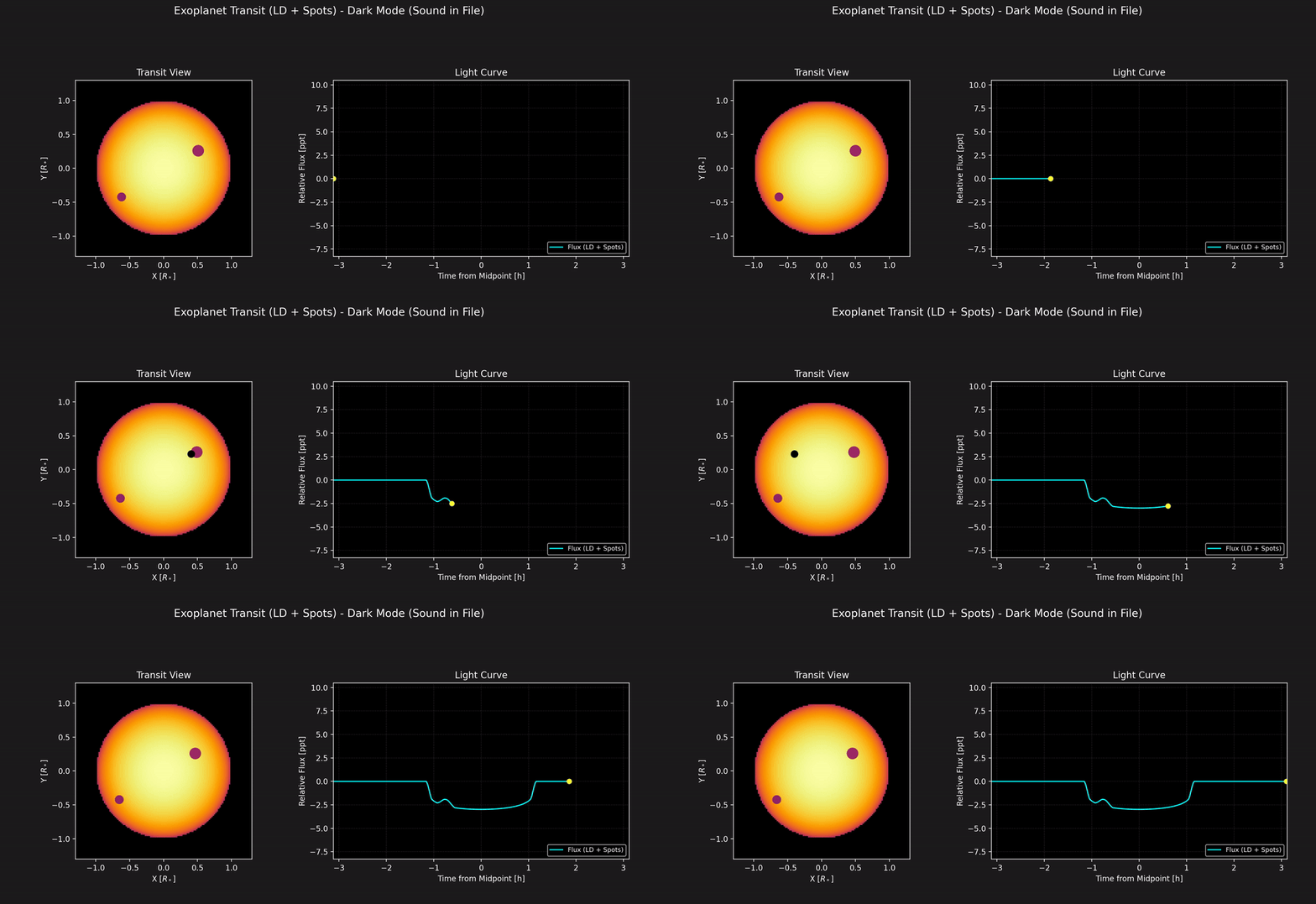
ExoTransit simulates and visualizes exoplanet transits using the batman-package. It creates compelling dark-mode MP4 animations suitable for presentations and educational purposes.
A key feature is the sonification of the transit light curve. The changing brightness of the star as the planet passes in front is mapped to changes in audio pitch, providing an auditory representation of the transit event. This feature aims to make the fascinating phenomenon of exoplanet transits more accessible to individuals who are blind or visually impaired.
- Transit Simulation: Simulates light curves for various scenarios:
- Uniform brightness star (No Limb Darkening)
- Star with Quadratic Limb Darkening
- Star with Limb Darkening and Starspots
- Dark Mode Animation: Generates visually appealing MP4 videos optimized for dark backgrounds.
- Sonification for Accessibility: Embeds an audio track in the video where the light curve flux is mapped to audio frequency (lower flux = lower pitch), aiding understanding for the blind and visually impaired.
- Configurable: Most simulation, animation, and audio parameters are controlled via a simple
config.yamlfile. - Command-Line Interface: Easy selection of scenarios and option to override configuration file settings.
- Smooth Audio: Uses phase continuity in audio generation to minimize clicks and jitter.
- Python 3.7+
- FFmpeg: Essential for combining the generated audio and video into the final MP4 file. Must be installed and accessible in your system's PATH.
- Download from ffmpeg.org.
- Verify the
ffmpegcommand works in your terminal.
- Python Libraries: See
requirements.txt. Install using pip.
-
Clone the repository:
git clone https://github.com/enzoperesafonso/ExoTransit.git # Use your actual repo URL!
cd exotransit_sonification
-
Create a Virtual Environment (Recommended):
python -m venv venv
# Activate it:
# Windows: .\venv\Scripts\activate
# macOS/Linux: source venv/bin/activate
-
Install Python dependencies:
pip install -r requirements.txt
-
Verify FFmpeg: Open your terminal/command prompt and run:
ffmpeg -version
If this command is not found, you need to install FFmpeg and ensure it's added to your system's PATH environment variable. Audio embedding will fail without it.
Modify the config.yaml file to customize the simulation and output:
system_params: Planet/orbit properties (batmanparameters).star_params: Stellar radius and rotation period.spots: Define starspots (only used forspotsscenario).animation_settings: Video output details (filename base, FPS, frame count, quality DPI).sonification_settings: Audio parameters (sample rate, frequency mapping, volume).ffmpeg_settings: Codecs and bitrates for video/audio merging.visual_settings: Override default dark mode colors.
Detailed comments explaining each parameter are included within the config.yaml file.
Execute the script from your terminal (within the activated virtual environment if you created one).
Select the desired scenario:
# Generate Limb Darkening scenario using defaults from config.yaml
python exotransit.py ld

# Generate Spots scenario
python exotransit.py spots

# Generate No Limb Darkening scenario
python exotransit.py none
Output video will be named according to output_basename in config.yaml (e.g., transit_animation_ld_dark_sound.mp4).
Command-Line Options:
# Use a specific configuration file
python exotransit.py ld --config my_custom_config.yaml

# Override the output filename
python exotransit.py spots --outfile custom_transit_with_spots.mp4

# Disable sound generation/embedding for this specific run
python exotransit.py ld --nosound

# Combine options
python exotransit.py spots --config big_planet.yaml --outfile big_planet_transit.mp4 --nosoundThe script produces an .mp4 video file. If sound generation is enabled (and FFmpeg is available), the sonified light curve audio track will be included in the video, allowing the transit event to be both seen and heard.
FileNotFoundError: ... 'ffmpeg': FFmpeg is not installed correctly or not found in your PATH. Verify your FFmpeg installation.soundfile.LibsndfileNotFoundError: Thelibsndfilebackend library might be missing. Installation methods vary:brew install libsndfile(macOS),sudo apt-get install libsndfile1(Debian/Ubuntu), checksoundfiledocumentation for others.- Video saves, but no sound: Review the console output for errors during the "Merging video and audio" step. This usually indicates an FFmpeg problem or that the temporary audio file wasn't created successfully.
ModuleNotFoundError: Ensure your virtual environment is active and you've installed requirements viapip install -r requirements.txt.- Audio sounds jittery/clicky: This should be minimized by the phase continuity fix, but if issues persist, experiment with
VIDEO_FPSandnum_framesin the config.
This project is licensed under the MIT License - see the LICENSE file for details.