

- Overview
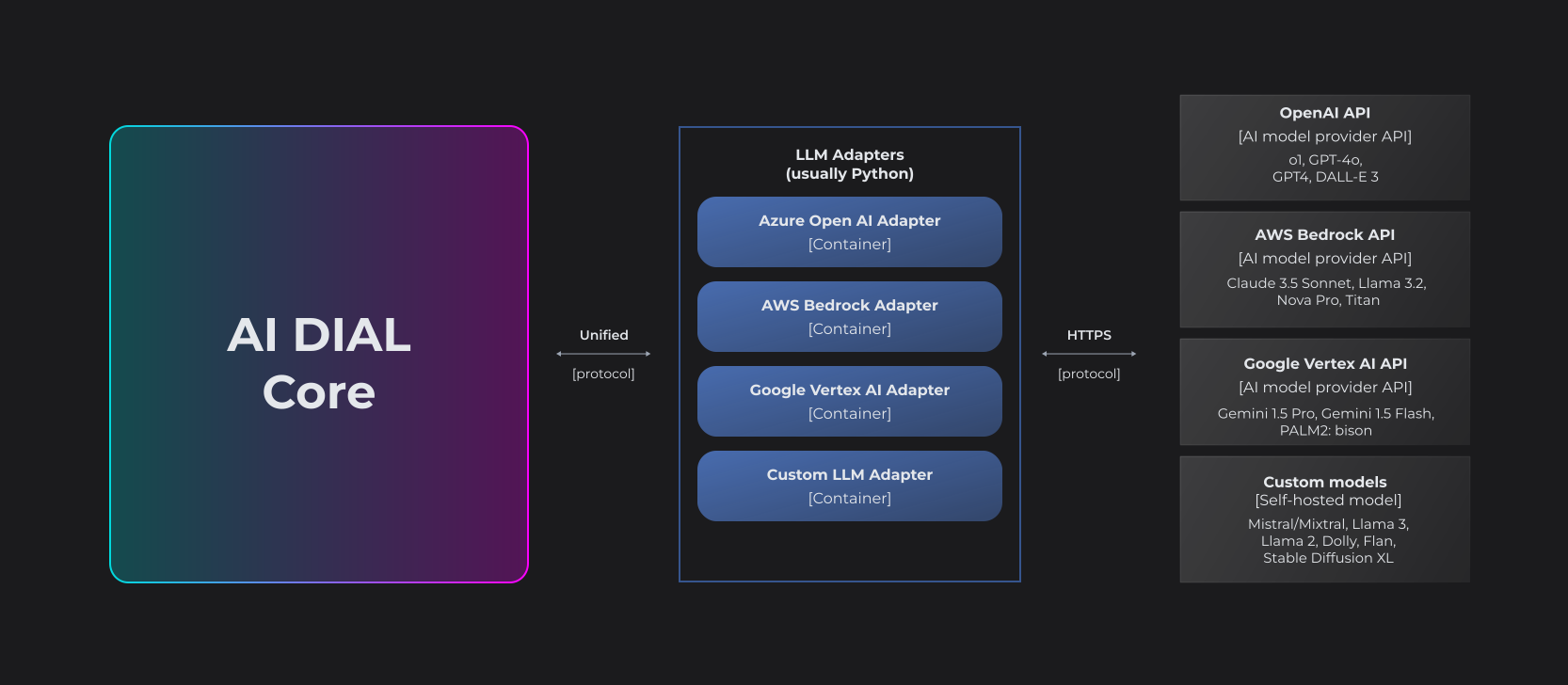
LLM Adapters unify the APIs of respective LLMs to align with the Unified Protocol of DIAL Core. Each Adapter operates within a dedicated container. Multi-modality allows supporting non-textual communications such as image-to-text, text-to-image, file transfers and more.
The project implements AI DIAL API for language models and embedding models from AWS Bedrock.
The following models support POST SERVER_URL/openai/deployments/DEPLOYMENT_NAME/chat/completions endpoint along with an optional support of POST /tokenize and POST /truncate_prompt endpoints:
Note that a model supports /truncate_prompt endpoint if and only if it supports max_prompt_tokens request parameter.
| Vendor | Model | Deployment name | Modality | /tokenize |
/truncate_prompt, max_prompt_tokens |
tools/functions | /configuration |
Implementation |
|---|---|---|---|---|---|---|---|---|
| Anthropic | Claude 4.5 Sonnet | anthropic.claude-sonnet-4-5-20250929-v1:0 | (text/image/document)-to-text | 🟡 | 🟡 | ✅ | ✅ | Anthropic SDK/Converse API |
| Anthropic | Claude 4.5 Haiku | anthropic.claude-haiku-4-5-20251001-v1:0 | (text/image/document)-to-text | 🟡 | 🟡 | ✅ | ✅ | Anthropic SDK/Converse API |
| Anthropic | Claude 4.1 Opus | anthropic.claude-opus-4-20250514-v1:0 | (text/image/document)-to-text | 🟡 | 🟡 | ✅ | ✅ | Anthropic SDK/Converse API |
| Anthropic | Claude 4 Opus | anthropic.claude-opus-4-20250514-v1:0 | (text/image/document)-to-text | 🟡 | 🟡 | ✅ | ✅ | Anthropic SDK/Converse API |
| Anthropic | Claude 4 Sonnet | anthropic.claude-sonnet-4-20250514-v1:0 | (text/image/document)-to-text | 🟡 | 🟡 | ✅ | ✅ | Anthropic SDK/Converse API |
| Anthropic | Claude 3.7 Sonnet | anthropic.claude-3-7-sonnet-20250219-v1:0 | (text/image/document)-to-text | 🟡 | 🟡 | ✅ | ✅ | Anthropic SDK/Converse API |
| Anthropic | Claude 3.5 Sonnet | anthropic.claude-3-5-sonnet-20240620-v1:0 | (text/image/document)-to-text | 🟡 | 🟡 | ✅ | ✅ | Anthropic SDK/Converse API |
| Anthropic | Claude 3.5 Sonnet 2.0 | anthropic.claude-3-5-sonnet-20241022-v2:0 | (text/image/document)-to-text | 🟡 | 🟡 | ✅ | ✅ | Anthropic SDK/Converse API |
| Anthropic | Claude 3.5 Haiku | anthropic.claude-3-5-haiku-20241022-v1:0 | (text/document)-to-text | 🟡 | 🟡 | ✅ | ✅ | Anthropic SDK/Converse API |
| Anthropic | Claude 3 Sonnet | anthropic.claude-3-sonnet-20240229-v1:0 | (text/image)-to-text | 🟡 | 🟡 | ✅ | ✅ | Anthropic SDK/Converse API |
| Anthropic | Claude 3 Haiku | anthropic.claude-3-haiku-20240307-v1:0 | (text/image)-to-text | 🟡 | 🟡 | ✅ | ✅ | Anthropic SDK/Converse API |
| Anthropic | Claude 3 Opus | anthropic.claude-3-opus-20240229-v1:0 | (text/image)-to-text | 🟡 | 🟡 | ✅ | ✅ | Anthropic SDK/Converse API |
| DeepSeek | DeepSeek R1 | deepseek.r1-v1:0 | text-to-text | 🟡 | 🟡 | ❌ | ✅ | Converse API |
| Meta | Llama 3.3 70B Instruct | meta.llama3-3-70b-instruct-v1:0 | text-to-text | 🟡 | 🟡 | ✅ | ✅ | Converse API |
| Meta | Llama 3.2 90B Instruct | meta.llama3-2-90b-instruct-v1:0 | (text/image)-to-text | 🟡 | 🟡 | ✅ | ✅ | Converse API |
| Meta | Llama 3.2 11B Instruct | meta.llama3-2-11b-instruct-v1:0 | (text/image)-to-text | 🟡 | 🟡 | ❌ | ✅ | Converse API |
| Meta | Llama 3.2 3B Instruct | meta.llama3-2-3b-instruct-v1:0 | text-to-text | 🟡 | 🟡 | ❌ | ✅ | Converse API |
| Meta | Llama 3.2 1B Instruct | meta.llama3-2-1b-instruct-v1:0 | text-to-text | 🟡 | 🟡 | ❌ | ✅ | Converse API |
| Meta | Llama 3.1 405B Instruct | meta.llama3-1-405b-instruct-v1:0 | text-to-text | 🟡 | 🟡 | ✅ | ✅ | Converse API |
| Meta | Llama 3.1 70B Instruct | meta.llama3-1-70b-instruct-v1:0 | text-to-text | 🟡 | 🟡 | ✅ | ✅ | Converse API |
| Meta | Llama 3.1 8B Instruct | meta.llama3-1-8b-instruct-v1:0 | text-to-text | 🟡 | 🟡 | ❌ | ✅ | Converse API |
| Meta | Llama 3 Chat 70B Instruct | meta.llama3-70b-instruct-v1:0 | text-to-text | 🟡 | 🟡 | ❌ | ✅ | Converse API |
| Meta | Llama 3 Chat 8B Instruct | meta.llama3-8b-instruct-v1:0 | text-to-text | 🟡 | 🟡 | ❌ | ✅ | Converse API |
| Stability AI | Stable Diffusion 3.5 Large | stability.sd3-5-large-v1:0 | (text/image)-to-image | ❌ | 🟡 | ❌ | ✅ | Bedrock API |
| Stability AI | Stable Image Ultra 1.0 | stability.stable-image-ultra-v1:1 | text-to-image | ❌ | 🟡 | ❌ | ✅ | Bedrock API |
| Stability AI | Stable Image Core 1.0 | stability.stable-image-core-v1:1 | text-to-image | ❌ | 🟡 | ❌ | ✅ | Bedrock API |
| Amazon | Titan Text G1 - Express | amazon.titan-tg1-large | text-to-text | 🟡 | 🟡 | ❌ | ❌ | Bedrock API |
| Amazon | Nova Pro | amazon.nova-pro-v1:0 | (text/image/document)-to-text | 🟡 | 🟡 | ✅ | ✅ | Converse API |
| Amazon | Nova Lite | amazon.nova-lite-v1:0 | (text/image/document)-to-text | 🟡 | 🟡 | ✅ | ✅ | Converse API |
| Amazon | Nova Micro | amazon.nova-micro-v1:0 | text-to-text | 🟡 | 🟡 | ❌ | ✅ | Converse API |
| AI21 Labs | Jamba 1.5 Large | ai21.jamba-1-5-large-v1:0 | text-to-text | 🟡 | 🟡 | ✅ | ✅ | Converse API |
| AI21 Labs | Jamba 1.5 Mini | ai21.jamba-1-5-mini-v1:0 | text-to-text | 🟡 | 🟡 | ✅ | ✅ | Converse API |
| Cohere | Command R | cohere.command-r-v1:0 | (text/document)-to-text | 🟡 | 🟡 | ✅ | ✅ | Converse API |
| Cohere | Command R+ | cohere.command-r-plus-v1:0 | (text/document)-to-text | 🟡 | 🟡 | ✅ | ✅ | Converse API |
✅, 🟡, and ❌ denote degrees of support of the given feature:
/tokenize, /truncate_prompt, max_prompt_token |
tools/functions | /configuration |
|
|---|---|---|---|
| ✅ | Fully supported via an official tokenization algorithm | Fully supported via native tools API or official prompts to enable tools | Configurable via the /configuration endpoint |
| 🟡 | Partially supported, because tokenization algorithm wasn't made public by the model vendor. An approximate tokenization algorithm is used instead. It conservatively counts every byte in UTF-8 encoding of a string as a single token. |
Partially supported, because the model doesn't support tools natively. Prompt engineering is used instead to emulate tools, which may not be very reliable. |
Not applicable |
| ❌ | Not supported | Not supported | Not configurable |
The model adapters differ in what SDKs/APIs they are based on:
- Converse API - the single API unifying different chat completion models
- Bedrock API - the original Bedrock API for calling chat completion models
- Anthropic SDK - the SDK for Anthropic Claude models that provides finer control over the model than the Converse API.
Certain models support configuration via the /configuration endpoint.
GET request to this endpoint returns the schema of the model configuration in JSON Schema format.
Such models expect that custom_fields.configuration field of the chat/completions request will contain a JSON value that conforms to the schema.
The custom_fields.configuration field is optional iff each field in the schema is optional too.
Models accept a configuration parameter that enables the optimized latency mode:
| Configuration | Comment |
|---|---|
{"performanceConfig": {"latency":"standard"}} |
Default latency |
{"performanceConfig": {"latency":"optimized"}} |
Optimized latency |
Note
Not all Bedrock models actually support the optimized latency mode. Check the official documentation before use.
Models accept a configuration parameter that enables guardrails for the given request:
{
  "messages": [
    {
      "role": "user",
      "content": "hello"
    }
  ],
  "custom_fields": {
    "configuration": {
      "guardrailConfig": {
        "guardrailIdentifier": "(identifier)",
        "guardrailVersion": "(version)",
        "streamProcessingMode": "sync | async (opt)",
        "trace": "enabled | disabled | enabled_full (opt)"
      }
    }
  }
}
The configuration is identical to the GuardrailStreamConfiguration object in the Converse API.
Limitations:
- Evaluation of a specific part of the chat completion request isn't supported.
- The trace provided by the Bedrock Guardrail isn't attached to the response. When guardrail intervenes, the adapter returns an error with
code=content_filter.
The default adapter for Claude 3/4 models is based on the Anthropic SDK that doesn't support optimized latency mode. when Converse API specific configuration is enabled, the adapter automatically switches the models to Converse API. When it happens, you are forfeiting all the features exclusive to the Anthropic SDK. Namely:
The model accepts optional configuration that enables thinking feature:
| Configuration | Comment |
|---|---|
{"thinking": {"type": "enabled", "budget_tokens": 1024}} |
Thinking enabled with the given limit on reasoning tokens |
{"thinking": {"type": "disabled"}} |
Thinking disabled |
The Claude models accept an optional list of beta feature flags. The whole list of flags could be found in the Anthropic SDK.
| Beta flag | Comment | Scope |
|---|---|---|
{"betas": ["token-efficient-tools-2025-02-19"]} |
Token-efficient tool use | Claude 3.7 Sonnet |
{"betas": ["output-128k-2025-02-19"]} |
Extended output length | Claude 3.7 Sonnet |
Not every model supports all flags. Refer to the official documentation before utilizing any flags.
The models accept optional configuration with the following fields:
aspect_ratio: str- one of "16:9", "1:1", "21:9", "2:3", "3:2", "4:5", "5:4", "9:16", "9:21"negative_prompt: str- a prompt to be used for negative examples
Certain chat completion models support prompt caching via cache breakpoint inserted in tool definitions or request messages.
The adapter supports cache breakpoint for the models based on Converse API and Claude 3 models.
System cache breakpoint
{
  "messages": [
    {
      "role": "system",
      "content": "Long system prompt",
      "custom_fields": {
        "cache_breakpoint": {}
      }
    },
    {
      "role": "user",
      "content": "user query"
    }
  ]
}
Message cache breakpoint
{
  "messages": [
    {
      "role": "system",
      "content": "System prompt"
    },
    {
      "role": "user",
      "content": "user query"
      "custom_fields": {
        "cache_breakpoint": {}
      }
    }
  ]
}
Tools cache breakpoint
{
  "tools": [
    {
      "type": "function",
      "name": "get_weather",
      "description": "Get current temperature for a given location.",
      "parameters": {
        "type": "object",
        "properties": {
          "location": {
            "type": "string",
            "description": "City and country e.g. Bogotá, Colombia"
          }
        },
        "required": [
          "location"
        ]
      },
      "custom_fields": {
        "cache_breakpoint": {}
      }
    }
  ],
  "messages": [
    {
      "role": "system",
      "content": "System prompt"
    },
    {
      "role": "user",
      "content": "user query"
    }
  ]
}
Note
Not every model supports prompt caching. Refer to the official documentation before utilizing any cache breakpoints.
The adapter supports cross-region inference for US, EU and APAC regions for the listed models.
E.g. Claude 3.5 Sonnet 2.0 model can be accessed via the following deployment names:
anthropic.claude-3-5-sonnet-20241022-v2:0us.anthropic.claude-3-5-sonnet-20241022-v2:0eu.anthropic.claude-3-5-sonnet-20241022-v2:0apac.anthropic.claude-3-5-sonnet-20241022-v2:0
Check that your AWS Bedrock account supports cross-region inference for a particular model before using it.
The following models support SERVER_URL/openai/deployments/DEPLOYMENT_NAME/embeddings endpoint:
| Model | Deployment name | Modality |
|---|---|---|
| Titan Multimodal Embeddings Generation 1 (G1) | amazon.titan-embed-image-v1 | image/text-to-embedding |
| Amazon Titan Text Embeddings V2 | amazon.titan-embed-text-v2:0 | text-to-embedding |
| Titan Embeddings G1 – Text v1.2 | amazon.titan-embed-text-v1 | text-to-embedding |
| Cohere Embed English | cohere.embed-english-v3 | text-to-embedding |
| Cohere Multilingual | cohere.embed-multilingual-v3 | text-to-embedding |
Copy .env.example to .env and customize it for your environment:
| Variable | Default | Description |
|---|---|---|
| AWS_ACCESS_KEY_ID | NA | AWS credentials with an access to the Bedrock service |
| AWS_SECRET_ACCESS_KEY | NA | AWS credentials with an access to the Bedrock service |
| AWS_SESSION_TOKEN | NA | AWS session token with an access the Bedrock service |
| AWS_DEFAULT_REGION | AWS region e.g. us-east-1 |
|
| AWS_ASSUME_ROLE_ARN | AWS assume role ARN e.g. arn:aws:iam::123456789012:role/RoleName |
|
| LOG_LEVEL | INFO | Log level. Use DEBUG for dev purposes and INFO in prod |
| AIDIAL_LOG_LEVEL | WARNING | AI DIAL SDK log level |
| DIAL_URL | URL of the core DIAL server. If defined, images generated by Stability are uploaded to the DIAL file storage and attachments are returned with URLs pointing to the images. Otherwise, the images are returned as base64 encoded strings. | |
| WEB_CONCURRENCY | 1 | Number of workers for the server |
| COMPATIBILITY_MAPPING | {} | A JSON dictionary that maps Bedrock deployments that aren't supported by the Adapter to the Bedrock deployments that are supported by the Adapter (see the Supported models section). Find more details in the compatibility mode section. |
| CLAUDE_DEFAULT_MAX_TOKENS | 1536 | The default value of max_tokens chat completion parameter if it is not provided in the request.Consider configuring the default in the DIAL Core Config instead as demonstrated in the example below. |
| BOTOCORE_MAX_RETRY_ATTEMPTS | 0 | How many times to retry chat model requests made via the Bedrock API or Converse API when the provider returns a retriable error |
| ANTHROPIC_MAX_RETRY_ATTEMPTS | 0 | How many times to retry Anthropic chat model requests when the provider returns a retriable error |
The following environment variables reveal adapter's implementation details and therefore are more susceptible to changes in future than the variables discussed so far.
| Variable | Applicable to models implemented via | Default | Description |
|---|---|---|---|
| ANTHROPIC_MAX_CONNECTIONS | Anthropic SDK | 1000 | The maximum number of concurrent requests. Corresponds to max_connections parameter of the HTTPX client. |
| ANTHROPIC_MAX_KEEPALIVE_CONNECTIONS | Anthropic SDK | 100 | The maximum number of idle connections kept in a connection pool. Corresponds to the max_keepalive_connections parameter of the HTTPX client. |
| BOTOCORE_CLIENT_MAX_POOL_CONNECTIONS | Bedrock API & Conserve API | 1000 | The maximum number of connections kept in a connection pool. |
Unlike OpenAI models, Claude models require the max_tokens parameter in the chat completion request.
We recommend configuring max_tokens default value on a per-model basis in the DIAL Core Config, for example:
{
    "models": {
        "dial-claude-deployment-id": {
            "type": "chat",
            "description": "...",
            "endpoint": "...",
            "defaults": {
                "max_tokens": 2048
            }
        }
    }
}
If the default is missing in the DIAL Core Config, it will be taken from the CLAUDE_DEFAULT_MAX_TOKENS environment variable.
However, we strongly recommend not to rely on this variable and instead configure the defaults in the DIAL Core Config.
Such a per-model configuration is operationally cleaner since all the information relevant to tokens (like pricing and token limits) is kept in the same place.
The default value set in the DIAL Core Config takes precedence over the one configured in the adapter.
Make sure the default doesn't exceed Claude's max output tokens, otherwise, you will receive an error like this one: The maximum tokens you requested exceeds the model limit of 131072.
The Adapter supports a predefined list of AWS Bedrock deployments. The Supported models section lists the models. These models could be accessed via /openai/deployments/{deployment_name}/(chat_completions|embeddings) endpoints. The Adapter won't recognize any other deployment name and will result in 404 error.
Now, suppose AWS Bedrock released a new version of a model, e.g. anthropic.claude-3-5-sonnet-20250210-v3:0 which is a better version of an older anthropic.claude-3-5-sonnet-20241022-v2:0 model.
Immediately after the release, the former model is unsupported by the Adapter, but the latter is supported.
Therefore, the request to openai/deployments/anthropic.claude-3-5-sonnet-20250210-v3:0/chat/completions will result in 404 error.
It will take some time for the Adapter to catch up with AWS Bedrock - support the v3 model and publish the release with the fix.
What to do in the meantime? Presumably, the v3 model is backward compatible with v2, so we may try to run v3 in the compatibility mode - that is to convince the Adapter to process v3 request as if it's v2 request with the only difference that the final upstream request to AWS Bedrock will be to v3 and not v2.
The COMPATIBILITY_MAPPING env variable enables exactly this scenario.
When it's defined like this:
COMPATIBILITY_MAPPING={"anthropic.claude-3-5-sonnet-20250210-v3:0": "anthropic.claude-3-5-sonnet-20241022-v2:0"}the Adapter will be able to handle requests to anthropic.claude-3-5-sonnet-20250210-v3:0 deployment.
The requests will be processed by the same pipeline as anthropic.claude-3-5-sonnet-20241022-v2:0, but the call to AWS Bedrock will be done to anthropic.claude-3-5-sonnet-20250210-v3:0 deployment name.
Naturally, this will only work if the APIs of v2 and v3 deployments are compatible:
- The requests utilizing the modalities supported by both v2 and v3 will work just fine.
- However, the requests with modalities that are supported by v3 (e.g. audio) and aren't supported by v2, won't be processed correctly. You will have to wait until the Adapter supports the v3 deployment natively.
When a version of the Adapter supporting the v3 model is released, you may migrate to it and safely remove the entry from the COMPATIBILITY_MAPPING dictionary.
Note that a mapping such as this one would be ineffectual:
COMPATIBILITY_MAPPING={"anthropic.claude-3-5-sonnet-20250210-v3:0": "stability.stable-image-ultra-v1:0"}since the APIs and capabilities of these two models are drastically different.
If you use DIAL Core load balancing mechanism, you can provide extraData upstream setting with different AWS account credentials/regions to use different model deployments:
{
  "upstreams": [
    {
      "extraData": {
        "region": "eu-west-1",
        "aws_access_key_id": "key_id_1",
        "aws_secret_access_key": "access_key_1"
      }
    },
    {
      "extraData": {
        "region": "eu-west-1",
        "aws_access_key_id": "key_id_2",
        "aws_secret_access_key": "access_key_2",
        "aws_session_token": "optional session token"
      }
    },
    {
      "extraData": {
        "region": "eu-west-1",
        "aws_assume_role_arn": "arn:aws:iam::123456789012:role/BedrockAccessAdapterRoleName"
      }
    },
    {
      "key": "anthropic-api-key"
    }
  ]
}
The fields in the extra data override the corresponding environment variables:
extraData field |
Env variable |
|---|---|
region |
AWS_DEFAULT_REGION |
aws_access_key_id |
AWS_ACCESS_KEY_ID |
aws_secret_access_key |
AWS_SECRET_ACCESS_KEY |
aws_session_token |
AWS_SESSION_TOKEN |
aws_assume_role_arn |
AWS_ASSUME_ROLE_ARN |
Authentication with AWS Bedrock is configured either:
- globally via
AWS_*environment vars, or - on a per upstream basis via
upstreams.extraDatafields in DIAL Core Config.
The adapter supports authentication with Anthropic API for Claude deployments.
-
Choose one of the Claude API model names from the official documentation. Let's call it
CLAUDE_API_MODEL_NAME. -
Find which AWS Bedrock model name corresponds to the chosen Claude API model name on the same documentation page. Let's call it
AWS_BEDROCK_MODEL_NAME. -
Add the Claude deployment to the DIAL Core configuration with API key configured on a per upstream basis:
{
  "models": {
    "dial-claude-deployment-name": {
      "endpoint": "${ADAPTER_ORIGIN}/deployments/${CLAUDE_API_MODEL_NAME}/chat/completions",
      "upstreams": [
        {
          "key": "${ANTHROPIC_API_KEY}"
        }
      ]
    }
  }
}
Note that there is no need to configure the upstream endpoint, since there is only one endpoint for the model inference in the Anthropic API and it will be used by default:
https://api.anthropic.com/v1/messages. -
Declare the following compatibility mapping in the Bedrock adapter environment:
COMPATIBILITY_MAPPING={"${CLAUDE_API_MODEL_NAME}":"${AWS_BEDROCK_MODEL_NAME}"}
The compatibility mapping is required, because the same Anthropic models have different model names in Claude API and AWS Bedrock. For example:
claude-sonnet-4-5-20250929(${CLAUDE_API_MODEL_NAME}) in Claude API corresponds toanthropic.claude-sonnet-4-5-20250929-v1:0(${AWS_BEDROCK_MODEL_NAME}) in AWS Bedrock.
The Bedrock adapter uses model names from AWS Bedrock. Therefore, in order to use Claude API model name you need to map it to a corresponding name from AWS Bedrock in the compatibility mapping. The adapter returns 404 when such a mapping is missing.
This project uses Python>=3.11 and Poetry>=2.1.1 as a dependency manager.
Check out Poetry's documentation on how to install it on your system before proceeding.
To install requirements:
poetry installThis will install all requirements for running the package, linting, formatting and tests.
The recommended IDE is VS Code. Open the project in VS Code and install the recommended extensions. VS Code is configured to use PEP-8 compatible formatter Black.
Alternatively you can use PyCharm. Set up the Black in PyCharm manually or install PyCharm>=2023.2 with built-in Black support.
As of now, Windows distributions do not include the make tool. To run make commands, the tool can be installed using the following command (since Windows 10):
winget install GnuWin32.MakeFor convenience, the tool folder can be added to the PATH environment variable as C:\Program Files (x86)\GnuWin32\bin.
The command definitions inside Makefile should be cross-platform to keep the development environment setup simple.
Run the development server locally:
make serveRun the server from a Docker container:
make docker_serveDon't forget to run the linting before committing:
make lintTo auto-fix formatting issues run:
make formatTo run the unit tests locally:
make testTo run the unit tests from the Docker container:
make docker_testTo run the integration tests locally:
make integration_testsTo remove the virtual environment and build artifacts:
make clean