

- Overview
- Chat completions deployments
- Supported upstream chat APIs
- Azure OpenAI Chat Completions API (Last generation API)
- Azure OpenAI Chat Completions API (Next generation API)
- Azure OpenAI Responses API (Next generation API)
- Azure AI Foundry Chat Completions API
- Azure OpenAI Images API
- Azure OpenAI Video API
- Azure Audio API
- OpenAI Platform Chat Completions API
- OpenAI Completions API
- Mistral Chat Completion API
- Tokenization of chat completion requests/responses
- Supported upstream chat APIs
- Embedding deployments
- Environment Variables
- Configurable models
- Load balancing
- Prompt caching
- API versioning
- Server performance configuration
- Development
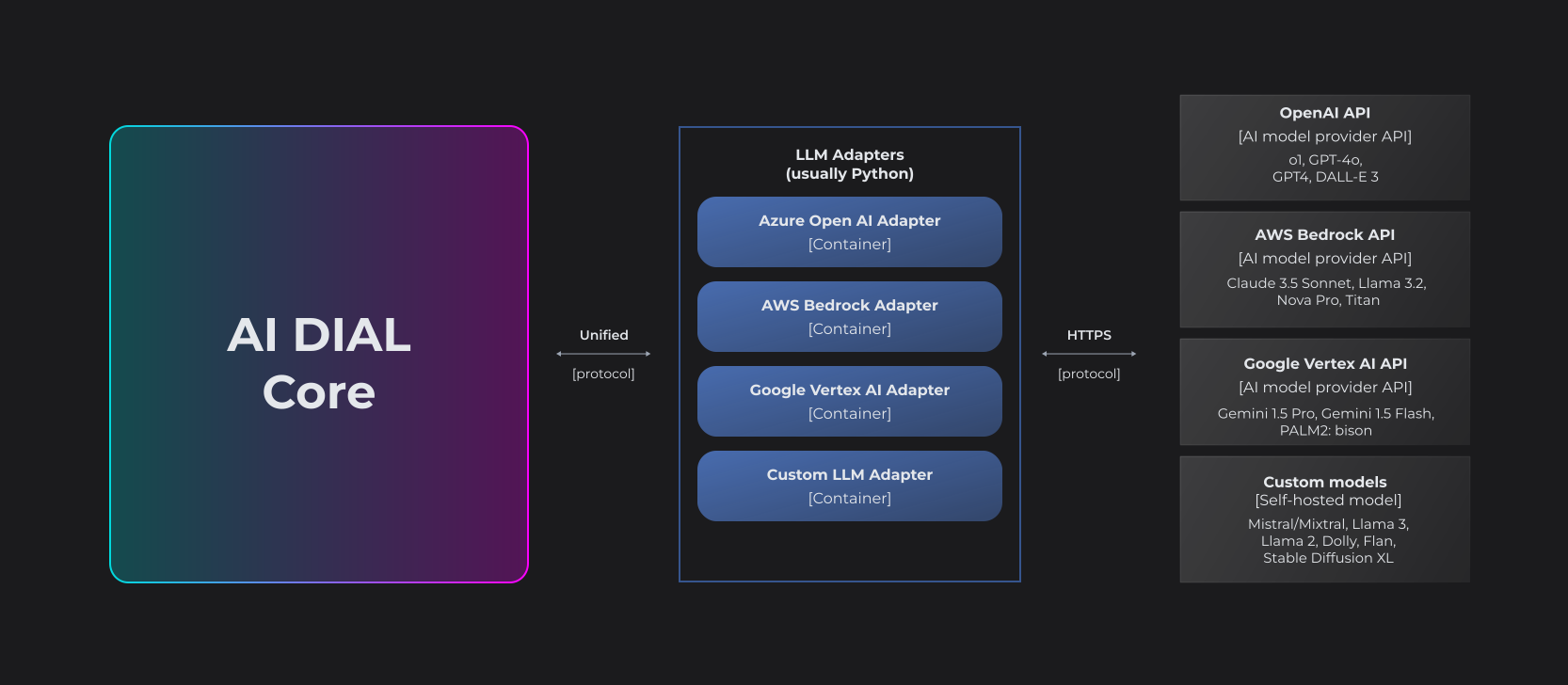
LLM Adapters unify the APIs of respective LLMs to align with the Unified Protocol of DIAL Core. Each Adapter operates within a dedicated container. Multi-modality allows supporting non-textual communications such as image-to-text, text-to-image, file transfers and more.
The project implements AI DIAL API for language models from Azure OpenAI.
The adapter is able to convert certain upstream APIs to the DIAL Chat Completions API (which is an extension of Azure OpenAI Chat Completions API).
Chat Completions deployments are exposed via the endpoint:
POST ${ADAPTER_ORIGIN}/openai/deployments/${ADAPTER_DEPLOYMENT_ID}/chat/completions
DIAL Core Config
{
  "models": {
    "${DIAL_DEPLOYMENT_ID}": {
      "type": "chat",
      "endpoint": "${ADAPTER_ORIGIN}/openai/deployments/${ADAPTER_DEPLOYMENT_ID}/chat/completions",
      "upstreams": [
        {
          "endpoint": "https://${AZURE_OPENAI_SERVICE_NAME}.openai.azure.com/openai/deployments/${AZURE_OPENAI_DEPLOYMENT_ID}/chat/completions",
          "key": "${OPTIONAL_API_KEY}"
        }
      ]
    }
  }
}
There are three free variables in the config related to deployment ids. Each of these variables corresponds to an HTTP request initiated by the DIAL client:
DIAL_DEPLOYMENT_ID- it's the deployment id visible to the DIAL Client via DIAL deployment listing. The client will be using the id to call the model by sending the requestPOST ${DIAL_CORE_ORIGIN}/openai/deployments/${DIAL_DEPLOYMENT_ID}/chat/completionsADAPTER_DEPLOYMENT_ID- the deployment id the OpenAI adapter receives when DIAL Core callsPOST ${ADAPTER_ORIGIN}/openai/deployments/${ADAPTER_DEPLOYMENT_ID}/chat/completions. Use this identifier in environment variables that define deployment categories.AZURE_OPENAI_DEPLOYMENT_ID- the Azure OpenAI deployment called by the OpenAI adapter.
sequenceDiagram
    autonumber
    actor U as DIAL Client
    participant C as DIAL Core
    participant A as OpenAI Adapter
    participant AZ as Azure OpenAI
    participant OP as OpenAI Platform

    Note over U,C: DIAL_DEPLOYMENT_ID
    U->>C: POST /openai/deployments/<br>${DIAL_DEPLOYMENT_ID}/chat/completions

    Note over C,A: ADAPTER_DEPLOYMENT_ID
    C->>A: POST ${ADAPTER_ORIGIN}/openai/deployments/<br>${ADAPTER_DEPLOYMENT_ID}/chat/completions

    alt Azure OpenAI upstream
        Note over A,AZ: AZURE_OPENAI_DEPLOYMENT_ID
        A->>AZ: POST https://${AZURE_OPENAI_SERVICE_NAME}.openai.azure.com/<br>openai/deployments/${AZURE_OPENAI_DEPLOYMENT_ID}/<br>chat/completions
        Note right of A: Auth: api-key (if provided) or Azure AD via DefaultAzureCredential
        AZ-->>A: JSON or SSE stream
    else OpenAI Platform upstream
        A->>OP: POST https://api.openai.com/v1/chat/completions<br>(with "model"=${OPENAI_MODEL_NAME}, api-key)
        OP-->>A: JSON or SSE stream
    end

    A-->>C: Normalized response (headers/stream)
    C-->>U: Response to client
Typically these three variables share the same value (the Azure OpenAI deployment name). They may differ if you expose multiple DIAL deployments that call the same Azure OpenAI endpoint but configured differently.
The DefaultAzureCredential is used to authenticate requests to Azure when an API key is not provided in the upstream configuration.
The Next generation API (aka v1 API) doesn't include the deployment id in the URL:
- Last generation API:
POST https://SERVICE_NAME.openai.azure.com/openai/deployments/gpt-4o/chat/completions - Next generation API:
POST https://SERVICE_NAME.openai.azure.com/openai/v1/chat/completions
The DIAL configuration changes accordingly:
DIAL Core Config
{
  "models": {
    "${DIAL_DEPLOYMENT_ID}": {
      "type": "chat",
      "overrideName": "${AZURE_OPENAI_DEPLOYMENT_ID}",
      "endpoint": "${ADAPTER_ORIGIN}/openai/deployments/${ADAPTER_DEPLOYMENT_ID}/chat/completions",
      "upstreams": [
        {
          "endpoint": "https://${AZURE_OPENAI_SERVICE_NAME}.openai.azure.com/openai/v1/chat/completions",
          "key": "${OPTIONAL_API_KEY}"
        }
      ]
    }
  }
}
Because the deployment ID is not included in the upstream URL, specify it in the overrideName field. If this field is missing, the model name takes the value of the model field from the original chat completion request (if present), otherwise ${ADAPTER_DEPLOYMENT_ID}.
Certain advanced features of OpenAI models, such as reasoning summary, are only accessible via Responses API and not accessible via Chat Completions API.
DIAL Core Config
{
  "models": {
    "${DIAL_DEPLOYMENT_ID}": {
      "type": "chat",
      "overrideName": "${AZURE_OPENAI_DEPLOYMENT_ID}",
      "endpoint": "${ADAPTER_ORIGIN}/openai/deployments/${ADAPTER_DEPLOYMENT_ID}/chat/completions",
      "upstreams": [
        {
          "endpoint": "https://${AZURE_OPENAI_SERVICE_NAME}.openai.azure.com/openai/v1/responses",
          "key": "${API_KEY}"
        }
      ]
    }
  }
}
As in other cases where the upstream URL omits a deployment id, specify it in the overrideName field.
The last generation API is also supported via an URLs in the following format:
"endpoint": "https://${AZURE_OPENAI_SERVICE_NAME}.openai.azure.com/openai/responses"
Certain LLM models like gpt-oss-120b or Mistral-Large-2411 can only be deployed to an Azure AI Foundry service. They are accessible via:
- Azure AI model inference endpoint or
- Azure OpenAI endpoint
DIAL Core Config (Azure AI model inference endpoint)
{
  "models": {
    "${DIAL_DEPLOYMENT_ID}": {
      "type": "chat",
      "overrideName": "${AZURE_AI_FOUNDRY_DEPLOYMENT_ID}",
      "endpoint": "${ADAPTER_ORIGIN}/openai/deployments/${ADAPTER_DEPLOYMENT_ID}/chat/completions",
      "upstreams": [
        {
          "endpoint": "https://${AZURE_AI_FOUNDRY_SERVICE_NAME}.services.ai.azure.com/models/chat/completions",
          "key": "${OPTIONAL_API_KEY}"
        }
      ]
    }
  }
}
DIAL Core Config (Azure OpenAI endpoint)
{
  "models": {
    "${DIAL_DEPLOYMENT_ID}": {
      "type": "chat",
      "overrideName": "${AZURE_AI_FOUNDRY_DEPLOYMENT_ID}",
      "endpoint": "${ADAPTER_ORIGIN}/openai/deployments/${ADAPTER_DEPLOYMENT_ID}/chat/completions",
      "upstreams": [
        {
          "endpoint": "https://${AZURE_AI_FOUNDRY_SERVICE_NAME}.openai.azure.com/openai/deployments/gpt-oss-120b/chat/completions",
          "key": "${OPTIONAL_API_KEY}"
        }
      ]
    }
  }
}
Azure OpenAI Images API
DIAL Core Config
{
  "models": {
    "${DIAL_DEPLOYMENT_ID}": {
      "type": "chat",
      "endpoint": "${ADAPTER_ORIGIN}/openai/deployments/${ADAPTER_DEPLOYMENT_ID}/chat/completions",
      "upstreams": [
        {
          "endpoint": "https://${AZURE_OPENAI_SERVICE_NAME}.openai.azure.com/openai/deployments/${AZURE_OPENAI_DEPLOYMENT_ID}/images/generations",
          "key": "${OPTIONAL_API_KEY}"
        }
      ]
    }
  }
}
The supported upstream models are dall-e-3 and gpt-image-1. These are the values that AZURE_OPENAI_DEPLOYMENT_ID variable can take.
Important
The DALL·E 3 adapter deployment must be declared in DALLE3_DEPLOYMENTS env variable, and GPT-Image 1 deployment - in GPT_IMAGE_1_DEPLOYMENTS.
DIAL Core Config
{
  "models": {
    "${DIAL_DEPLOYMENT_ID}": {
      "type": "chat",
      "overrideName": "${AZURE_OPENAI_DEPLOYMENT_ID}",
      "endpoint": "${ADAPTER_ORIGIN}/openai/deployments/${ADAPTER_DEPLOYMENT_ID}/chat/completions",
      "upstreams": [
        {
          "endpoint": "https://${AZURE_OPENAI_SERVICE_NAME}.openai.azure.com/openai/v1/video/generations",
          "key": "${OPTIONAL_API_KEY}"
        }
      ]
    }
  }
}
The supported upstream models are sora. This is the value that AZURE_OPENAI_DEPLOYMENT_ID variable can take.
The video generation models support configuration via the custom_fields.configuration field in the chat completion request:
{
  "model": "sora",
  "messages": [
    {
      "role": "user",
      "content": "A cat playing with a ball of yarn"
    }
  ],
  "custom_fields": {
    "configuration": {
      "width": 480,
      "height": 480,
      "n_seconds": 5,
      "n_variants": 1
    }
  }
}
Width and height are defaulted to 480x480 if not specified.
Find the details in the Azure API specification.
Note
n_variants>1 results in multiple video attachments to a single chat completion choice.
Important
Prompt tokens in the usage are set to zero. Completion tokens are set to the overall number of seconds in the generated video(s).
The adapter supports models connected via Azure Audio API.
Set AZURE_DEPLOYMENT_ID variable to one of the text-to-speech models supported by Azure Audio API:
DIAL Core Config
{
  "models": {
    "${DIAL_DEPLOYMENT_ID}": {
      "type": "chat",
      "endpoint": "${ADAPTER_ORIGIN}/openai/deployments/${AZURE_AUDIO_API_DEPLOYMENT_ID}/chat/completions",
      "upstreams": [
        {
          "endpoint": "https://${AZURE_SERVICE_NAME}.(openai|cognitiveservices).azure.com/openai/deployments/${AZURE_DEPLOYMENT_ID/audio/speech",
          "key": "${OPTIONAL_API_KEY}"
        }
      ]
    }
  }
}
At the moment of writing, these are: tts, tts-hd, and gpt-4o-mini-tts.
The adapter takes the last user message as a text prompt and sends it to the upstream as input parameter. The input text is limited to 4096 characters. The text is being translated into speech audio by the upstream model. The audio file is returned as an attachment in the chat completion response.
System instructions are used to set the tone of the synthesized speech.
The adapter supports the following configuration for the TTS models:
{
  "instruction": "Speak in a cheerful tone.", # optional, sets the tone; appended the system message from the chat completion request
  "voice": "allow", # one of the preset voices
  "speed": 1.0, # speech speed multiplier
  "response_format": "mp3" # one of the supported audio formats
}
Find the configuration details in the Azure specification or in the OpenAI Platform specification.
The usage is computed in the following way:
gpt-4o-mini-tts- prompt tokens are computed usinggpt-4otiktoken algorithm. Completion tokens are set to zero.ttsandtts-hd- there is no official documentation on the pricing for these models. Tokenizer forgpt-4omodel will be used as a default for prompt tokens calculation. Completion tokens are set to zero.
Set AZURE_DEPLOYMENT_ID variable to one of the speech-to-text models supported by Azure Audio API:
DIAL Core Config
{
  "models": {
    "${DIAL_DEPLOYMENT_ID}": {
      "type": "chat",
      "endpoint": "${ADAPTER_ORIGIN}/openai/deployments/${AZURE_AUDIO_API_DEPLOYMENT_ID}/chat/completions",
      "upstreams": [
        {
          "endpoint": "https://${AZURE_SERVICE_NAME}.(openai|cognitiveservices).azure.com/openai/deployments/${AZURE_DEPLOYMENT_ID/audio/transcriptions",
          "key": "${OPTIONAL_API_KEY}"
        }
      ]
    }
  }
}
At the moment of writing, these are: whisper, gpt-4o-transcribe, gpt-4o-mini-transcribe, and gpt-4o-transcribe-diarize.
The adapter takes an audio attachment from the last user message and pass it to the transcription model. The transcription is return as a text in the chat completion response.
System instructions are used to set the prompt parameter in the Transcription API request.
The usage is computed in the following way:
gpt-4o-*models return audio tokens in theusage.prompt_tokensfield and text tokens - inusage.completion_tokens.whispermodels return duration of the given audio file in seconds inusage.prompt_tokensand zero inusage.completion_tokens.
OpenAI Platform Chat Completions API
DIAL Core Config
{
  "models": {
    "${DIAL_DEPLOYMENT_ID}": {
      "type": "chat",
      "overrideName": "${OPENAI_MODEL_NAME}",
      "endpoint": "${ADAPTER_ORIGIN}/openai/deployments/${ADAPTER_DEPLOYMENT_ID}/chat/completions",
      "upstreams": [
        {
          "endpoint": "https://api.openai.com/v1/chat/completions",
          "key": "${API_KEY}"
        }
      ]
    }
  }
}
Note the difference from the Azure OpenAI configuration:
- The API key is required.
- Added
overrideNameto specify the upstream OpenAI model name. The upstream URL does not include the model name (unlike Azure), so we pass it viaoverrideName. If this field is missing, the model name takes the value of themodelfield from the original chat completion request (if present), otherwise${ADAPTER_DEPLOYMENT_ID}.
The adapter also supports legacy Completions API both for Azure-style upstream endpoints and OpenAI Platform-style endpoints:
DIAL Core Config
{
  "models": {
    "${DIAL_DEPLOYMENT_ID}": {
      "type": "chat",
      "overrideName": "${OPENAI_MODEL_NAME}",
      "endpoint": "${ADAPTER_ORIGIN}/openai/deployments/${ADAPTER_DEPLOYMENT_ID}/chat/completions",
      "upstreams": [
        {
          "endpoint": "https://api.openai.com/v1/completions",
          "key": "${API_KEY}"
        }
      ]
    }
  }
}The Mistral Platform provides Chat Completions API, therefore, it could be connected to via the adapter:
DIAL Core Config
{
  "models": {
    "${DIAL_DEPLOYMENT_ID}": {
      "type": "chat",
      "overrideName": "${MISTRAL_MODEL_NAME}",
      "endpoint": "${ADAPTER_ORIGIN}/openai/deployments/${MISTRAL_MODEL_NAME}/chat/completions",
      "upstreams": [
        {
          "endpoint": "https://api.mistral.ai/v1/chat/completions",
          "key": "${MISTRAL_API_KEY}"
        }
      ]
    }
  }
}
Where MISTRAL_MODEL_NAME is one of the available models on the Platform.
The adapter guarantees that all chat completion responses include token-usage information (the number of prompt and completion tokens consumed).
However, by default neither Azure OpenAI nor OpenAI Platform returns token usage for streaming requests (those with stream=true).
Therefore, the adapter tokenizes both the request and the response when the upstream doesn’t provide usage. Adapter-side tokenization is also required when the request includes max_prompt_tokens - the maximum number of tokens to which the incoming request is truncated before being sent upstream.
The tokenization algorithm is CPU-heavy and may throttle requests under high load. Therefore, it’s important to minimize cases where tokenization is required.
Azure OpenAI and OpenAI Platform return token usage for streaming requests when the include_usage option is enabled in the chat completion request. We recommend setting this option in the DIAL Core configuration via the defaults field to reduce the adapter’s CPU usage:
{
  "models": {
    "${DIAL_DEPLOYMENT_ID}": {
      "type": "chat",
      "endpoint": "...",
      "upstreams": ["..."],
      "defaults": {
        "stream_options": {
          "include_usage": true
        }
      }
    }
  }
}How does the adapter know which deployment requires which tokenization algorithm?
The adapter does not perform tokenization for:
- deployments registered in
DATABRICKS_DEPLOYMENTSandMISTRAL_DEPLOYMENTSenv vars. It's expected upstream for these deployments are going to return the token usage. - deployments supported by the following APIs:
- legacy Completions API
- Images API
- Responses API
For other deployments, tokenization is determined as follows.
Important
Adapter-side tokenization of documents, audio, and video files isn’t currently supported. Such multimodal content is counted as zero tokens.
The adapter is using the tiktoken library as a tokenizer for OpenAI models.
TIKTOKEN_MODEL_MAPPING env variable defines a mapping from adapter deployment ids to the model identifies which are know to tiktoken.
If deployment id is missing from TIKTOKEN_MODEL_MAPPING, then the deployment id itself will be used to find a tokenizer in tiktoken. You can check if the deployment id is compatible with tiktoken by running the command python -c "from tiktoken.model import encoding_name_for_model as e; print(e('my-deployment-name'))".
Finally, if the deployment id is neither declared in TIKTOKEN_MODEL_MAPPING, nor is it compatible with tiktoken, then the tokenizer for gpt-4o model will be used as a default. It's a reasonable default since the corresponding o200k_base tokenizer is used for the majority of the latest OpenAI models.
If a deployment is registered in GPT4O_DEPLOYMENTS or GPT4O_MINI_DEPLOYMENTS, the corresponding image-tokenization algorithm described in the Azure documentation is used.
Otherwise, images aren’t tokenized — the image tokens are assumed to be 0.
The adapter is able to convert certain upstream APIs to the DIAL Embeddings API (which is an extension of Azure OpenAI Embeddings API).
Embeddings deployments are exposed via the endpoint:
POST ${ADAPTER_ORIGIN}/openai/deployments/${ADAPTER_DEPLOYMENT_ID}/embeddings
DIAL Core Config
{
  "models": {
    "${DIAL_DEPLOYMENT_ID}": {
      "type": "embedding",
      "endpoint": "${ADAPTER_ORIGIN}/openai/deployments/${ADAPTER_DEPLOYMENT_ID}/embeddings",
      "upstreams": [
        {
          "endpoint": "https://${AZURE_OPENAI_SERVICE_NAME}.openai.azure.com/openai/deployments/${AZURE_OPENAI_DEPLOYMENT_ID}/embeddings",
          "key": "${OPTIONAL_API_KEY}"
        }
      ]
    }
  }
}DIAL Core Config
{
  "models": {
    "${DIAL_DEPLOYMENT_ID}": {
      "type": "embedding",
      "overrideName": "${AZURE_OPENAI_DEPLOYMENT_ID}",
      "endpoint": "${ADAPTER_ORIGIN}/openai/deployments/${ADAPTER_DEPLOYMENT_ID}/embeddings",
      "upstreams": [
        {
          "endpoint": "https://${AZURE_OPENAI_SERVICE_NAME}.openai.azure.com/openai/v1/embeddings",
          "key": "${OPTIONAL_API_KEY}"
        }
      ]
    }
  }
}The adapter supports Azure Multimodal embeddings.
DIAL Core Config
{
  "models": {
    "${DIAL_DEPLOYMENT_ID}": {
      "type": "embedding",
      "endpoint": "${ADAPTER_ORIGIN}/openai/deployments/${ADAPTER_DEPLOYMENT_ID}/embeddings",
      "upstreams": [
        {
          "endpoint": "https://${COMPUTER_VISION_SERVICE_NAME}.cognitiveservices.azure.com",
          "key": "${OPTIONAL_API_KEY}"
        }
      ]
    }
  }
}
Important
${ADAPTER_DEPLOYMENT_ID} must be added to the env variable AZURE_AI_VISION_DEPLOYMENTS to enable the embeddings deployment.
The multimodal embeddings model supports text and images as inputs.
Since the original OpenAI embeddings API only support text inputs, the image inputs should be passed in the custom_input request field as URL or in base64-encoded format:
curl -X POST "${DIAL_CORE_ORIGIN}/deployments/${DIAL_DEPLOYMENT_ID}/embeddings" -v \
  -H "api-key:${DIAL_API_KEY}" \
  -H "content-type:application/json" \
  -d '{"input": ["cat", "fish"], "custom_input": [{"type": "image/png", "url": "https://learn.microsoft.com/azure/ai-services/computer-vision/media/quickstarts/presentation.png"}]}'
The response will contain three embedding vectors, each corresponding to one of the inputs in the original request.
OpenAI Platform Embeddings API
DIAL Core Config
{
  "models": {
    "${DIAL_DEPLOYMENT_ID}": {
      "type": "embedding",
      "overrideName": "${OPENAI_MODEL_NAME}",
      "endpoint": "${ADAPTER_ORIGIN}/openai/deployments/${ADAPTER_DEPLOYMENT_ID}/embeddings",
      "upstreams": [
        {
          "endpoint": "https://api.openai.com/v1/embeddings",
          "key": "${API_KEY}"
        }
      ]
    }
  }
}Copy .env.example to .env and customize it for your environment.
The following variables cluster all deployments into the groups of deployments which share the same API and the same tokenization algorithm.
| Variable | Default | Description |
|---|---|---|
| DALLE3_DEPLOYMENTS | `` | Comma-separated list of deployments that support DALL-E 3 API. Example: dall-e-3,dalle3,dall-e |
| DALLE3_AZURE_API_VERSION | 2024-02-01 | The API version for requests to the Azure DALL·E 3 API |
| GPT_IMAGE_1_DEPLOYMENTS | `` | Comma-separated list of deployments that support GPT-Image 1 API. Example: gpt-image-1 |
| GPT_IMAGE_1_AZURE_API_VERSION | 2024-02-01 | The API version for requests to the Azure GPT-Image 1 API |
| MISTRAL_DEPLOYMENTS | `` | Comma-separated list of deployments that support Mistral Large Azure API. Example: mistral-large-azure,mistral-large |
| DATABRICKS_DEPLOYMENTS | `` | Comma-separated list of Databricks chat completion deployments. Example: databricks-dbrx-instruct,databricks-mixtral-8x7b-instruct,databricks-llama-2-70b-chat |
| GPT4O_DEPLOYMENTS | `` | Comma-separated list of GPT-4o chat completion deployments. Example: gpt-4o-2024-05-13 |
| GPT4O_MINI_DEPLOYMENTS | `` | Comma-separated list of GPT-4o mini chat completion deployments. Example: gpt-4o-mini-2024-07-18 |
| AZURE_AI_VISION_DEPLOYMENTS | `` | Comma-separated list of Azure AI Vision embedding deployments. The endpoint of the deployment is expected to point to the Azure service: https://<service-name>.cognitiveservices.azure.com/ |
| AUDIO_AZURE_API_VERSION | 2025-03-01-preview | The API version for requests to the Azure Audio API endpoints. |
Deployments that do not fall into any of the categories are considered to support text-to-text chat completion OpenAI API or text embeddings OpenAI API.
|LOG_LEVEL|INFO|Log level. Use DEBUG for dev purposes and INFO in prod|
|TIKTOKEN_MODEL_MAPPING|{}|A JSON dictionary from the request deployment id to a tiktoken model name. It's used for tokenization of chat completion requests on the adapter side. Example: {"my-gpt-deployment":"gpt-3.5-turbo","my-gpt-o3-deployment":"o3"}. The tokenizer for gpt-4o is used as a default.|
|DIAL_USE_FILE_STORAGE|False|Save image model artifacts to DIAL File storage (DALL-E images are uploaded to the DIAL file storage and its base64 encodings are replaced with links to the storage)|
|DIAL_URL||URL of the core DIAL server (required when DIAL_USE_FILE_STORAGE=True)|
|NON_STREAMING_DEPLOYMENTS|``|Comma-separated list of deployments that do not support streaming. The adapter will emulate streaming by calling the model and converting its response into a single-chunk stream. Example: "o1-mini,o1-preview"|
|ACCESS_TOKEN_EXPIRATION_WINDOW|10|The Azure access token is renewed this many seconds before its actual expiration time. The buffer ensures that the token does not expire in the middle of an operation due to processing time and potential network delays.|
|AZURE_OPEN_AI_SCOPE||Provided scope of access token to Azure OpenAI services. Default: `https://cognitiveservices.azure.com/.default`|
|API_VERSIONS_MAPPING|`{}`|Mapping of API versions for requests to the Azure OpenAI Chat Completions API. Example: `{"2023-03-15-preview": "2023-05-15", "": "2024-02-15-preview"}`. An empty key sets the default API version when the user does not pass one in the request. Find the details in the section about API versioning.|
|ELIMINATE_EMPTY_CHOICES|False|When enabled, the response stream is guaranteed to exclude chunks with an empty list of choices. This is useful when a DIAL client doesn't support such chunks. An empty list of choices can be generated by Azure OpenAI in at least two cases: (1) when the Content filter is not disabled, Azure includes prompt filter results in the first chunk with an empty list of choices; (2) when `stream_options.include_usage` is enabled, the last chunk contains usage data and an empty list of choices.|
|WEB_CONCURRENCY|1|Number of worker processes to spawn in the Uvicorn server. Find the details in the section about performance.|
|THREAD_POOL_SIZE||The size of a thread pool for CPU-heavy tasks such as tokenization and image analysis. The default is `min(32, #logicalCPUs + 4)`. Find the details in the section about performance.|
Certain models support configuration via the $ADAPTER_ORIGIN/openai/deployments/$DEPLOYMENT_NAME/configuration endpoint.
GET request to this endpoint returns the schema of the model configuration in JSON Schema format.
Such models expect the custom_fields.configuration field of the chat/completions request to contain a JSON value conforming to that schema.
The custom_fields.configuration field is optional if and only if every field in the schema is also optional.
The configuration can be preset in the DIAL Core config via the defaults parameter:
DIAL Core Config
{
  "models": {
    "my-deployment-id": {
      "type": "chat",
      "endpoint": "$ADAPTER_ORIGIN/openai/deployments/my-deployment-id/chat/completions",
      "upstreams": [
        {
          "endpoint": "$AZURE_OPENAI_SERVICE_ORIGIN/openai/deployments/openai-deployment-id/chat/completions"
        }
      ],
      "defaults": {
        "custom_fields": {
            "configuration": $MODEL_CONFIGURATION_OBJECT
        }
      }
    }
  }
}
This is convenient when major model features can be enabled via configuration (e.g., web search or reasoning) and you want a deployment where these features are permanently enabled.
DIAL Core will enrich requests with the configuration specified in defaults, so the client doesn’t need to provide it with each chat completion request.
OpenAI image generation models accept configurations with parameters specific for image generation such as image size, style, and quality.
The latest supported parameters can be found in the official OpenAI documentation for models capable of image generation or in the Azure OpenAI API documentation.
Alternatively, the configuration schema can be retrieved programmatically from the /configuration endpoint. However, this schema may lag behind the official one (see Forward compatibility).
An example of DALL-E 3 request with configured style and image size:
Request
{
  "model": "dall-e-3",
  "messages": [
    {
      "role": "user",
      "content": "forest meadow"
    }
  ],
  "custom_fields": {
    "configuration": {
      "size": "1024x1024",
      "style": "vivid"
    }
  }
}
Similarly, the configuration could be preset on the per-deployment basis in the DIAL Core config:
DIAL Core Config
{
  "models": {
    "dial-dall-e-3": {
      "type": "chat",
      "description": "...",
      "endpoint": "...",
      "defaults": {
        "custom_fields": {
          "configuration": {
            "size": "1024x1024",
            "style": "vivid"
          }
        }
      }
    }
  }
}
So that the end user doesn't have to attach configuration to each chat completion request. It will be applied automatically (if missing) by the DIAL Core for all incoming requests to this deployment.
The configuration schema in the adapter isn't fixed and allows for extra fields and arbitrary parameter values. This enables forward compatibility with the future versions of the image generation API.
Let's say the next version of GPT Image model introduces support of a negative prompt (which isn't currently supported). It still will be possible to use a version of OpenAI adapter that is ignorant of the latest developments in the GPT Image API thanks to the permissive configuration schema.
Request
{
  "model": "gpt-image-1",
  "messages": [
    {
      "role": "user",
      "content": "forest meadow"
    }
  ],
  "custom_fields": {
    "configuration": {
      "negative_prompt": "trees"
    }
  }
}The Responses API provides more features than Chat Completions API. Some of these features could be enabled via a configuration fields in the chat completions request.
The JSON schema of the configuration is open which enables forward compatibility with the future developments in the Responses API.
Note
Such a configuration is only possible for the models that are configured in the DIAL Core config to use Responses API upstream endpoints.
The reasoning and the reasoning summary could be enabled via the configuration like this one:
Request
{
  "model": "gpt-5-2025-08-07",
  "messages": [
    {
      "role": "user",
      "content": "Write a bash script that takes a matrix represented as a string with format \"[1,2],[3,4],[5,6]\" and prints the transpose in the same format."
    }
  ],
  "custom_fields": {
    "configuration": {
      "reasoning": {
        "effort": "medium",
        "summary": "auto"
      }
    }
  }
}
Here custom_fields.configuration.reasoning is an object which is being passed to the Response API as the reasoning parameter.
Important
Not all models support reasoning. Consult with the documentation before enabling reasoning.
The adapter supports multiple upstream definitions in the DIAL Core config:
{
  "models": {
    "gpt-4o-2024-11-20": {
      "type": "chat",
      "endpoint": "http://$OPENAI_ADAPTER_ORIGIN/openai/deployments/gpt-4o-2024-11-20/chat/completions",
      "displayName": "GPT-4o",
      "upstreams": [
        {
          "endpoint": "https://$AZURE_OPENAI_SERVICE_NAME1.openai.azure.com/openai/deployments/gpt-4o-2024-11-20/chat/completions"
        },
        {
          "endpoint": "https://$AZURE_OPENAI_SERVICE_NAME2.openai.azure.com/openai/deployments/gpt-4o-2024-11-20/chat/completions"
        },
        {
          "endpoint": "https://$AZURE_OPENAI_SERVICE_NAME3.openai.azure.com/openai/deployments/gpt-4o-2024-11-20/chat/completions"
        }
      ]
    }
  }
}
Prompt caching can be enabled via the autoCachingSupported flag in the DIAL Core config.
{
  "models": {
    "gpt-4o-2024-11-20": {
      "type": "chat",
      "endpoint": "http://$OPENAI_ADAPTER_ORIGIN/openai/deployments/gpt-4o-2024-11-20/chat/completions",
      "displayName": "GPT-4o",
      "upstreams": [
        {
          "endpoint": "https://$AZURE_OPENAI_SERVICE_NAME1.openai.azure.com/openai/deployments/gpt-4o-2024-11-20/chat/completions"
        },
        {
          "endpoint": "https://$AZURE_OPENAI_SERVICE_NAME2.openai.azure.com/openai/deployments/gpt-4o-2024-11-20/chat/completions"
        },
        {
          "endpoint": "https://$AZURE_OPENAI_SERVICE_NAME3.openai.azure.com/openai/deployments/gpt-4o-2024-11-20/chat/completions"
        }
      ],
      "features": {
        "autoCachingSupported": true
      }
    }
  }
}
Important
Verify that the deployment actually supports prompt caching before enabling it.
The adapter provides an Azure-flavour of the OpenAI Chat Completions API.
Azure’s API is a variant of the OpenAI Platform API. The key differences are the deployment ID in the path and the required api-version query parameter:
OpenAI Platform: POST https://api.openai.com/v1/chat/completions
Azure OpenAI:    POST https://YOUR_RESOURCE_NAME.openai.azure.com/openai/deployments/YOUR_DEPLOYMENT_NAME/chat/completions?api-version=2024-06-01
The api-version parameter tracks API changes, and the OpenAI SDK requires it.
Consider an application calling Azure OpenAI via DIAL. You typically pin an Azure OpenAI API version (usually the latest). Over time, new API versions ship with new features, and SDKs add support for them. This means the application developer must bump both the SDK version and the Azure OpenAI API version - adding maintenance overhead.
Moreover, some Azure OpenAI API versions are retired, breaking applications that still depend on them.
In practice, most changes between API versions have been backward-compatible, so clients generally want to use the latest version.
Given that the API largely evolves in a backward-compatible way, we introduced API_VERSIONS_MAPPING to reduce version-management burden:
-
Map deprecated to current versions so DIAL apps don’t break:
DIAL Client: client = AsyncAzureOpenAI(api_version="2023-01-01-preview", ...) response = await client.chat.completions.create(...) OpenAI Adapter: API_VERSIONS_MAPPING={"2023-01-01-preview":"2025-06-01"} -
Define a default version by mapping the empty string to the latest version. This delegates tracking of the latest API version to DIAL:
DIAL Client:
  client = AsyncAzureOpenAI(api_version="", ...)
  response = await client.chat.completions.create(...)

OpenAI Adapter:
  API_VERSIONS_MAPPING={"":"2025-06-01"}
Keeping the mapping current is the DIAL operations team’s responsibility, not the application developer’s.
Note
API version is irrelevant for the upstreams that use Response API or v1 Chat Completions API, since these APIs aren't versioned.
There are two environment variables that control server performance:
-
WEB_CONCURRENCY(default = 1) — the number of worker processes spawned by uvicorn. Workers run independently; the parent uvicorn process handles load balancing across them. The OS schedules workers on different CPU cores, enabling true parallelism. This matters when the server performs CPU-intensive work, primarily request/response tokenization. For full CPU utilization, set this to the number of logical CPUs. However, the default of 1 is fine if you don’t expect much CPU load (see minimizing tokenization). -
THREAD_POOL_SIZE(default = logical CPUs + 4) — the size of the thread pool used for CPU-heavy tasks (currently, only request/response tokenization). This effectively caps how many CPU-bound tasks can run simultaneously: no more thanTHREAD_POOL_SIZEat a time. Note that this does not block requests without CPU-heavy work (e.g., health checks or embeddings requests).
This project uses Python>=3.11 and Poetry>=2.1.1 as a dependency manager.
Check out Poetry's documentation on how to install it on your system before proceeding.
To install requirements:
poetry installThis will install all requirements for running the package, linting, formatting and tests.
The recommended IDE is VS Code. Open the project in VS Code and install the recommended extensions. VS Code is configured to use PEP-8 compatible formatter Black.
Alternatively you can use PyCharm. Set up the Black in PyCharm manually or install PyCharm>=2023.2 with built-in Black support.
As of now, Windows distributions do not include the make tool. To run make commands, the tool can be installed using the following command (since Windows 10):
winget install GnuWin32.MakeFor convenience, the tool folder can be added to the PATH environment variable as C:\Program Files (x86)\GnuWin32\bin.
The command definitions inside Makefile should be cross-platform to keep the development environment setup simple.
Run the development server locally:
make serveRun the server from a Docker container:
make docker_serveRun the linting before committing:
make lintTo auto-fix formatting issues run:
make formatRun unit tests locally:
make testTo remove the virtual environment and build artifacts:
make clean