‼there is a new project called notion-proxy-ng whcih overcomes this one ‼
Turn your Notion pages into a Website with your URLs and customizations
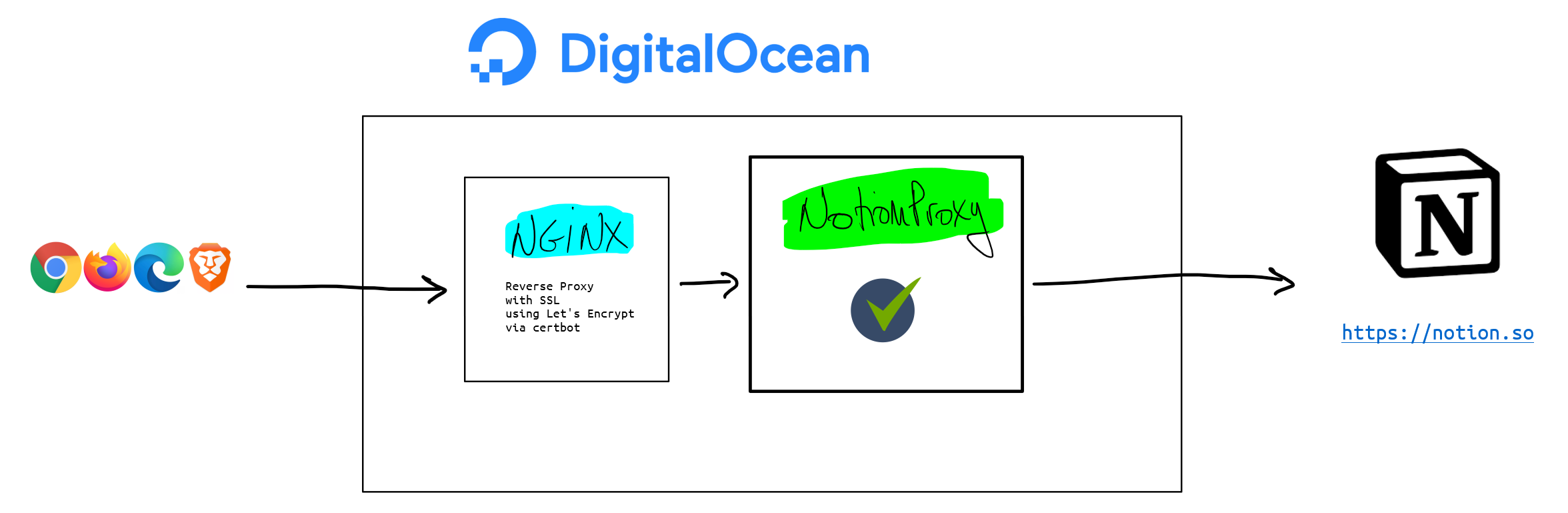
git clone https://github.com/equiposinoficina/notion-proxy.git
cd notion-proxy
npm install
node app.jsCopy file 'config.json.sample' in 'config/' directory to 'default.json'.
cd config
cp config.json.sample default.json
Customize the configuration:
{
  "host": "127.0.0.1",
  "port": 3333,
  "my_domain": "YOUR-PUBLIC-DOMAIN",
  "SLUG_TO_PAGE": {
    "": "NOTION_PAGE_ID"
  },
  "PAGE_TITLE": "",
  "PAGE_DESCRIPTION": "",
  "GOOGLE_FONT": "",
  "CUSTOM_SCRIPT_FILE": "./config/custom.script",
  "ROBOTS_FILE": "./config/robots.txt",
  "CACHE_TTL": 86400
}
At least change the variable values:
- YOUR-PUBLIC-DOMAIN -> hostname of the URL that you want to use
- NOTION_PAGE_ID -> Notion page ID
If you don't know how to get the notion page ID, may be this screenshot will help you:

Assume you have docker-compose installed
docker-compose up -dIf you have any errors, just debug with:
docker-compose upserver {
listen 80;
server_name YOUR_DOMAIN.TLD;
location /.well-known/acme-challenge/ {
root /var/www/certbot;
}
location / {
return 301 https://$host$request_uri;
}
}
server {
  listen 80;
  listen [::]:80;

  server_name YOUR-DOMAIN;
  return 404; # managed by Certbot

  if ($host = YOUR-DOMAIN) {
    return 301 https://$host$request_uri;
  } # managed by Certbot
}

server {
  listen [::]:443 ssl ipv6only=on; # managed by Certbot
  listen 443 ssl; # managed by Certbot

  server_name YOUR-DOMAIN;
  root /opt/notion-proxy;
  index index.html index.htm index.nginx-debian.html;

  ssl_certificate /etc/letsencrypt/live/YOUR-DOMAIN/fullchain.pem; # managed by Certbot
  ssl_certificate_key /etc/letsencrypt/live/YOUR-DOMAIN/privkey.pem; # managed by Certbot
  include /etc/letsencrypt/options-ssl-nginx.conf; # managed by Certbot
  ssl_dhparam /etc/letsencrypt/ssl-dhparams.pem; # managed by Certbot

  proxy_headers_hash_max_size 512;
  proxy_headers_hash_bucket_size 128;

  location / {
    proxy_set_header Host $server_name;
    proxy_set_header X-Real-IP $remote_addr;
    proxy_set_header X-Forwarded-Proto http;
    proxy_set_header X-Forwarded-For $proxy_add_x_forwarded_for;
    proxy_set_header REMOTE_ADDR $remote_addr;
    proxy_set_header X-Forwarded-Proto $scheme;

    proxy_pass http://127.0.0.1:3333/;

    # kill cache
    add_header Last-Modified $date_gmt;
    add_header Cache-Control 'no-store, no-cache, must-revalidate, proxy-revalidate, max-age=0';
    if_modified_since off;
    expires off;
    etag off;

  }
}
Slugs and perma_links are automaticaly created by a different script (get_slugs.js) which is going to be executed on demand or scheduled by cron. Script execution will create a cache file in JSON format with Notion table content which has the list of pages to publish.
Table of pages only requires two fields, one of them is the page title which is mandatory in Notion. This title is going to be sluglified for creating the slug URL. Another required property is the unique page number, the property name has to be "#" (dash symbol, without the quotes).
Remember that in Notion tables are also called datbases. Because of that in this documentation we use both words as synonims.
"get_slugs.js" is in 'scripts/' and has to be configured at 'scripts/config/default.json'. File syntaxis is:
{
  "NOTION_API": "",
  "DATABASE_IDS": {
    "DATABASE_NAME":"DATABASE_ID",
  },
  "SLUGS_JSON": "../cache/slugs.json"
}
After configuring which databases has to be processed, it's time to schedule the process for downloading database content and save the slugs cache.
We are going to use crontab for scheduling 'get_slug.js' execution.
# change PATH_TO_THE_CODE for your path where "get_slugs.js" is located
0 0 * * *  /usr/bin/bash -c "cd /PATH_TO_THE_CODE/scripts && node get_slugs.js"
GNU General Public License v3.0
Dani Aguayo - http://danielaguayo.com
Oriol Rius - https://oriolrius.me