






An executive-facing cockpit for procurement & supply-chain analytics, built for a mid-to-large cloud/hosting company (profile: DACH, Microsoft-365 ecosystem, indirect + IT/cloud-heavy spend). Audience: a non-technical CEO ("Cleo") deciding whether AI/analytics investment is worth it.
It ships in two forms: a live, interactive web cockpit (hosted, auto-refreshing, wired to a deployed API) and the Power BI report the lab requires — both reading the same backend so the numbers always agree.
Contents: Live dashboard · Presentation · 3D Control Tower · Orders & delivery · Autonomy · Walkthrough · What this project is · Consulting case (Project 5) · What's inside · Quick start · Project structure · Status
Environment-aware. The cockpit is a thin server-side proxy: it logs into one SCM Master instance (set via
API_BASE) and serves its analytics. The same code deploys per environment — a demo cockpit wired to the demo API, and a production cockpit (own Railway project) wired to the forge-locked prod API — so each board reflects only its own environment's data. Uses a read-only viewer account; it never writes.
A fully interactive cockpit that opens on a 3D Control Tower home screen (a real-time logistics view of the live supply chain) and drills into 8 analytics tabs — Overview · SC Scorecard · Spend · Inventory · Orders · Forecast · Should-Cost · TCO — plus a hidden Autonomy panel (the agent's decision loop + audit trail). Cross-filtering, click-to-drill KPIs, reorder alerts, an inbound-order pipeline with delivery-performance tracking, a forecast "why was it wrong / how to predict better" diagnostic, a clean-sheet should-cost margin lever, and a total-cost-of-ownership view. It logs into the SCM Master API server-side and auto-refreshes, so the board is always current.
A 12-slide interactive deck telling the consulting story — is AI worth it? → the problem,
the market proof, hype-vs-evidence, the opportunity & the trap, the solution, the rubric→file
map, and a live-demo hand-off. Hosted on GitHub Pages (renders in any browser); source at
Presentation/scm-cockpit-deck.html. Use ← / → to navigate.
The cockpit opens on a real-time-strategy-style 3D logistics control tower — a Babylon.js WebGL scene that renders the supply chain as a living warehouse floor: inbound trucks at receiving, forklift agents ferrying crates, a stacked warehouse, datacenter racks lighting up as assets deploy, and an end-of-life lane to disposal.
It is state-accurate, not a toy animation. Every count, capacity %, crate stack, lit rack and event-log line is read from the same live
/api/v1model the rest of the cockpit uses, and re-syncs on each refresh. Only the forklift/truck motion between those states is illustrative — timed off the realdaily_in/daily_outflow rates. No number is fabricated.
| In the scene | Driven by (live data) |
|---|---|
| Warehouse fill + number of crates | committed / capacity — the box count is in proportion to the warehouse's max capacity |
| Inbound trucks (arriving POs) | inventory[].on_order + next_eta — real open purchase orders, by SKU |
| Datacenter racks lit | Σ tco_by_class[].assets — the deployed fleet |
| Over-order guard refusing an inbound | the real fail-closed guard (committed ≥ capacity → refuse), the same HTTP-422 invariant the API enforces |
| In/out flow, weeks of cover, depletion | capacity_flow.daily_in / daily_out / days_to_depletion |
| AI requisition gate (auto-PO vs escalate) | the same 0.85 confidence floor the SCM Master agent enforces — LLM advises, code decides |
| Event stream (right panel) | the live deterministic rule-insights findings (concentration/HHI, low-cover SKUs, should-cost gap, TCO inversion…) |
Render (Tier-2): Babylon.js 6.49 with physically-based materials, image-based lighting, soft
PCF shadows, ACES tone-mapping, a glow layer, restrained bloom and SSAO — with an in-scene FX
toggle and speed/pause/orbit controls. The heavy WebGL only mounts while the Control Tower tab is
active, so the data tabs are never taxed. Source: deploy/tower.js.
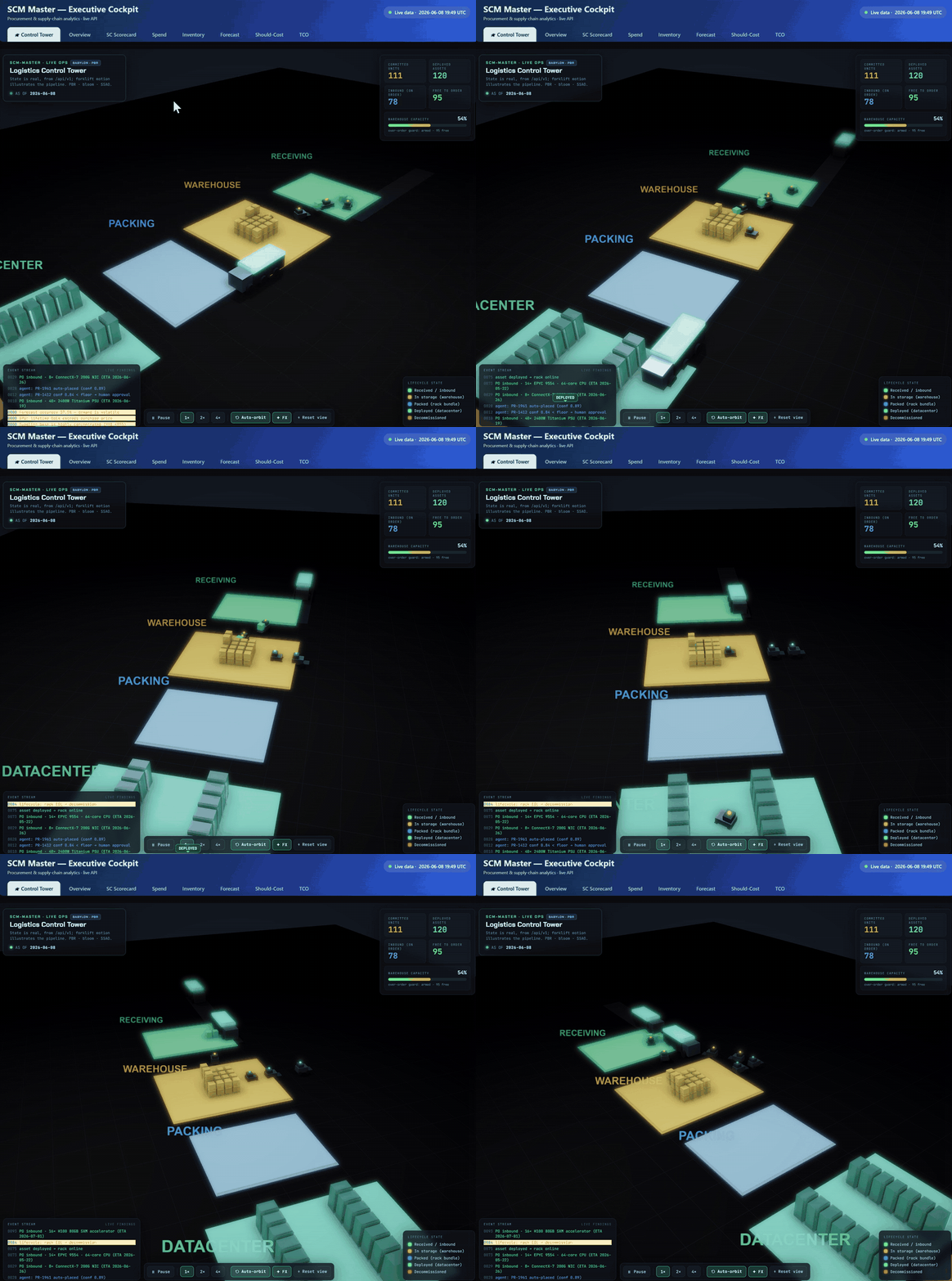
The 3D Control Tower running live — trucks arriving with real POs, forklifts moving the committed stock, racks lit to the deployed fleet. For the full-quality clip, ▶︎ open
clip/tower.mp4.
The Orders tab is the inbound instrument: current-year purchase orders, delivered vs incoming, sorted soonest-arrival-first. Each PO shows units, value, ETA and "covers gap" — how much still-outstanding demand it fills (tied to the same inventory-position model the agent nets against). Click any order to expand its line-item contents (product · qty · unit · line · covers · ETA) — so you can always see what's in an order, on the cockpit and in the SCM-Master Orders timeline.
Delivery performance, lightweight. It matches each shipment's promised ETA vs actual (
eta_originalvseta_currentfrom the live tracking view) and surfaces the slip per order plus a rollup: delivery accuracy % (on time or early), avg slip, worst slip — so you can see at a glance whether lead-time assumptions need tweaking. Orders without a shipment record just show their PO ETA — no fabricated data.
A hidden Autonomy panel (opened from the header) surfaces the agent's decision loop end to end: intake a requisition → a live gate resolving three checks (capacity OK? · price in band? · confidence ≥ bar? → tier) → a persistent, append-only audit trail with click-to-drill from a decision to its inputs and, when placed, its purchase order via the provenance chain.
LLM advises, deterministic code decides. Real placing is fail-closed: dry-run by default, live placement only behind an explicit
ALLOW_LIVE_PLACEflag — a client can never force it. Every figure is code-computed; the model only narrates over it.
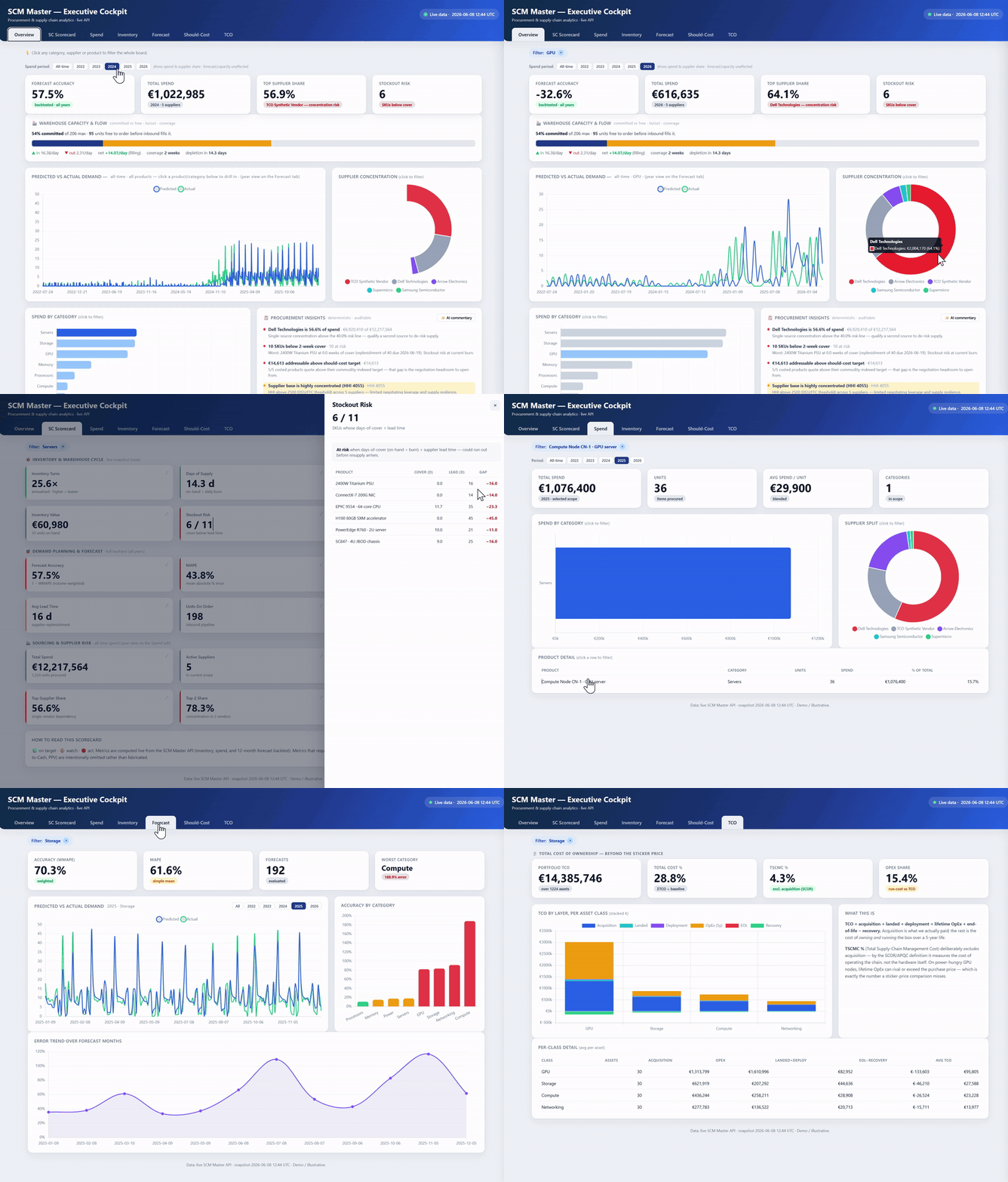
The live, hosted cockpit in motion — scm-power-bi-production.up.railway.app. For the full-quality clip with audio, ▶︎ open
clip/hosted-dashboard.mp4.
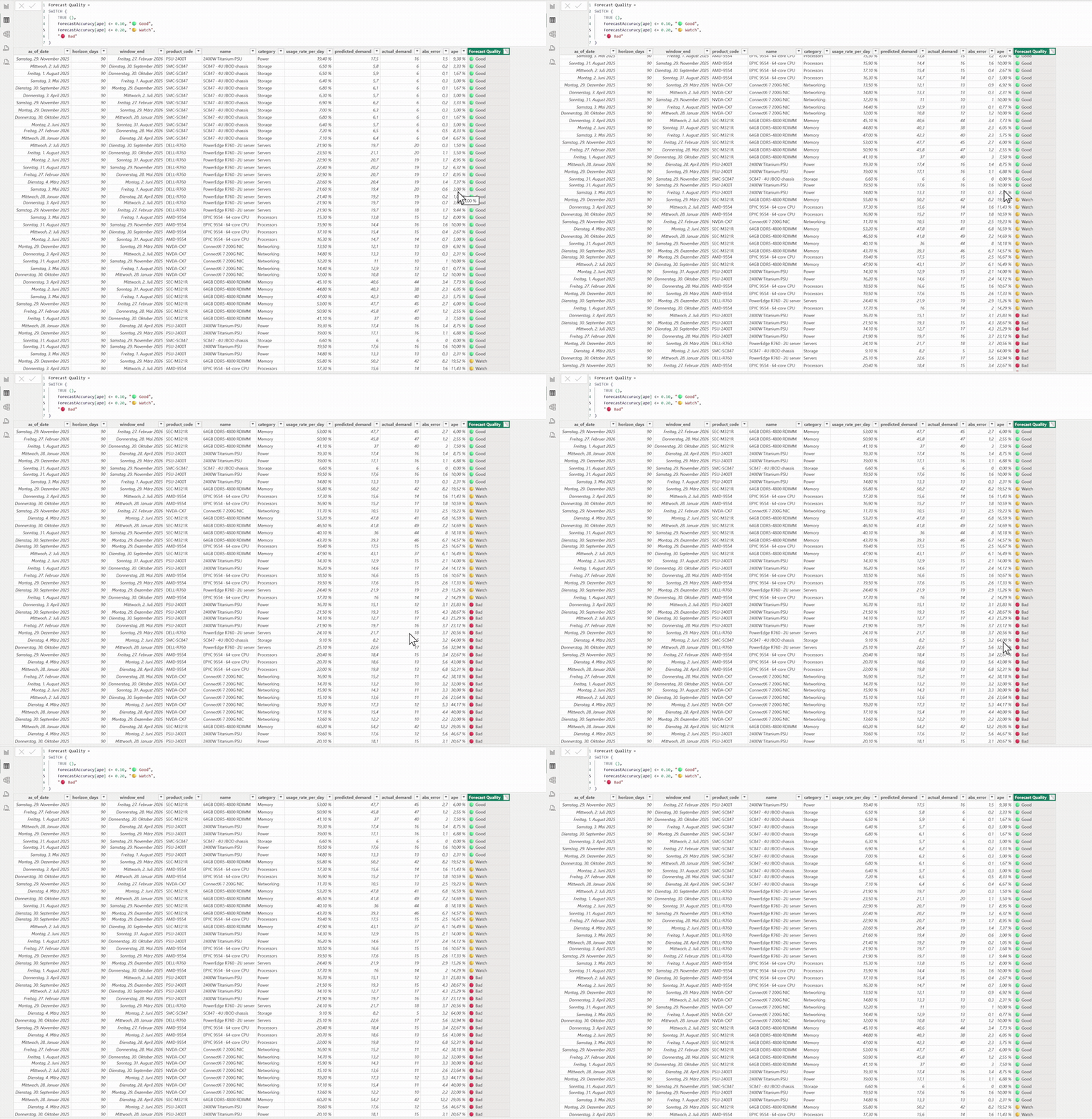
The Power BI report wired to the same live API — forecast-accuracy measures and the predicted-vs-actual view, with a DAX
Forecast Qualityflag. For the full clip, ▶︎ opendocs/demo.mp4.
| Tab | KPI / visual | What it answers |
|---|---|---|
| Overview | Forecast Accuracy (1 − WMAPE), Total Spend, Top Supplier Share, Stockout Risk, + a Warehouse capacity & flow tile | The numbers a CEO checks first — forecast trust, spend, supplier concentration, stockout risk — plus a live capacity tile: % committed vs free-to-order, daily in/out flow (filling/draining), weeks of cover and days to depletion. A spend-period selector scopes the spend KPIs by year. |
| Overview | Predicted vs Actual Demand (multi-year backtest, year-filterable) + Supplier Concentration (donut) + Spend by Category (bars) + Procurement Insights (deterministic) | The forecast "money shot" against actuals, plus a click-to-filter spend/supplier breakdown and a rules-engine read of the data — concentration / HHI, weeks-of-cover, should-cost gap, TCO inversion — with an optional one-click AI commentary that narrates over those computed facts. |
| SC Scorecard | Inventory Turns, Days of Supply, Fill Rate, Forecast Bias, HHI concentration, Avg Lead Time, On-Order, SKUs below safety … | The full supply-chain health panel — every tile is click-to-drill: it opens a slide-out with the exact formula and the underlying rows. |
| Spend | Spend by category / supplier / product, maverick & tail-spend %, top-supplier concentration, per-year selector (All-time · 2022…2026) | Where the money goes and the concrete savings levers — sliceable by year. Cross-filters the whole board on click. |
| Inventory | On-hand, daily burn, Reorder Point (burn × lead + safety), Days-to-reorder, Action column (🔴 ORDER NOW / 🟡 order in N d / ✅ on order / 🟢 ok) |
Tells planners when to reorder each SKU, not just what the stock is. |
| Orders | Open orders · Incoming units · Delivered YTD · Inbound value, an order pipeline (delivered vs incoming, soonest first) with "covers gap" per PO, click-to-expand line-item contents, and a delivery-performance strip — promised vs actual ETA, slip, accuracy % | What's arriving, what it contains, how much outstanding demand it covers, and whether deliveries are on time — the signal for tuning lead-time assumptions. |
| Forecast | Accuracy (WMAPE) + Forecast bias (over/under, drives safety stock) as the headline; accuracy by category (WMAPE), worst-category flag, error trend by month, a per-year selector, click-to-drill why-it-missed / how-to-fix diagnostic. MAPE is kept at detail level, labelled — it's inflated by near-zero actuals on intermittent SKUs, so WMAPE+bias lead. | Why the forecast was wrong and how to predict better — with the metric matched to the demand profile (WMAPE/bias for intermittent SKUs, where per-point MAPE is meaningless). |
| Should-Cost | Addressable Savings, Avg Cost Gap %, Products Modelled, Total Margin Stacked; Quote vs Target vs Floor bars + gap by supplier/component | The margin lever — a clean-sheet teardown shows how much negotiation headroom exists vs a fair price, and where margin leaks. |
| TCO | Portfolio TCO, Total Cost %, TSCMC % (SCOR), OpEx Share; TCO stacked by layer per asset class | True lifetime cost beyond the sticker price (acquisition + landed + deployment + OpEx + EOL − recovery) → smarter buy decisions. |
AI demand forecast accuracy ≈ 85% — backtested across 78 forecasts over 12 months. Mean Absolute % Error (MAPE) = 14.6%; volume-weighted (WMAPE) = 13.9%. "Our AI demand forecast has been right within ~15% on average, proven against 12 months of actuals."
| Category | MAPE | Read |
|---|---|---|
| Storage | 8.5% | 🟢 excellent |
| Servers | 9.6% | 🟢 excellent |
| Memory | 12.7% | 🟢 good |
| Processors | 17.3% | 🟡 watch |
| Power | 18.1% | 🟡 watch |
| Networking | 21.5% | 🔴 weakest — improvement target |
⚠️ All data in this repo is synthetic. It is randomly generated to be plausible, not real. No real company data is used. See research/01_data_assumptions.md.
A complete, end-to-end answer to one CEO-level question: "Is investing in AI/analytics for our supply chain actually worth it?" Instead of a slide deck of opinions, it backs the answer with a working system you can click through.
The full stack:
-
A synthetic-but-consistent data world. A Python/pandas generator produces seven internally-coherent CSVs — suppliers, product categories, purchase spend, contracts, a 12-month demand forecast vs. actuals, supply disruptions, and a date dimension. Everything ties together (the same products, suppliers and dates flow through every table), so the KPIs are believable rather than random.
-
A deployed backend (SCM Master API). A FastAPI service on Railway exposes authenticated analytics endpoints (OAuth2 login → Bearer token) for spend, inventory, forecast accuracy, should-cost and TCO. This is the single source of truth both front-ends read.
-
A live web cockpit (hosted here) — a coded, branded dashboard (Node server + Chart.js) that logs into the API server-side, caches and auto-refreshes the data, and renders an interactive board no spreadsheet could match:
- Cross-filtering — click any category/supplier and the whole board reslices.
- Click-to-drill KPIs — every scorecard tile opens a slide-out panel with its exact formula and the underlying rows, so a number is never a black box.
- Reorder intelligence — per-SKU reorder point (
burn × lead-time + safety stock), days-to-reorder, and an action column (🔴 ORDER NOW / 🟡 order in N days / ✅ on order / 🟢 ok) so planners see when to act, not just what the stock is. - Forecast "why & how" diagnostic — click a category and get a plain-English read on why the forecast missed (bias direction, demand volatility / coefficient of variation, over- vs under-shoot counts) and how to predict better (bias-correction factor, aggregation, safety-stock sizing, a seasonal model), plus the biggest individual misses.
- Should-Cost / margin lever — a clean-sheet teardown rebuilds each box from components and compares quote vs target vs cost floor; surfaces addressable negotiation savings, avg cost gap %, and where margin leaks by supplier/component class.
- Total Cost of Ownership (TCO) — beyond the sticker price: portfolio TCO, TSCMC % (SCOR — supply-chain cost excl. acquisition), OpEx share, and TCO stacked by layer (acquisition + landed + deployment + lifetime OpEx + end-of-life − recovery) per asset class.
- Deterministic insights + on-demand AI — the Overview "Procurement Insights" panel is a
rules engine (
deploy/insights.js): supplier concentration + Herfindahl–Hirschman Index (DOJ/FTC threshold), weeks-of-cover stockout risk, should-cost gap, TCO inversion (lifetime OpEx ≥ acquisition), forecast volatility. The numbers match the KPIs exactly because they're computed the same way — zero tokens, reproducible, auditable. A one-click "✨ AI commentary" button then asks the LLM to synthesise a short read over those findings (sent as structured input, never raw data), so every figure stays code-computed. The board never calls the LLM automatically. - Near-zero passive cost — the priced LLM call (insights commentary) is the only token-costing step, so it's decoupled from the data refresh: spend/inventory/forecast refresh on the fast clock, AI commentary only on a deliberate click (rate-limited per day).
- Environment-aware deployment — the same cockpit deploys to a demo stack and an
isolated production stack (own Railway project), each wired to its environment's API via
API_BASEwith a read-only viewer account.
-
The Power BI report (
Order_Accuracy_Forecast_2026.pbix) — the lab-mandated deliverable, wired to the same live API via paste-ready Power Query (auto-login on every refresh). The forecast-accuracy "predicted vs actual" line chart with a MAPE card is the centrepiece. The full build is specified indashboard/dashboard_spec.mdand the connection steps indashboard/live_api_connection.md. -
A decision layer. Every page carries a "robust vs. needs-validation" note that rolls up into a concrete pilot / wait / invest recommendation — the honest version of the answer, including where the model is weak (Networking is the worst category at ~21% error).
Why it stands out: the data is live and wired end-to-end, the KPIs are anchored to real supply-chain frameworks (SCOR, WMAPE, reorder-point theory) rather than invented, and the board is explainable — every figure drills to its formula and its raw rows. It's built to survive a sceptical CEO asking "where does that number come from?"
This repo is a full AI-adoption consulting case: advising Cleo (a non-technical CEO) whether to invest in AI for procurement & supply-chain.
- Sector: Cloud / hosting & data-center infrastructure (DACH, Microsoft-365 ecosystem).
- Company size: Large enterprise — ~5,000 employees (IONOS-scale), ~€640m managed spend.
- Stakeholders & pain: Procurement, capacity planners, finance and ops all suffer when demand
forecasts are wrong and chip lead times swing unpredictably. (Full discovery:
research/use_case_discovery.md.) - Primary use case selected: AI demand forecasting + a dynamic reorder point — strongest evidence, lowest lift (working PoC already exists), clearest ROI, and it de-risks the geopolitical chip lead-time problem that hits a hardware-heavy cloud business hardest.
- AI is mainstream: 78% (2024) → 88% (2025) of orgs use AI in ≥1 function (Stanford AI Index; McKinsey). Supply chain is a proven savings area — 61% report cost savings.
- AI demand forecasting cuts error 30–50% (vendor evidence — treated as upper bound).
- Why now: ~90% of advanced chips come from Taiwan; memory prices rose ~4× Sep–Nov 2025
— static reorder points fail when lead times swing. Full analysis + sources:
research/market_research.md·sources.md.
- The honest read: adoption is real, but only 39% see EBIT impact and ~64% stall in pilot;
most SC savings are <10%. (See
research/hype_vs_evidence.md.) -
🟡 Recommendation for Cleo: RUN A 10-WEEK PILOT — don't invest at full scale yet, don't wait. Validate the 30–50% improvement on our SKUs before committing. Full reasoning, cost (~€43k pilot / ~€135k year-1) and timeline:
implementation/solution_proposal.md·implementation/implementation_plan.md·cost_estimation/.
- Operational data (dashboard): synthetic, reproducible via
scripts/generate_data.py→data/raw/. Chosen for reproducibility and no-NDA review; documented inresearch/01_data_assumptions.md. - Market-evidence data: public, compiled from cited sources into
data/processed/ai_adoption_evidence.csv. - Public Kaggle analogs (to validate the model on third-party data in the pilot) are listed in
sources.md(section F).
| Deliverable | File |
|---|---|
| Use-case discovery & selection | research/use_case_discovery.md |
| Market research & data gathering | research/market_research.md |
| Opportunity & risk map | research/opportunities_risks.md |
| Hype-vs-evidence analysis | research/hype_vs_evidence.md |
| Source list | sources.md |
| Dashboard (Power BI) | Order_Accuracy_Forecast_2026.pbix |
| Dashboard documentation | dashboard/dashboard_documentation.md |
| Solution proposal (invest/wait/pilot) | implementation/solution_proposal.md |
| Implementation plan | implementation/implementation_plan.md |
| Cost analysis | cost_estimation/cost_analysis.md |
| Timeline estimate | cost_estimation/timeline_estimate.md |
| Layer | Where | What |
|---|---|---|
| 1. Synthetic data | scripts/generate_data.py → data/raw/ |
Python/pandas generator → 7 internally-consistent CSVs (suppliers, categories, spend, contracts, forecast, disruptions, date dim). |
| 2. Measure layer | measures/measures_dax.md |
Every KPI with plain-English formula and copy-paste Power BI DAX, grouped by framework. |
| 3. Data model | dashboard/data_model.md |
Star schema, relationships, helper tables — how to wire the .pbix. |
| 4. Dashboard spec | dashboard/dashboard_spec.md |
4 pages, every visual specified (chart type, fields, CEO-readability). |
| 5. Hype-vs-value | dashboard/hype_vs_value.md |
Per-page "robust vs needs-validation" note → a "pilot / wait / invest" recommendation. |
| 6. Research & adoption analysis | research/ |
Use-case discovery, market research, opportunity/risk map, hype-vs-evidence — all cited (sources.md). |
| 6b. Implementation & cost | implementation/, cost_estimation/ |
Solution proposal (invest/wait/pilot), phased plan, cost & timeline estimates. |
| 6c. Public evidence data | data/processed/ai_adoption_evidence.csv |
Cited public AI-adoption / chip-risk figures powering the market-evidence layer. |
| 7. Live API connection | dashboard/live_api_connection.md |
Paste-ready Power Query (M) to connect Power BI to the deployed backend — auto-login on every refresh (OAuth2 → Bearer). |
| 8. Built dashboard | Order_Accuracy_Forecast_2026.pbix |
The Power BI report itself, wired to the live API. (Git LFS) |
| 9. Live web cockpit | deploy/ → hosted |
Node server + Chart.js + Babylon.js. Server-side API login, in-memory cache, auto-refresh. A 3D Control Tower home screen (deploy/tower.js) + 8 tabs (Overview, SC Scorecard, Spend, Inventory, Orders, Forecast, Should-Cost, TCO) + a hidden Autonomy decision-loop/audit panel. Cross-filtering, click-to-drill KPIs, reorder alerts, inbound-order pipeline + delivery-performance tracking, forecast diagnostics (WMAPE + bias), should-cost margin lever, TCO. Environment-aware (demo + isolated prod). Deployed on Railway. |
The cockpit follows the same rule as the SCM Master backend it reads from: facts are computed by tested code; the LLM only narrates over them. The Overview insights are a deterministic rules engine (concentration/HHI, weeks-of-cover, should-cost gap, TCO inversion) — so "Dell is 64.9% of spend" is a threshold over real numbers, reproducible and auditable, not a figure a model might hallucinate. The optional AI commentary is handed those already-computed findings as structured input and asked only to synthesise a short read — it never re-derives a number. The result is an AI dashboard whose every figure is trustworthy and whose passive token cost is ≈ 0.
- SCOR DS Level-1 metrics: Perfect Order Fulfillment %, Order Fulfillment Cycle Time, Cash-to-Cash Cycle Time, Total SCM Cost, Return on SC Fixed Assets.
- Forecast accuracy: WMAPE (primary), Forecast Bias % (95–105% band), RMSE, Plan/Schedule Adherence % — shown as a 3-month trend, not pass/fail.
- Resilience: Time-to-Awareness / -Action / -Recover / -Survive, the TTS > TTR rule, a node-level Resilience Score, and single- vs multi-source risk flags.
- Spend & savings: spend cube, addressable vs influenceable, tail-spend %, maverick/ off-contract %, savings waterfall (negotiated → realized → cost avoidance), contract coverage %.
- Overall forecast error falls 9.2% → 7.6% over M1→M3 (analytics is working)…
- …except Logistics, which absorbs a supplier disruption (WMAPE spikes to ~24% in M2, recovering to ~13% in M3) — a real, explained miss, not a hidden one.
- ~20% maverick spend and 64% contract coverage → concrete savings levers.
- 15% of suppliers violate TTS>TTR and 17.5% are single-source → resilience action list.
# 1. Generate the data (Python 3.12)
python -m venv venv && source venv/bin/activate   # Windows: venv\Scripts\activate
pip install -r requirements.txt
python scripts/generate_data.py          # writes CSVs to data/raw/

# 2. Build the .pbix
#    - Data source — pick ONE:
#        a) Static: Get Data ▸ Text/CSV ▸ load data/raw/*.csv
#        b) Live API: follow dashboard/live_api_connection.md (paste-ready Power Query,
#           auto-login on refresh against the deployed backend)
#    - Wire relationships per dashboard/data_model.md
#    - Add measures from measures/measures_dax.md to a _Measures table
# - Build the 4 pages per dashboard/dashboard_spec.mdPower BI Desktop is free, native to the Microsoft-365 stack this company runs, and the brief's measure layer is authored in DAX. The synthetic CSV layer is tool-agnostic and could feed Tableau later; only the measures would need re-authoring.
SCM-POWER-BI/
├── data/
│   ├── raw/                    # 7 synthetic CSVs (operational data)
│   └── processed/              # ai_adoption_evidence.csv (public, cited)
├── research/
│   ├── use_case_discovery.md   # sector, size, stakeholders, why this use case
│   ├── market_research.md      # sector trends, AI adoption signals, sources
│   ├── opportunities_risks.md  # 2-3 opportunities + risk map + priority
│   ├── hype_vs_evidence.md     # AI claims: supported vs overhyped
│   └── 01_data_assumptions.md  # synthetic-data methodology
├── dashboard/
│   ├── dashboard_documentation.md  # metrics, design rationale, screenshots
│   ├── dashboard_spec.md / data_model.md / measures (see measures/)
│   └── live_api_connection.md      # Power Query to the live API
├── implementation/
│   ├── solution_proposal.md    # invest / wait / pilot recommendation
│   └── implementation_plan.md  # validation → pilot → rollout
├── cost_estimation/
│   ├── cost_analysis.md        # pilot ~€43k / year-1 ~€135k
│   └── timeline_estimate.md    # ~10-week pilot
├── measures/measures_dax.md    # every KPI: formula + DAX
├── deploy/                     # live web cockpit (Node + Chart.js + Babylon.js)
│   ├── server.js               #   proxy + /api/* branches (data, orders, decisions, …)
│   ├── index.html              #   8 tabs + hidden Autonomy panel (inline app JS)
│   └── tower.js                #   3D Control Tower (Babylon.js, window.SCMTower)
├── clip/                       # walkthrough GIFs + mp4
├── Order_Accuracy_Forecast_2026.pbix   # Power BI report (Git LFS)
├── scripts/generate_data.py    # synthetic data generator
├── sources.md                  # all sources, labelled by type
├── requirements.txt
├── .env.example
└── README.md
- Synthetic data generator + validated CSVs
- Measure layer (formulas + DAX)
- Data model + 4-page dashboard spec
- Hype-vs-value layer + research notes
- Live API connection guide (
dashboard/live_api_connection.md) — verified against the deployed backend -
.pbixbuilt in Power BI Desktop — wired to the live API, forecast-accuracy measures + visuals live - Live web cockpit deployed — hosted on Railway, auto-refreshing, with drill-downs + reorder alerts + forecast diagnostics
- 3D Control Tower home screen — Babylon.js WebGL (PBR · IBL · SSAO · bloom), wired live to
/api/v1(state-accurate; crates ∝ warehouse capacity, racks = deployed fleet, real POs + over-order guard); engine only mounts on its tab - Orders tab — inbound pipeline (delivered vs incoming, current year), per-PO line-item contents, "covers gap" per order, and delivery performance (promised vs actual ETA, slip, accuracy %)
- Autonomy panel — the agent's decision loop (intake → live gate → tier) + a persistent append-only audit trail with provenance drill-down; fail-closed, dry-run by default
- Forecast metrics matched to the demand profile — WMAPE + bias lead the headline; MAPE demoted to labelled detail (it's inflated by intermittent near-zero actuals); accuracy-by-category uses WMAPE
- Should-Cost / margin-lever tab — clean-sheet teardown (quote vs target vs floor), addressable savings, wired to the live API
- TCO tab — total cost of ownership by layer + TSCMC % (SCOR), wired to the live API
- Per-environment deployment — same cockpit deploys to a demo stack and an isolated production stack (own Railway project), each wired to its environment's SCM Master API via
API_BASEwith a read-only viewer account - Ruff lint clean + status/tech badges