TLE Raw
The MLIR backend is an experimental implementation of TLE-Raw.
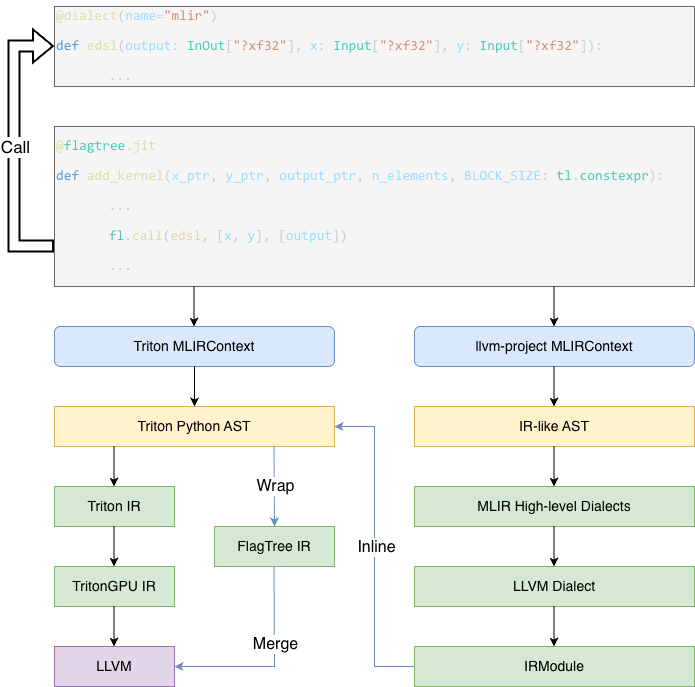
The main compilation pipeline of the TLE-Raw is divided into two parts. On the one hand, the compiler compiles TLE-Raw kernels and extracts the generated code as strings. On the other hand, we establish a pipeline to inject the compiled MLIR strings into the original Triton IR.
The code responsible for TLE-Raw kernel compilation is primarily maintained in the python/triton/experimental/tle/raw directory. The entry point that triggers TLE-Raw kernel compilation is the dialect function in python/triton/experimental/tle/raw/runtime.py. This function constructs an MLIRJITFunction object to store kernel-related metadata and compilation state.
The MLIRCodeGenerator, defined in python/triton/experimental/tle/raw/mlir/codegen.py, specifies the frontend code parsing rules and describes how to lower Python code into the corresponding MLIR representation. Subsequently, MLIRJITFunction applies a predefined compilation pipeline to lower the MLIR code, ultimately producing MLIR that is largely based on the LLVM Dialect. This portion of the generated MLIR is extracted as a string and passed to the next stage of processing.
Function parameters currently require annotations, which fall into two categories. One is InOut, indicating that the parameter may be modified within the function, and the other is Input, indicating that the parameter is read-only and must not be modified. During frontend code processing, if a parameter is annotated as InOut, it is automatically returned in the generated MLIR code to facilitate SSA-based analysis of value changes in Triton kernels.
The annotations are required to specify shape and type information in the MLIR text format, which are then parsed as MLIR types and used to build the function signature for subsequent LLVM lowering.
In Triton kernels, TLE-Raw kernels are invoked through tle_raw.call (implemented in python/triton/experimental/tle/language/raw/core.py). This API takes three arguments: the kernel object being invoked, the output list, and the input list. The output list and input list are concatenated in order to form the operands of DSLRegionOp, while the types of the output list define the result types.
In Triton, the key operation is tle::DSLRegionOp, which encapsulates the compiled LLVM code. In createTLERawRegionByLLVMFunc within third_party/tle/triton_tle_raw.cc (bound to Python builder API as create_tle_raw_region_by_llvm_func), a TLE-Raw kernel is transformed into a DSLRegionOp. During this transformation, the LLVM module text is parsed and imported into the current module, then a DSLRegionOp is created from outputs and inputs. Inside the region, SignaturePattern::apply inserts protocol operations (such as ExtractOps) to map Triton-side operands to the LLVM callee signature. The call is materialized as LLVM::CallOp. Return values are converted back via ReturnPattern::apply, then propagated to the outer scope through tle::YieldOp.
During the lowering process, the key components are implemented in third_party/tle/dialect/lib/Conversion/TleToLLVM and third_party/tle/dialect/lib/Transforms. Among them, three aspects are particularly important. First, tensor operands/results of DSLRegionOp are converted to MemDesc in the TritonGPU Dialect. Second, DSLRegionOp is lowered and eliminated through TLE passes/conversions. Finally, conversion rules are defined for lowering ExtractOps and PackOp.
In Triton, tensors are often allocated in registers, which prevents different threads within a TLE-Raw kernel from accessing arbitrary elements of a tensor. Therefore, before entering DSLRegionOp, tensor operands are converted to shared-memory MemDesc by allocating local memory and storing tensor values into it. After DSLRegionOp, the data in shared memory is loaded back into tensors and used to replace subsequent references. The corresponding implementation is in third_party/tle/dialect/lib/Transforms/ConvertArgToMemDesc.cpp.
Specifically, for each tensor operand, a shared-memory region is allocated via LocalAllocOp, populated by LocalStoreOp, and released with LocalDeallocOp; for tensor results, LocalLoadOp is inserted after DSLRegionOp. In addition, when conversion happens, a block-level NVVM::Barrier0Op is inserted before the region. For layout, shared-memory descriptors disable swizzling (using (1, 1, 1) parameters) while preserving the tensor order from Triton encoding.
In third_party/tle/dialect/lib/Transforms/DSLRegionInline.cpp, DSLRegionOp is inlined by rewriting region control flow into explicit LLVM branches (LLVM::BrOp) and replacing tle::YieldOp with branches to continuation blocks. In later LLVM conversion, DSLRegionOp is also handled by third_party/tle/dialect/lib/Conversion/TleToLLVM/DSLRegionOpToLLVM.cpp.
ExtractOp lowering is implemented in third_party/tle/dialect/lib/Conversion/TleToLLVM/ExtractOpToLLVM.cpp. For TLE-Raw, these operations are lowered based on converted operand forms (MemDesc/LLVM values). The current strategies are:
-
ExtractAllocatedPtrOpis lowered to the pointer of the shared memory. -
ExtractAlignedPtrOpis lowered to the pointer of the shared memory. -
ExtractOffsetOpis lowered to a constant zero. -
ExtractSizesOpis lowered to constants derived from the memdesc shape. -
ExtractStridesOpcomputes per-dimension strides from memdesc shape and memory order.
The current TLE-Raw implementation depends on a customized llvm-project build with Python bindings. Since the development version is still unstable, we recommend installing it inside a virtual environment to avoid affecting your system setup. You can follow the steps below to obtain and install it.
git clone https://github.com/flagos-ai/llvm-project.git
git checkout triton_3.6.x
Next, build it from source. Make sure your environment already has all the required dependencies for compiling llvm-project. Then, compile it using the following commands
cmake -G Ninja -B build -S llvm -DLLVM_ENABLE_PROJECTS="mlir;llvm;lld" -DLLVM_TARGETS_TO_BUILD="host;NVPTX;AMDGPU" -DCMAKE_BUILD_TYPE=Debug -DCMAKE_EXPORT_COMPILE_COMMANDS=ON -DCMAKE_C_COMPILER=clang -DCMAKE_CXX_COMPILER=clang++ -DLLVM_ENABLE_LLD=ON -DMLIR_ENABLE_BINDINGS_PYTHON=ON
cmake --build build
After the build completes, you should be able to find the generated Python artifacts under build/tools/mlir/python_packages/mlir_core/mlir/. Next, you need to make them available to your Python interpreter. A safer approach is to do this by setting environment variables
export PYTHONPATH=<LLVM_PROJECT_PREFIX_PATH>/build/tools/mlir/python_packages/mlir_core/mlir/:${PYTHONPATH}If you are confident that it will not affect your host environment, you may also directly link it into your Python package manager
ln -s <LLVM_PROJECT_PREFIX_PATH>/build/tools/mlir/python_packages/mlir_core/mlir/ <PYTHON_PREFIX_PATH>/lib64/python3.10/site-packages/mlirIn the future, we plan to release our own managed llvm-project wheel package with Python bindings.
now we implement it, see below
- Install Prerequisites
apt install clang
- Clone the LLVM Wheel Builder && Build the Wheel Package
git clone --recursive https://github.com/flagos-ai/flagtree_mlir.git
cd llvm-wheel
python -m build -w
This tool is used to build and package the corresponding version of LLVM into a wheel package. The default LLVM version is from: https://github.com/flagos-ai/llvm-project/tree/triton_v3.6.x
- Install the LLVM Wheel
pip install ./dist/llvm_wheel-0.1.0-cp{}-cp{}-linux_x86_64.whl --force-reinstall
After installing the LLVM wheel, you can proceed with FlagTree's own build process.
- Clone FlagTree Repository and Install Dependencies
git clone --branch triton_v3.6.x https://github.com/flagos-ai/flagtree.git
cd flagtree
apt install zlib1g zlib1g-dev libxml2 libxml2-dev  # Ubuntu
cd python
python3 -m pip install -r requirements.txt
- Install FlagTree Package (Nvidia Backend)
cd flagtree
python3 -m pip install . --no-build-isolation -v