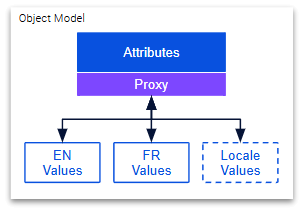
A vanilla JS middleware used to abstract away the bidirectional data-binding of localized object model attributes.
- Import
$ npm install localized-entity --saveimport { LocalizedModel } from 'localized-entity';- Extend class definition
class AppObject extends LocalizedModel{
  constructor(){
    super();
    this.attrValue = '';
  }
  fromJSON(obj){
    this.initLocalizedValue('attrValue', obj.localeValues, 'localizedAttr')
    return this;
  }
  toJSON(){
    return {
      localeValues: this.inflateLocales({
        attrValue: 'localizedAttr'
      })
    }
  }
}- Use to simplify read/update
let appObj = new AppObject().fromJSON(serverJSON);
// Read the English value of attrValue
console.log(appObj.attrValue);
// Update the English value
appObj.attrValue = 'english value update';

// switch locales
appObj.localize('fr');

// Read the French value of attrValue
console.log(appObj.attrValue);
// Update the French value
appObj.attrValue = 'mise à jour de la valeur française';When building UIs that edit entities that have localized attributes view-model logic is often responsible for managing the mapping of CRUD actions to the respective localized version of an entity. Namely making sure the English, French, or whichever locale specific values are rendered in a form field and edits to that form field will update the respective localized values.
Deferring this responsibility to view-model logic leads to inconsistent and tedious repetition of object model mapping wherever editing UI such as form fields exist in an application. This approach is error prone and leads to poor maintainability.
When designing client side applications, the need for a unified data layer responsible for interacting with APIs and facilitating client side object models is key. This creates an abstraction layer between the client side application logic and the source system and centralizes object model logic and maintainence.
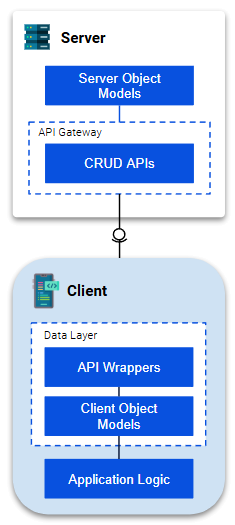
This library aligns with this paradigm and encapsulates the management of localized attribute mapping to simplify the logic on the view-model layer. Handling localized attribute value mapping and updates behind the scenes, on the actual object model itself, removes the need for application logic to take this into consideration. That is to say UI views can bind to simple consistent object model attributes without consideration of which locale is selected on the UI page that would typically require logic to update data bindings to localized versions of the object model attributes.
As an example, if the JSON of your entity from the server looked like the below:
{
  "localizations": {
    "en": {
      "header": "this is a header",
      "description": "this is a description"
    },
    "fr": {
      "header": "il s’agit d’un en-tête",
      "description": "il s’agit d’une description"
    }
  }
}
In order to simplify object model usage within the lower view-model layers of your application downstream of your data layer, localized-entity will allow you to have an object model that resembles:
{
  "header": "this is a header",
  "description": "this is a description"
}
Depending on your selected locale these attributes will represent their localized versions without any additional logic outside of your class definition. That is to say your views need only bind once directly to header or description.
Within your client side data layer simply define your data model as an ES6 class and extend the LocalizedModel class. Then specify which attributes are localized and provide the localized value mappings.
// extend LocalizedModel
class AppObject extends LocalizedModel{
  constructor(){
    super();
    this.header = '';
    this.description = '';

    // return localized object proxy
    return this._localizedProxy;
  }
  fromJSON(obj){
    // initialize model attributes based on localized values
    this.initLocalizedValue('header', obj.localizations);
    this.initLocalizedValue('description', obj.localizations);

    return this;
  }
  toJSON(){
    // transform back to server JSON object structure
    return {
      localizations: this.inflateLocales({
        header: 'header',
        description: 'description'
      })
    }
  }
}
Now you can use this object model definition to produce simple objects for downstream binding. For example,
const jsonData = {
  "localizations": {
    "en": {
      "header": "this is a header",
      "description": "this is a description"
    },
    "fr": {
      "header": "il s’agit d’un en-tête",
      "description": "il s’agit d’une description"
    }
  }
};
// parse server JSON object structure
let entity = new AppObject().fromJSON(jsonData);
// now you can 2 way bind your views to `entity.header` and `entity.description`

// once the language is selected
entity.localize('en');
// Read the English value "this is a header"
console.log(entity.header);
// Update the English value
entity.header = 'change the english header';


// change the selected language
entity.localize('fr');
// Read the French value "il s’agit d’un en-tête"
console.log(entity.header);
// Update the French value
entity.header = `changer l'en-tête français`;

// transform back to server JSON object structure
const serverPayload = entity.toJSON();If your object model contains a child object with localized attributes simply utilize the localizeObj function within your class definition constructor.
Take for example the following JSON structure
{
  "subObject": {
    "localeValues": {
      "en": {
        "attr1": "this is a header",
        "attrName2": "this is a description"
      },
      "fr": {
        "attr1": "il s’agit d’un en-tête",
        "attrName2": "il s’agit d’une description"
      }
    }
  }
}
Leverage LocalizedModel functions to initialize and transform localized values.
class AppObject extends LocalizedModel{
  constructor(){
    super();
    // declare your child object as localized
    this.child = this.localizeObj('child', {
      attr1: '',
      attr2: ''
    });

    // return localized object proxy
    return this._localizedProxy;
  }
  fromJSON(obj){
    // initialize model attributes based on localized values
    this.initLocalizedValue('child.attr1', obj.subObject.localeValues);
    // normalize incoming `attrName2` attribute key into `attr2` for consistency
    this.initLocalizedValue('child.attr2', obj.subObject.localeValues, 'attrName2');

    return this;
  }
  toJSON(){
    // transform back to server JSON object structure
    return {
      subObject: {
        localeValues: this.inflateLocales({
          'child.attr1': 'attr1',
          'child.attr2': 'attrName2'
        })
      }
    }
  }
}If your object model contains an object array where each object contains localized attributes simply utilize the localizeArray function within your class definition constructor.
Take for example the following JSON structure
{
  "subArray": [
    {
      "localeValues": {
        "en": {
          "attr1": "this is a header",
          "attrName2": "this is a description"
        },
        "fr": {
          "attr1": "il s’agit d’un en-tête",
          "attrName2": "il s’agit d’une description"
        }
      }
    }
  ]
}
Leverage LocalizedModel functions to initialize and transform localized values.
class AppObject extends LocalizedModel{
  constructor(){
    super();
    // declare your child object array as localized
    this.children = this.localizeArray('children', ['attr1', 'attr2']);

    // return localized object proxy
    return this._localizedProxy;
  }
  fromJSON(obj){
    // initialize model attributes based on localized values
    obj.subArray.forEach((obj, index) => {
      this.children.push({
        attr1: this.initLocalizedArrValue('children', index, 'attr1', obj.localeValues),
        // normalize incoming `attrName2` attribute key into `attr2` for consistency
        attr2: this.initLocalizedArrValue('children', index, 'attr2', obj.localeValues, 'attrName2')
      })
    })

    return this;
  }
  toJSON(){
    // transform back to server JSON object structure
    return {
      subArray: this.children.map((obj, index) => {
        return {
          localeValues: this.inflateLocales({
            'children.{index}.attr1': 'attr1',
            'children.{index}.attr2': 'attrName2'
          }, index)
        }
      })
    }
  }
}Similar to the underlying implementation of the Vue.js v3 reactivity system, localized-entity leverages the native JavaScript Proxy to observe changes and update encapsulated localized versions of attribute values.