- Overview
- Table of contents
- Installation
- Usage
- Files
- Output and environment variables
- Optional Dependencies
- Features
- Package Lists
- See Also
- Screenshots
- Title : Aegis , Debian based Linux distribution maintenance program.
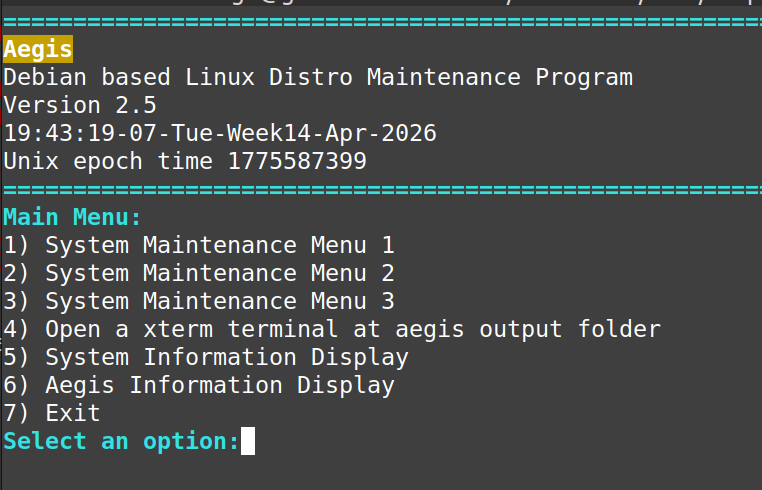
- Description: A TUI (terminal user interface) which allows users to carry out maintenance on an Debian based linux distributions. The program is menu-based and written in bash. This program provides a Terminal based alternative to GUI software managers found in many distros
- Author: Gavin Lyons
Install by makefile. Download latest fixed release and run the makefile as per terminal commands below for version 2.5 latest release at time of writing.
curl -sL https://github.com/gavinlyonsrepo/aegis/archive/2.5.tar.gz | tar xz
cd aegis-2.5
sudo make installRun in a terminal by typing:
aegis -[options]
Options list (standalone cannot be combined):
| Option | Description |
|---|---|
| -h --help | Print aegis information and exit |
| -s --system | Print system information and exit |
| -v --version | Print version information and exit |
| -p --print | Print the package lists |
| -b --bleachbit | Shortcut to opens the bleachbit select menus |
The program also installs a desktop entry file, so it can be launched from the desktop environment menu by clicking on Aegis Icon.

| File | Description |
|---|---|
| /usr/bin/aegis | The main shell script |
| /usr/lib/aegis/modules/* | Module files containing functions |
| /usr/share/doc/aegis/README.md | Help file |
| /usr/share/pixmaps/aegisicon.png | program icon |
| /usr/share/applications/aegis.desktop | desktop entry file |
AEGIS_CACHE_DEST is an optional custom environmental variable used by program. If variable AEGIS_CACHE_DEST is not set or does not exist, aegis uses the default path.Most system output (logfiles, downloads and updates etc)is placed at below path, unless otherwise specified on screen. Output folders are created with following time/date stamp syntax HHMM-DDMONYY-X where X is output type i.e download, update etc.
| Name | Description | Default |
|---|---|---|
| AEGIS_CACHE_DEST | Aegis output path | $HOME/.cache/aegis |
| AEGIS_COLOR_OFF | if it does not exist aegis uses colored text | Color is on |
Place these in your .profile or .bashrc file to set them permanently, if desired.
Some functions require dependencies packages to be installed. These optional dependencies are left to user discretion. The user can check if optional dependencies installed with aegis help.
| Dependencies | Usage |
|---|---|
| aptitude | High-level interface to the package manager APT |
| deborphan | Orphaned package finder |
| debsums | Verify the integrity of installed package files |
| ppa-purge | Disables a PPA and reverts to official packages |
| bleachbit | System clean and shredding |
The features are split into two main sections.
Section one deals with system maintenance. The options here are divided into 3 menus. Menu one deals with routine package maintenance upgrading, installing, searching etc. Menu two deals with more advanced options such as removing obsolete and orphaned packages, Exercise care and make backups and copys of the "packagelists" before using these options. Menu 3 deals has some general linux maintenance options as well as a CLI wrapper for bleachbit. BleachBit is a free and open-source disk space cleaner, privacy manager, and computer system optimizer.
Section two is the miscellaneous section it mainly contains aegis and system information displays.
- Check for updates (no download), aptitude search '~U'
- Upgrade all, apt update && apt dist-upgrade
- Display remote package information, apt-cache show
- Install Package, apt install
- Delete Package, apt remove
- Search for packages in the database, apt search
- Search for already installed packages, aptitude search '~i'
- Display info for locally installed packages, dpkg -s
- List all files owned by a given package, dpkg -L
- Write installed package lists to files (see package list section)
- View dpkg log file at /var/log/dpkg.log
- Show all or most information about a package, apt show
- Show the changelog of a package, apt-get changelog
- Verify all packages, debsums
- Verify dependencies of the complete system, apt-get check
- Add a PPA to system, add-apt-repository ppa:
- Purge a PPA from system, ppa-purge
Warning:
Some of these options in menu 2 remove unwanted and unneeded packages and configs from system as identified by utilities. What will be removed is presented to user first. Please take care especially with deborphan options numbered 3 <-> 6. These have not been tested on all debian type distros. Options 3 to 6 should only be used with caution by advanced users.
- Clean up all local cache, apt autoclean
- Removes pkgs installed by other pkgs & no longer needed, apt autoremove
- Remove pkg's no longer included in any repos, aptitude purge '~o'
- Remove orphan packages with orphaner tool
- Remove orphaned packages automatically, sudo deborphan | xargs sudo apt-get -y remove --purge
- Removing packages and configurations which are not required by any other package upon your system, deborphan -n --find-config | xargs apt-get -y purge
- delete contents of AEGIS_CACHE_DEST output folder
- All Failed Systemd Services and system status
- All Failed Active Systemd Services
- Check log Journalctl for Errors
- Check log Journalctl for fstrim SSD trim (check for SSD in system)
- Analyze system boot-up performance
- Check for broken symlinks
- Check for files not owned by any user or group
- Diskspace usage
- Old configuration files scan, output to files
- Find system inode usage
- Find largest files
- Print sensors information
- Vacuum journal files
- Delete core dumps
- delete files
- Shred specific files with bleachbit
- Shred specific folders with bleachbit
- Clean system with bleachbit (also run by -b standalone option.)
- Preset option based on the same options as in the GUI
- Custom options involved for user to pick cleaners and options
- preview
- clean (without overwrite, BB checks the config in GUI).
- clean + overwrite (with overwrite permanent deletion)
- List all open files
- Option to open xterm terminal at output folder path in new window
- Computer system information display
- Displays detailed information on system and package setup
- Function also run by -s standalone option.
- Aegis information:
- Dependencies installation check, info and display readme file to screen
- Function can also run by option -h
| Index | Contents | Filename |
|---|---|---|
| 1 | All installed | All_PKG |
| 2 | All native, explicitly installed | Exp_PKG |
| 3 | List orphaned packages | noinstall_PKG |
| 4 | Get a dump of the whole system information | stats_PKG |
| 5 | List packages that were recently added to one of the installation sources | Recent_add_PKG |
| 6 | List packages not required by any other package | non-Dep_PKG |
| 7 | List packages installed automatically (as dependencies) | auto_Dep_PKG |
| 8 | Prints a list of all installation source | Info_Source_PKG |
| 9 | List of non-standard repositories in use | non_standard_PKG |
| 10 | List Installed packages by size | install_size_PKG |
| 11 | List packages by install date | Install_date_1_PKG |
| 12 | List packages by install date less data | Install_date_2_PKG |
Commands used by index number in table:
- dpkg --list | grep "^i"
- apt-mark showmanual
- deborphan
- apt-cache stats
- aptitude search '~N'
- deborphan -anp1
- apt-mark showauto
- apt-cache policy
- cat /etc/apt/sources.list.d/*.list | grep -v "^#"
- aptitude search "~i" --display-format "%p %I" --sort installsize
- grep installed /var/log/dpkg.log
- grep " install " /var/log/dpkg.log
-
Arch Linux users may be interested in the original program: cylon which can be found in the AUR. Cylon is a more feature rich and complex program than Aegis, but it is only for Arch Linux based distros. Aegis is a fork and truncated version of cylon, which can be used on Debian based distros. Cylon is also written by author.