Software to make an Arduino board and a Maya session communicate.
This can be particularly useful to create custom input devices.
It is programmed in Python and Arduino language. It uses pySerial (https://github.com/pyserial/pyserial).
See it working on my twitter
and on my July 2017 reel.
This repository contains:
- A Maya Python API/PyMEL plugin (src/maya)
- A Python script to read the serial stream incoming from Arduino and feed it to Maya via socket connection (src/driver)
- An Arduino test firmware (src/arduino)
- An Arduino board. I've used an UNO v3. Other boards are ok. Just watch out for interrupt mappings
- Three potentiometers. I recommend sliders. But the choice is yours
- Jumper wires
- pySerial (https://github.com/pyserial/pyserial)
- Maya. I've used the 2017 v3 Student Edition. Not too old versions are fine too
- Follow this circuit diagram to make the connections:
- Flash the Arduino sketch
src/arduino/firmware.inoto your board. - Put the
src/maya-plugin/arduinomaya.pyplugin into the Mayaplug-insfolder. - Load the
arduinomaya.pyplugin within a Maya session. - Start the
src/driver/serial2maya.pyscript. - Connect the three available channels using the GUI that can be brought up with the
arduinoGUIcommand. - Enjoy.

Here an approximate system diagram:
The data flow is pretty simple. The potentiometers generate analog signals. The Arduino board converts them with its ADC and sends them through serial connection to the computer where Maya is running. Here the signals are translated into Maya commands and are feeded to the Maya session through its commandPort socket.
Finally, Maya must understand them and modify the current scene.
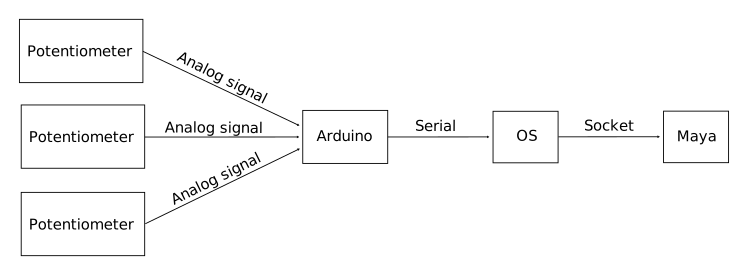
To make this work, three software pieces are needed: the Arduino firmware, the "Serial to Maya" driver, and a Maya plugin. Here the details for each piece.
The provided Arduino firmware reads the three analog signals that comes into A0,A1, and A2 ports. Every ~30ms it puts the delta value for each port in to the Serial outgoing stream.
It is a Python script that uses the pySerial lib for Arduino to PC serial communication and the socket module to send messages to Maya. It runs an endless loop that launches the MEL command defined in the Maya plugin.
The plugin adds four commands. Usually the user should invoke only arduinoGUI.
arduinoGUI: Brings up the GUI.arduinoConnectAttribute <channel> <object> <attribute>: This connects thechannelto theattributeof the givenobject. Theattributemust be a float attribute. Example:arduinoConnectAttribute 0 pCube1 rotateXthis connects the first channel (or potentiometer if you are using the firmware provided here) to the attributerotateXof thepCube1object.arduinoConnectTime <channel>: This connectschannelto the time slider.arduinoUpdateChannel <channel> <delta>: Addsdeltato the attribute connected tochannel.