A full-stack blockchain demonstration using Gno.land to control a real physical piano.
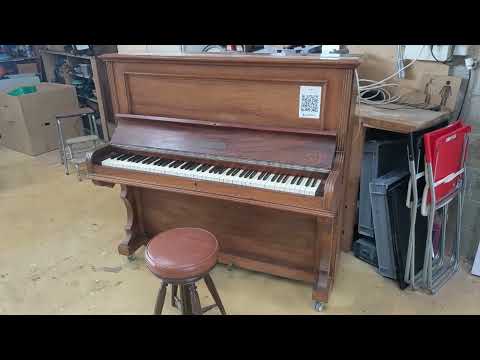
PiaGno is an end-to-end example of a blockchain-powered application that bridges the digital and physical worlds. Users queue MIDI songs through a web interface, the songs are stored on the Gno.land blockchain, and a Raspberry Pi fetches and plays them on a real player piano.
- How does it work?
- Why Blockchain?
- Architecture Overview
- Component Deep Dive
- How Data Flows Through the System
- Key Learning Points for Gno.land Developers
- Understanding the Gno Realm Code
- Interacting with Gno.land from Web Applications
Physical Access: A QR code displayed on the piano opens the gnokey-mobile app and redirects to the web interface with your account address. This allows you to queue songs using your mobile wallet.
Browser Access: Visit the web interface directly to use the Adena browser extension for signing transactions.
When you select a song through the web interface:
- Your transaction is signed (via Adena extension or gnokey-mobile) and broadcast to the Gno.land blockchain
- The blockchain stores the MIDI data (or reference to it) in the realm's state
- A player application polls the blockchain for the next song
- When a song is queued, it's downloaded, validated, and played on a physical MIDI-enabled piano
- After playback, the player calls an admin function to advance to the next song
This creates a transparent, decentralized playlist where anyone can see what's playing, what's queued, and who added each song.
This project demonstrates several unique advantages of blockchain technology:
- Transparency: The entire playlist history is publicly visible and immutable
- Decentralization: No central server controls the playlist; it lives on-chain
- Programmability: Smart contract logic enforces rules
- User Attribution: Every song is cryptographically linked to its submitter
- Global Access: Anyone with a Gno wallet can queue songs from anywhere
- Integration with Ecosystem: Leverages Gno.land's user system and Hall of Realms
PiaGno serves as an educational example of building full-stack blockchain applications.
┌────────────────────────┐
│   Web Browser          │
│   (Frontend)           │
│                        │
│  - Adena Wallet        │
│  - gnokey-mobile App   │
└────────┬───────────────┘
         │
         │ Signed Transaction
         │ (QueueSong/ReplaySong)
         ▼
┌─────────────────────────────┐
│   Gno.land Blockchain       │
│   (Smart Contract Layer)    │
│                             │
│  /r/vik000/piagno           │
│  - Playlist State           │
│  - Song Data (base64)       │
│  - Admin Functions          │
└──────────┬──────────────────┘
           │
           │ HTTP Polling
           │ (Read State + Call Admin Functions)
           ▼
┌─────────────────────────────┐
│   Raspberry Pi              │
│   (Physical Piano Player)   │
│                             │
│  - Fetch current song       │
│  - Decode & validate MIDI   │
│  - Send to MIDI device      │
│  - Call Next() on-chain     │
└─────────────────────────────┘
- Gno Realm (
gnorealm/) - PiaGno realm managing playlist state - Web Frontend (
webapp/) - PHP interface with Adena and Gnokey integration - Piano Player (
pianoapp/) - Player application running on Raspberry Pi
Location: gnorealm/
QueueSong - Adds new songs to the playlist. Accepts a title and base64-encoded gzipped MIDI data. Validates inputs, stores entries with timestamp and submitter information, and automatically starts playback if needed.
ReplaySong - Queues existing songs without duplicating data by storing references to originals. Validates that targets are original songs that haven't been deleted.
The realm provides multiple read-only views through path-based routing:
- Default view for Gnoweb: Full UI with instructions, current song, and queue
- songData: Current song's MIDI data for player consumption
- status: Playlist state (playing status, index, total songs)
- pastSongs: Historical list of played songs
- csvSongList: CSV export for web frontend integration
Protected operations requiring permission via the ownable package. Only two authorized addresses can:
- Advance to next song
- Jump to specific song index
- Remove songs from playlist
- Clear entire playlist
- Pause/resume playback
Playlist entries contain title, compressed MIDI data, timestamp, replay reference (for deduplication), and submitter identity.
Integrates with Gno's Hall of Realms for discoverability, uses the user system to resolve addresses to usernames, and leverages markdown rendering for formatted output.
Location: webapp/
A PHP-based web interface for browsing and queuing songs, consisting of the main selection interface, and transaction broadcast handler.
The interface fetches the CSV song list from the blockchain's csvSongList endpoint, parses the HTML response to extract data from code blocks, and displays songs as a clickable list with search functionality.
The web interface supports two signing methods, automatically selected based on how the user accesses the application:
QR Code Entry Point - A QR code displayed on the physical piano contains the link:
land.gno.gnokey://tosignin?client_name=PiaGno&callback=https%3A%2F%2Fgno.vik.tf%2Fpiagno%2Findex.php
When scanned, this opens gnokey-mobile, authenticates the user, and redirects back to index.php with an address parameter. The presence of this parameter tells the web interface to use the gnokey-mobile signing flow.
Adena Wallet (Browser Extension) - When the page is accessed without an address parameter and Adena is detected, transactions are signed directly in the browser using the Adena extension API, which handles the contract call with appropriate parameters and gas settings.
gnokey Mobile App (Custom Link) - When the address parameter is present (from QR code sign-in), the interface constructs a custom link containing the transaction details, user address, RPC endpoint, chain ID, and callback URL. This opens the gnokey app for signing, which then redirects back to the validation handler.
The two signing methods handle broadcasting differently:
Adena (Browser Extension) - Transactions are signed AND broadcast directly by the browser extension. No server-side processing is required.
gnokey-mobile (Offline Signing) - After the user signs the transaction in the mobile app, the signed transaction is sent to validate.php on the server. The validation script then writes the signed transaction to a temporary file and executes the gnokey broadcast command to submit it to the configured RPC endpoint. Results including gas usage and success/failure status are displayed to the user.
Setup Requirement: The gnokey binary must be placed in the webapp/ directory alongside the PHP files. The validation script uses it for broadcasting transactions signed by gnokey-mobile.
Location: pianoapp/
The piano player program runs continuously on a Raspberry Pi connected to a MIDI piano. The player uses MIDI libraries for file parsing and playback, and executes shell commands for blockchain interaction.
The application runs an infinite loop that checks the playlist status, fetches the current song only if playing, validates the MIDI file format, checks duration limits (max 6 minutes), plays the song through the MIDI port and calls the blockchain to advance to the next track if needed. The player optimizes by skipping fetch operations when the playlist is stopped.
Note: The current implementation uses polling with status checks to minimize unnecessary queries. This approach can be improved by using GraphQL subscriptions to listen for blockchain events instead.
GraphQL Subscription Approach: The staging GraphQL indexer at https://indexer.staging.gno.land/graphql supports subscription queries that can watch for specific transactions in real-time. For example, to watch for transactions calling a specific function:
subscription {
  getTransactions(
    where: {
      success: { eq: true }
      messages: {
        value: {
          MsgCall: {
            func: { eq: "Increment" }
            pkg_path: { eq: "gno.land/r/demo/counter" }
          }
        }
      }
    }
  ) {
    messages {
      value {
        ... on MsgCall {
          caller
          args
        }
      }
    }
  }
}
This subscription-based approach would reduce unnecessary network calls and improve efficiency by only receiving updates when relevant blockchain events occur.
Song Fetching - Retrieves song data from the blockchain using gnokey RPC queries (vm/qrender), extracts base64-encoded content from code blocks, and decodes/decompresses it to produce a MIDI file.
Validation - Verifies files are valid MIDI format using system file detection tools and checks that song duration doesn't exceed the 6-minute limit by parsing MIDI timing data.
Playback - Opens a MIDI output port, parses the MIDI file structure, and streams messages to the physical piano interface.
Playlist Advancement - Checks the playlist status first, then calls the blockchain's Next() admin function using the gnokey command-line tool only when needed (not already stopped and at end of playlist) to avoid wasting gas.
User clicks song in webapp
    ↓
Transaction signed (Adena or gnokey)
    ↓
Broadcast to Gno.land blockchain
    ↓
QueueSong() or ReplaySong() function executes
    ↓
PlaylistEntry added to realm state
    ↓
Playlist rendered on gno.land/r/vik000/piagno
Playback app checks status via vm/qrender query
    ↓
If playing=true:
    ↓
Fetch and decode MIDI data from vm/qrender
    ↓
Validate format and duration
    ↓
Send MIDI messages to piano
    ↓
Check status and call Next() if needed (not at end)
    ↓
Blockchain advances index or stops playback
    ↓
Loop repeats (5 second delay)
The blockchain serves as the single source of truth. All components read from it:
- Web UI: Reads song list and status
- Piano Player: Reads current song and calls state-changing admin functions
- Users: Can verify playlist state directly on gno.land
Gno realms maintain state between function calls:
var (
    playlist = []PlaylistEntry{}  // Persistent state
    index    = 0
    playing  = false
)
Unlike Ethereum, Gno uses Go's native data structures without special storage keywords.
Use the ownable package for admin functions:
import "gno.land/p/nt/ownable"

var admin = ownable.NewWithAddress("g1...")

func checkPermission() {
    addr := runtime.PreviousRealm().Address()
    if addr != admin.Owner() {
        panic("access restricted")
    }
}Realms can serve web content via Render(path string):
- Use markdown helpers:
gno.land/p/moul/md - Support multiple views with path routing
- Return structured data (CSV, JSON-like)
- Register with Hall of Realms for discoverability
- Use userbase of Gno.land for identity resolution
- Follow Gno conventions for module structure
Adena provides a JavaScript API similar to MetaMask:
// Establish connection
await window.adena.AddEstablish('AppName')

// Get user's account
const account = await window.adena.GetAccount()

// Execute transaction
const result = await window.adena.DoContract({
    messages: [{
        type: '/vm.m_call',
        value: {
            caller: account.address,
            send: '',
            pkg_path: 'gno.land/r/your/realm',
            func: 'FunctionName',
            args: ['arg1', 'arg2']
        }
    }]
})Use deep links to trigger transactions:
const tx = {
    "msg": [{
        "@type": "/vm.m_call",
        "caller": userAddress,
        "send": "",
        "pkg_path": "gno.land/r/your/realm",
        "func": "FunctionName",
        "args": ["arg1", "arg2"]
    }],
    "fee": {
        "gas_wanted": "5000000",
        "gas_fee": "1000000ugnot"
    }
}

const url = `land.gno.gnokey://tosign?` +
    `tx=${encodeURIComponent(JSON.stringify(tx))}` +
    `&address=${userAddress}` +
    `&remote=${rpcUrl}` +
    `&chain_id=${chainId}` +
    `&callback=${callbackUrl}`

window.location.href = urlSimply fetch rendered content via HTTP:
fetch('https://gno.land/r/vik000/piagno:csvSongList')
    .then(res => res.text())
    .then(html => {
        // Parse HTML to extract data from <code> blocks
    })
Or use RPC for structured queries:
curl http://rpc.gno.land:26657/abci_query?path="/vm/qeval"&data="..."Songs are stored as:
cat song.mid | gzip | base64This approach:
- Compresses MIDI files (typically 10-50% of original size)
- Encodes binary data as text-safe base64
- Enables on-chain storage in string fields
- Limits storage costs
Instead of duplicating song data:
type PlaylistEntry struct {
    Song   string
    Replay int  // -1 = original, >=0 = points to original song index
}
When rendering:
if playlist[index].Replay >= 0 {
    return md.CodeBlock(playlist[playlist[index].Replay].Song)
}
This saves blockchain space while allowing unlimited replays.
Deleted songs aren't removed from the array:
func DeleteSong(_ realm, idx int) {
    playlist[idx] = PlaylistEntry{
        Song:   "",      // Clear data
        Replay: -1,      // Mark as deleted
    }
}
This maintains playlist indices and historical record while removing playable content to save space.
- Gno.land Documentation: https://docs.gno.land
- Adena Wallet: https://docs.adena.app/
- gnokey Mobile: https://github.com/gnolang/gnokey-mobile
- Hall of Realms: https://gno.land/r/leon/hor
- Live Demo: https://gno.land/r/vik000/piagno