Godot version: v3.2.1.stable.official, though relevant code appears to be the same in master
OS/device including version:
Issue description: Using Image.FORMAT_R8 in GLES3 correctly produces ImageTextures that have your given data in the Red channel. In GLES2, the data is not in the Red channel but the Alpha channel, breaking compatibility between the two backends and also breaking expectations.
The documentation does not specify this behavior which can cause confusion.
Relevant GLES3 code:
|
case Image::FORMAT_R8: { |
|
r_format.format = RD::DATA_FORMAT_R8_UNORM; |
|
r_format.swizzle_r = RD::TEXTURE_SWIZZLE_R; |
|
r_format.swizzle_g = RD::TEXTURE_SWIZZLE_ZERO; |
|
r_format.swizzle_b = RD::TEXTURE_SWIZZLE_ZERO; |
|
r_format.swizzle_a = RD::TEXTURE_SWIZZLE_ONE; |
Relevant GLES2 code:
|
case Image::FORMAT_R8: { |
|
r_gl_internal_format = GL_ALPHA; |
|
r_gl_format = GL_ALPHA; |
Relevant documentation:
https://github.com/godotengine/godot/blob/master/doc/classes/Image.xml#L506-L507
Steps to reproduce: Create an Image with format Image.FORMAT_R8, add data to it either by drawing pixels or supplying it with an existing PoolByteArray, create an ImageTexture from that Image and draw it.
Minimal reproduction project:
Make a scene based off a Control, add a TextureRect as a child with the following script:
extends TextureRect

func _ready() -> void:
	rect_scale = Vector2(100, 100)
	var image = Image.new()
	image.create_from_data(3, 3, false, Image.FORMAT_R8, PoolByteArray([0, 20, 40, 60, 80, 100, 128, 180, 255]))
	var image_texture = ImageTexture.new()
	image_texture.create_from_image(image, 0)
	texture = image_texture
Proposed fixes:
- Least disruptive to existing projects - add a note to the documentation specifying that
Image.FORMAT_R8 will store data in the Alpha channel in GLES2.
- Make the GLES2 backend use
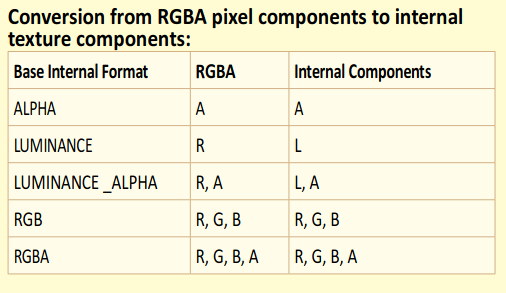
GL_LUMINANCE instead of GL_APLHA for the format and internal format. The OpenGL ES2.0 reference card states that the red channel is used to access the data in this format, which will ensure compatibility with godot shaders written for the GLES3 backend, and not break expectations for users who aren't already working around the current behavior. It won't draw the same pure-red gradient that the GLES3 backend might, but it will give more expected behavior for shader code.
https://www.khronos.org/opengles/sdk/docs/reference_cards/OpenGL-ES-2_0-Reference-card.pdf


Godot version: v3.2.1.stable.official, though relevant code appears to be the same in master
OS/device including version:
Issue description: Using
Image.FORMAT_R8in GLES3 correctly producesImageTextures that have your given data in the Red channel. In GLES2, the data is not in the Red channel but the Alpha channel, breaking compatibility between the two backends and also breaking expectations.The documentation does not specify this behavior which can cause confusion.
Relevant GLES3 code:
godot/servers/rendering/rasterizer_rd/rasterizer_storage_rd.cpp
Lines 56 to 61 in 00949f0
Relevant GLES2 code:
godot/drivers/gles2/rasterizer_storage_gles2.cpp
Lines 156 to 158 in 00949f0
Relevant documentation: https://github.com/godotengine/godot/blob/master/doc/classes/Image.xml#L506-L507
Steps to reproduce: Create an
Imagewith formatImage.FORMAT_R8, add data to it either by drawing pixels or supplying it with an existingPoolByteArray, create anImageTexturefrom thatImageand draw it.Minimal reproduction project:
Make a scene based off a Control, add a TextureRect as a child with the following script:
Proposed fixes:
Image.FORMAT_R8will store data in the Alpha channel in GLES2.GL_LUMINANCEinstead ofGL_APLHAfor the format and internal format. The OpenGL ES2.0 reference card states that the red channel is used to access the data in this format, which will ensure compatibility with godot shaders written for the GLES3 backend, and not break expectations for users who aren't already working around the current behavior. It won't draw the same pure-red gradient that the GLES3 backend might, but it will give more expected behavior for shader code.https://www.khronos.org/opengles/sdk/docs/reference_cards/OpenGL-ES-2_0-Reference-card.pdf