An Edge AI–driven OCR system that accurately extracts text from both printed and handwritten documents, auto-fills digital forms, and verifies the extracted data — all while running fully offline.
Optimized for edge and low-resource devices, this solution ensures accessibility and performance even in rural or low-connectivity areas, enabling robust and reliable document automation anywhere.
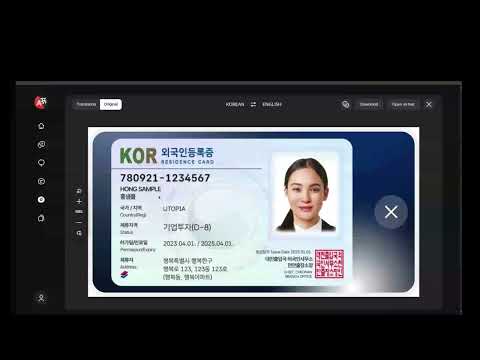
- Problem Statement
- Key Features
- Tech Stack
- System Architecture
- Challenges and Solutions
- Getting Started
- API Documentation
- CI/CD Pipeline and MOSIP Alignment
Manual text extraction and verification from documents such as ID cards, certificates, and forms is slow, error-prone, and labor-intensive.
Traditional OCR systems often rely on cloud APIs, limiting accessibility in offline or rural setups.
Our solution replaces this with an AI-powered pipeline capable of intelligently detecting, recognizing, mapping, and verifying text fields locally, ensuring high accuracy, privacy, and speed — even on entry-level hardware.
- Upload any image or PDF for automated OCR extraction within seconds.
- Uses CRAFT for text detection and TrOCR for text recognition (printed + handwritten).
- A custom classifier decides dynamically which TrOCR model (printed or handwritten) to use per region.
- Automatic language detection ensures the right TrOCR or multilingual model is used.
- Supports English, Arabic, Korean, and other supported scripts.
- Field-by-field comparison between extracted data and submitted values.
- Each field receives:
matchstatus (MATCH / MISMATCH)confidencescore (0–1 scale)statusflag for quick review.
- Bounding boxes drawn on recognized text regions.
- Each box labeled with recognized text and confidence level.
- Returned as a base64-encoded annotated image for instant display.
- Handles multi-page PDFs in sequence.
- Supports real-time OCR from camera feeds.
- Uses Gemma2:2B via Ollama for local, offline mapping from OCR text → structured fields (e.g. Name, DOB, ID No.).
- Ensures privacy, no external API calls.
- Runs seamlessly on standard laptops or edge devices without GPU.
- Fully Dockerized for easy deployment and portability.
| Component | Description |
|---|---|
| Framework | FastAPI (Python 3.10+) |
| OCR Detection | CRAFT – Text detection network |
| OCR Recognition | TrOCR – Transformer-based OCR (Printed + Handwritten) |
| LLM Parser | Gemma2 (via Ollama) – Offline intelligent field extraction |
| Verification | SequenceMatcher – String similarity for accuracy scoring |
| Component | Description |
|---|---|
| Interface | HTML + CSS + JS |
| Visualization | Confidence overlay and annotation viewer |
| Hosting | Static via FastAPI /demo/index.html endpoint or any web server |
| Tool | Purpose |
|---|---|
| Docker | Full backend containerization |
| DockerHub | Image repository for deployment |
| Jenkins | CI/CD automation for build + push pipeline |
| Render / Vercel | Hosting for backend (FastAPI) and UI |

- Python 3.10+
- Docker (optional) for container deployment
- Ollama installed locally (for Gemma2)
- Git
git clone https://github.com/gouravanirudh05/OCR_Recognition
cd OCR_Recognition
python3 -m venv venv
source venv/bin/activate
pip install -r requirements.txtollama serve
ollama pull gemma2:2b
uvicorn app.main:app --reloaddocker build -t ocr_recognition:latest .
docker run -p 8000:8000 ocr_recognition:latestAccess at: http://127.0.0.1:8000
POST /ocr_form
| Field | Type | Description |
|---|---|---|
file |
File | Image or PDF |
fields |
String | Comma-separated field names |
lang |
String | Optional (default: auto) |
curl -X POST "http://localhost:8000/ocr_form" \
  -F "file=@document.pdf" \
  -F "fields=Name,Date,Signature" \
  -F "lang=english"
Response Example:
{
  "pages": 3,
  "requested_fields": ["Name", "Date", "Signature"],
  "recognized_texts": ["all", "text", "from", "all", "pages"],
  "structured_output": {
    "Name": "Jane Smith",
    "Date": "2024-12-13",
    "Signature": "Jane Smith"
  },
  "annotated_images": [
    {
      "page": 0,
      "image": "base64_encoded_string"
    },
    {
      "page": 1,
      "image": "base64_encoded_string"
    }
  ],
  "detections": [
    {
      "page": 0,
      "detections": [
        {
          "box": [[x1, y1], [x2, y2], [x3, y3], [x4, y4]],
          "text": "detected text",
          "confidence": 0.92
        }
      ]
    }
  ]
}
POST /verify_form
| Field | Type | Description |
|---|---|---|
file |
File | Input document |
form_data |
JSON | Fields submitted by user |
lang |
String | Optional language |
curl -X POST "http://localhost:8000/verify_form" \
  -F "file=@signed_form.pdf" \
  -F 'form_data={"Name":"John Doe","Email":"john@email.com"}' \
  -F "lang=english"
Response Example:
{
  "fields_verified": 2,
  "verification_results": {
    "Name": {
      "submitted_value": "John Doe",
      "extracted_value": "John Doe",
      "match": true,
      "confidence": 1.0,
      "status": "MATCH"
    },
    "Email": {
      "submitted_value": "john@email.com",
      "extracted_value": "john@gmail.com",
      "match": false,
      "confidence": 0.82,
      "status": "MISMATCH"
    }
  }
}
| Challenge | Solution |
|---|---|
| Printed vs Handwritten OCR | Integrated a classifier to choose between TrOCR models dynamically. |
| Blurred / Tilted Images | Added adaptive preprocessing (contrast enhancement, deskew). |
| Offline Execution | Embedded Ollama for local LLM inference. |
| Low-end Hardware Support | Reduced dependency footprint, optimized model loading. |
The entire system is integrated into a Jenkins-based CI/CD pipeline:
- Code Push to GitHub triggers Jenkins.
- Jenkinsfile automates:
- Building Docker image (
ocr_recognition:latest). - Running linting & unit tests.
- Logging in to DockerHub.
- Pushing the latest image (
gouravanirudh/ocr_recognition:latest).
- Building Docker image (
- Deployment stage automatically updates the backend on Render or any edge node.
This ensures:
- Consistent builds across all environments.
- Rapid deployment and rollback support.
- Easy scaling to multiple offline or semi-connected nodes.
This solution directly aligns with MOSIP’s mission of enabling inclusive, secure, and privacy-preserving digital identity ecosystems, by:
- Ensuring offline-first, edge-ready infrastructure for identity and document processing.
- Supporting low-resource environments — crucial for rural digital adoption.
- Providing open, interoperable AI modules deployable across MOSIP-integrated systems.
- Upholding data sovereignty & privacy, as all OCR + LLM inference happens locally without cloud dependence.
In essence, this project embodies MOSIP’s core philosophy: “Digital inclusion through open, secure, and accessible technology.”
- Gourav Anirudh
- Pramatha Rao