Releases: grokability/snipe-it
v4.6.1

New in v4.6.1
This is a bug fix release that handles a few issues with login, custom fields and consumables.
IMPORTANT: This will be one of the final releases of Snipe-IT that will work with PHP5. Future versions of Snipe-IT will require PHP 7.1.3 or greater. Please start upgrading your versions of PHP to 7.1.3 to prepare for the next release. There may be a few small bug fix releases before Snipe-IT v5, but you should start preparing now.
Fixed:
- Fixed #5894 - lookup by asset tag in top search broken
- Fixed #5895 - wrong date validation in maintenances
- Fixed #5893 - activated typo
- Fixed - checkin_email does not exist on consumable. (#5891)
- Partial fix for #5896 - custom fields regex not saving correctly
Upgrading
For general upgrading instructions, click here. Users who installed Snipe-IT via Git (recommended) can just run php upgrade.php.
For a full list of changes, see the changelog.
Known Issues
Users running MariaDB 10.2.7 and later may have an issue upgrading or installing, due to a change in the way MariaDB stores null defaults. This issue will be fixed once the open pull request in the Doctrine repo is merged and a new version of Doctrine is released with these fixes. You can read more about that issue here.
After completing the upgrade process below, be sure to clear your browser cookies.
Upgrading from v3
Please see the upgrade instructions here.
v4.6.0
New in v4.6.0
This release fixes a few regression issues from the last few releases related to checkin/checkout email notifications and assets pending acceptance.
We also discovered and fixed an issue with authorization gates that would erroneously display a "checkin" button for license seats that were not actually checked out if a non-admin user had a particular set of granular permissions. Clicking on that "checkin" button would result in a "whoops" error, since it was trying to checkin an asset that wasn't checked out in the first place.
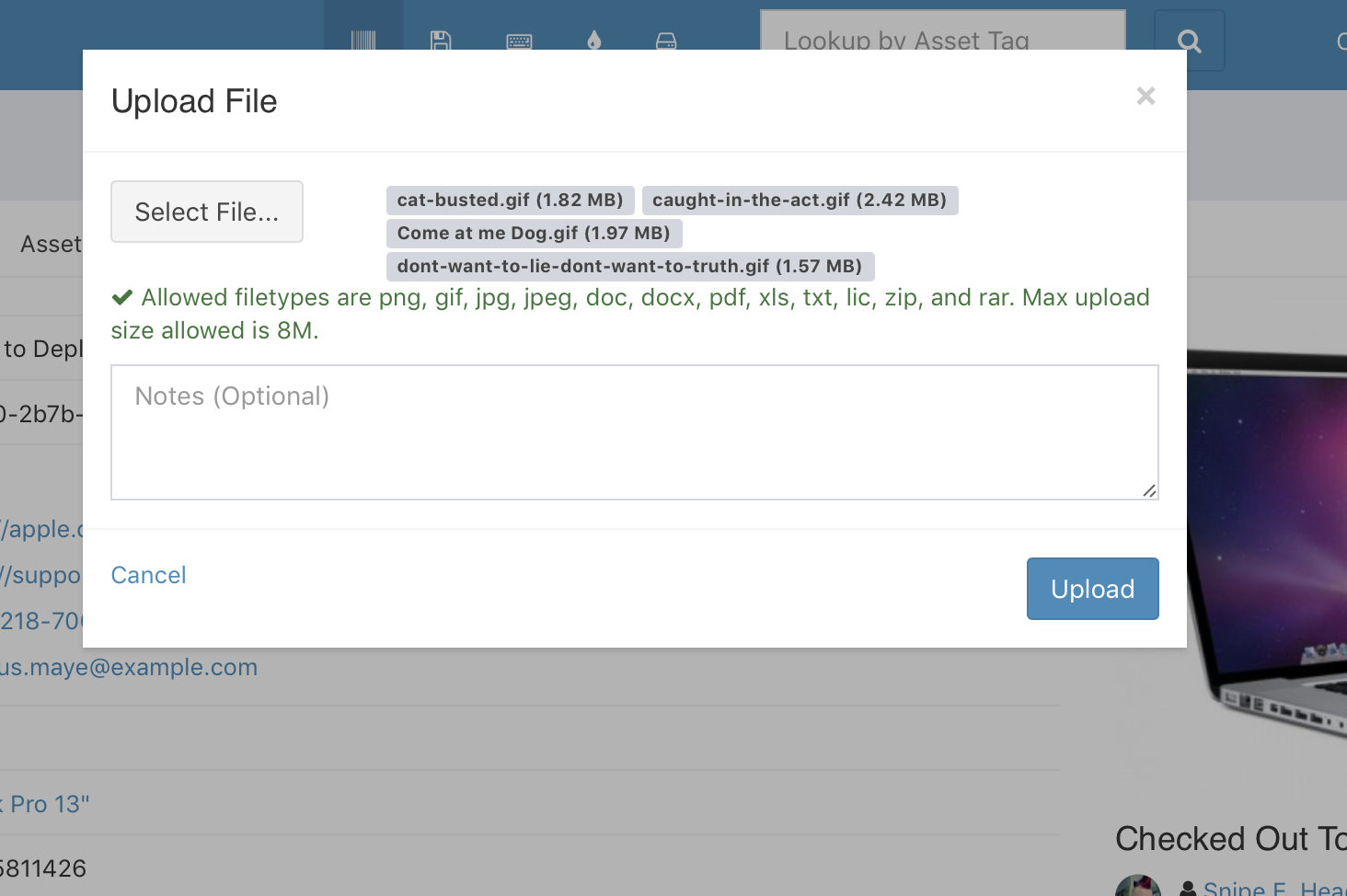
We've added a nicer UI on the asset and license file upload interface as well, which will now show you the names of the files you're uploading.
A new logging table has been added to track login attempts (successful and unsuccessful), although there isn't a UI that exposes that just yet. (Next release.)
And finally, we've cleaned up the Low Inventory email report and the Expiring Assets email report. Behold, the before and after!
Old


New


IMPORTANT: This will be one of the final releases of Snipe-IT that will work with PHP5. Future versions of Snipe-IT will require PHP 7.1.3 or greater. Please start upgrading your versions of PHP to 7.1.3 to prepare for the next release. There may be a few small bug fix releases before Snipe-IT v5, but you should start preparing now.
Added:
- Added #5859 - added file name/size to file upload UI
- Added (unofficial) support for PgSQL
- Added #5842 - added components to location detail view
- Added login attempt logging
- Add DB port number to docker configs
Fixed:
- Fixed issue where you could not check out to a user/location with the same ID as the asset.
- Fixed regression #5470: Checkin emails not working
- Fixed regression #5772: Assets requiring acceptance not storing pending acceptance state
- Fixed #5591 - Removes setting the encryption status on custom field update
- Fixed activated flag check for login
- Fixed issue with License gate for non-admins
- Fixed issue with Location gate for non-admins
Improved:
- Refactored and cleaned up old code
- Removed old unused helpers
- Removed the unused bulk operations for components
- Nicer email notifications for low inventory report and expiring licenses/assets report
Upgrading
For general upgrading instructions, click here. Users who installed Snipe-IT via Git (recommended) can just run php upgrade.php.
For a full list of changes, see the changelog.
Known Issues
Users running MariaDB 10.2.7 and later may have an issue upgrading or installing, due to a change in the way MariaDB stores null defaults. This issue will be fixed once the open pull request in the Doctrine repo is merged and a new version of Doctrine is released with these fixes. You can read more about that issue here.
After completing the upgrade process below, be sure to clear your browser cookies.
Upgrading from v3
Please see the upgrade instructions here.
v4.5.0
New in v4.5.0
IMPORTANT: This will be one of the final releases of Snipe-IT that will work with PHP5. Future versions of Snipe-IT will require PHP 7.1.3 or greater. Please start upgrading your versions of PHP to 7.1.3 to prepare for the next release. There may be a few small bug fix releases before Snipe-IT v5, but you should start preparing now.
Added:
- Use custom header color in emails
- Added notes field to acessories and consumable checkout pages
- Added created_at to file upload UI, added header/footer to files modals
- Added #5354 - adds dd/mm/yyyy to localization
- Added Ubuntu Bionic Beaver 18.04 support (#5687)
- Make version footer configurable. (#5730)
- Set composer timeout to 3000 - this should resolve issues with downloading psyh/psyh on slow connections
- Added textarea as a custom field type
- Added logo class for logo override in custom CSS on login page
- Added method to get info on the current user of the API (#5722)
- Added #5751 - added option for unique constraint on serial
Fixed:
- Added last name to expected checkin notification
- Force default storage engine (this should fix weird indexing issues on versions of mysql that inexplicably still have MyISAM set as the default storage engine type)
- Fixed #5617 - incorrect url to fieldset editing
- Fixed #5616 - removed duplicate call to ekkoLightbox on asset view
- Fixed oauth issue in Docker
- Fixed #5172 - autosum on assets detail view for components tab
- Fixed #5693 - don’t truncate license key
- Fixed inconsistent or incorrect comment labels
- Fixed the alignment of a couple navbar icons (#5764)
- Fixed broken pagination on status labels API
- Fixed bug where software categories did not check to see if they had licenses in them before deleting
- Fixed #5742 - create_function() is deprecated
- Fixed bug in branding image upload size text
- Small UI fixes
- Misc Docker improvements/fixes
Added Documentation:
- Documentation for Auditing via the API
Upgrading
For general upgrading instructions, click here. Users who installed Snipe-IT via Git (recommended) can just run php upgrade.php.
For a full list of changes, see the changelog.
Known Issues
Users running MariaDB 10.2.7 and later may have an issue upgrading or installing, due to a change in the way MariaDB stores null defaults. This issue will be fixed once the open pull request in the Doctrine repo is merged and a new version of Doctrine is released with these fixes. You can read more about that issue here.
After completing the upgrade process below, be sure to clear your browser cookies.
Upgrading from v3
Please see the upgrade instructions here.
v4.4.1
New in v4.4.1
IMPORTANT: This will be one of the final releases of Snipe-IT that will work with PHP5. Future versions of Snipe-IT will require PHP 7.1.3 or greater. Please start upgrading your versions of PHP to 7.1.3 to prepare for the next release. There may be a few small bug fix releases before Snipe-IT v5, but you should start preparing now.
This release contains a single small bugfix that addresses an issue where the new (v.4.4.0) expected checkin alerts were not checking for more than 0 results before firing the email. This means that if you had no checkins coming due on your assets, you'd still get the expected checkin alert, but with no assets listed.
Fixed:
- Check for assets > 0 before firing expected checkin alerts notification
Upgrading
For general upgrading instructions, click here. Users who installed Snipe-IT via Git (recommended) can just run php upgrade.php.
For a full list of changes, see the changelog.
Known Issues
Users running MariaDB 10.2.7 and later may have an issue upgrading or installing, due to a change in the way MariaDB stores null defaults. This issue will be fixed once the open pull request in the Doctrine repo is merged and a new version of Doctrine is released with these fixes. You can read more about that issue here.
After completing the upgrade process below, be sure to clear your browser cookies.
Upgrading from v3
Please see the upgrade instructions here.
v4.4.0
New in v4.4.0
IMPORTANT: This will be one of the final releases of Snipe-IT that will work with PHP5. Future versions of Snipe-IT will require PHP 7.1.3 or greater. Please start upgrading your versions of PHP to 7.1.3 to prepare for the next release. There may be a few small bug fix releases before Snipe-IT v5, but you should start preparing now.
This release contains several bug fixes, including one that could impact users with a large number of assets and/or log entries in the action_logs table, slowing things down quite a bit.
Note: In order to apply the de-normalization migration, we have to walk through each of your assets in the assets table. This means your migrations might take a little longer than usual. It's nothing to worry about, and that migration only needs to be run once.
We've also added category support for licenses, something folks have been asking for for a while. Email notifications will follow the same category-based rules for licenses as they do for other items in Snipe-IT.
New:
- Added license categories
- Include EULA/acceptance in license interfaces
- Added admin alert on expected checkins
- Added #5477 - added GDPR privacy policy link in email and webpage
- Added #5491 - added default location filter for custom report
- Added more flexible date range in datepicker for expected checkin filter
- Added orange bar for required asset to edit blade for asset maintenance
Fixed:
- Fixed advanced search on model number
- Fixed #5472 - show_in_email for custom fields missing in edit field UI
- Fixed #5482 - typo in custom fields info
- Fixed another php7.2 count issue
- Fixed dashboard issue that broke category breakdown table scrolling
- Fixed slack notification error if location is not set on checkin
- Fixed #5500 - present() on correct location value in custom report
- Fixed #5501 - regression disallowing license files to be downloaded
- Fixed padding on next page with Chrome. (#5509)
- Fixed speed issue with new counters from v4.2.0 - De-normalize new counters from 4.3.0 (#5547)
- Fixed category tests
API
- Added
licenses_countin Categories API result payload - Added
categoryJSON object in Licenses API
Documentation
- Added documentation on the Asset Counter Sync cli tool.
Upgrading
For general upgrading instructions, click here. Users who installed Snipe-IT via Git (recommended) can just run php upgrade.php.
For a full list of changes, see the changelog.
Known Issues
If your MySQL defaults to MyISAM as a storage engine (which it shouldn't, since InnoDB has been the default since MySQL 5.6), you may have to run the following on your database before running migrations:
ALTER TABLE action_logs ENGINE = InnoDB
ALTER TABLE assets ENGINE = InnoDB
If you get a max key length error during migrations, you need to run the above commands.
Users running MariaDB 10.2.7 and later may have an issue upgrading or installing, due to a change in the way MariaDB stores null defaults. This issue will be fixed once the open pull request in the Doctrine repo is merged and a new version of Doctrine is released with these fixes. You can read more about that issue here.
After completing the upgrade process below, be sure to clear your browser cookies.
Upgrading from v3
Please see the upgrade instructions here.
v4.3.0
New in v4.3.0
IMPORTANT: This will be the final release of Snipe-IT that will work with PHP5. Future versions of Snipe-IT will require PHP 7.1.3 or greater. Please start upgrading your versions of PHP to 7.1.3 to prepare for the next release.
Introducing brand new notifications for several emails that look nicer, but more importantly now support including optional custom fields.

New:
- Added API calls to look up assets by tag and serial
- Added the backup env flag to the
example.env - Added location address to custom asset report export
- Added setting to include images in email notifications (useful for folks using Snipe-IT behind a closed network, where images won't load if the recipient isn't on the network at the time.)
- Added title field in Asset Maintenances list/filter/export
- Added count of checkins, checkouts, requests (#5314)
- Added department to custom asset export
- Added custom fields default values (#5389)
- Added Bulk Checkout to Assets and Location (#5385)
- Added #4301 - added image upload to audit
Fixed:
- Fixed broken action buttons on asset view maintenances tab
- Fixed component checkout bug
- Fixed #5279 - [regression] edit button not appearing in asset view
- Fixed #5266 - small scroll window for EULA accept screen
- Fixed #5319 - signature pad too small on mobile
- Fixed #5338 - mark required setup fields during setup (#5359)
- Fixed #5393 - added notes to suppliers API (#5400)
- Fixed #5410 - missing subject string for license delivery
- Fixed #5422 - remove extension ending from uploaded file name
- Fixed #5423 - removed required text on preflight
- Fixed advanced search on supplier, count for PHP7.2
- Fixed wrong users index route name (only triggered in failed LDAP attempt)
- Fixed incorrect gate for “new” button for status labels on asset create
- Fixed #5431 - category widget error on dashboard
Improvements
- Improved notifications to use nicer email templates
- Use Bootstrap Tables on custom fields screens for column selector
Documentation:
Upgrading
For general upgrading instructions, click here. Users who installed Snipe-IT via Git (recommended) can just run php upgrade.php.
For a full list of changes, see the changelog.
Known Issues
Users running MariaDB 10.2.7 and later may have an issue upgrading or installing, due to a change in the way MariaDB stores null defaults. This issue will be fixed once the open pull request in the Doctrine repo is merged and a new version of Doctrine is released with these fixes. You can read more about that issue here.
After completing the upgrade process below, be sure to clear your browser cookies.
Upgrading from v3
Please see the upgrade instructions here.
v4.2.0
New in v4.2.0
Lots of small bug fixes this time around, along with a few exciting but nascent features: themes and REMOTE_USER authentication.
We've made some improvements to the way the importer handles files with weird line endings and also how it handles duplicate header columns. (Previously it used to blow up, now it tells you which header is duplicated.)
New:
- Partial fix for #2892 - Added export for license seat assignments
- Added roave security-advisories to composer
- Added Slack test button to admin
- Added ability to backup the .env if
BACKUP_ENVis set to true - Added basic theme selector with a few basic color schemes
- Added #2402 - ability to restore manufacturers
- Added #5151 - asset tag to maintenances listing display
- Added #5150 - lastname first initial as username format
- Added #5138 - added default_label flag to status labels for easier ordering
- Added #5160 - make field_values readable via custom fields API
- Added - BETA Authentication via REMOTE_USER (#5142) - Needs docs
- Added - make accessory manufacturer field searchable
- Added - catch duplicate headers in the importer UI instead of crashing (#5244)
- Added - Sample CSVs with bad headers
Fixed:
- Fixed #5067 - account for only one name in generateFormattedNameFromFullName()
- Fixed incorrect component not found string
- Fixed #5084 - min supplier name length is now 1
- Fixed assets checked out to assets listing table
- Fixed 2FA reset button
- Fixed
viewKeyspermission check on Asset page (#5141) - Fixed #5110 - crash on accessory checkin missing last_name
- Fixed incorrect settings HTML
- Fixed #5078 - check for object or array as location in LDAP sync
- Fixed #5168 - users without superadmin could not see custom fields UI even if granted
- Fixed asset model permission not granted for edit
- Fixed - Support
\r-terminated files better from the Importer (#5184) - Fixed #5217 - permissions error with importer for non-admins
- Fixed - Removed e() from array_smart_custom_field_fetch which may have resulted in encoded/unencoded mismatch causing duplicate entries to be created
- Fixed #5186 - placeholder notification being sent on checkin
- Fixed #5186 - email being sent to admin as well as user on checkout
Documentation:
- Added Importer troubleshooting help
- Updated IIS documentation to reflect Handler Mapping requirement
Upgrading
If you use the backup tool and would like to backup your .env file as well, you'll want to set BACKUP_ENV=true.
For general upgrading instructions, click here. Users who installed Snipe-IT via Git (recommended) can just run php upgrade.php.
For a full list of changes, see the changelog.
Known Issues
Users running MariaDB 10.2.7 and later may have an issue upgrading or installing, due to a change in the way MariaDB stores null defaults. This issue will be fixed once the open pull request in the Doctrine repo is merged and a new version of Doctrine is released with these fixes. You can read more about that issue here.
After completing the upgrade process below, be sure to clear your browser cookies.
Upgrading from v3
Please see the upgrade instructions here.
v4.1.14
New in v4.1.14
Another small release that tightens up the UX a little.
New:
- Added - alerting in custom fields if it looks like the db_column and real column name do not match
- Added - make total sortable in components
- Added qty to sorting in components
Fixed:
- Fixed gates for auditing
- Fixed regression from 4.1.11 - Added sum footer back into accessories
- Fixed regression from 4.1.11 - removed extra components table
- Importer name/full name fixes.
Upgrading
For general upgrading instructions, click here. Users who installed Snipe-IT via Git (recommended) can just run php upgrade.php.
For a full list of changes, see the changelog.
Known Issues
Users running MariaDB 10.2.7 and later may have an issue upgrading or installing, due to a change in the way MariaDB stores null defaults. This issue will be fixed once the open pull request in the Doctrine repo is merged and a new version of Doctrine is released with these fixes. You can read more about that issue here.
After completing the upgrade process below, be sure to clear your browser cookies.
Upgrading from v3
Please see the upgrade instructions here.
v4.1.13
New in v4.1.13
This is a small release to add some useful additional sorting on the locations and status labels page, and to fix a small issue that would occur one some listing pages if there was no default page size set.
New:
- Added - Order location by manager
- Added - sort by color on status labels
Fixed:
- Fixed - better handle admin routes when user is not logged in
- Fixed issue where bootstrap tables didn’t use a default page size
Documentation:
- Added more Google Maps API info
Upgrading
For general upgrading instructions, click here. Users who installed Snipe-IT via Git (recommended) can just run php upgrade.php.
For a full list of changes, see the changelog.
Known Issues
Users running MariaDB 10.2.7 and later may have an issue upgrading or installing, due to a change in the way MariaDB stores null defaults. This issue will be fixed once the open pull request in the Doctrine repo is merged and a new version of Doctrine is released with these fixes. You can read more about that issue here.
After completing the upgrade process below, be sure to clear your browser cookies.
Upgrading from v3
Please see the upgrade instructions here.
v4.1.12
New in v4.1.12
This is a quick bug fix release to handle location search when using table prefixes, and also to fix an odd bug that would prevent the per-page selector from loading if you had 10 items per page set previously.
Fixed:
- Fixed bootstrap table issue if per page was set to 10
- Fixed - missing table prefix for location parent search
Upgrading
For general upgrading instructions, click here. Users who installed Snipe-IT via Git (recommended) can just run php upgrade.php.
For a full list of changes, see the changelog.
Known Issues
Users running MariaDB 10.2.7 and later may have an issue upgrading or installing, due to a change in the way MariaDB stores null defaults. This issue will be fixed once the open pull request in the Doctrine repo is merged and a new version of Doctrine is released with these fixes. You can read more about that issue here.
After completing the upgrade process below, be sure to clear your browser cookies.
Upgrading from v3
Please see the upgrade instructions here.