Releases: grokability/snipe-it
v4.1.11

New in v4.1.11
This release fixed a number of bugs, and adds a few new bells and whistles.
Admins now have the ability to add custom footer text and hide user’s manual/support.

Additionally, we now have a much nicer UI for image uploads, featuring an image preview, and a size limitations based on the server's php.ini settings.
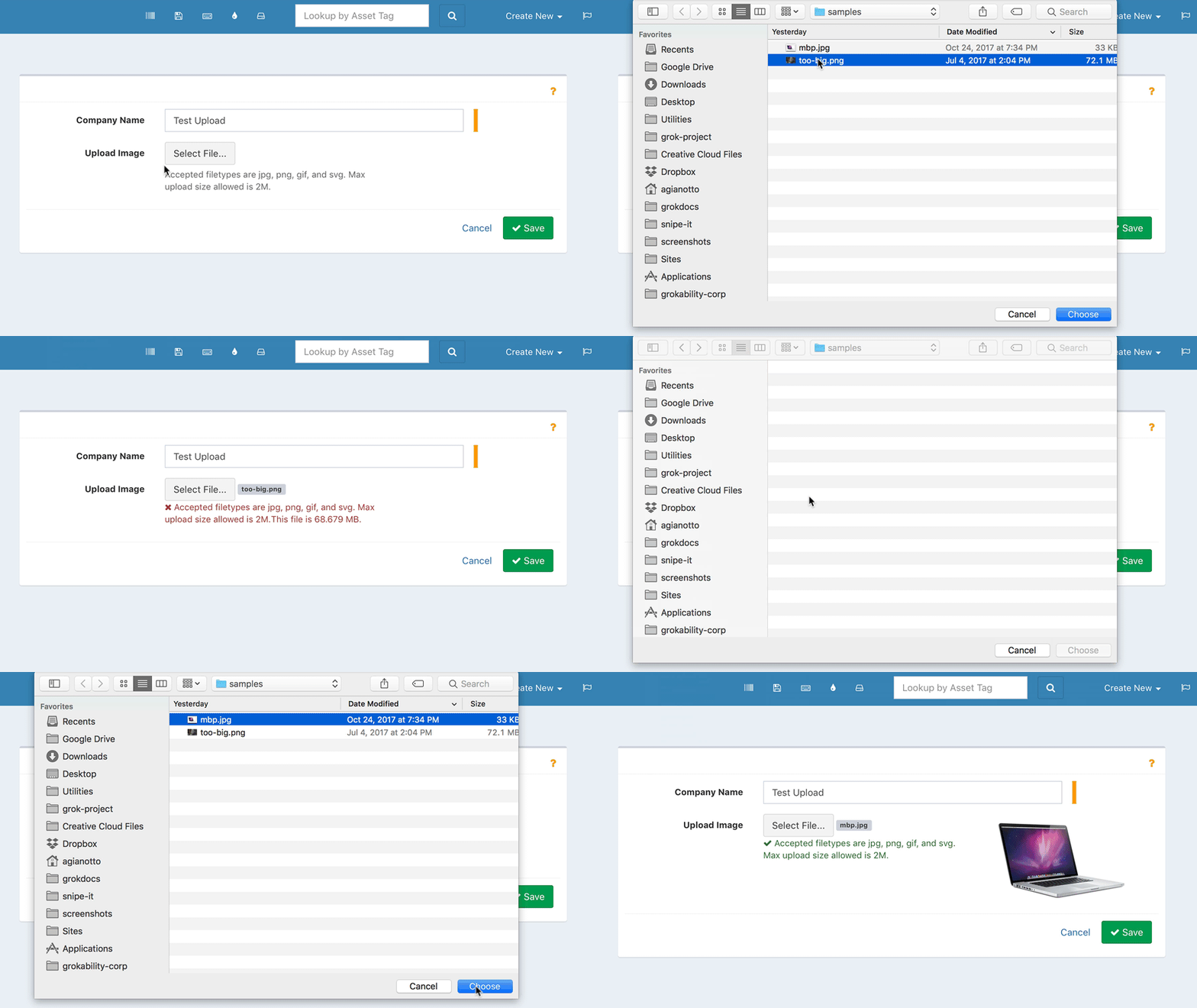
And finally, admins can now set what level of detail is shown in the asset models dropdown across Snipe-IT.

New
- Added #4881 - API endpoint for (dis)associating fields with fieldsets
- Added
--base_dn optionto LdapSync command. - Added ability to change actual location from bulk edit assets
- Added ability to add custom footer text, hide user’s manual/support…
- Added #4879 - setting to choose what appears in model select list
- Added departments to user export
- Added - Deep linking in Bootstrap tabs
- Added
firstname_lastnameas possible username format - Added #5037 - use line breaks in notes in table view
- Added image preview for uploads
Fixed:
- Fixed #4868 - Reset the item between rows of import to avoid stale data.
- Fixed #4882 - Allow manager_id to be fillable in API
- Fixed - Hide mfg button if no permissions to create
- Fixed #4875 - bug with labels in different languages
- Fixed #4858 - bug in bulk editing users (wrong params for id count)
- Fixed #4876 - Added qty to asset components
- Fixed #4899 - sorting in user history
- Fixed crash in edge cases where an asset has no model
- Fixed - Only use location currency if it's actually set. (#4904)
- Fixed upload images problem with Docker (#4906)
- Fixed #4902 - include last name in checkin email
- Fixed #5014 - cookie issue where visible asset columns would reset on logout
- Fixed: Disabling the event dispatcher broke model validation.
- Fixed #4872 - Check for assigned in depreciation table
- Fixed - Do not try to show depreciation report if no depreciations are set up
- Fixed #4952 - ignore show_archived setting when drilling down into specific status ID
- Fixed #4938 - default sort order
- Fixed sort ordering on dashboard
- Fixed #4951 - updating asset location in bulk edit
- Fixed #4988 - incorrect variable name in asset checkout API method
- Fixed #4923 - invalid check for location object in Ldap Sync
- Fixed issue where group with no permissions would crash view page
- Fixed method to generate usernames from full names
- Fixed #4668 - wrong gate on manufacturer save
- Fixed #5033 - use PHP’s max filesize for image uploads
- Fixed #5044 - incorrect env values for SSL DB paths
- Fixed #5027 - remove link to non-existant reports index page
- Fixed #4321 - incorrect next audit date if asset override
Documentation Updates
- Improved Common Issues page
- Added Common Installation/Upgrade Issues page
- Moved documentation on the LDAP Sync command line tool to its own page
Upgrading
For general upgrading instructions, click here. Users who installed Snipe-IT via Git (recommended) can just run php upgrade.php.
For a full list of changes, see the changelog.
Known Issues
Users running MariaDB 10.2.7 and later may have an issue upgrading or installing, due to a change in the way MariaDB stores null defaults. This issue will be fixed once the open pull request in the Doctrine repo is merged and a new version of Doctrine is released with these fixes. You can read more about that issue here.
After completing the upgrade process below, be sure to clear your browser cookies.
Upgrading from v3
Please see the upgrade instructions here.
v4.1.10
New in v4.1.10
Lots of little fixes and improvements in this release. One of the most significant changes affects the way we handle the display of status labels.
Previously, if an asset was in a deployable state and was assigned, it would be marked as "Deployed", regardless of status label. Now, we show you the asset status name, and mark deployed assets with a "deployed" label.
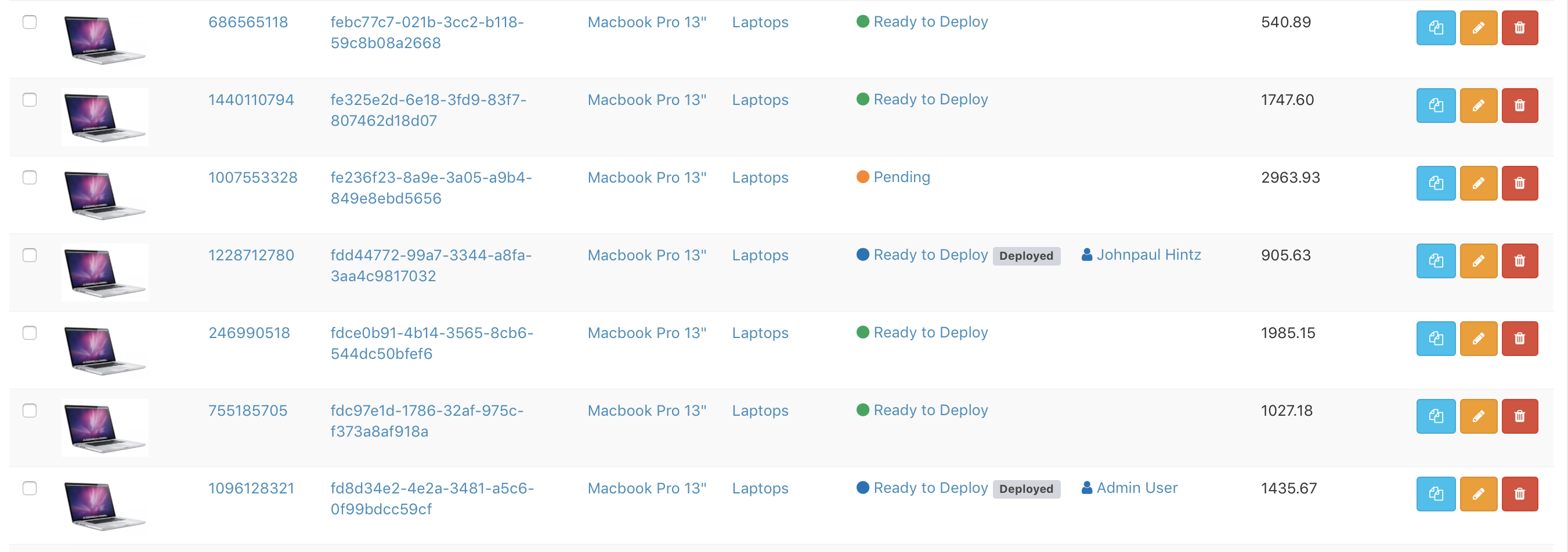
Hopefully this will be a step in the right direction to handle user confusion around status labels.
Here's more details on what's new in v4.1.10. If you're using the API, be sure to check the API Changes section below.
New
- Added auto increment through the API
- Added language update in user bulk edit
- Added #4774 - show assets assigned to assets in asset view
- Added new seats API route
- Added license seat location method
- Added sortable counts in mfg sorting
- Added ability to sort by asset count in models
- Added user group membership to user view page
- Added - display asset model category on hardware view page
- Added #4829 - add custom fields api (#4840)
- Added additional options in setup Quickstart
- Added #4768 - dashboard message option to settings
- Added #4821 - add username to user selection dropdown
- Added #4837 - link phone numbers in HTML/Javascript
- Added Ukrainian to language dropdown
Fixed:
- Fixed #4817 - [BREAKING API CHANGE] - changed user API response from
firstname,lastnametofirst_name,last_name - Fixed #4663 - removed duplicate manufacturer name in selectlist
- Fixed button class on asset view
- Fixed manufacturer error on printable user page
- Fixed issue in
orWhereRawwhich causes a database error if using table prefixes - Fixed double create log on import
- Fixed #4778 - added notes to asset model view
- Fixed #4779 - show selected filename on filepicker
- Fixed Models in the asset-edit screen maintain chosen values
- Fixed #4784 (Workaround) - make changes tab always visible
- Fixed #4770 - broken licenses, etc on company view
- Fixed #4787 - don’t try to display category if it is invalid
- Fixed switchable attributes on table headers
- Fixed - Account for user’s that have been deleted in the requested list
- Fixed depreciation report not showing assigned to
- Fixed phone number update in API
- Fixed - allow changing user activated field via API
- Fixed #4844 - use input value for ids in user bulk edit
- Fixed typos in default blade that cause components to not show up for non-admins
- Fixed #4652 - asset not correctly checking out to user on creation
- Fixed - Update asset location based on user checkout in bulk checkout
- Fixed #4593 - do not require model_id to update asset custom fields via API
- Fixed Company policy to fix company deletion permission issue
- Fixed - Check for valid category before checking acceptance in checkout blade
- Fixed #4300 - Fix for illegal character type in action log
- Fixed #4820 and major overhaul for modals
- Fixed #4671 - corrected component checkin gate
- Fixed misc UI permissions elements
Improved
- Use real status label names, even if deployed
API Changes
- Fixed #4817 - [BREAKING API CHANGE] - changed user API response from
firstname,lastnametofirst_name,last_name - Added new seats API route
- Fixed phone number update in API
- Fixed - allow changing user activated field via API
- Fixed #4593 - do not require model_id to update asset custom fields via API
Upgrading
For general upgrading instructions, click here. Users who installed Snipe-IT via Git (recommended) can just run php upgrade.php.
For a full list of changes, see the changelog.
Known Issues
Users running MariaDB 10.2.7 and later may have an issue upgrading or installing, due to a change in the way MariaDB stores null defaults. This issue will be fixed once the open pull request in the Doctrine repo is merged and a new version of Doctrine is released with these fixes. You can read more about that issue here.
After completing the upgrade process below, be sure to clear your browser cookies.
Upgrading from v3
Please see the upgrade instructions here.
v4.1.9
New in v4.1.9
This is a small maintenance release, mostly to fix an issue some folks were having viewing the companies listings.
New
- Added “new” buttons for manufacturer and category in asset model create
Fixed:
- Fixed #4640 - add username to user detail
- Fixed #4647 - requestable model button not clickable
- Fixed #4639 - Issue editing/viewing companies in companies listing
Improved
- Improved handling of error when a user tries to access /register
Documentation Updates
- Added/improved code examples for several API calls
Upgrading
For general upgrading instructions, click here. Users who installed Snipe-IT via Git (recommended) can just run php upgrade.php.
For a full list of changes, see the changelog.
Known Issues
Users running MariaDB 10.2.7 and later may have an issue upgrading or installing, due to a change in the way MariaDB stores null defaults. This issue will be fixed once the open pull request in the Doctrine repo is merged and a new version of Doctrine is released with these fixes. You can read more about that issue here.
After completing the upgrade process below, be sure to clear your browser cookies.
Upgrading from v3
Please see the upgrade instructions here.
v4.1.8
New in v4.1.8
Snipe-IT v4.1.8 is here, and with it comes some custom report tweaks, a license checkout permission issue for non-superadmins, and miscellaneous UI improvements.
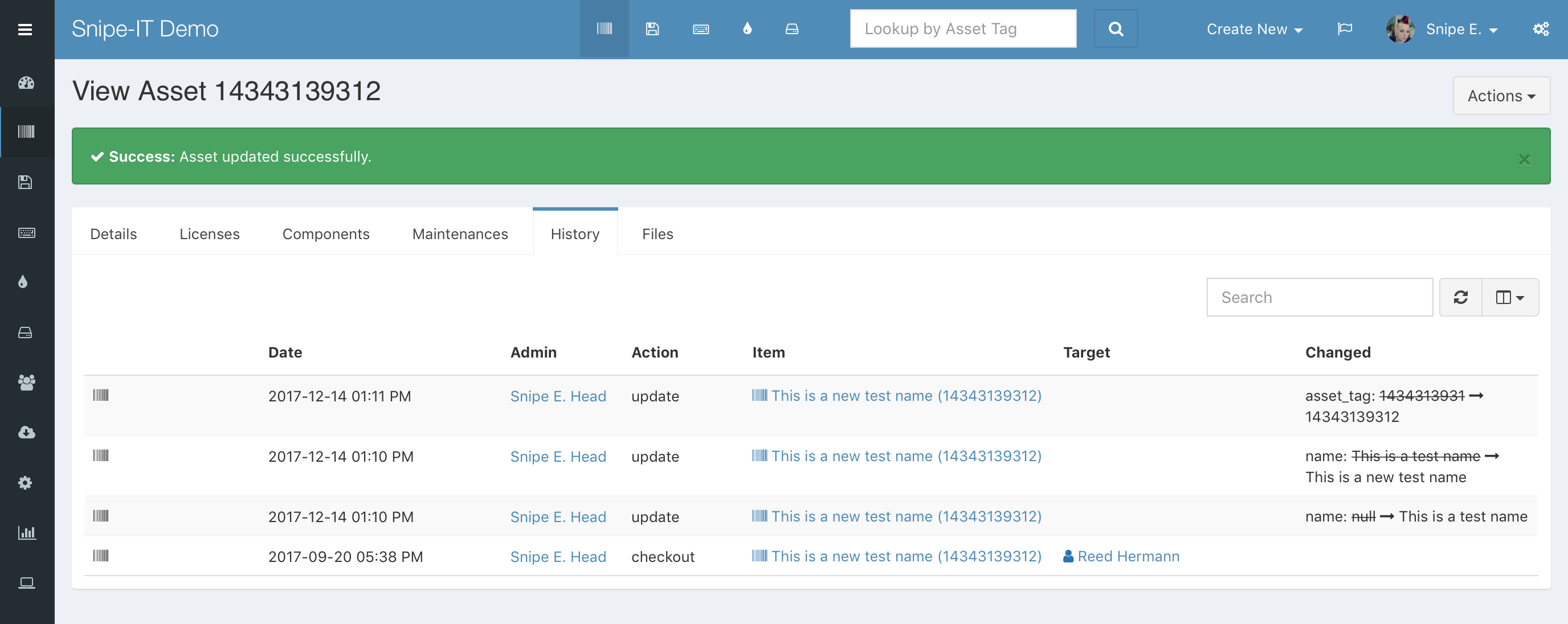
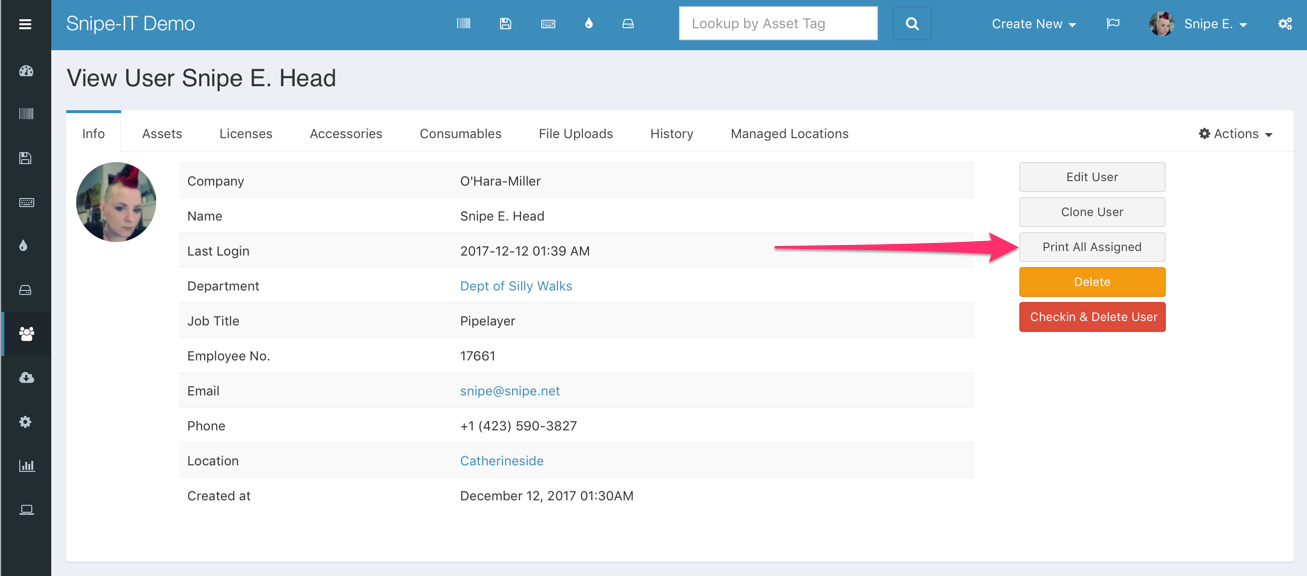
We've also added a basic change-tracking system so that you can see what fields have been changed (with their old and new value) when editing assets - and we've also added a printable inventory sheet for users. Look for more improvements on these new features moving forward!
New:
- Added #2893 - track changes on asset edits
- Added - changelog searchable in history tab
- Added - bulk asset actions to model asset listings
- Added #3416 - bulk delete asset models
- Added #2562 - print view of all assigned inventory
Fixed:
- Fixed #4557 - added missing fields in components/consumables list view
- Fixed ambiguous query on non-super admins with FCS
- Fixed EOL in custom report
- Fixed #4444 - Added EOL back into asset listing and custom report
- Fixed #4576 - licence checkout gate
- Fixed - Check for gate on license key display
- Fixed #2415 - only allow gif, png jpg, svg image uploads
- Fixed #4596 - manufacturer gate
- Fixed #2810 - checkin fix for licenses
- Fixed #4613 - Added table prefix to user search DB raw
- Fixed - Removed duplicate "delete" logaction
- Fixed - Removed duplicate log entry on asset creation
- Fixed #4589 - Licence deployed to asset issue
- Fixed namespace gate for components - related to #4282
Improved
- Improved line spacing between unstyled lists on asset view
- Improved - disallow delete through the GUI if asset model, company, manufacturers, etc have associated items
- Improved - make asset, etc totals in company listing sortable
- Improved - De-norm last audit date so we can display it in the asset listing
- Improved select/unselect all javascript for group permissions
- Updated with latest translations
- Include purchase cost column in custom report if depreciation is selected
- Removed duplicate purchase cost column in custom asset report
- Removed version from asset table cookie to persist column selections between revisions
Documentation Updates
- Updated custom fields documentation
- Added documentation on the Admin Backups
- Added/improved code examples for several API calls
Upgrading
For general upgrading instructions, click here. Users who installed Snipe-IT via Git (recommended) can just run php upgrade.php.
To use the new Google Map embed, your locations/suppliers should have a valid address, and you'll need to add GOOGLE_MAPS_API=YOUR-GOOGLE-API-KEY to your .env file. (Follow these directions to get a free Google Maps API key.)
If you get a composer error about AWS, like PHP Fatal error: Class 'Aws\Laravel\AwsServiceProvider' not found [Symfony\Component\Debug\Exception\FatalErrorException]:
- delete the files (not the directory) in
bootstrap/cache - run
composer dump-autoload - remove
config/aws.phpif it exists
For a full list of changes, see the changelog.
Known Issues
This version requires the php-curl extension library to be installed. (php-curl is in the overall requirements for Snipe-IT but you could get away with not having that extension loaded previously.) Composer install will fail if you do not have php-curl enabled, however php-curl is a common package and is most likely already installed/enabled.
Users running MariaDB 10.2.7 and later may have an issue upgrading or installing, due to a change in the way MariaDB stores null defaults. This issue will be fixed once the open pull request in the Doctrine repo is merged and a new version of Doctrine is released with these fixes. You can read more about that issue here.
After completing the upgrade process below, be sure to clear your browser cookies.
Upgrading from v3
Please see the upgrade instructions here.
v4.1.7
New in v4.1.7
This point release introduces more UI refinements, and some improvements to the Custom Asset Report, as well as the Locations and Suppliers detail views.
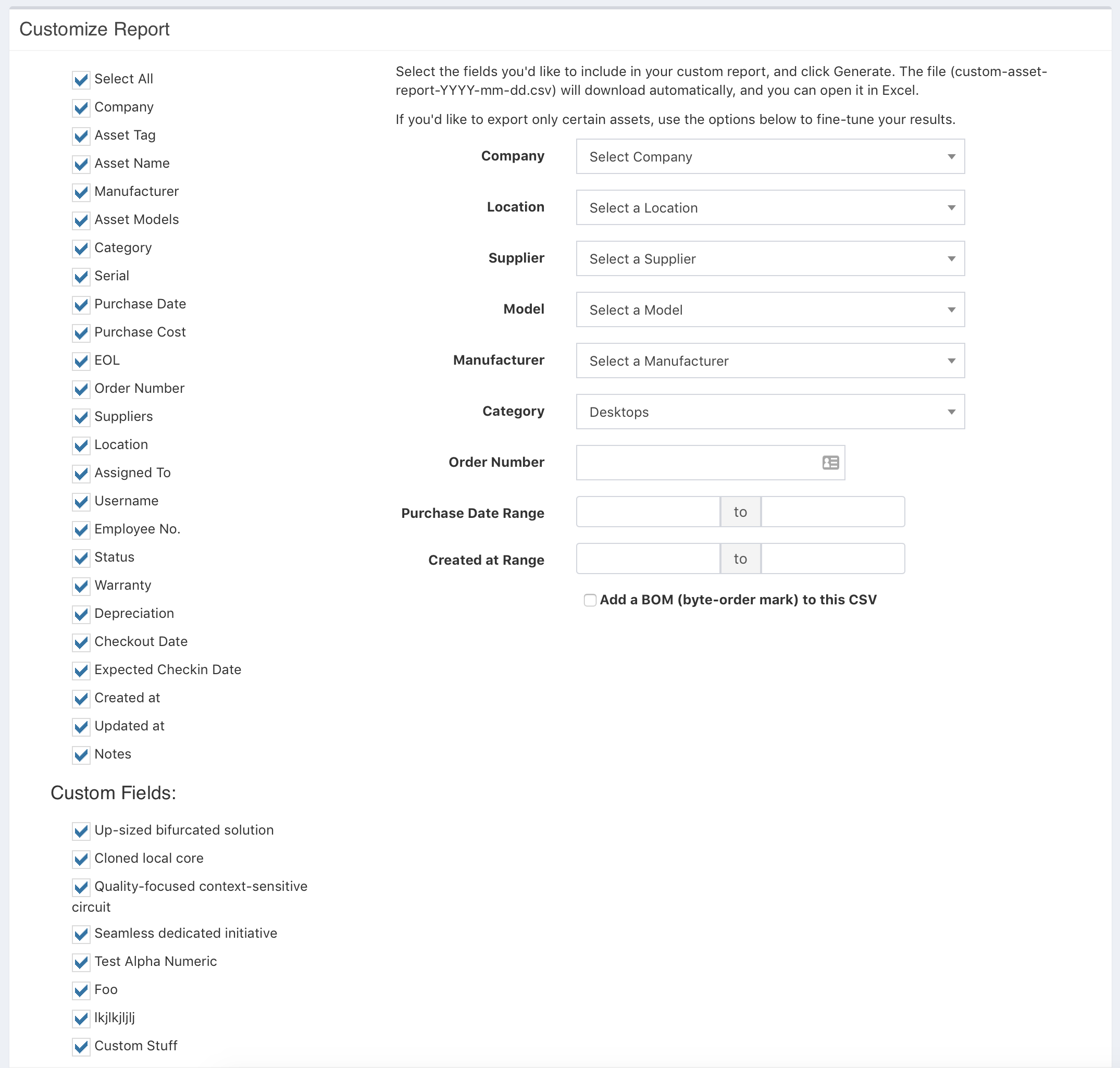
Improvements to the Custom Asset Report include streaming/chunking of results, so users with data sets over 10k assets should not run into issues exporting anymore. Additionally, we've tweaked the UI of that Custom Report UI, adding a select-all checkbox and a handful of filters to help you narrow down what the results you want to download based on status, location, company, model, purchase date range and more.
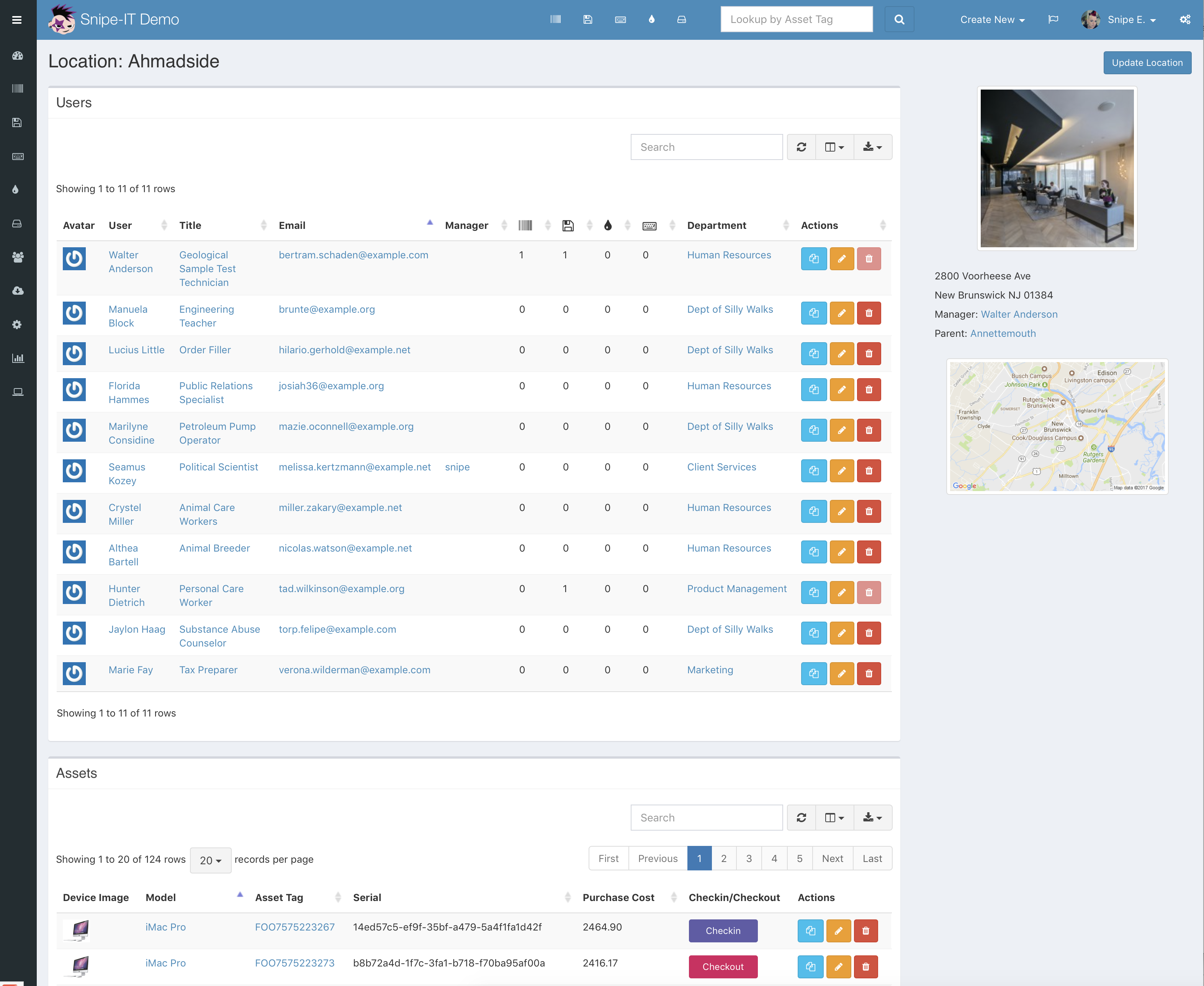
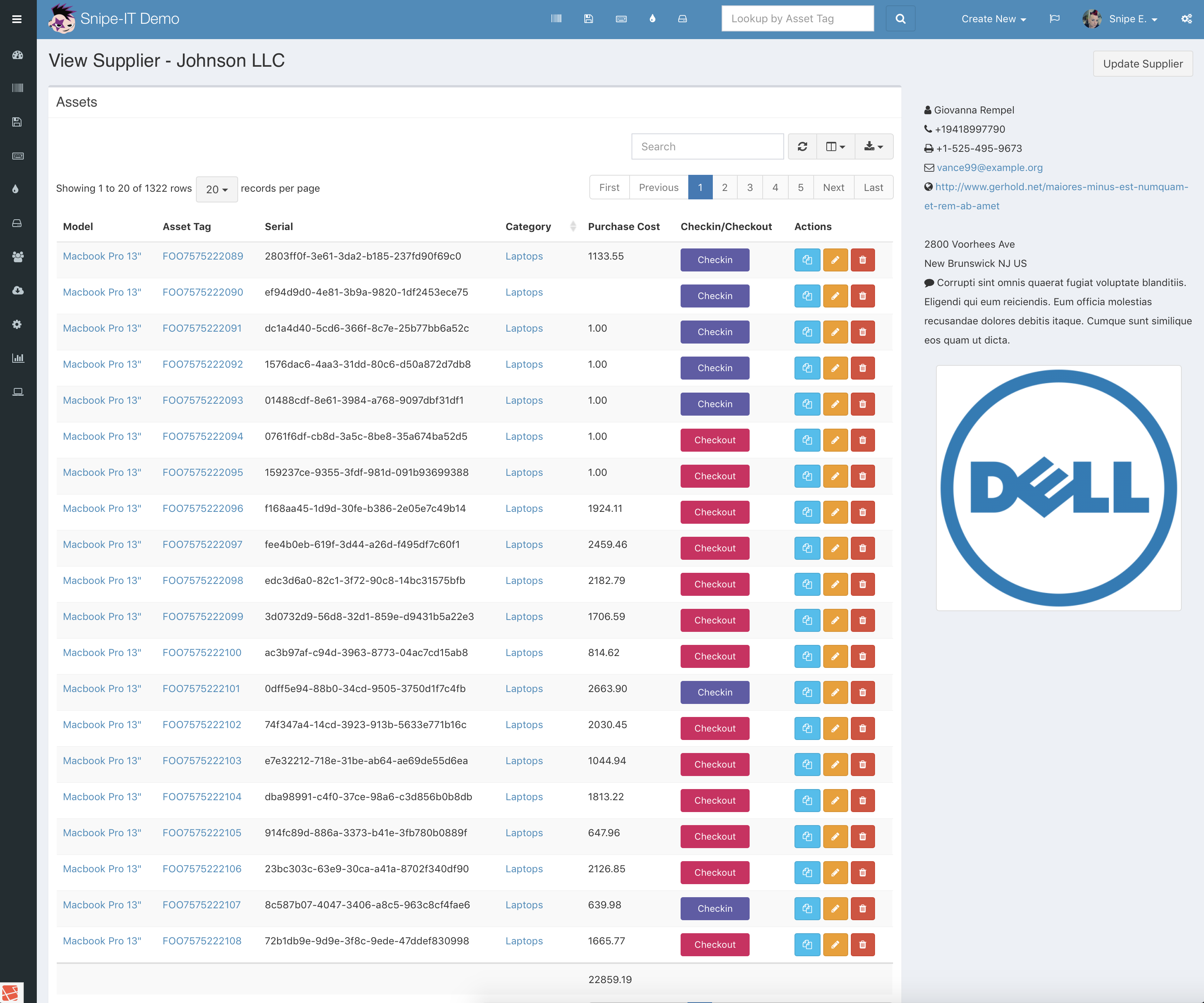
We've also made the Locations and Suppliers detail views MUCH more useful, with faster loading tables, Google Maps integration (if you have an API key present in the .env and a valid address) and more useful actions to take on associated assets.
In addition, here is the highlight reel of changes for this release.
- Fixed repeated header issue in asset export
- Added datepicker range CSS
- Added variable to determine if “new” modal button should be displayed
- Fixes #4495 - missing field in Download CSV, added filter options on custom report export, use chunking for larger datasets
- Fixed #4345 - Disallow future date for checkin date, disallow past dates for expected_checkin
- Fixes #4508 - adds image to location view (and google map, if address and API key are present)
- Fixed bad suppliers error route on invalid supplier
- Improved suppliers view (use ajax tables)
- Fixed #4566 - search by purchase_date
- Fixed #4565 - show manufacturer in models selectlist
- Fixed #4559 - min width for checkin/checkout buttons
- Fixed #4548 - add category to model dropdown
- Fixed #4521 - profile location not selected
Upgrading
For general upgrading instructions, click here. Users who installed Snipe-IT via Git (recommended) can just run php upgrade.php.
To use the new Google Map embed, your locations/suppliers should have a valid address, and you'll need to add GOOGLE_MAPS_API=YOUR-GOOGLE-API-KEY to your .env file. (Follow these directions to get a free Google Maps API key.)
If you get a composer error about AWS, like PHP Fatal error: Class 'Aws\Laravel\AwsServiceProvider' not found [Symfony\Component\Debug\Exception\FatalErrorException]:
- delete the files (not the directory) in
bootstrap/cache - run
composer dump-autoload - remove
config/aws.phpif it exists
For a full list of changes, see the changelog.
Known Issues
This version requires the php-curl extension library to be installed. (php-curl is in the overall requirements for Snipe-IT but you could get away with not having that extension loaded previously.) Composer install will fail if you do not have php-curl enabled, however php-curl is a common package and is most likely already installed/enabled.
Users running MariaDB 10.2.7 and later may have an issue upgrading or installing, due to a change in the way MariaDB stores null defaults. This issue will be fixed once the open pull request in the Doctrine repo is merged and a new version of Doctrine is released with these fixes. You can read more about that issue here.
After completing the upgrade process below, be sure to clear your browser cookies.
Upgrading from v3
Please see the upgrade instructions here.
v4.1.6
New in v4.1.6
As always, lots of small UI tweaks and improvements in this release - but the one we're most excited about is the new UI for checking assets out. Instead of three clunky dropdowns (user/asset/location), we have a much nicer UI that makes it clearer that only one should be selected.
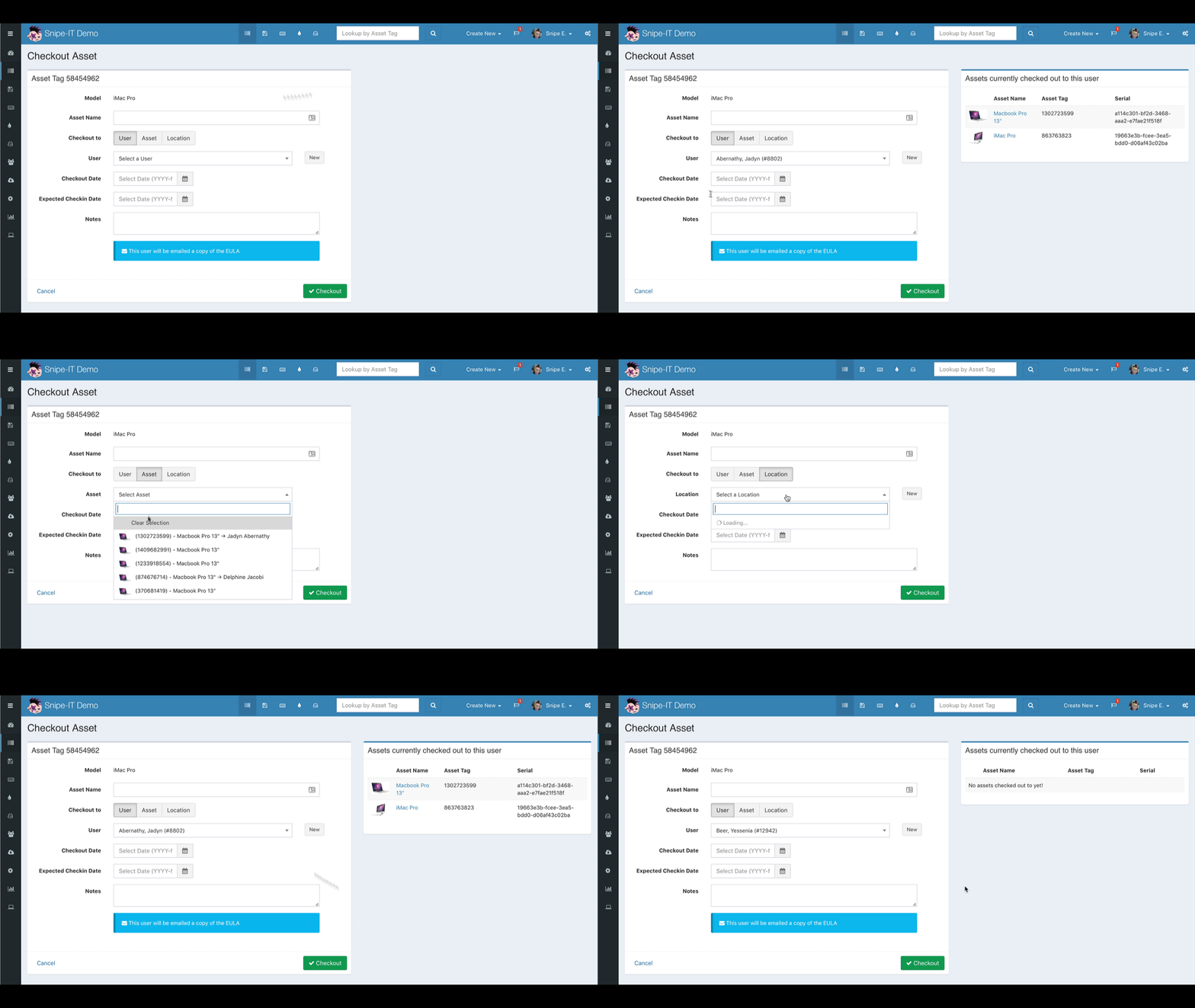
We're really pleased with how that small UI change turned out, and we hope it makes things easier on our users.
In addition, here is the highlight reel of changes for this release.
- Fixed #4491 and #4483 - handle pre-selected asset on checkout
- Improved checkout-to-selection UI
- Fixed #4494 - use audit settings for asset audit pre-population
- Added sorting and additional category types to dashboard categories
- Fixed #4098 - autolink URL and email addresses in listing
- Fixed #4411 - broken activity report if purge didn’t remove relations…
- Added sanity checks in BS tables formatter
- Added ItemFormatter for activity report
- Added - sync locations artisan call after seed
- Fixed restore permission to assets API disable delete/checkin/checkout
- Fixed CSV asset export missing checked out to info
- Fixed - supplier is not required on asset creation/edit, removed UI required class
- Fixed - mark supplier as requried in maintenance
- Fixed #4516 - More importer fixes
- Fixed #4190 - Added artisan command to regenerate asset tags
- Use asset checkout request in API
- Fixed #4522 - properly check for valid target, throw error otherwise
- Fixed - Make sure the asset is available for checkout before displaying the checkout form
- Fixed custom fields edit behavior with cutom format always selected
- Fixed #4542 and #4482 - default asset location not updating on bulk edit
- Fixed #4517 - order number not visible if no purchase cost given on asset
- Improved display of asset status and meta status on asset view
- Fixed inconsistent glyphs for users/locations
Documentation
We've also made some improvements to the User's Manual:
- Version 4.1.6 is now the official current version of the documentation
- Added - Docs on the artisan command to regenerate ALL asset tags
- Added - Docs on the artisan command to fix asset locations
For upgrading instructions, click here. Users who installed Snipe-IT via Git (recommended) can just run php upgrade.php.
If you get a composer error about AWS, like PHP Fatal error: Class 'Aws\Laravel\AwsServiceProvider' not found [Symfony\Component\Debug\Exception\FatalErrorException]:
- delete the files (not the directory) in
bootstrap/cache - run
composer dump-autoload - remove
config/aws.phpif it exists
For a full list of changes, see the changelog.
Known Issues
This version requires the php-curl extension library to be installed. (php-curl is in the overall requirements for Snipe-IT but you could get away with not having that extension loaded previously.) Composer install will fail if you do not have php-curl enabled, however php-curl is a common package and is most likely already installed/enabled.
Users running MariaDB 10.2.7 and later may have an issue upgrading or installing, due to a change in the way MariaDB stores null defaults. This issue will be fixed once the open pull request in the Doctrine repo is merged and a new version of Doctrine is released with these fixes. You can read more about that issue here.
After completing the upgrade process below, be sure to clear your browser cookies.
Upgrading from v3
Please see the upgrade instructions here.
v4.1.5
New in v4.1.5
Lots of small fixes in this release, and one bigger fix to handle regression issue in 4.1.4 in which certain licenses would not allow the checkout of anything other than the first seat.
- Fixed #4457 - use un-escaped CSS for custom CSS styles
- Fixed #4450 - added MAIL_REPLYTO_ADDR to docker.env
- Fixed #4428 - updated translations
- Fixed #4408 - requestable assets "request" button not working
- Improved - removed 500 pixel width on 2FA dropdown
- Fixed #4471 - removed gate for categories selectlist
- Fixed sort by model in asset listing
- Fixed #4440 - allow username search in asset dropdown
- Fixed location sorting
location_idinstead ofrtd_location_id, which was causing weird results - Improved - upgrade language in
upgrade.php - Fixed #4413 - Next license seat not bering assigned correctly
Documentation
We've also made some improvements to the User's Manual:
- Added - Docs on switching to Git install from manual
- Added - More detailed breakdown of the admin settings
If your locations don't seem to be reporting correctly, you can try running php artisan snipeit:sync-asset-locations --output=all to sync them up with where they should be. (This could have happened if your migration that de-normalized the locations didn't work properly.)
For upgrading instructions, click here. Users who installed Snipe-IT via Git (recommended) can just run php upgrade.php.
If you get a composer error about AWS, like PHP Fatal error: Class 'Aws\Laravel\AwsServiceProvider' not found [Symfony\Component\Debug\Exception\FatalErrorException]:
- delete the files (not the directory) in
bootstrap/cache - run
composer dump-autoload - remove
config/aws.phpif it exists
For a full list of changes, see the changelog.
Known Issues
This version requires the php-curl extension library to be installed. (php-curl is in the overall requirements for Snipe-IT but you could get away with not having that extension loaded previously.) Composer install will fail if you do not have php-curl enabled, however php-curl is a common package and is most likely already installed/enabled.
Users running MariaDB 10.2.7 and later may have an issue upgrading or installing, due to a change in the way MariaDB stores null defaults. This issue will be fixed once the open pull request in the Doctrine repo is merged and a new version of Doctrine is released with these fixes. You can read more about that issue here.
After completing the upgrade process below, be sure to clear your browser cookies.
Upgrading from v3
Please see the upgrade instructions here.
v4.1.4
New in v4.1.4
Lots of small UI and sorting fixes in this release.
We've also added a custom fields regex validator and some useful text for creating custom validators to make it clearer what format it's expecting. Previously, if you added a custom validator to a custom field and the format was incorrect (or at least not what Snipe-IT was expecting), it would silently crash the validators, which would cause the validator to crash and the add/edit asset form to be re-presented without any visible errors. This change attempts to validate that the regex you enter is at least one that won't cause the validator to crash.
- Fixes #4236 - validate the regex custom validation (#4380)
- Removed buggy migration code switched to artisan command
- Fixed sorting for filtered items by location
- Fixed custom report bug if assignedTo has no value
- Fixed - Only return location name if find is valid in ajax menus
- Fixed #4391 - companies now listing correct assets
- Fixed #4384 - bulk checkout of assets not working
- Fixed #4381 - asset uploads error "no files selected"
- Fixed IIS+ Chrome not showing webfonts
- Fixed #4392 - select2 + fastclick incompatibility causing ajax menus to behave badly on mobile
- Improved -Service providers broken out by responsibility
- Removed AWS package
- Fixed deleted ordering scope
- Fixed transformers to use new singleton upload urls
- Fixed handling deleting old images better
- Fixed - Update location on checkout, error if bad target
- Fixed - Error handling for when log ID has no match on asset accept
- Fixed incorrect permissions policy reference in consumables listing
- Fixed #4390 - results couldn’t be loaded error
- Improved - Better error handling for qr codes on invalid assets
- Fixed - Slightly less fugly groups permission styling
- Improved - Nicer icheck for user menu
- Fixed - Spacing for QR/barcode on labels only reserved if necessary #4354
- Added ability to disable the alert icon in the top menu
- Added UI fade out when bootstrap alerts are dismissed
- Added #2855 - checkin for components
- Fixed - default log type back to single
- Fixed - Format expected checkin as Y-m-d in form
- Fixed ambiguous query when selecting by model_id
- Added #4374 - Add option to display company names to labels (#4405)
- Fixed - Removed gates from selectlist method
- Fixed #4418 - order models by name asc in selectlist
- Fixed #4412 - use select2 ajax list for asset maintenances
- Fixed #4437 - pagination for maintenances
- Fixed misc sorting issues in assets
If your locations don't seem to be reporting correctly, you can try running php artisan snipeit:sync-asset-locations --output=all to sync them up with where they should be. (This could have happened if your migration that de-normalized the locations didn't work properly.)
For upgrading instructions, click here. Users who installed Snipe-IT via Git (recommended) can just run php upgrade.php.
If you get a composer error about AWS, like PHP Fatal error: Class 'Aws\Laravel\AwsServiceProvider' not found [Symfony\Component\Debug\Exception\FatalErrorException]:
- delete the files (not the directory) in
bootstrap/cache - run
composer dump-autoload - remove
config/aws.phpif it exists
For a full list of changes, see the changelog.
Known Issues
This version requires the php-curl extension library to be installed. (php-curl is in the overall requirements for Snipe-IT but you could get away with not having that extension loaded previously.) Composer install will fail if you do not have php-curl enabled, however php-curl is a common package and is most likely already installed/enabled.
Users running MariaDB 10.2.7 and later may have an issue upgrading or installing, due to a change in the way MariaDB stores null defaults. This issue will be fixed once the open pull request in the Doctrine repo is merged and a new version of Doctrine is released with these fixes. You can read more about that issue here.
After completing the upgrade process below, be sure to clear your browser cookies.
Upgrading from v3
Please see the upgrade instructions here.
v4.1.3
New in v4.1.3
Lots of small bugfixes in this release, largely related to sorting and filtering.
If your locations don't seem to be reporting correctly, you can try running php artisan snipeit:sync-asset-locations --output=all to sync them up with where they should be. (This could have happened if your migration that de-normalized the locations didn't work properly.)
We also addresses an n+1 query issue on the licenses listing pages, which should make make the licenses listing page load much faster now.
For upgrading instructions, click here. Users who installed Snipe-IT via Git (recommended) can just run php upgrade.php.
For a full list of changes, see the changelog.
As always, we deeply appreciate those of you willing to test beta releases. It's a huge help. <3
Known Issues
Users running MariaDB 10.2.7 and later may have an issue upgrading or installing, due to a change in the way MariaDB stores null defaults. This issue will be fixed once the open pull request in the Doctrine repo is merged and a new version of Doctrine is released with these fixes. You can read more about that issue here.
After completing the upgrade process below, be sure to clear your browser cookies.
Upgrading from v3
Please see the upgrade instructions here.
v4.1.2
New in v4.1.2
Another small bug-fix for some sorting issues when filtering on status labels in the hardware search.
For upgrading instructions, click here. Users who installed Snipe-IT via Git (recommended) can just run php upgrade.php.
As always, we deeply appreciate those of you willing to test beta releases. It's a huge help. <3
Known Issues
Users running MariaDB 10.2.7 and later may have an issue upgrading or installing, due to a change in the way MariaDB stores null defaults. This issue will be fixed once the open pull request in the Doctrine repo is merged and a new version of Doctrine is released with these fixes. You can read more about that issue here.
After completing the upgrade process below, be sure to clear your browser cookies.
Upgrading from v3
Please see the upgrade instructions here.