A powerful Retrieval-Augmented Generation (RAG) backend API that processes RSS news feeds, stores them in a vector database, and provides AI-powered chat responses with citations. Built with Express.js, Qdrant vector store, and Google's Gemini AI.
- RSS Feed Processing: Automatically extract and process articles from RSS feeds
- Vector Embeddings: Convert articles into embeddings using Jina AI for semantic search
- AI-Powered Chat: Generate contextual responses using Google Gemini AI
- Real-time Streaming: Stream AI responses in real-time using Server-Sent Events
- Chat History: Persist user conversations using Redis
- Authentication: Secure endpoints with Clerk authentication
- Citation Support: Automatic citation linking with source URLs
- Article Extraction: Smart content extraction from various news sources
- Backend: Node.js, Express.js
- AI/ML: Google Gemini API, Jina Embeddings
- Vector Database: Qdrant
- Caching: Redis
- Authentication: Clerk
- Web Scraping: Cheerio, Axios
- RSS Parsing: RSS-Parser
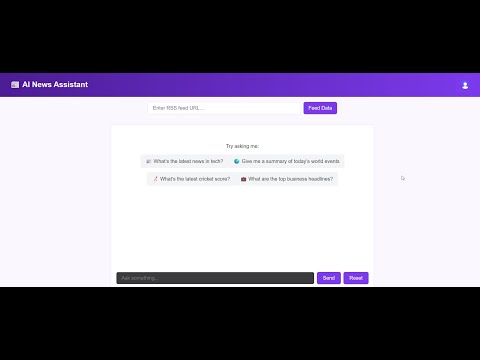
Live Demo:
Before you begin, ensure you have the following installed:
- Node.js (v18 or higher)
- npm or yarn
- Redis server
- Access to the following services:
- Qdrant (Cloud or self-hosted)
- Google Gemini API
- Jina AI API
- Clerk for authentication
git clone https://github.com/haider0107/rag-backend.git
cd rag-backendnpm installCreate a .env file in the root directory with the following variables:
# Server Configuration
PORT=3000

# Clerk Authentication
CLERK_PUBLISHABLE_KEY=your_clerk_publishable_key
CLERK_SECRET_KEY=your_clerk_secret_key

# AI Services
GEMINI_API_KEY=your_gemini_api_key
JINA_API_KEY=your_jina_api_key

# Vector Database (Qdrant)
QDRANT_URL=your_qdrant_cluster_url
QDRANT_API_KEY=your_qdrant_api_key

# Redis Configuration
REDIS_URL=redis://localhost:6379
# Or for cloud Redis:
# REDIS_URL=redis://username:password@host:port# Install Redis (Ubuntu/Debian)
sudo apt update
sudo apt install redis-server
# Start Redis server
sudo systemctl start redis-server
# Or run Redis in Docker
docker run -d -p 6379:6379 redis:latest- Sign up for Qdrant Cloud or run locally
- Create a collection named
testing - Set vector size to match Jina embeddings (1024 dimensions)
npm run devnpm startThe server will start on http://localhost:3000 (or your specified PORT).
http://localhost:3000
All protected routes require a valid Clerk JWT token in the Authorization header:
Authorization: Bearer <your_jwt_token>
| Method | Endpoint | Description | Auth Required |
|---|---|---|---|
| POST | /upload/add-feed |
Add RSS feed to vector database | ✅ |
| Method | Endpoint | Description | Auth Required |
|---|---|---|---|
| POST | /chat/ask |
Ask question with streaming response | ✅ |
| GET | /chat/history |
Get user's chat history | ✅ |
| POST | /chat/clear |
Clear user's chat history | ✅ |
| GET | /chat/ |
Health check | ❌ |
curl -X POST http://localhost:3000/upload/add-feed \
  -H "Content-Type: application/json" \
  -H "Authorization: Bearer <your_jwt_token>" \
  -d '{
    "rssUrl": "https://timesofindia.indiatimes.com/rssfeedstopstories.cms"
  }'
Response:
{
  "message": "Feed processed successfully",
  "totalArticles": 25,
  "feedTitle": "Times of India - Top Stories"
}curl -X POST http://localhost:3000/chat/ask \
-H "Content-Type: application/json" \
-H "Authorization: Bearer <your_jwt_token>" \
-d '{
"question": "What are the latest developments in technology?"
}'Response (Server-Sent Events):
data: {"text": "Based on the latest news articles"}
data: {"text": " I can tell you about several"}
data: {"text": " technology developments [Source 1]..."}
data: [DONE]
curl -X GET http://localhost:3000/chat/history \
  -H "Authorization: Bearer <your_jwt_token>"
Response:
{
  "success": true,
  "history": [
    {
      "role": "user",
      "content": "What are the latest tech news?"
    },
    {
      "role": "assistant",
      "content": "Based on recent articles..."
    }
  ]
}rag-backend/
├── src/
│ ├── routes/
│ │ ├── chat.js # Chat-related endpoints
│ │ └── feed.js # RSS feed processing endpoints
│ ├── services/
│ │ ├── aiService.js # Google Gemini AI integration
│ │ ├── vectorService.js # Qdrant vector store operations
│ │ ├── sessionService.js# Redis session management
│ │ └── citationService.js# Citation link processing
│ ├── app.js # Express app configuration
│ ├── server.js # Server entry point
│ └── redisClient.js # Redis client setup
├── data/
│ ├── extractor.js # Article content extraction
│ ├── chunker.js # Text chunking for embeddings
│ └── bulkUpload.js # Bulk data operations
├── package.json # Dependencies and scripts
├── .env # Environment variables (create this)
├── .gitignore # Git ignore rules
└── README.md # Project documentation
- RSS Feed Processing: Users submit RSS feed URLs which are parsed to extract article links
- Content Extraction: Articles are scraped and cleaned using Cheerio
- Text Chunking: Long articles are split into smaller chunks (300 words with 50-word overlap)
- Vector Embeddings: Chunks are converted to embeddings using Jina AI
- Vector Storage: Embeddings are stored in Qdrant with metadata (title, URL)
- Query Processing: User questions are embedded and compared against stored vectors
- Context Retrieval: Most similar articles are retrieved as context
- AI Response: Gemini generates responses using retrieved context and chat history
- Citation Linking: Source citations are automatically linked to original articles
- Start the server:
npm run dev - Test health endpoint:
curl http://localhost:3000/chat/
- Add a test RSS feed (with authentication)
- Ask a question and verify streaming response
- Check chat history endpoint
If you encounter any issues:
- Check that all environment variables are properly set
- Ensure Redis and Qdrant services are accessible
- Verify API keys are valid and have sufficient quota
- Check server logs for detailed error messages
For additional support, please open an issue in the repository.
Built with ❤️ using Node.js, Express, Qdrant, and Gemini AI