Access our site here: http://welvon.herokuapp.com
Build from scratch a front and back-end system that utilises Google Maps geolocation (on-click event) to retrieve news and other data relevant to location
Building on acquired knowledge from previous study weeks as part of Founders & Coders, where we focused on front and back-end topics. In this project we are taking a more holistic approach and putting the user experience centre stage. The objective we need to hit can be found in the objectives section at the bottom.
This was a project to extend our team experience with using APIs, making calls from the backend and putting that together with a well written and styled front-end.
A application that will provide location based news from newsapi.org based on a click event within Google maps.
We Whiteboarded our ideas and then split our project as follows. For details on system-architecture please see below for the relevant section.
Front-end
-
index.html
-
Public folder - containing:
- style.css,
- dom.js,
- logic.js
Back End
-
src folder - containing:
- server.js,
- router.js,
- apihandler.js (to API),
- statichandler.js (from API) ,
- filter.js
The chain of events were to take place as follows
- Click event in Google Maps
- Event listener for 'on-click' event
- XHR/server static server Request
- Request sent to GPS to address API
- Data manipulated and sent to NYT API
- Response with required data
- Dom Manipulation / filtering of data in API Handler
- Rendering of information back to user
- src - containing:
- server.js,
- router.js,
- apihandler.js (to API),
- statichandler.js (from API) ,
- filter.js
- Test.js
The chain of events were to take place as follows
- 1 Click event in Google Maps
- 2 Event listener for 'on-click' event
- 3 XHR/server static server Request
- 4 Request sent to GPS to address API
- 5 Data manipulated and sent to newsapi.org API
- 6 Response with required data
- 5 Dom Manipulation / filtering of data in API Handler
- 6 Rendering of information back to user
Click the weblink in the title of the repo. Then...
- Click anywhere on the Google Maps Screen.
- The click event will trigger the rest of the User experience
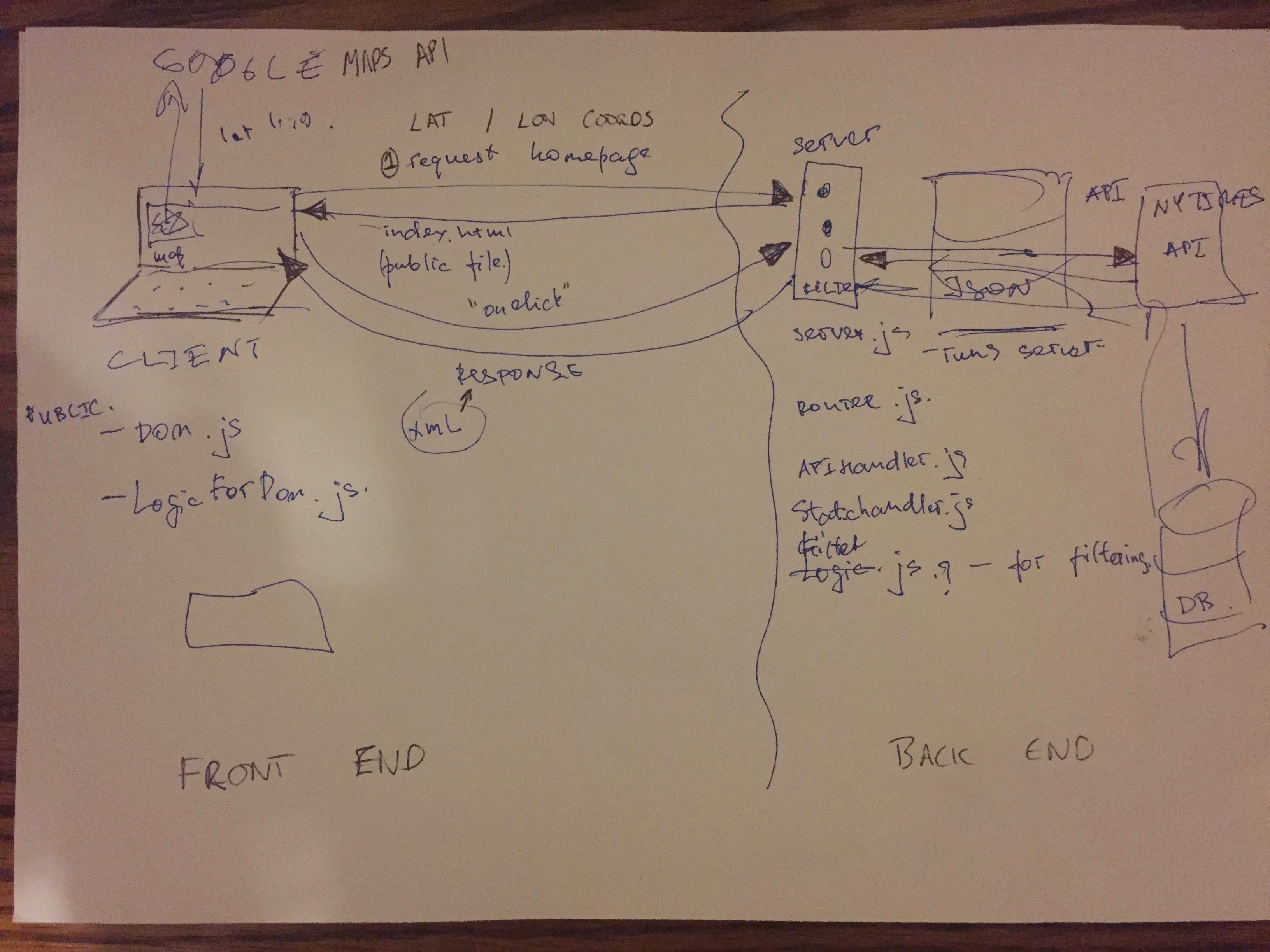
- Whiteboard ideas and user experience
- Research suitable APIs to achieve user objectives
- Readme outline
- Setup of project and folders
- outline front-end workload
- outline back-end workload
- create servers
- create basic route paths
- Set up google API on click integration
- complete DOM handler for static information
- Trouble-shoot Google Maps API gps data
- Setup feeding in GPS data to additional API to return an address
- Consider testing structure
- Complete index.js (XHR requests)
- Extend testing and see they pass
- CSS and Mobile friendly checks
- Accessability Checks
- Linter Checks
- Update README
- upload to cloud server
- Review code between team members to ensure understanding
-
Use at least 1 API
-
Make your API calls from the back-end using the Request module (or one you build yourself)
-
Your server should contain a minimum of 2 routes
-
We expect back-end testing using tape (test as many components as you can) and basic front-end testing.
-
Test your server by injecting fake HTTP requests using Shot.
-
Host your project on heroku, see resources
-
Use module.exports and require to break a single large server file into smaller modules.
-
Consider a good server file structure based on what we have discussed over the week.
-
Employ continuous intergration on your project with Travis or a similar tool. (If you decide to use Travis, we strongly recommend that you host this project in your own repo rather than in your cohort's FAC repository to avoid all builds getting queued together)
-
Use CodeCov or a similar tool for test coverage.
-
Display continuous intergration and code coverage badges on your project README.
-
Ensure that errors are handled, if for example a user attempts to make a request to a non-existent route to your server, provide the user with a custom response.
- 13 Include a user input field on your web app and include server-side validation to protect your server from potentially malicious user input.