
Do you prefer to keep NFC off and only enable it when needed? Ever wondered why NFC isn't part of Android's Quick Settings by default? Honestly, same here! Well, look no further—this is the shortcut you've been waiting for! 🎉
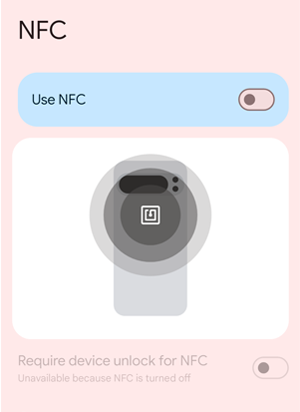
This simple Android app adds an NFC Shortcut tile to the Quick Settings Panel, combining security and convenience by providing a direct link to the NFC settings page, all while adhering to Android's secure architecture.
- Android 14 (API Level 34) or higher.
- Compatible with devices supporting Quick Settings customization.
- Tested on Android 14, 15.
- Quick NFC Access: Add the NFC tile to your Quick Settings Panel for faster access to NFC settings.

- Minimal Permissions: Designed with user privacy in mind; no unnecessary permissions are required.
- Security-Focused Design: Complies with Android's security model by not directly toggling NFC but providing an easy shortcut instead.
- Lightweight and Simple: Focused purely on functionality, with no additional clutter.
This app adheres to Android's security guidelines. Direct NFC toggling from the Quick Settings tile is not allowed due to security restrictions designed to protect user control and system stability. Instead, the app provides a secure and efficient way to access the NFC settings page quickly.
- Download: You can download the
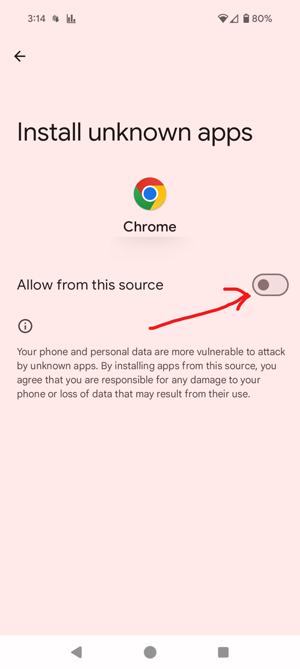
.apkfile from https://github.com/harriswong/android-nfc-shortcut/releases/. - Install: Install the APK on your Android device. Ensure that "Unknown Sources" is enabled in your device settings if installing manually. Remember to uncheck the "Allow from this source" afterwards.


- Add the Tile: Pull down the Quick Settings Panel, tap the "Edit" or "Customize" button, and drag the NFC Shortcut tile to your active tiles.

- Tap the NFC Shortcut tile in your Quick Settings Panel.
- The NFC settings page will open, allowing you to toggle NFC as needed.
Unfortunately no. I am not planning to create a Play Developer account. It costs money and it also exposes my email, partial/full address. Sorry! You can look for threads online similar to this one: https://support.google.com/googleplay/android-developer/thread/290790624/full-legal-address-gets-shown-for-private-developer-account?hl=en
Found a bug or have a suggestion? Feel free to open an issue or submit a pull request. Contributions are welcome!
This project is licensed under the MIT License. You are free to use, modify, and distribute this software with attribution.
Enjoy faster access to your NFC settings with NFC Shortcut!