Volume control with on-screen display notifications. Works with any window manager, such as i3wm, bspwm, and KDE, as a standalone script, or with statusbars such as i3status-rust, polybar, i3blocks, i3status, and more.


volume up              # Increase volume by default step (5%)
volume down            # Decrease volume by default step (5%)
volume set 50         # Set to 50%
volume set +10         # Increase by 10% (relative)
volume mute           # Toggle mute
volume mic mute        # Toggle microphone mute
Command Aliases: up = raise = increase, down = lower = decrease, prev = previous
volume -n up 5         # Increase with notification
volume -n -N dunst up 5 # Use dunst for notificationsvolume -j \",,,\" output \"%i %n %c%v %p \n\" # i3status-rust
volume output i3blocks # i3blocks format (mouse wheel auto-handled)
volume output polybar # polybar formatSee Installation for setup instructions.
- 🎚️ Volume Control: Increase, decrease, set, mute with decimal and dB support
- 🎤 Microphone Control: Control input volume and mute state
- 🎯 Per-Application Volume: Control individual app volumes independently
- 📊 Multiple Sinks: Switch between audio devices, sync volumes across sinks
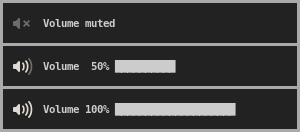
- 🎨 Notifications: Support for dunst, notify-osd, xob, XOSD, herbe, volnoti, KOSD
- 🔌 Plugin System: Custom notification and output format plugins
- ⚙️ Per-Sink Configuration: Different settings for different audio devices
- 📈 Advanced Features: Volume profiles, boost, balance, normalization, smooth fade transitions
Read the installation instructions to get started. For specific setups:
volume up 10           # Increase by 10%
volume down 5          # Decrease by 5%
volume set 50          # Set to 50%
volume set +10         # Increase by 10% (relative)
volume set -5          # Decrease by 5% (relative)
volume set 45.5        # Set to 45.5% (decimal support)
volume set -6dB        # Set to -6dB (dB support)
volume -f 1000 up 10   # Fade volume up by 10% over 1 second
volume -d up 10 # Test what would happen (dry-run mode)# Per-application volume control
volume app list # List all applications with audio
volume app firefox up 5 # Increase Firefox volume by 5%
volume app mpv set +10 # Increase mpv volume by 10% (relative)
# Volume profiles
volume profile save quiet # Save current settings as "quiet"
volume profile load loud # Load saved "loud" profile
# Temporary volume boost
volume boost 20 60 # Boost by 20% for 60 seconds
# Stereo balance
volume balance -10 # Shift 10% to left speaker
volume balance +10 # Shift 10% to right speaker
# Sink management
volume list sinks # List all audio devices
volume switch # Switch to next audio device
volume sync # Sync volume across all sinksFull Command Reference: See MANUAL.md or run volume help for complete usage.
| notify-osd | dunst | xob |
|---|---|---|
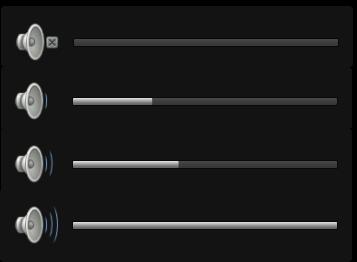 |
 |
 |
| XOSD | herbe | volnoti |
|---|---|---|
 |
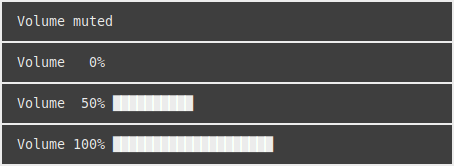 |
 |
| KOSD |
|---|
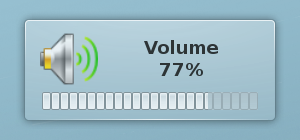 |
Read about notifications for more information.
i3-volume looks for a configuration file at ~/.config/i3-volume/config or $XDG_CONFIG_HOME/i3-volume/config.
# Enable notifications with dunst
NOTIFICATION_METHOD="dunst"
DISPLAY_NOTIFICATIONS=true
USE_DUNSTIFY=true

# Set default step size
DEFAULT_STEP=10

# Set maximum volume
MAX_VOL=100Note: When using i3blocks, mouse wheel events are automatically handled. Scrolling up or down on the volume block will increase or decrease the volume without any additional configuration.
STATUSLINE="i3blocks"
SIGNAL="SIGRTMIN+10"
NOTIFICATION_METHOD="dunst"
USE_DUNSTIFY=true
DISPLAY_NOTIFICATIONS=true
USE_FULLCOLOR_ICONS=true
PORT_ALIASES[analog-output-speaker]=SpeakerConfigure different settings for different audio devices:
# Global defaults
DEFAULT_STEP=5
MAX_VOL=100

# Per-sink overrides
SINK_MAX_VOL[USB Audio]=150        # Headphones can go louder
SINK_DEFAULT_STEP[USB Audio]=2     # Smaller steps for headphones
SINK_DISPLAY_NOTIFICATIONS[USB Audio]=false  # Disable notifications
Supported per-sink settings:
SINK_MAX_VOL[sink_identifier]- Maximum volume limitSINK_DEFAULT_STEP[sink_identifier]- Default step sizeSINK_DISPLAY_NOTIFICATIONS[sink_identifier]- Enable/disable notificationsSINK_BALANCE[sink_identifier]- Balance setting (-100 to +100)
See Configuration wiki for all options and examples.
up [value],down [value],set <value>,mute- Aliases:
raise/increasefor up,lower/decreasefor down - Supports decimals and dB:
set 45.5,set -6dB,set +10
mic up/down/set/mute- Control microphone volume- Aliases:
mic raise/mic increasefor up,mic lower/mic decreasefor down - Relative operations:
mic set +10,mic set -5
app list- List apps with audioapp <name> up/down/set/mute- Control app volume- Aliases:
app <name> raise/app <name> increasefor up,app <name> lower/app <name> decreasefor down - Relative operations:
app <name> set +10,app <name> set -5
list sinks/sources- List audio devicesswitch/next/prev- Switch between sinks (alias:previousforprev)sync- Sync volume across sinks
profile save/load/list/delete- Volume profilesboost <amount> [timeout]- Temporary volume boostbalance [value]- Stereo balance (-100 to +100)normalize [cmd]- Normalize volumes across sourcesfade <from> <to> [duration]- Smooth volume transitionsfade option: Use-f <duration_ms>withup,down,set, ormutefor smooth transitionsundo- Restore previous volumehistory [count]- View volume history
Full Reference:
- See MANUAL.md for complete command reference
- Run
volume helpfor complete usage information - See Features wiki for detailed documentation
i3-volume uses standard exit codes for script integration:
| Code | Constant | Description |
|---|---|---|
| 0 | EX_OK |
Success - command executed successfully |
| 33 | EX_URGENT |
Urgent - volume exceeds maximum limit (MAX_VOL) |
| 64 | EX_USAGE |
Usage error - invalid command, option, or argument |
| 69 | EX_UNAVAILABLE |
Unavailable - required tool or feature not available |
Example usage in scripts:
#!/bin/bash
if ! volume up 5; then
    case $? in
        64) echo "Usage error - check command syntax" ;;
        69) echo "Tool unavailable - check dependencies" ;;
        33) echo "Volume limit exceeded" ;;
    esac
fi
Use volume --exit-code to view detailed exit code information.
# In ~/.config/i3/config
bindsym XF86AudioRaiseVolume exec --no-startup-id volume up
bindsym XF86AudioLowerVolume exec --no-startup-id volume down
bindsym XF86AudioMute exec --no-startup-id volume mute
bindsym XF86AudioMicMute exec --no-startup-id volume mic mute

# With notifications
bindsym XF86AudioRaiseVolume exec --no-startup-id volume -n up
bindsym XF86AudioLowerVolume exec --no-startup-id volume -n down

# In ~/.config/sxhkd/sxhkdrc (sxhkd doesn't use --no-startup-id)
XF86AudioRaiseVolume
    volume up
XF86AudioLowerVolume
    volume down
XF86AudioMute
    volume mute
XF86AudioMicMute
volume mic mute#!/bin/bash
# Safe volume increase with error handling
if volume up 5; then
echo "Volume increased successfully"
else
case $? in
33) notify-send "Volume limit reached" ;;
64) notify-send "Invalid command" ;;
69) notify-send "Audio system unavailable" ;;
esac
fi# Fade with notifications
volume -n -f 1000 up 10
# Multiple sinks with fade
volume -a -f 500 set 50
# Custom notification method with fade
volume -n -N dunst -f 1000 mute
# Test commands without executing (dry-run mode)
volume -d up 10 # See what would happen without changing volume
volume --dry-run set 50 # Test setting volume to 50%
volume -d switch # See which sink would be switched to
# Logging and debugging
volume --log up 5 # Log operations to syslog
volume --log /tmp/volume.log up 5 # Log to custom file
volume --log --debug up 5 # Enable debug mode with verbose loggingi3-volume works with many other programs:
| Program | Note |
|---|---|
| i3blocks | See our example blocklet. Mouse wheel events are automatically handled - scrolling on the volume block adjusts volume without additional configuration. |
| i3status-rust | See our example custom block |
| xob | Requires extra steps for notifications. Guide |
| XOSD | Notifications require the -N xosd option. Example |
| herbe | Notifications require the -N herbe option. Example |
| volnoti | Notifications require the -N volnoti option. Example |
| KOSD | Notifications require the -N kosd option. Example |
| sxhkd | For keybindings with or without i3wm, often used with bspwm. Example |
Having a problem? Try reading our common issues or open an issue.
i3-volume is released under GNU General Public License v2
Copyright (C) 1989, 1991 Free Software Foundation, Inc.