Skip to content

new tool: generate silkscreen#370

Merged
carrotIndustries merged 7 commits intohorizon-eda:masterfrom
m-byte:footprint-generate-silkscreen
Apr 8, 2020
Merged

new tool: generate silkscreen#370
carrotIndustries merged 7 commits intohorizon-eda:masterfrom
m-byte:footprint-generate-silkscreen

Conversation

@m-byte
Copy link
Copy Markdown
Contributor

@m-byte m-byte commented Apr 5, 2020

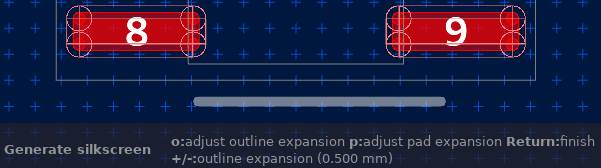
As suggested by @endofexclusive, I moved the silkscreen generator from #367 into a tool. Right now it creates an outline by offsetting the package polygon and subtracting all pads from it. I will next turn this into a tool that allows for dynamic changes of the offset. This tool does not yet take care of adding a reference designator.

@m-byte
Copy link
Copy Markdown
Contributor Author

m-byte commented Apr 6, 2020

With commit 9eb521d, the tool is interactive and both offsets (pad/polygon) can be adjusted. Also, if there are multiple package polygons, the tool selects the first one and the user can change this selection.

@m-byte m-byte force-pushed the footprint-generate-silkscreen branch from 4a3d4bf to 9eb521d Compare April 6, 2020 09:40
@fruchti
Copy link
Copy Markdown
Contributor

fruchti commented Apr 6, 2020

This is a great addition! A minor nitpick: The default pad/package expansion should probably be 0.2 mm, in accordance with the current pool convention.

@m-byte
Copy link
Copy Markdown
Contributor Author

m-byte commented Apr 6, 2020

Thanks for the reminder. 0.15mm was in there because I used the same value for line width and expansion in the very first version. I'll update it once I get time to implement proper handling of settings.

@m-byte
Copy link
Copy Markdown
Contributor Author

m-byte commented Apr 6, 2020

@fruchti here you go. Settings are now properly implemented and default is 0.2 mm.

@fruchti
Copy link
Copy Markdown
Contributor

fruchti commented Apr 6, 2020

Works great, thank you!

@endofexclusive
Copy link
Copy Markdown
Contributor

This is cool! Really nice how the silkscreen can snake around corners etc.

I observed one small oddity while using the tool on the default SO footprint in the IPC-7351:
silk0
In the screenshot the lower horizontal line extends farther to the right than to the left. It is visible only for particular combinations of outline and pad expansion. Here it was 0.7 mm pad and 0.5 mm outline expansion. The upper horizontal line looks as expected though.

The tool could of course be extended with lots of style options and parameters. But I think it already does a great job and improves the package editor workflow already.

@carrotIndustries
Copy link
Copy Markdown
Member

Very cool to see someone who isn't me implement a nontrivial tool without any hand holding!

The current way of adjusting the expansion parameters is a bit too clunky IMO, and I think there's a better way: For not all that long we have a way for tools to show a non modal dialog to adjust more complex parameters on the fly, see the renumber pads tool for an example. In our case a window with just two spinbuttons (use SpinButtonDim) to adjust the spacing parameters is probably all we need.

When it comes to pin 1 markings, keep in mind that there are two styles for pin 1 markings:

  1. Omit one of the lines in the corner if the package doesn't have pins that extend beyond the package's body (QFN)
  2. Extend the line if pins extend beyond the package's body (SOIC, QFP)

@m-byte m-byte force-pushed the footprint-generate-silkscreen branch from d799fd1 to 631f74e Compare April 7, 2020 04:40
@m-byte
Copy link
Copy Markdown
Contributor Author

m-byte commented Apr 7, 2020

@endofexclusive That's a bug that seems to be caused by a rounding error. I checked the points that I'm feeding into ClipperLib and they are correct. So the root cause seems to be within Clipper. Until someone figures out what is going wrong, I added an extra .000001 mm offset to the pad expansion.

@carrotIndustries pin 1 markers are not implemented at the moment. For now, the user would have to take care of that manually. But I believe that is rather trivial. Especially on packages with curved packages, I find drawing a correct outline with cutouts for pads most challenging (and annoying).

Right now, I'm looking into the modal dialog you mentioned and will probably implement it relatively soon.

Longer term, I'm planning to add other styles (e.g. corners only), pin 1 markers (I'm planning to have the options none, extended/omitted line, arrow, dot) and silkscreen text. For these, a dialog is likely the best interface. But since the current status is enough to satisfy my immediate need, I first wanted to get some feedback on the current status to make sure I don't waste time on features no one will ever use.

@carrotIndustries
Copy link
Copy Markdown
Member

But since the current status is enough to satisfy my immediate need, I first wanted to get some feedback on the current status to make sure I don't waste time on features no one will ever use.

No worries, with the non modal dialog in place, this PR is ready to be merged.

@m-byte
Copy link
Copy Markdown
Contributor Author

m-byte commented Apr 7, 2020

Sometimes my hands are faster than my head 😄
As requested, here's the non modal dialog.

Comment thread src/core/tools/tool_generate_silkscreen.cpp
Comment thread src/core/tools/tool_generate_silkscreen.cpp Outdated
Comment thread src/dialogs/generate_silkscreen_window.cpp Outdated
Comment thread src/dialogs/generate_silkscreen_window.hpp Outdated
@carrotIndustries
Copy link
Copy Markdown
Member

Works perfectly! Some nitpicking:

  • Style check failed
  • Is persistently saving the settings for expansion a good idea? We have some defaults that should be used in the majority of cases. The current situation makes it quite hard to get back to the defaults. So either provide a way to reset the settings back to default or don't store them persistently in the first place.
  • Changing the layer display settings doesn't let the layer box on the left side doesn't pick up changes made directly to the canvas. The proper way to do this would be to manipulate the layer box through the ImpInterface. Unfortunately that infrastructure isn't there yet, but isn't too hard to add if needed.
  • See code comments

Comment thread src/core/tools/tool_generate_silkscreen.cpp Outdated
@m-byte
Copy link
Copy Markdown
Contributor Author

m-byte commented Apr 7, 2020

Thanks for the thorough review!

  • Saving settings: I guess that comes down to the user. Yes, the defaults reflect the style guide for the horizon pool. But what if users have their own corporate guidelines regarding style that are different? Then, they will have to change all the settings every time. But I get your point and will add a "defaults" button (if there are better suggestions for the name, let me know).
  • Style check: That's odd. I ran clang-format-9 -style=file -i on the file before pushing.
  • Proper layer display manipulation: I don't think that should be part of this pull request, so I believe leaving it as is until a proper interface is there should be okay. Do you agree?

@carrotIndustries
Copy link
Copy Markdown
Member

Proper layer display manipulation: I don't think that should be part of this pull request, so I believe leaving it as is until a proper interface is there should be okay. Do you agree?

Okay, I'll try to add the proper interface once the PR is merged.

@endofexclusive
Copy link
Copy Markdown
Contributor

The dialog is a nice improvement.

Some comments (minor):

  1. The tool changes layer.
    I don't see it as a big problem and maybe it is intended. But it behaves different compared to the tools Place pad and Generate courtyard which do not change the layer as it finishes.
  2. Return/enter could finish the tool, or progress to the next widget in the non-modal.
    There is code for ToolEventType::KEY but it seems to not reach the tool from the window (?).
  3. Escape key to cancel the tool?

@m-byte
Copy link
Copy Markdown
Contributor Author

m-byte commented Apr 7, 2020

  1. The tool changes layer.

This is intentional, so the user can see the silkscreen. Of course - like for the package layer - I could store the current working layer and then return to it after the silkscreen is done. Is that preferred?

  1. Return/enter could finish the tool, or progress to the next widget in the non-modal.
  2. Escape key to cancel the tool?

The code for both escape and enter is in the tool, so it would work if you select the main window. I haven't yet implemented it for the dialog, but I also feel like this should be done on a higher level (i.e. as part of ToolWindow) so that these basic key bindings are the same for all tools using windows. #375 would allow for this.

@endofexclusive
Copy link
Copy Markdown
Contributor

This is intentional, so the user can see the silkscreen. Of course - like for the package layer - I could store the current working layer and then return to it after the silkscreen is done. Is that preferred?

No real preference from my side. I am fine with how it works now.

The code for both escape and enter is in the tool, so it would work if you select the main window. I haven't yet implemented it for the dialog, but I also feel like this should be done on a higher level (i.e. as part of ToolWindow) so that these basic key bindings are the same for all tools using windows.

Aaah, that explains it. Indeed the keys work when the window does not have focus. I previously had the dialog focused while trying out the hot keys. The window manager here (i3) always gives the window focus as it opens (did not try with other managers). To be continued in #375 then :-).

Comment thread src/core/tools/tool_generate_silkscreen.cpp Outdated
Comment thread src/core/tools/tool_generate_silkscreen.cpp
@carrotIndustries
Copy link
Copy Markdown
Member

Sorry for not catching anything at first sight, these should be trivial to fix. The layout of the "Default" button still needs some improvement as the window is a bit left-heavy right now:

  • Attach the button to the grid, below the entries and make it span both columns
  • That way, we have more space in the button, e.g. "Restore defaults"
  • set the grid's halign to CENTER

@m-byte m-byte force-pushed the footprint-generate-silkscreen branch from a6c3929 to 3f8dc05 Compare April 8, 2020 05:47
@carrotIndustries carrotIndustries merged commit c314592 into horizon-eda:master Apr 8, 2020
@carrotIndustries
Copy link
Copy Markdown
Member

29b9174 fixes the layer display inconsistencies

@m-byte
Copy link
Copy Markdown
Contributor Author

m-byte commented Apr 9, 2020

Great! Thank you!

@m-byte m-byte deleted the footprint-generate-silkscreen branch May 7, 2020 20:31
Sign up for free to join this conversation on GitHub. Already have an account? Sign in to comment

Labels

None yet

Projects

None yet

Development

Successfully merging this pull request may close these issues.

4 participants