As part of HOT's participation in @Tech To The Rescue, we collaborated with our new tech partner Fulton Ring for the development of an AI-powered API for generating valid OSM tags from street-level imagery
The original idea was to integrate OSM Tagger with ChatMap but it can be used with any source of geo-located pictures.
This tool is an experimental project, is not intended to be used yet by the general user/mapper to update OSM
For running OSM Tagger locally, you'll need Ollama installed on your system.
Then, depending on your hardware, select and download an Ollama model.
Currently we support: ollama/llava:34b and llama3.2-vision:11b.
ollama pull llama3.2-vision:11bAnd configure config/models.py accordingly.
Note: you can also use Amazon Bedrock.
For local development and testing:
docker compose -f docker-compose.dev.yaml up -dMigrations and initial data for tagging roads:
poetry run alembic --name alembic revision --autogenerate
poetry run alembic --name alembic upgrade head
poetry run insert-image-embeddingsGo to the MinIO admin and setup a new bucket named hotosm-osm-tagger.
Then generate access keys and edit config/models.py un-commenting the lines for MinIO and adding the
credentials (aws_access_key_id, aws_secret_access_key).
You'll need to upload images to the Bucket, these are +9000 images of roads downloaded from Mapillary that will help OSM Tagger to do the work and return a confidence value:
https://drive.google.com/file/d/1rNhUnXxmTjkCvbw6TuKc-0MgEIRsWxq4/view?usp=drive_link
Download the .zip file, un-compress it and upload the files to your bucket.
Note: you can also use AWS S3
Install dependencies and run the API:
poetry install
uvicorn tagger.main:app --reload
Then, send a request with category and image (url and coordinates).
In this example we use "roads" and the image below:
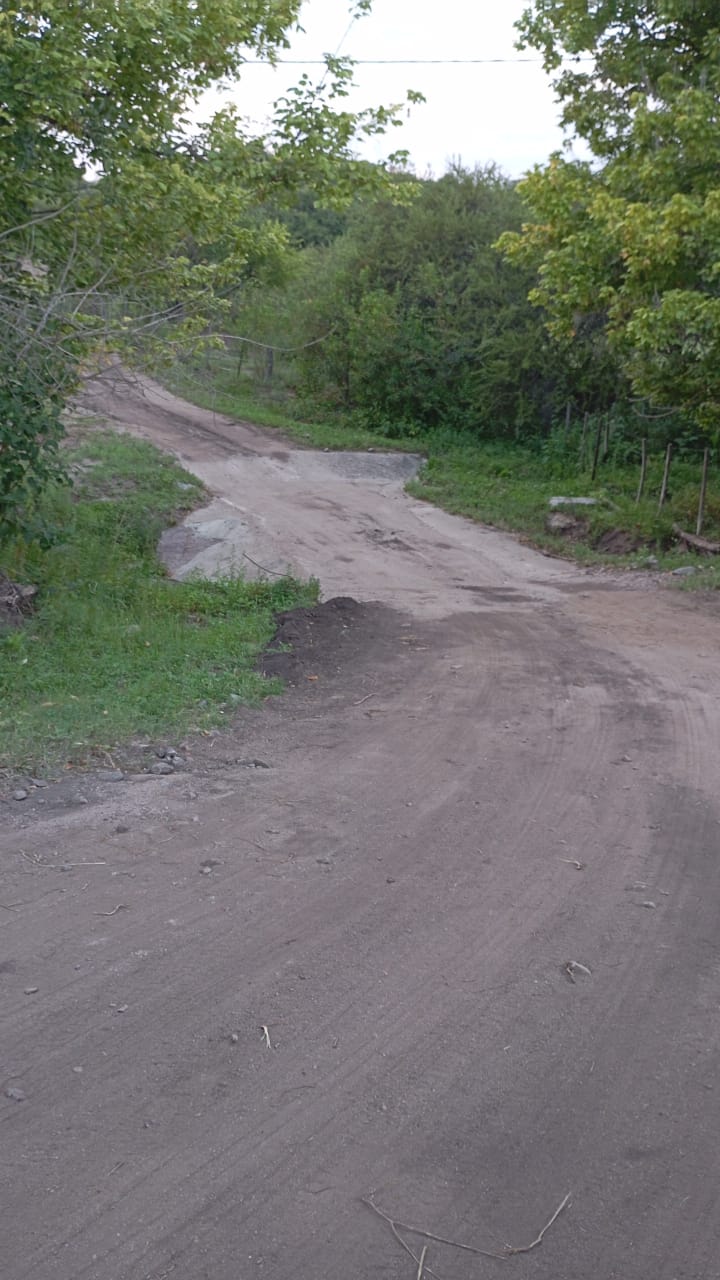
curl --request POST -H "Content-Type: application/json" \
  --url http://127.0.0.1:8000/api/v1/tags/ \
  --data '{
  "category": "roads",
  "image": {
    "url": "https://umap.hotosm.org/media_file/00000030-PHOTO-2025-02-04-07-03-24.jpg",
    "coordinates": {
      "lat": -31.039293,
      "lon": -64.312332
    }
  }
}'
You should receive a response with OSM tags:
{
  "tag_id": "f9ed4777-e9ef-46e0-b629-004eba0d2997",
  "tags": [
    {
      "key": "smoothness",
      "value": "intermediate",
      "confidence": 0.6
    },
    {
      "key": "surface",
      "value": "unpaved",
      "confidence": 0.6
    }
  ]
}You can also upload images directly using the /upload endpoint:
curl --location 'http://localhost:8000/api/v1/tags/upload' \
--form 'category="roads"' \
--form 'lat="6.248001"' \
--form 'lon="-75.540833"' \
--form 'image=@"/Users/jeremyherzog/Downloads/bad_unpaved_road.jpg"'
Once tags have been confirmed, they can be saved for future use to improve
accuracy using the tag_id:
curl --location 'http://localhost:8000/api/v1/tags/f9ed4777-e9ef-46e0-b629-004eba0d2997' \
--header 'Content-Type: application/json' \
--data '{
    "tags": [
        {
            "key": "smoothness",
            "value": "very_bad",
            "confidence": 0.9497874632288248
        },
        {
            "key": "surface",
            "value": "unpaved",
            "confidence": 0.9497874632288248
        }
    ]
}'
OSMTagger API should receive a request with an image URL, geo-location and category, and return OSM valid tags. The category will help the API to decide a prompt and maybe other configurations.
Two models will be used, one focused on extracting text from an image and the other for generating OSM tags from the text. This will divide the problem in two and provide more flexibility for the final solution.