How SwaLint works ~ a technical advice
apparently your project involves the SWALinter. Since its codebase is somewhat large, we decided to leave some insights for you.
The Linter was originally developed by a team around Tobias Pape a long time ago, who might still be part of the SWA-teaching group. We worked on it in 2018.
So what do you need to know about the Linter? First off, let's have a look on the "architecture" (it's not 100% accurate, but captures some aspects).
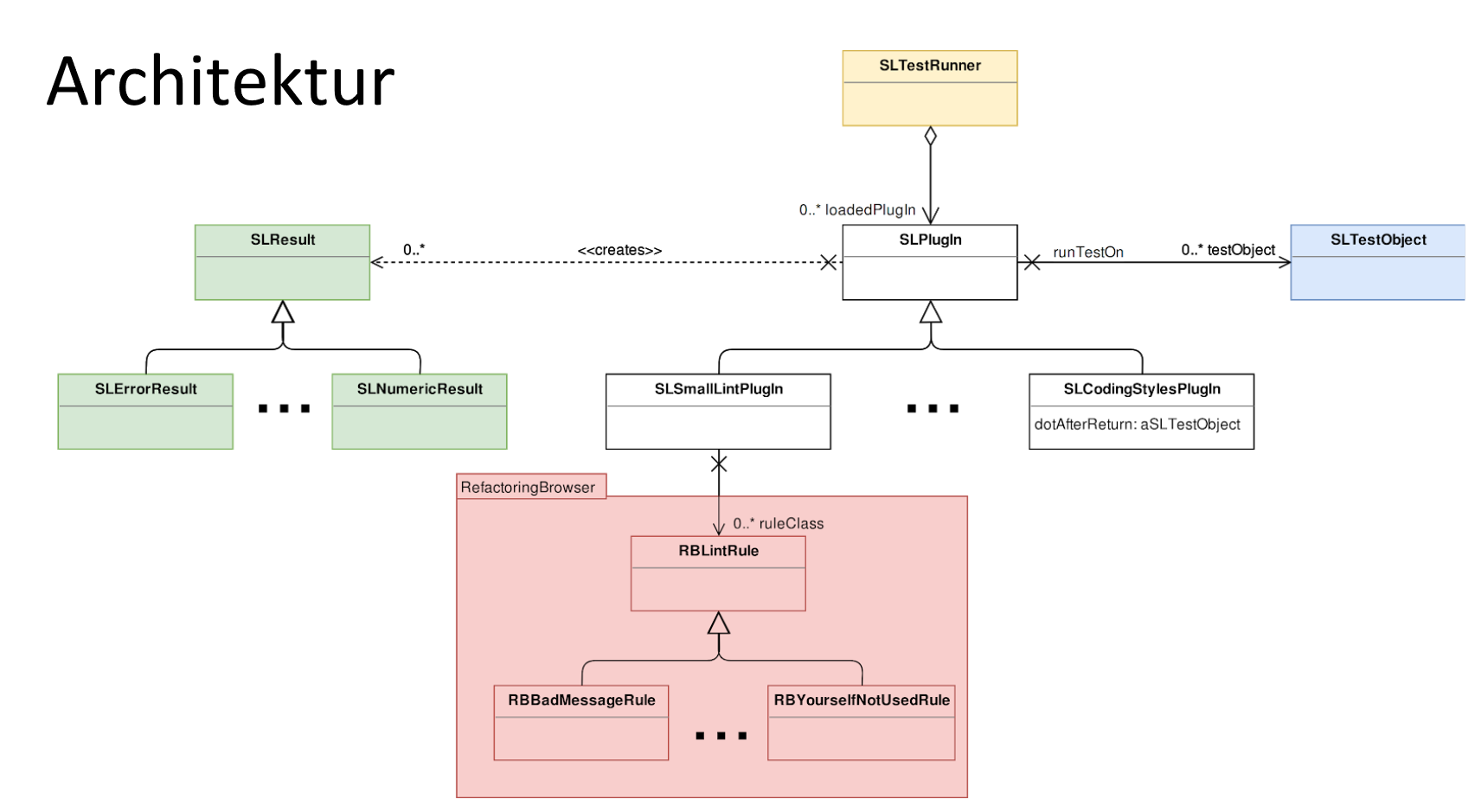
As you can see, there is no GUI here, these classes are responsible for the linting logic. The TestRunner runs a certain environment consisting of test classes and test cases (aka linter rules).
In order to do that, it relies on the PlugIns, which contain the actual rules (for example: dotsAfterReturn, which goes through all messages of a class, counts the number of messages with dots after return and then returns the percentage as a result).
Rule methods got pragmas (If you don't know what this is, how to use it etc.? - Ask your tutor!) that contain, among others, name, category and description of a rule which will be shown to the user. You can create a new rule just by adding another method like this, with new name and functionality. If you do add own tests, have a look on the SLTestObjects. Also, we highly recommend to look at similar, existing tests.
One special PlugIn is the SLSmallLintPlugIn, since it gets all of its logic from the outside, the RB (RefactoringBrowser) package. So the SLSmallLintPlugIn class just redirects a call to a specific linter rule to the corresponding RB-class, e.g. RBPrecedenceRule (naming is alway RB as prefix, then the actual name followed by Rule as postfix).
Some of the RB stuff is somewhat unreliable (especially spellchecking, do not trust it). When we worked at the project we went through and checked for all these rules (except for like spellchecking and such) if they did what they claimed to do.
We then added fixed versions of the broken RB rules in the RBImportPlugIn. Same for the other PlugIns. We also added unit tests for the linter rules (in the tests package). So if you find a defect or want to make an improvement on a rule provided by the RB test, please disable the corresponding test in SLSMallLintPlugIn class > smallLintTests and add your fixed version to the SLRBImportPlugIn class.
As a little summary: You definitely do NOT want to mess with the RB package (Tobi told us that they believe it's broken, since it hasn't been update for a long long period of time)... In case there are any tests that do not work properly, just exclude them (class side of SLSmallLintPlugin).
So what about the GUI? That is contained in SLDefaultDialog (which is the main window you see when the linter is started; by the way: We didn't rename it, but maybe you want to change the class name...) and SLResultDialog (the result window).
Both are build with toolbuilder (ask you tutor/go to the lectures). Since they use newer tollbuilder methods they are the reason why the prject is trunk-only (August 13, 2018, the current trunk version might have changed since then).
There are also a few classes named overview pyramid (the one you'll see in one of the refactoring lecture (and it's likely to be relevant for the final exam)). We didn't write that, it's from another group working on the linter before us. It didn't work for us and we had enough other problems to fix, so we simply disabled it for now. But maybe you want to make it work again (it might very well be easy to fix, we didn't really tried to make it work).