
Show changes in a Version in a table
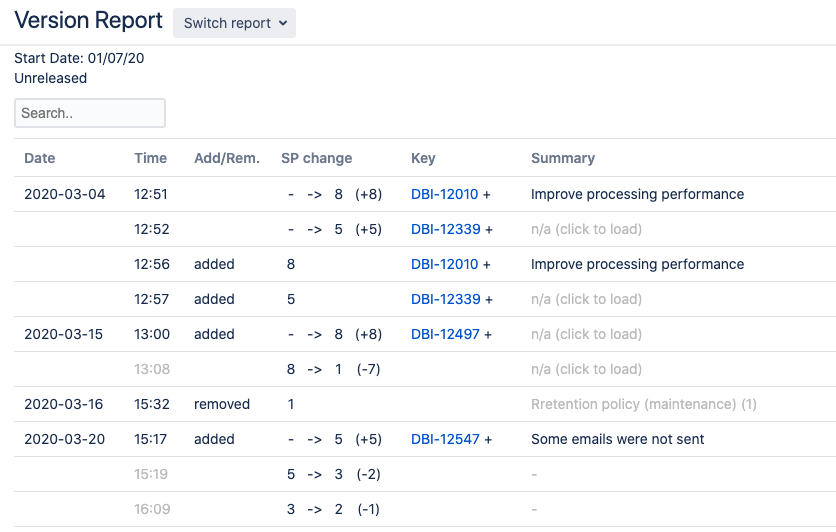
Create readable table with scope changes of a JIRA Version/Release/Fix Version
The existing graph is nice, but hard to read the details so this tool shows a table of the data.
Since the supplied data from JIRA is somewhat ungrouped it's still hard to read, but with some practiving and smart use of the filter it's a very handy tool for people that want to see what changed on a product backlog.
Known bug: you have to refresh the page after first load and after selecting another version in the dropdown
- Install 'User JavaScript and CSS' extension for Chrome https://chrome.google.com/webstore/detail/user-javascript-and-css/nbhcbdghjpllgmfilhnhkllmkecfmpld?hl=en
- Open a random JIRA Version report in your browser. The url probably contains "chart=versionReport" now.
- Click 'User JavaScript and CSS' icon in Chrome (Blue/red dotted lines-icon)
- Click 'Add new'
- fill in:
- Name: Version report
- URL: replace url by
https://jira.*/*chart=versionReport* - Options: enable JavaScript and JQuery 3
- Open https://github.com/infonl/jira-version-report-changes-table/blob/main/css.css And copy-paste content in the CSS pane.
- Open https://raw.githubusercontent.com/infonl/jira-version-report-changes-table/main/js%2Cjs And copy-paste content in the JS pane.
- Save
- Go to JIRA Version report and refresh. The table should appear above the graph