Custom OpenSpec schemas packaged as copyable folders under openspec/schemas/.
Default OpenSpec includes the spec-driven schema, which is a strong general-purpose workflow. This repo adds more focused workflows for specific delivery contexts, and also demonstrates how to customise OpenSpec for different styles of work.
Detailed write-up: https://intent-driven.dev/blog/2026/02/12/openspec-custom-schemas/
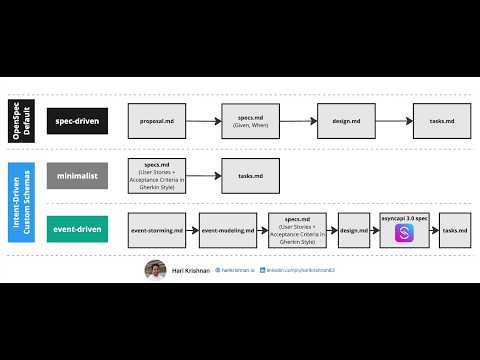
For most projects, the built-in spec-driven schema is all you need. For complex projects — meaningful behaviour, technical design, and long-lived architectural decisions — intent-driven is the most complete general-purpose schema in this collection. The remaining schemas are either lighter subsets or specialised for a particular style of delivery.
| Schema | Artifact flow | Choose when |
|---|---|---|
spec-driven (built-in) |
proposal -> specs -> design -> tasks |
Default for most projects; ships with OpenSpec |
behaviour-driven |
proposal -> (specs, design) -> tasks |
Observable behaviour carries the intent, written as Gherkin-style GIVEN/WHEN/THEN scenarios in OpenSpec Markdown delta specs |
spec-driven-with-adr |
proposal -> specs / design -> adr -> tasks |
You need durable Architecture Decision Records on top of spec-driven |
intent-driven |
proposal -> (specs, design) -> adr -> tasks |
behaviour-driven plus durable ADRs: behaviour specs, design, and long-lived decisions |
event-driven |
event-storming -> event-modeling -> specs -> design -> asyncapi -> tasks |
Event-Driven Architecture Systems |
minimalist |
specs -> tasks |
Small, well-scoped, low-risk changes |
How the schemas relate: intent-driven is behaviour-driven plus a durable ADR artifact — the same OpenSpec Markdown delta specs, adding per-change ADR review and repository-level decision records. It still subsumes spec-driven-with-adr (same ADR handling, richer specs, larger companion skill set). Choose behaviour-driven when you don't need durable ADRs. event-driven is domain-specific for event-centric/AsyncAPI-first systems, and minimalist is for small, low-risk changes.
Executable acceptance testing is not a schema feature. behaviour-driven and intent-driven both declare the opt-in spec-as-source skill, which makes spec.md the executable source of truth — fenced-Gherkin authoring, acceptance-first task ordering, and specs/code zone isolation — and pulls in acceptance-test-authoring for the runner, extraction, linting, and reports. Install the skill when you want specs run as tests; use either schema alone for the artifact discipline without the test harness.
To try these schemas without installing anything, start from a template repo — intent-driven-template or behaviour-driven-template — each a starter project with the schema, OpenSpec config, commands, and companion skills already installed.
Ask your coding agent to read the install guide and follow the instructions:
Read this file: https://raw.githubusercontent.com/intent-driven-dev/openspec-schemas/refs/heads/main/AGENT_INSTALL.md and follow the instructions.
If you already know which schema you want, include the name and the guide will confirm it exists before proceeding:
Read this file: https://raw.githubusercontent.com/intent-driven-dev/openspec-schemas/refs/heads/main/AGENT_INSTALL.md and install schema intent-driven.
Otherwise the guide will enumerate all available schemas and ask you to pick one.
Schemas declare their companion skills in a skills.txt manifest inside the schema directory. The install guide's Step 6 installs those skills from intent-driven-dev/skills into your project's .agents/skills/, so installing a schema also brings in the skills it works best with.
schema: intent-driven

context: |
  Tech Stack:
    - Node.js, TypeScript
    - PostgreSQL

rules:
  proposal:
    - Maximum of 250 words
  tasks:
    - Break tasks to logical commits.
Artifact alignment source: openspec/schemas/intent-driven/schema.yaml (proposal, specs, design, adr, tasks).
For the full step-by-step install flow, see AGENT_INSTALL.md.
Proposal-to-tasks workflow for changes where observable behaviour carries the
intent. Specs are OpenSpec Markdown deltas whose requirements and scenarios are
written in Gherkin style with GIVEN/WHEN/THEN steps, so archive can merge
them. To run those scenarios as an acceptance suite, add the schema's opt-in
spec-as-source
skill, which owns fenced-Gherkin authoring, acceptance-first task ordering, and
the two spec-first rules.
To try it without installing anything, start from the behaviour-driven-template — a starter project with the schema, OpenSpec config, commands, and companion skills already installed.
Artifact order:
proposal -> (specs, design) -> tasks
Activation:
schema: behaviour-drivenValidate:
openspec schema validate behaviour-drivenFor more details, see openspec/schemas/behaviour-driven/README.md.
Experimental proposal-to-tasks workflow for changes that also need durable
Architecture Decision Records persisted under the target repository's top-level
adr/ folder. intent-driven shares this schema's ADR handling and adds
behaviour-focused specs plus a larger skill set — prefer it unless you want
plain spec-driven specs with ADRs and nothing more.
Artifact order:
proposal -> specs / design -> adr -> tasks
Activation:
schema: spec-driven-with-adrValidate:
openspec schema validate spec-driven-with-adrFor more details, see openspec/schemas/spec-driven-with-adr/README.md.
behaviour-driven plus durable Architecture Decision Records: behaviour is
written as Gherkin-style scenarios in OpenSpec Markdown delta specs, technical
design is constrained by in-force ADRs, and each change completes an ADR review
before task planning. Executable acceptance testing comes from the same opt-in
spec-as-source
skill that behaviour-driven declares.
To try it without installing anything, start from the intent-driven-template — a starter project with the schema, OpenSpec config, commands, and companion skills already installed. (Companion skills are canonically hosted at intent-driven-dev/skills.)
Artifact order:
proposal -> (specs, design) -> adr -> tasks
Activation:
schema: intent-drivenValidate:
openspec schema validate intent-drivenFor more details, see openspec/schemas/intent-driven/README.md.
Structured workflow for event-centric systems with Event Storming discovery followed by AsyncAPI specification.
Artifact order:
event-storming -> event-modeling -> specs -> design -> asyncapi -> tasks
Activation:
schema: event-drivenValidate:
openspec schema validate event-drivenFor more details, see openspec/schemas/event-driven/README.md.
Fast path from spec to execution using user-story requirements and Gherkin acceptance-criteria style. Lightweight schema for well-scoped, low-risk changes.
Artifact order:
specs -> tasks
Activation:
schema: minimalistValidate:
openspec schema validate minimalistFor more details, see openspec/schemas/minimalist/README.md.
See CONTRIBUTING.md for how to create/customize schemas using openspec schema init / openspec schema fork, and how to validate before opening a PR.