Stock Case is a Android Mobile Application allowing you to get real time stock prices for your portfolio. Easily download the apk from https://github.com/jamessnguyenn/Stock-Case/releases/tag/v1.0 and view and store stocks in your case!
To run the program, enter “git clone https://github.com/jamessnguyenn/Stock-Case.git” in your command terminal. This will copy the files to your computer as a local repository. Open the local repository through Android Studios, and then click the green play button to run the application on your emulated device. App Information
Furthermore, you can also download the apk from https://github.com/jamessnguyenn/Stock-Case/releases/tag/v1.0 to your Android device.
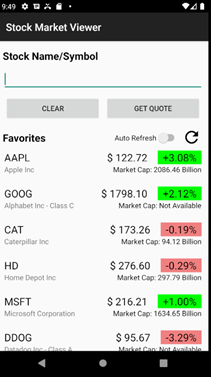

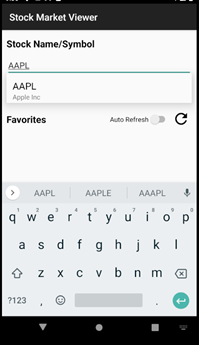
Stock Case starts off with a loading screen to collect data that is in the favorites list, if there is any, and then displays the main screen. Users can enter the Stock Name/Symbol in the text field. If the length of the entered text is greater or equal to 3, the matching companies and symbols will be displayed, and users can click on the Stock Name/ Symbol to get the company symbol.
Once a valid company symbol entered, users can press “GET QUOTE” which will start a loading screen and then send them to another screen displaying details of the stock. On this screen, users can view details of the current stock as well as historical data of the stock. Users can also add the stock to their Favorites List, which is shown on the main screen, by pressing the Star Button next to the stock name. They can remove the stock from the favorites list by pressing the Star Button again, and they should see an “empty star”.
The Favorites List will display all the user’s favorites stocks. With the Favorites List, users can turn on auto refresh using a switch, which allows them to refresh data of the Favorites List every 10 seconds. If the user presses the refresh button, the button will be animated, and a loading screen will be shown until all the data is refreshed. Ifthe user clicks on any of the Favorites List, they will be redirected to a screen showing the stocks details.
The Tiingo API only provides the market cap for the Top 30 Dow. If the stock is not in the Top 30 Dow, the Market Cap will be displayed as ‘unavailable’.
The Tiingo API also only allows a certain amount of API calls per hour. If the amount of API calls exceeds the max limit, the application will not show any data, and will say all symbols are invalid, when one is trying to get a quote. To have a less chance of this, try not to use auto refresh too much because of the amount of API calls it does every 10 seconds.**