Releases: jcyuan06/Kcalbeloh-System
Releases · jcyuan06/Kcalbeloh-System
v1.1.8

Installtion Guide
- Install Kcalbeloh System
- If you have an older version of the Kcalbeloh System installed, please completely delete it before proceeding with the new version.
- Download from one of the sources:
- Download
Kcalbeloh-System-(v1.x.x).zip. - Choose ONE of them to download:
Kcalbeloh-Textures-4k.zip: Regular-res textures.Kcalbeloh-Textures-8k.zip: High-res textures, NOT recommended if your RAM is no more than 16 GB.
- Extract the zip files and put all the folders in
/GameData(000_NiakoUtils,001_DuckweedUtils,KcalbelohSystem,KcalbelohTextures, andKopernicusExpansion) to your[KSP installation folder]/GameData/folder. - Do NOT download
KcalbelohExtras.zipunless you know what it is used for.
- Install Dependencies
- Kopernicus: for creating custom celestial bodies.
- Singularity: for blackhole and wormhole shaders.
- KSPCommunityFixes: for bug fixes.
- Install Visuals
The planet pack works fine without visual mods, but it will lose a large part of its aesthetic.
Changes since v1.1.7
- Added support for KSRSS (requires SigmaDimensions). The scale of the system follows KSRSS settings.
- Added VertexColorMapEmissive as the new dependency. Emissivity of lava is revamped using the new emissive mod.
- Adjusted 2.5x rescale to 2.56x.
- Changed rotation speed of Uleg to 2:1 spin-orbit resonance.
- Other minor changes and fixes.
v1.1.7
Installtion Guide
- Install Kcalbeloh System
- If you have an older version of the Kcalbeloh System installed, please completely delete it before proceeding with the new version.
- Download from one of the sources:
- Download
Kcalbeloh-System-(v1.x.x).zip. - Choose ONE of them to download:
Kcalbeloh-Textures-4k.zip: Regular-res textures.Kcalbeloh-Textures-8k.zip: High-res textures, NOT recommended if your RAM is no more than 16 GB.
- Extract the zip files and put all the folders in
/GameData(000_NiakoUtils,KcalbelohSystem,KcalbelohTextures, andKopernicusExpansion) to your[KSP installation folder]/GameData/folder. - Do NOT download
KcalbelohExtras.zipunless you know what it is used for.
- Install Dependencies
- Kopernicus: for creating custom celestial bodies.
- Singularity: for blackhole and wormhole shaders.
- KSPCommunityFixes: for bug fixes.
- Install Visuals
The planet pack works fine without visual mods, but it will lose a large part of its aesthetic.
Changes since v1.1.6
Fixed a visual bug.
v1.1.6
Installtion Guide
- Install Kcalbeloh System
- If you have an older version of the Kcalbeloh System installed, please completely delete it before proceeding with the new version.
- Download
Kcalbeloh-System-(v1.x.x).zip. - Choose ONE of them to download:
Kcalbeloh-Textures-4k.zip: Same resolution as previous releases.Kcalbeloh-Textures-8k.zip: High-res textures, NOT recommended if your RAM is no more than 16 GB.
- Extract the zip files and put all the folders in
/GameData(000_NiakoUtils,KcalbelohSystem,KcalbelohTextures, andKopernicusExpansion) to your[KSP installation folder]/GameData/folder. - Do NOT download
KcalbelohExtras.zipunless you know what it is used for.
- Install Dependencies
- Kopernicus: for creating custom celestial bodies.
- Singularity: for blackhole and wormhole shaders.
- KSPCommunityFixes: for bug fixes.
- Install Visuals
The planet pack works fine without visual mods, but it will lose a large part of its aesthetic.
Changes since v1.1.4
- Added optional 8k textures for most celestial bodies.
- Added a new homeswitch option: Mehtna.
- Adjusted the default size of stars to a realistic scale compared with planets. These changes can be disabled in settings.
- Stars look brighter at a distance.
- The size of Kcalbeloh's kill sphere is made larger to avoid some minor issues.
- Adjusted the heat of Kcalbeloh and Dipuc's volcanoes.
- New cloud texture for Suluco and Efil, which is consistent with the upcoming official volumetric cloud support.
- Other minor changes and fixes.
v1.1.5-beta
Installtion Guide
- Install Kcalbeloh System
- If you have an older version of the Kcalbeloh System installed, please completely delete it before proceeding with the new version.
- Download
Kcalbeloh-System-(v1.x.x).zip. - Choose ONE of them to download:
Kcalbeloh-Textures-4k.zip: Same resolution as previous releases.Kcalbeloh-Textures-8k.zip: High-res textures, NOT recommended if your RAM is no more than 16 GB.
- Extract the zip files and put all the folders in
/GameData(000_NiakoUtils,KcalbelohSystem,KcalbelohTextures, andKopernicusExpansion) to your[KSP installation folder]/GameData/folder. - Do NOT download
KcalbelohExtras.zipunless you know what it is used for.
- Install Dependencies
- Kopernicus: for creating custom celestial bodies.
- Singularity: for blackhole and wormhole shaders.
- KSPCommunityFixes: for bug fixes.
- Install Visuals
The planet pack works fine without visual mods, but it will lose a large part of its aesthetic.
Changes since v1.1.4
- Added optional 8k textures for most celestial bodies.
- Added a new homeswitch option: Mehtna.
- Other minor changes and fixes.
v1.1.4
Installtion Guide
- Install Kcalbeloh System
- If you have an older version of the Kcalbeloh System installed, please completely delete it before proceeding with the new version.
- Download
Kcalbeloh-System-(v1.x.x).zip. - Extract the zip file and put all three folders in
/GameData(000_NiakoUtils,KcalbelohSystemandKopernicusExpansion) to your[KSP installation folder]/GameData/folder. - Do NOT download
KcalbelohExtras.zipunless you know what it is used for.
- Install Dependencies
- Kopernicus: for creating custom celestial bodies.
- Singularity: for blackhole and wormhole shaders.
- KSPCommunityFixes: for bug fixes.
- Install Visuals
The planet pack works fine without visual mods, but it will lose a large part of its aesthetic.
Changes since v1.1.2
- Added a lot of science definitions, including the experiments in DMagic Orbital Science and science definition support for Homeswitch. Thanks to the contribution of the community, the science definitions are mostly complete for almost every celestial body and experiment type, with nearly 3000 items and 50000 words in total for you to discover!
- Added the option to have realistic-sized stars.
- Added a tail to Arorua.
- Improved RSS, RSSVE and EVO compatibility without any extra patches (replacing
RSSKopernicusSettings.cfgis not needed anymore). - Added the option to remove Kerbol system if homeswitch is enabled.
- Added principia support for homeswitch.
- New loading screens from winners of the loading screen contest.
- Other minor improvements and fixes.
v1.1.2 - Principia and Delta-V Map
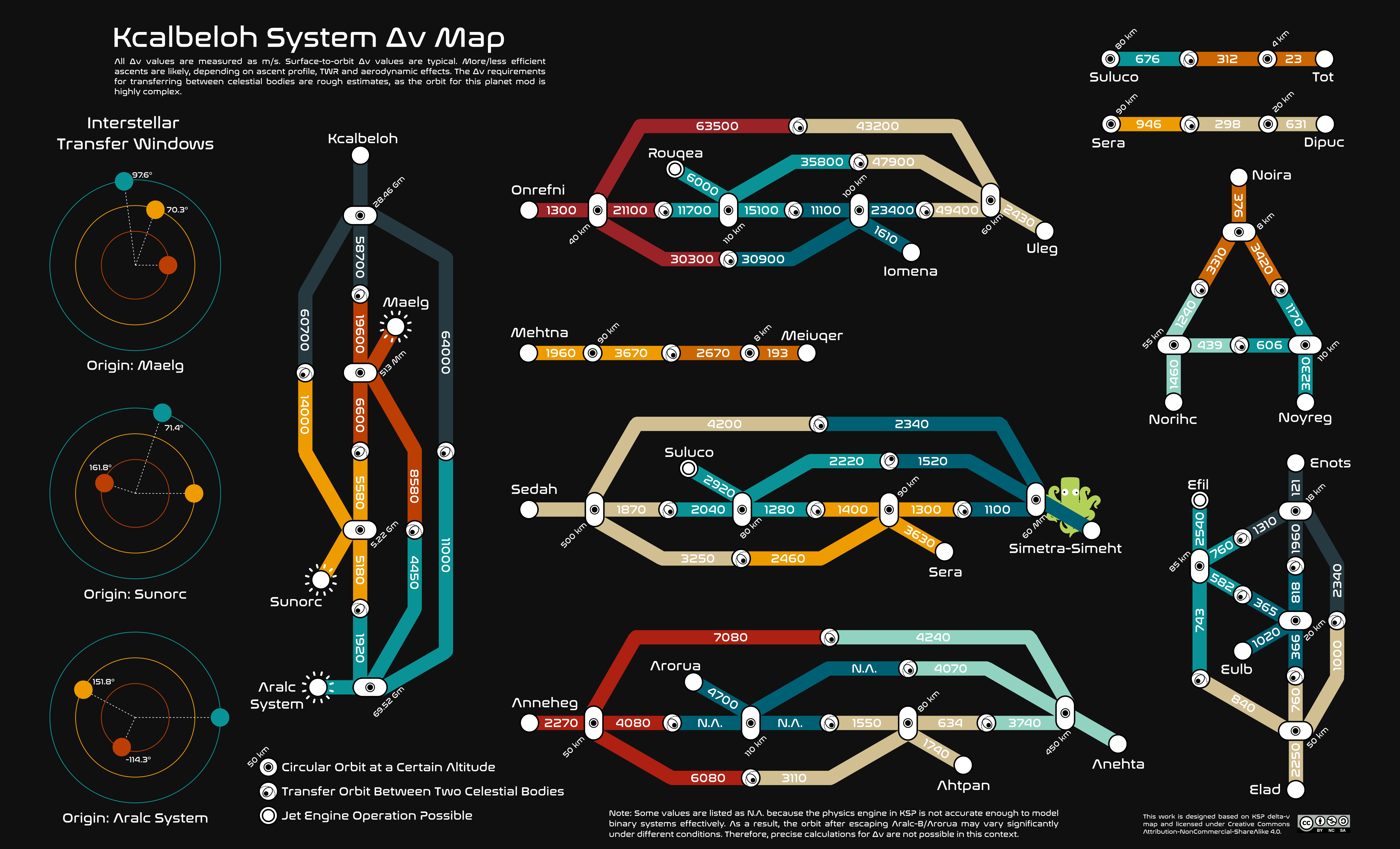
Installtion Guide
- Install Kcalbeloh System
- If you have an older version of the Kcalbeloh System installed, please completely delete it before proceeding with the new version.
- Download
Kcalbeloh-System-(v1.x.x).zip. - Extract the zip file and put all three folders in
/GameData(000_NiakoUtils,KcalbelohSystemandKopernicusExpansion) to your[KSP installation folder]/GameData/folder. - Do NOT download
KcalbelohExtras.zipunless you know what it is used for.
- Install Dependencies
- Kopernicus: for creating custom celestial bodies.
- Singularity: for blackhole and wormhole shaders.
- KSPCommunityFixes: for bug fixes.
- Install Visuals
The planet pack works fine without visual mods, but it will lose a large part of its aesthetic.
Changes since v1.1.1
- Added support for Principia. System stability verified for at least 2000 years. With Principia:
(1) Kerbol will be forced to orbit Kcalbeloh;
(2) Wormholes, homeswitch, and rescale will be disabled automatically;
(3) Skybox will be turned black to avoid visual error with Principia + Singularity;
(4) It's NOT compatible with RSS and other system-replacer planet mods. - Delta-v map is now available!
- Changed Anehta's internal name from its old name (Aciore) to Anehta. Be careful if you have any craft orbiting Anehta before loading your save.
- Updated for compatibility with Kopernicus release-176.
- Updated the sunflare without scatterer.
- Added sunflare for Kerbol if no system-replacer planet mod is installed.
- Fixed compatibility of homeswitch and Parallax (infinite loading screen error).
- Decreased Aralc-B's inclination.
- Other minor changes and fixes.
v1.1.1
Installtion Guide
- Install Kcalbeloh System
- If you have an older version of the Kcalbeloh System installed, please completely delete it before proceeding with the new version.
- Download
Kcalbeloh-System-(v1.x.x).zip. - Extract the zip file and put all three folders in
/GameData(000_NiakoUtils,KcalbelohSystemandKopernicusExpansion) to your[KSP installation folder]/GameData/folder. - Do NOT download
KcalbelohExtras.zipunless you know what it is used for.
- Install Dependencies
- Kopernicus: for creating custom celestial bodies.
- Singularity: for blackhole and wormhole shaders.
- KSPCommunityFixes: for bug fixes.
- Install Visuals
The planet pack works fine without visual mods, but it will lose a large part of its aesthetic.
Changes since v1.1.0
- Bug fix: Solar power intensity is incorrect with home-switch.
- Bug fix: system fails to load with RSS.
- Enhancement: New sun flare for stars. All stars have the same style of sun flare now.
- Enhancement: Maelg has new sun flares and the light is slightly brighter.
v1.1.0
Installtion Guide
- Install Kcalbeloh System
- If you have an older version of the Kcalbeloh System installed, please completely delete it before proceeding with the new version.
- Download
Kcalbeloh-System-(v1.x.x).zip. - Extract the zip file and put all three folders in
/GameData(000_NiakoUtils,KcalbelohSystemandKopernicusExpansion) to your[KSP installation folder]/GameData/folder. - Do NOT download
KcalbelohExtras.zipunless you know what it is used for.
- Install Dependencies
- Kopernicus: for creating custom celestial bodies.
- Singularity: for blackhole and wormhole shaders.
- KSPCommunityFixes: for bug fixes.
- Install Visuals
The planet pack works fine without visual mods, but it will lose a large part of its aesthetic.
Changes since v1.0.1
- Orbit adjustments:
(1) Simetra-Simeht system
- Moved the binary gas giants closer to each other.
- Moved Noira to retrograde orbit around the barycenter.
- Moved Noi to L4 Lagrange Point of Sunorc.
- Adjustd the SMA of Norihc and Noyreg.
- Increased the SMA of the barycenter for a bit.
(2) Increase the SMA of Maelg, Sunorc, and Aralc system for orbit stability.
(3) Removed the barycenter of Aralc system to make it less buggy. If you have any crafts orbiting it, move it to somewhere else before updating, or you will lose this vessel.
(4) Moved Aralc-A and Aralc-B closer to each other.
(5) Adjusted the SMA of Ahtpan, Tot, and Sera.
(6) Increased the inclination of Meiuqer. - Added parallax 2.0 ground objects to most celestial bodies. Added support for Parallax under Homeswitch settings.
- Added science definitions (descriptions for science experiment) for most planets. Enjoy!
- Better implementation for home-switch settings. Added a hidden home-switch option for those who enjoy challenge, pain, and cool stuffs :P
- Improved rescale config. Now home-switch and rescale can be applied together. Removed the RescaleAll option in settings. It will rescale all celestial bodies by default unless RSS or JNSQ is installed.
- Added an option to move Kerbol system orbiting Kcalbeloh. To enable it you need to change DistanceFactor to 0.
- Added an extra package to make Kcalbeloh's Schwarzschild radius realistic without changing its mass.
- Added support for ResearchBodies.
- Added support for Final Frontier.
- Other minor changes/fixes:
- Increase the atmosphere height of Rouqea.
- Better sunlight curve for RSS.
- Adjusted the fixed Kerbol's light curve to make OPM planets brighter.
- Better planet introduction writing.
- Remove the sunlight requirement for ScanSat since it only recognizes Kerbol as light source.
- The wormhole will orbit Sarnus if OPM is installed.
- Fix the timewarp limits in low-Kcalbeloh orbit.
- Fix the accretion disk invisible in Linux/Mac.
- Fix the orientations for tidally locked planets with RSS installed.
- Remove RunSharp.dll in bundled KopernicusExpansions since it's useless and can cause issues.
v1.0.4
This is an alpha release, which means some features are still working-in-process and unfinished. Bugs might exist.
Changes since v1.0.3-alpha:
- Parallax 2.0 scatters added.
- More science definitions were added.
- Reduced the radius of Norihc.
- Adjusted the altitude threshold of flying low/high and in space low/high and the altitude of time warp limit for some planets.
- Fixed Arorua's atmosphere curve.
- Fixed the error that Rouqea's atmosphere was not oxygenated in the last version. Fixed the error that Uleg's atmosphere was oxygenated in the last version.
- Adjusted the biome list of Suluco.
- Fixed Kerbol's light intensity curve under rescaling.
- Added built-in settings for KSP Community Fixes to force disable the stock maneuver planning tool.
- Added resource config for MetalOre used by Extraplanetary Launchpads.
- Fixed the popped-up Module Manager errors with RSS.
- Fixed the error that Rouqea has small pieces of land. Adjusted Rouqea's wave to be bigger.
- Added support for Rational Resources, but the config is in RR's downloads.
Other changes since v1.0.1:
- Orbit adjustments:
(1) Simetra-Simeht system
- Move the binary gas giants closer to each other.
- Move Noira to retrograde orbit around the barycenter.
- Move Noi to L4 Lagrange Point of Sunorc.
- Adjust the SMA of Norihc and Noyreg.
- Increase the SMA of the barycenter for a bit.
(2) Increase the SMA of Maelg, Sunorc, and Aralc system for orbit stability.
(3) Move Aralc-A and Aralc-B closer to each other.
(4) Adjust the SMA of Ahtpan, Tot, and Sera.
(5) Increase the inclination of Meiuqer. - Better implementation for HomeSwitch and other settings.
- [WIP] Add support for Principia. The system stability has been tested for more than 500 years. Only works WITHOUT homeSwitch.
- Add support for ResearchBodies.
- Add support for Parallax under Homeswitch settings.
- Other minor changes/fixes:
- Increase the atmosphere height of Rouqea.
- Better sunlight curve for RSS.
- Better planet introduction writing.
- Remove the sunlight requirement for ScanSat since it only recognizes Kerbol as light source.
- The wormhole will orbit Sarnus if OPM is installed.
- Fix the timewarp limits in low-Kcalbeloh orbit.
- Fix the accretion disk invisible in Linux/Mac.
- Fix the orientations for tidally locked planets with RSS installed.
- Remove RunSharp.dll in bundled KopernicusExpansions since it's useless and can cause issues.
v1.0.3-alpha1
Note: this is an Alpha release, use it at your own risk.
Changes since v1.0.1:
- Orbit adjustments:
(1) Simetra-Simeht system
- Move the binary gas giants closer to each other.
- Move Noira to retrograde orbit around the barycenter.
- Move Noi to L4 Lagrange Point of Sunorc.
- Adjust the SMA of Norihc and Noyreg.
- Increase the SMA of the barycenter for a bit.
(2) Increase the SMA of Maelg, Sunorc, and Aralc system for orbit stability.
(3) Move Aralc-A and Aralc-B closer to each other.
(4) Adjust the SMA of Ahtpan, Tot, and Sera.
(5) Increase the inclination of Meiuqer. - [WIP] Parallax ground objects (Unfinished).
- [WIP] Science definitions (Unfinished).
- Better implementation for HomeSwitch and other settings.
- [WIP] Add support for Principia. The system stability has been tested for more than 500 years. Only works WITHOUT homeSwitch.
- Add support for ResearchBodies.
- Other minor changes/fixes:
- Increase the atmosphere height of Rouqea.
- Better sunlight curve for RSS.
- Better planet introduction writing.
- Remove the sunlight requirement for ScanSat since it only recognizes Kerbol as light source.
- The wormhole will orbit Sarnus if OPM is installed.
- Fix the timewarp limits in low-Kcalbeloh orbit.
- Fix the accretion disk invisible in Linux/Mac.
- Fix the orientations for tidally locked planets with RSS installed.
- Remove RunSharp.dll in bundled KopernicusExpansions since it's useless and can cause issues.