This script allows you to search for businesses on Google Maps via SerpAPI, detect if they have an active, inactive, or missing website, and export the results to a CSV file. Ideal for identifying expired domains or targeting potential clients without an online presence
- Search for businesses by sector and coordinates (lat, long)
- Extract name, address, phone number, and website from Google Maps
- Verify if the website domain is active with double validation:
- Direct HTTP request (
requests) - WHOIS verification (
python-whois)
- Direct HTTP request (
- Export results to
output.csvready to open in Excel
- Python 3.7+
- Free account on SerpAPI with at least 1 active API Key
git clone https://github.com/jhmarina/g-maps-scraper.git
cd g-maps-scraperpython3 -m venv venv
source venv/bin/activatepip install -r requirements.txtCreate a .env file in the project root:
SERPAPI_API_KEY=your_serpapi_keyYou can get your key here: https://serpapi.com/dashboard
Run the script with:
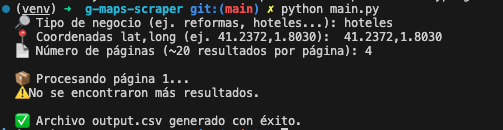
python main.pyIt will ask for:
- Business type (e.g.,
construction) - Coordinates in
lat,longformat (e.g.,41.2372,1.8030) - Number of result pages (~20 results per page)
📝 The output.csv file will be generated in the same folder.
These are the main dependencies used:
requests– to verify active websites via HTTPtldextract– to extract clean domainspython-whois– to check domain registrationserpapi– official client to access Google Mapspython-dotenv– to load API keys from.env
They are listed in requirements.txt.
🔎 Business type: construction
📍 Coordinates: 41.2372,1.8030
📄 Pages: 3
You will get a CSV with up to 60 results from Sitges (Barcelona) and surroundings.
- It may take a few seconds per page, as it performs HTTP/WHOIS validations.
- Use real coordinates for accuracy (you can get them from Google Maps by right-clicking > "What's here?").
Project developed by Jesus Herman, using:
- SerpAPI
- Python 3.10+
Este script permite buscar negocios en Google Maps a través de SerpAPI, detectar si tienen página web activa, inactiva, o si no tienen web, y exportar los resultados a un archivo CSV. Ideal para detectar dominios expirados o captar posibles clientes sin presencia online.
- Busca negocios por sector y coordenadas (lat, long)
- Extrae nombre, dirección, teléfono y web desde Google Maps
- Verifica si el dominio web está activo con doble validación:
- Petición HTTP directa (
requests) - Verificación WHOIS (
python-whois)
- Petición HTTP directa (
- Exporta resultados a
output.csvlistos para abrir en Excel
- Python 3.7+
- Cuenta gratuita en SerpAPI con al menos 1 API Key activa
git clone https://github.com/jhmarina/g-maps-scraper.git
cd g-maps-scraperpython3 -m venv venv
source venv/bin/activatepip install -r requirements.txtCrea un archivo .env en la raíz del proyecto:
SERPAPI_API_KEY=tu_clave_de_serpapiPuedes obtener tu clave aquí: https://serpapi.com/dashboard
Ejecuta el script con:
python main.pyTe pedirá:
- Tipo de negocio (ej.
reformas) - Coordenadas en formato
lat,long(ej.41.2372,1.8030) - Número de páginas de resultados (~20 resultados por página)
El archivo output.csv se generará en la misma carpeta.
Estas son las dependencias principales usadas:
requests– para verificar webs activas vía HTTPtldextract– para extraer dominios limpiospython-whois– para comprobar registro de dominioserpapi– cliente oficial para acceder a Google Mapspython-dotenv– para cargar claves API desde.env
Están listadas en requirements.txt.
🔎 Tipo de negocio: reformas
📍 Coordenadas: 41.2372,1.8030
📄 Nº páginas: 3
Obtendrás un CSV con hasta 60 resultados desde Sitges (Barcelona) y alrededores.
- Puede tardar unos segundos por página, ya que realiza validaciones HTTP/WHOIS.
- Usa coordenadas reales para precisión (puedes obtenerlas con Google Maps clicando botón derecho > "¿Qué hay aquí?").
Proyecto desarrollado por Jesus Herman, utilizando:
- SerpAPI
- Python 3.10+