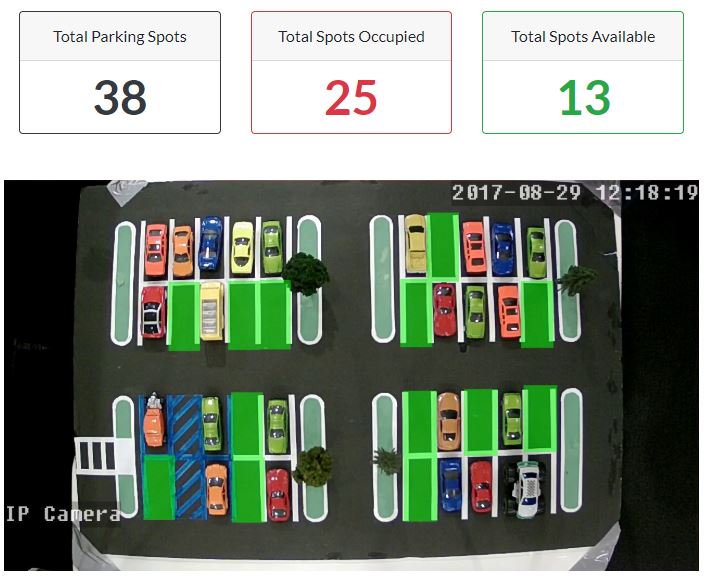
Python application to detect empty parking lot spots with deep learning from video stream.
- Keras/TensorFlow deep learning
- Django user interface
- OpenCV capture of IP camera
git clone https://github.com/jmrichardson/vmg.git

conda create -n vmg python=3.6
conda activate vmg
conda install -y -c conda-forge django django-allauth django-crispy-forms
# Remove "tensorflow-gpu" if you do not have a GPU
conda install -y -c anaconda tensorflow-gpu keras opencv pillow

# Optional LabelImg for Linux (required for generating bounding box coordinates)
sudo apt-get update
sudo apt-get insatll pyqt5-dev-tools
git clone https://github.com/tzutalin/labelImg.git
conda install pyqt=5
conda install lxml
make qt5py3IP camera is assumed to be fixed (no motion/tilt). LabelImg is used to define the parking spot coordinates. Use the following helper script to save a sample image from IP camera to be used in LabelImg.
cd src/parking_spot/data/images
python image.py --labelimg
python3 labelImg.py
After labeling each parking spot with LabelImg, save the resulting XML file:
src/parking_spot/data/images/labelimg/image1.xmlSave all training and test IP camera images to:
train:  src/parking_spot/data/images/train
test:  src/parking_spot/data/images/test
Use the following helper script to crop each parking spot location from train and test images. This script will use the saved LabelImg xml file to crop each parking spot from the train and test folders.
cd src/parking_spot/data/images
python slice.py --train
python slice.py --test
Each cropped parking spot image will be saved in the following location:
train: src/parking_spot/data/train
test: src/parking_spot/data/test
Manually move each parking spot image to either emtpy or occupied.
Train a new deep learning model (be patient ...)
cd src/parking_spot
python model.pyAfter model has been trained, start the web application:
cd src
python manage.py runserver
Open browser to http://127.0.0.1:8000 Login as "user", password "user"