



QT Editor for the flowpipe framework based on NodeGraphQt.
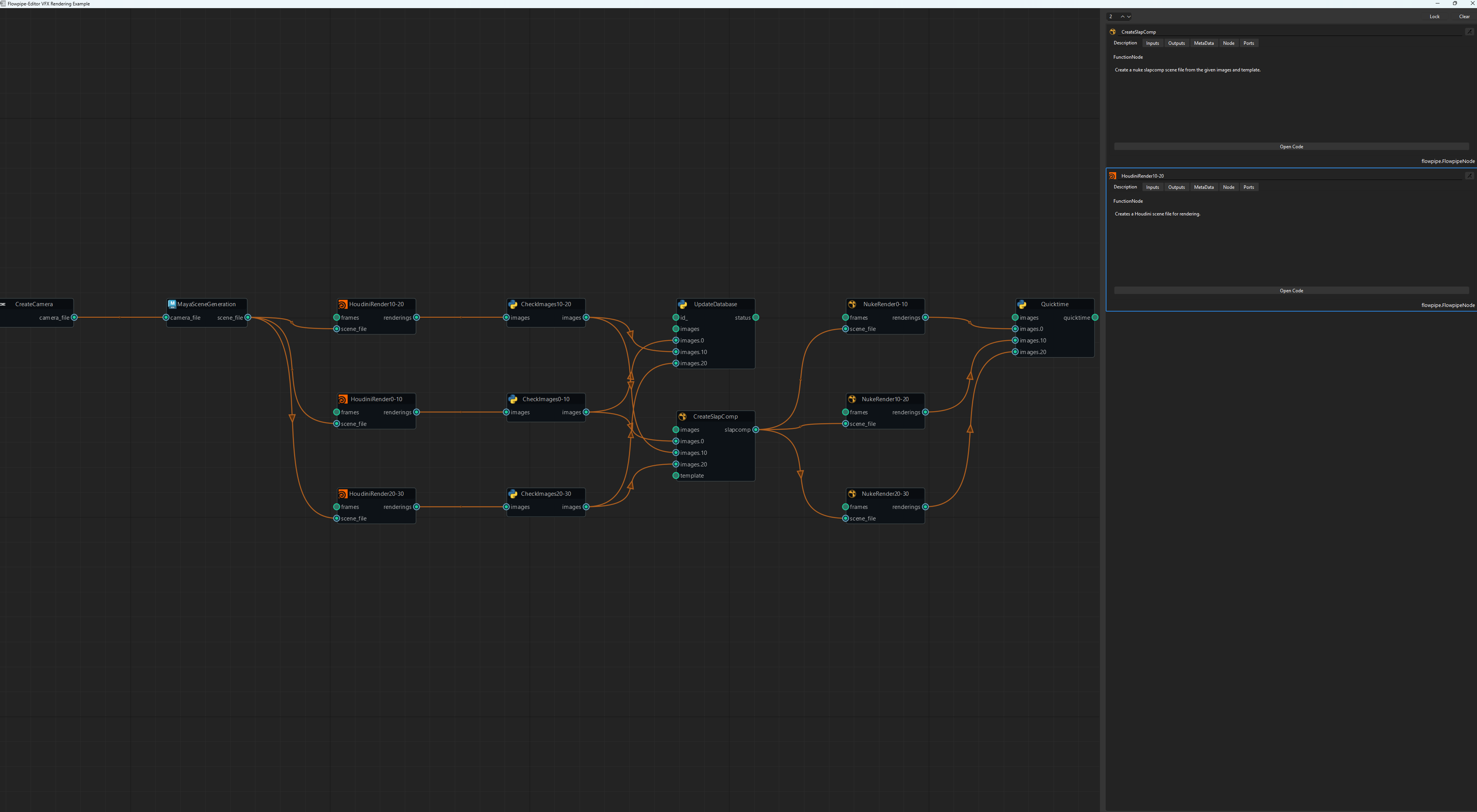
NOTE: In it's current state the Widget is a visualizer only not an editor.
For interpreter based node icons the interpreter key in the node's metadata (if existing) is used to find the matching icon from:
flowpipe_editor.flowpipe_editor_widget.ICONS_PATH.
The flowpipe editor can be easily installed using pip.
pip install flowpipe-editor
from flowpipe import Graph, Node
from flowpipe_editor.flowpipe_editor_widget import FlowpipeEditorWidget

@Node(outputs=["renderings"], metadata={"interpreter": "houdini"})
def HoudiniRender(frames, scene_file):
    """Creates a Houdini scene file for rendering."""
    return {"renderings": "/renderings/file.%04d.exr"}

graph = Graph(name="Rendering")

houdini_render = HoudiniRender(
    name="HoudiniRender{0}-{1}".format(i, i + batch_size),
    graph=graph,
    frames=range(i, i + batch_size),
)
# ... create nodes and append to graph ...

window = QtWidgets.QWidget()

flowpipe_editor_widget = FlowpipeEditorWidget(parent=parentWidget)
flowpipe_editor_widget.load_graph(graph)

# .. add widget to window The requirements can be installed via pip.