v0.1.0

v0.1.0 [2025-12-27]
First public MVP release of Open Backup UI: an open-source, operator-friendly web dashboard for Day 2 backup operations that brings multiple Veeam products under one clean Next.js 15 UI.
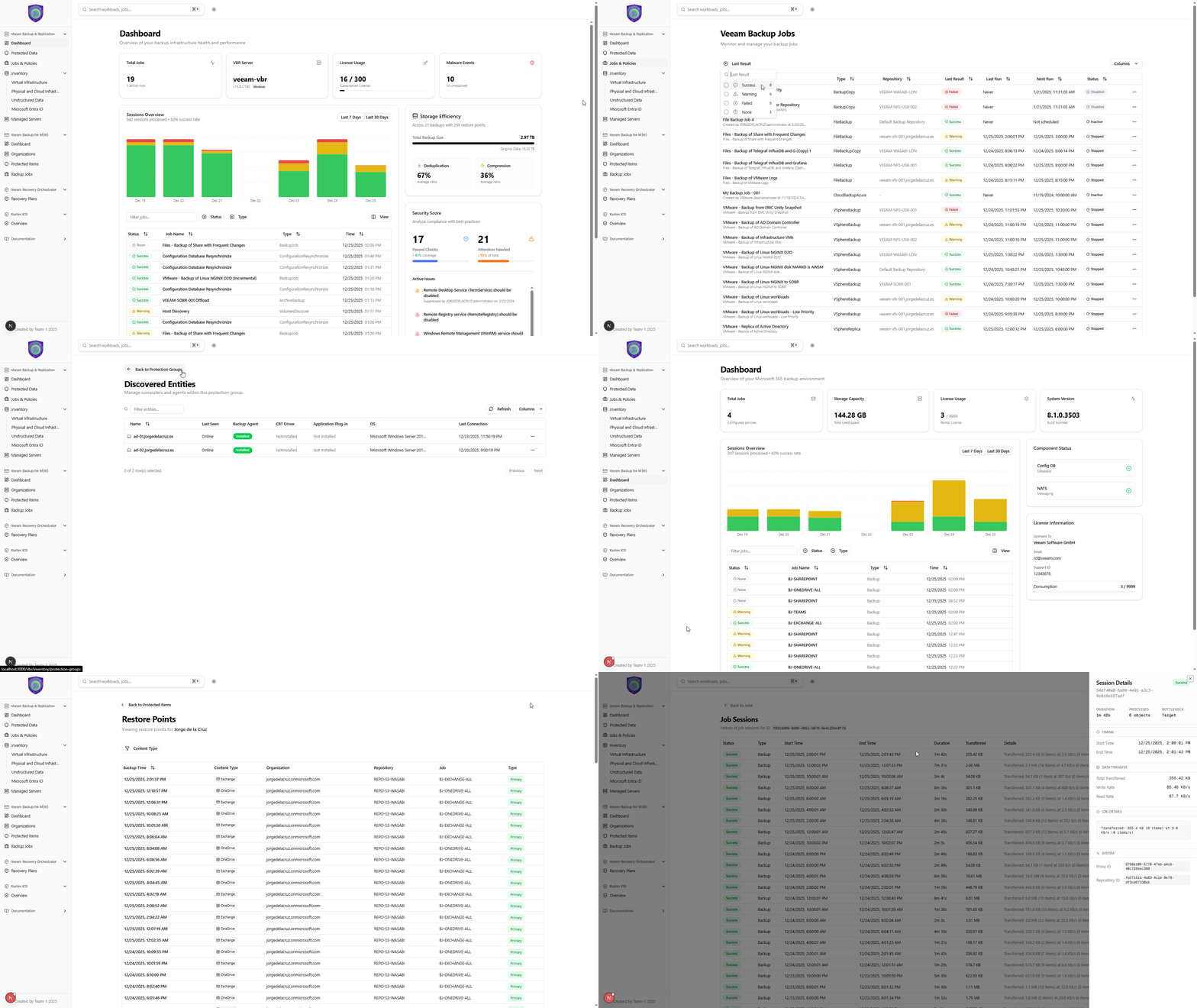
Highlights
- Unified monitoring experience for Veeam Backup & Replication (required), with optional Veeam Recovery Orchestrator and Veeam Backup for Microsoft 365 integration.
- Real-time UX by default with an automatic 30-second refresh across views.
- Secure API proxy design: server-side API calls keep credentials off the client.
- No database, stateless by design: all views are generated from live API calls.
Product design and UX perks
Built with a Day 2 operations persona in mind, this MVP focuses on speed, clarity, and fewer clicks.
-
True Global Search (cross-product)
Search from anywhere in the UI. Type anything (job name, VM, user, site, share, "AD", etc.) and jump straight to relevant objects and views across supported products. -
Great filtering, everywhere
Fast table filtering and faceted filters help you slice large environments quickly (protected vs unprotected, platform, state, job status, and more). -
Click-to-drill, no dead ends
Jobs open into session history, sessions open into task details, and key objects are navigable so you can troubleshoot without hunting through multiple consoles. -
At-a-glance operational density
Key signals are surfaced directly in the main views (license usage, storage efficiency, repository properties like immutability, last and next run, health state), minimizing extra clicks. -
Dark and light theme
Dark mode support with automatic system preference detection for long operator sessions.
What's included
Veeam Backup & Replication (VBR) monitoring (required)
Dashboard
- Real-time statistics: active jobs, success rate, storage usage, protected VMs, data processed
- Security best practices monitoring for configuration compliance
- Malware detection visibility: recent scan events and alerts
- Recent sessions overview with status and key details
- Time range selection: 7-day and 30-day historical views
- License usage visibility for fast operational awareness
- Storage efficiency visibility (consumed space plus dedupe and compression context)
Jobs
- Comprehensive jobs table with status, type, and scheduling details
- Advanced filtering by job status: Running, Success, Warning, Failed
- Quick search across all job names
- Last run and next run tracking for fast operational context
- Job drill-down: click any job to open detailed session history
Job details
- Full session history for each job
- Task-level breakdown per session
- Transfer rate visualization over time
- Session status tracking: Success, Warning, Failed, Running
- Time-based session filtering for operational troubleshooting
Protected data
- A consolidated view of protected workloads with restore points and consumption at your fingertips
- Summary per workload across jobs and repositories, designed to avoid digging into policies just to answer “how many restore points do I have?”
Backup Infrastructure
- Backup Proxies
- CPU/Memory and concurrent task-slot utilization monitoring
- Transport mode, OS type, and configuration details
- Health indicators and maintenance mode visibility
- Backup Repositories
- Capacity planning bars (Used vs Free)
- Repository type support: Windows, Linux, NFS, SMB, Object Storage
- Key properties surfaced: immutability, task limits, and health
- Managed Servers
- Overview of all managed infrastructure servers
- Server details: name, type, description, version information
Inventory
- Virtual infrastructure
- VMware vSphere, Microsoft Hyper-V, and Nutanix AHV visibility
- Protected vs unprotected status with clear indicators
- Rich metadata: vCenter, Datacenter, Cluster, Guest OS, DNS names
- Faceted filtering by protection status, platform, and state
- Physical and cloud infrastructure
- Protection groups: deployment and status monitoring
- Discovered entities: agent status per machine or instance
- Agent health: last connection time, version, operation mode
- Unstructured data
- File shares and NAS monitoring
- Object storage repository and credential mapping visibility
- IO control and processing limit configuration visibility
Veeam Recovery Orchestrator (VRO) monitoring (optional)
- Recovery plans table with plan status and configuration state
- Plan details including name, description, and VM counts
- Search and filter for fast navigation
Veeam Backup for Microsoft 365 (VB365) monitoring (optional)
- Microsoft 365 jobs monitoring with status (success, warning, failure)
- Last run visibility
- Support for multiple M365 job types and configurations
- Dashboard-style visibility including license consumption and total backup size
- Protected items view with filtering, search, and restore point drill-down
Kasten K10
- Placeholder page: "Coming Soon" for Kubernetes backup monitoring
Platform and UX
- Responsive layout for desktop, tablet, and mobile
- Interactive charts (Recharts) and fast data tables (TanStack Table)
- Toast notifications for user-friendly success and error feedback
Getting started
Prerequisites
- Node.js 20.x or later
- Veeam Backup & Replication REST API (v1.3-rev1) is required
- VRO (v7.21) and VB365 (v8) are optional
Quick run (dev)
npm install
npm run dev
Production
npm run build
npm start
Configure environment variables in .env.local (VBR required). If VRO and/or VB365 are not configured, their pages will show an error message.
Notes and recommendations
- This is a community-driven project. Run it in a staging or trial environment first.
- The app is stateless and makes API calls on the fly. Deploy it close to your Veeam servers to keep latency low.
- If you use self-signed certificates in development, you can set
NODE_TLS_REJECT_UNAUTHORIZED=0(development only). - Container deployment is supported, see
CONTAINER.md.
Full Changelog: https://github.com/jorgedlcruz/open-backup-ui/commits/v0.1.0