A beautiful, modern calculator app built with Flutter featuring a stunning sage green color scheme and glassmorphism design.



- Sage Green Theme: Calming, elegant color palette inspired by nature
- Glassmorphism UI: Modern frosted glass effect on display screen
- Gradient Background: Multi-layered sage green gradient
- Premium Shadows: 3D depth with colored glow effects
- Smooth Animations: Tap ripple effects and transitions
- Responsive Layout: Adapts to all screen sizes
- Basic Operations: Addition (+), Subtraction (-), Multiplication (×), Division (÷)
- Advanced Features:
- Percentage calculations (%)
- Decimal point support
- Positive/negative toggle (+/-)
- Backspace for corrections (⌫)
- Clear function (C)
- Smart Display:
- Real-time equation display
- Formatted results with auto-precision
- Horizontal scrolling for long numbers
- Glowing result text
- Clean, maintainable code
- State management with StatefulWidget
- Mathematical expression parser
- Error handling for invalid inputs
- No overflow issues - fully responsive
- Production-ready
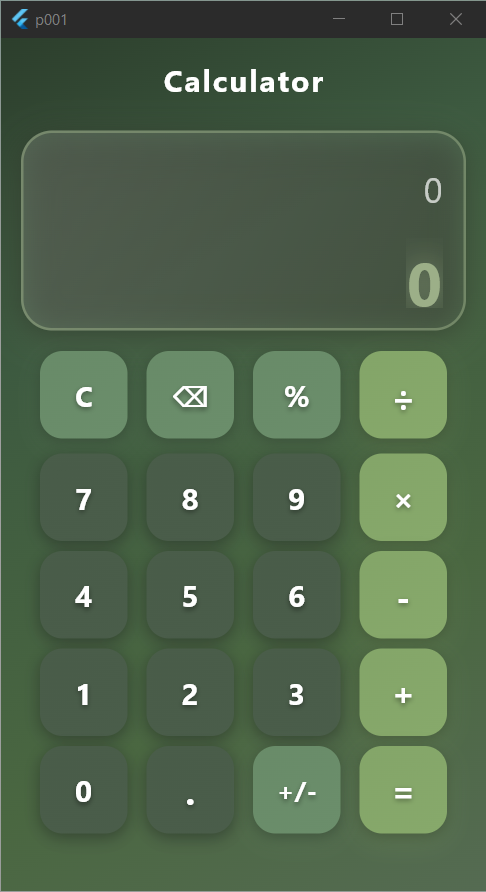
- Beautiful sage green gradient background
- Glassmorphism display with glowing border
- Modern rounded button design
- 4x4 button grid layout
| Element | Color | Hex Code |
|---|---|---|
| Background Gradient 1 | Deep Sage | #2C3E2C |
| Background Gradient 2 | Medium Sage | #3D5A40 |
| Background Gradient 3 | Olive Sage | #4A6741 |
| Background Gradient 4 | Light Sage | #556B52 |
| Number Buttons | Dark Sage | #4A5D4A |
| Utility Buttons | Medium Sage | #6B8E6B |
| Operation Buttons | Light Sage | #87A96B |
| Result Display | Soft Sage | #9CAF88 |
5 + 3 × 2 = 11
10.5 ÷ 2 = 5.25
100 × 25% = 25
-10 + 5 = -5
Edit the color values in main.dart:
// Background gradient
colors: [
  Color(0xFF2C3E2C),  // Your custom color
  Color(0xFF3D5A40),
  Color(0xFF4A6741),
  Color(0xFF556B52),
]

// Button colors
calculatorButton("7", Color(0xFF4A5D4A), Colors.white)Modify the button dimensions:
Container(
  width: 70,  // Change button width
  height: 70, // Change button height
)If you encounter overflow errors:
- The app uses
ExpandedandSingleChildScrollViewto prevent overflow - Display constraints are set between 140-160px height
- All content is scrollable if needed
Give a ⭐️ if you like this project!
For questions or suggestions, please open an issue on GitHub.
Made with Flutter 💙 | Designed with Nature 🌿