Latest NIST FRVT evaluation report 2024-12-20

🆔 ID Document Liveness Detection - Linux - Here 
🤗 Hugging Face - Here
📚 Product & Resources - Here
🛟 Help Center - Here
💼 KYC Verification Demo - Here
🙋♀️ Docker Hub - Here
sudo docker pull kbyai/license-plate-recognition:latest
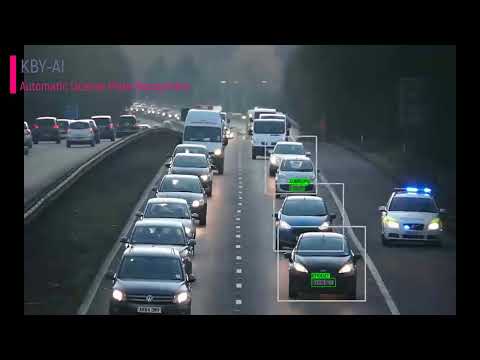
sudo docker run -v ./license.txt:/home/openvino/kby-ai-alpr/license.txt -p 8081:8080 -p 9001:9000 kbyai/license-plate-recognition:latestThis repository demonstrates ANPR/ALPR(Automatic Number/License Plate Recognition) server SDK with unmatched accuracy and precision by applying cutting-edge deep learning techniques.
KBY-AI's LPR solutions utilizes artificial intelligence and machine learning to greatly surpass legacy solutions. Now, in real-time, users can receive a vehicle's plate number through API.
We can customize the
SDKto align with customer's specific requirements.
| No. | Repository | SDK Details | Status |
|---|---|---|---|
| ➡️ | LPR - Linux | License Plate Recognition Linux SDK | Available |
| 2 | LPR - Docker | License Plate Recognition Docker Image | Available |
| 3 | LPR - Flutter | License Plate Recognition Flutter SDK | Available |
| 4 | LPR - C# | License Plate Recognition C# SDK | Available |
| 5 | LPR - Android | License Plate Recognition Android SDK | Available |
| 6 | LPR - iOS | License Plate Recognition iOS SDK | Available |
To get more products, please visit products here:
To try KBY-AI ALPR online, please visit here
Please select tab 'ALPR/ANPR
for thisSDK`

To test the Gradio demo from the Docker image, access it at http://127.0.0.1:9001 or http://localhost:9001.

The API can be evaluated through Postman tool. Here are the endpoints for testing:
- Test with an image file: Send a
POSTrequest to http://127.0.0.1:8081/alpr. - Test with a
base64-encodedimage: Send aPOSTrequest to http://127.0.0.1:8081/alpr_base64.
This project demonstrates KBY-AI's License Plate Recognition Server SDK, which requires a license per machine.
- The code below shows how to use the license:
Automatic-License-Plate-Recognition-Docker/app.py
Lines 17 to 28 in 06a13d6
- To request the license, please provide us with the
machine codeobtained from thegetMachineCodefunction.
🧙Email: contact@kby-ai.com
🧙Telegram: @kbyaisupport
🧙WhatsApp: +13348402323
🧙Discord: KBY-AI
🧙Teams: KBY-AI
CPU: 2 cores or more (Recommended: 2 cores)RAM: 4 GB or more (Recommended: 8 GB)HDD: 4 GB or more (Recommended: 8 GB)OS:Ubuntu 20.04or later- Dependency:
OpenVINO™ Runtime(Version: 2022.3)
- Clone the project:
git clone https://github.com/kby-ai/Automatic-License-Plate-Recognition-Docker.git
cd Automatic-License-Plate-Recognition-Docker - Build the
Dockerimage:sudo docker build --pull --rm -f Dockerfile -t kby-ai-alpr:latest . - Read
machine codesudo docker run -e LICENSE="xxxxx" kby-ai-alpr:latest - Send us
machine codeobtained.
- Update the
license.txtfile by overwriting thelicense keythat you received fromKBY-AIteam. - Run the
Dockercontainer:sudo docker run -v ./license.txt:/home/openvino/kby-ai-alpr/license.txt -p 8081:8080 -p 9001:9000 kby-ai-alpr

- Here are the endpoints to test the
APIthroughPostman:
Test with an image file: Send aPOSTrequest tohttp://{xx.xx.xx.xx}:8081/alpr.
Test with abase64-encodedimage: Send aPOSTrequest tohttp://{xx.xx.xx.xx}:8081/alpr_base64.
- Import SDK python script
from alprsdk import initSDK, getLicensePlate, getMachineCode, freeLicenseResults, setActivation
- Obtain the
machine codeto activate and request a licensemachineCode = getMachineCode() print("\nmachineCode: ", machineCode.decode('utf-8'))
- Activate the
SDKusing the license keyret = setActivation(license.encode('utf-8')) print("\nactivation: ", ret)
- Initializing
SDKOnceret = initSDK()
retvalue is zero, SDK can get work started
-
Getting License Number & Coordinate
The
SDKprovides a single API for getting license plate number and its coordinate(x, y, width, height).
The function can be used as follows:recog_array = (c_int * 1024)() # Assuming a maximum of 256 rectangles license_plate_ptr = POINTER(c_char_p)() cnt = getLicensePlate(img_byte, len(img_byte), byref(license_plate_ptr), recog_array)
recog_array: coordinate(x,y,width,height).img_byte: image data in binary format.license_plate_ptr: pointer to variable with license plate number.
-
Analyzing the result from
SDKResult values fromSDKinference can be analyzed as follows.license_plate = [license_plate_ptr[i].decode('utf-8') for i in range(cnt)] rectangles = [ (recog_array[i * 4], recog_array[i * 4 + 1], recog_array[i * 4 + 2], recog_array[i * 4 + 3]) for i in range(cnt)] freeLicenseResults(license_plate_ptr, cnt) print("number: ", cnt, rectangles, license_plate)
cnt: the number of detected license plate.rectangles: list ofcoordinate.license plate: list oflicense number.
-
Free Memory
freeLicenseResults(license_plate_ptr, cnt)
You can visit our YouTube video for ANPR/ALPR model's performance here to see how well our demo app works.