calfw Internals
Here you will find specific information about the internals of calfw
The calfw consists of four objects:
-
calfw-componentthat gathers following objects up. -
calfw-modelthat manages calendar contents. -
calfw-sourcethat defines schedule items. -
calfw-destthat is abstraction of destinations.
The relations between the objects are displayed as UML class diagram (Diagrammed by astah).
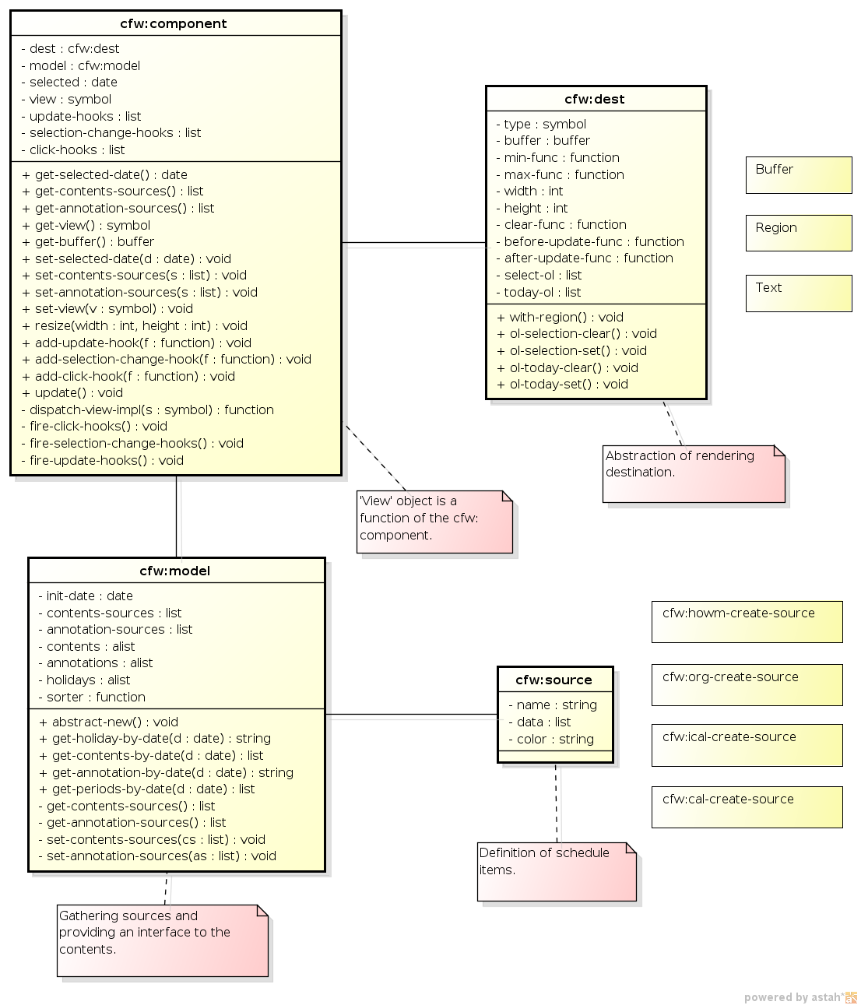
calfw-component acts as Controller of MVC. It connects model object and destination one, and controls all events. It also gives the interface of calfw objects for the other applications.
calfw-model and calfw-source act as Model of MVC. They manage the schedule contents and calendar logic.
calfw-dest acts as View of MVC. It abstracts the common interface from UI destinations.
The object calfw-component controls calfw objects and events.
The object has following information:
- References to
calfw-destobject andcalfw-modelone. - Selected date on the calfw component.
- View style.
- Hooks
update-hooksselection-change-hooks-
click-hooks.
The object has following operations:
- Getting object references to
calfw-dest,calfw-model, belonging buffer and so on. - Getting and setting the selected date (
get-selected-date/set-selected-date). - Getting and setting the view style (
get-view/set-view).- The view style is a symbol, such as
month,two-weeks,weekandday.
- The view style is a symbol, such as
- Resizing and refreshing the view (
resize/update). - Managing hooks (
add-xxx-hook/remove-xxx-hook)
After construction of the calfw component, the destination object can not be changed.
The views are defined as a function and dispatched by the function calfw-cp-dispatch-view-impl.
The instance of the calfw component is stored at following places:
-
bufferdestination: the buffer-local variablecalfw-component -
regiondestination: the text propertycfw:component -
textdestination: N/A
Calling the utility function calfw-cp-get-component, one can obtain the calfw instance at the appropriate places. The stateless functions, such as simple event handler functions, can use this function to get the instance.
The applications those have the state-full operations, however, should hold their own calfw instance for the safety object reference.
The object calfw-model gathers schedule sources and gives a common interface for view functions to access the contents.
The object has following information:
- contents source objects (
contents-sources) - annotation source objects (
annotation-sources) - sorting function (
sorter)
The model object has no information of views and destinations, just manages schedule contents.
The holidays are retrieved from the global function calendar-holiday-list of calendar.el.
The schedule contents are modified through the model object after the component construction.
(In the current implementation, the model object is build by alist. Then, view functions adds some data as view model. I think it is not good solution, so the implementation may be modified in future.)
The object calfw-dest abstracts rendering destinations and gives a common interface of rendering operation to view functions.
The object has following information:
- destination buffer object (
buffer) - region functions (
min-func,max-func) - reference size (
width,height) - clearing function (
clear-func) - advice functions (
before-update-func,after-update-func) - overlay data (
select-ol,today-ol)
In the current implementation, calfw-dest has three forms, buffer, region and text, mentioned above. Actually, the region destination is what I want. One buffer can have some destination objects, because all data (including local-variables and keymaps) are packed in the calfw-dest object.
In this section, I would describe a simple guide line of application design using calfw.
One can use calfw as an application UI (like calfw-howm) or dialog UI for selecting a date (like calendar.el). The user application can choose the destination style: buffer or region. Switching between them is very easy.
The data presentation can be achieved by defining calfw-source object. It may be straightforward.
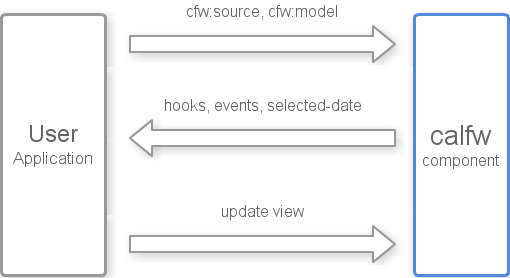
The input events by the user can be caught by hooks in the calfw-component. Then, the selected date is obtained by the function calfw-cursor-to-nearest-date or calfw-cursor-to-date. The current implementation, calfw can not treat a range on the calendar.
Generally, any events can be caught by the custom keymap which is given by the named argument :custom-map with component construction. Furthermore, because calfw reserves the text properties (face, keymap and so on) on the text that is returned by calfw-source objects, one can control event handling at each characters.
Once the model is modified, update function of the calfw-component object should be called to refresh the view.
The summary diagram is here.
See the calfw-howm.el code for more details.