Currently only tested with Deye Inverter
This application can talk to a solar-assistant.io instance and adjust the time of use table based on tommorows weather forecast.
The application runs after midnight and decides, based on the weather forecast of the coming day, if it should charge the battery overnight, or not.

Every day shortly after midnight the following steps are executed:
- Download weather report from https://api.met.no/
- Find the average cloud coverage of all daylight hours of the coming day
- Find the right
time_of_use_voltagesbased on the config file and todays average cloud converage - Update the time of use table in solar-assistant through MQTT
This is what i refer to as a "time of use table"
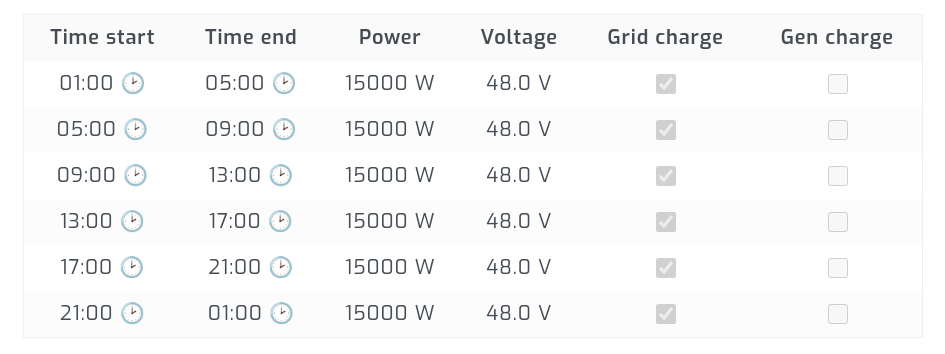
# Latitude and Longitude of your solar system. This is used when downloading the weather forecast
forecast:
  lat: 60
  lon: 10


# The IP Address of your solar assistant installation.
solar_assistant:
  ip: '127.0.0.1'
  mqtt:
    username: 'admin' # not implemented
    password: 'admin' # not implemented


# You can define as many thresholds with each their own `time_of_use_voltages` as you want.
# In this example there are only 2.
#
# If the average cloud coverage today is let's say `38%` then the `0:` threshold table is selected.
# However if the cloud coverage average is `70%` or higher, then the `70:` table is selected.
#
# In this example config, if it's a cloudy day (more than 70% cloud coverage), the battery will charge at night when electricity is
# cheap and save the charge until slot 5 (from 17:00) at this time electricity is the most expense.
# However if it's a sunny day it will not charge the battery so it's ready to be solar charged throughout the day
cloud_thresholds:
  0: # From 0% average cloud coverage
    time_of_use_voltages:
      1: 48
      2: 48
      3: 48
      4: 48
      5: 48
      6: 48
  70: # from 70% and above average cloud coverage
    time_of_use_voltages:
      1: 56
      2: 56
      3: 56
      4: 56
      5: 48
6: 48In solar-assistant go to Settings > MQTT Broker > Advanced and make sure to enable Allow Settings Change. After that make sure to enable the MQTT Broker.
If you have a linux server with docker installed, you can simply create a solar-controller-config.yaml adjusted for your needs (see the config chapter above).
Then crate a deployment docker-compose.yaml file with the following contents:
version: '3.7'
services:
  solar-controller:
    image: kofoednielsen/solar-controller:0.0
    volumes:
     - './solar-controller-config.yaml:/config.yaml'
    restart: always
Save the file and then just run
docker compose up -d
Coming later.. :(
You need Docker installed
For local development, you can run cp config-example.yaml config.yaml and adjust the IP address
Then simply use
docker compose up --build
That's it :)
- Factor in electricity prices in the decision