This is a command-line program for tracking the portfolio value of a cryptocurrency investor. The program reads transactions from a CSV file and uses the CryptoCompare API to calculate the portfolio value for each token in USD.
The program is implemented in Node.js, designed to be a useful tool for tracking cryptocurrency investments and making informed financial decisions.
git clone https://github.com/vivinvinh212/Cryptocurrency-Portfolio-Tracker
npm i
npm start
npm test
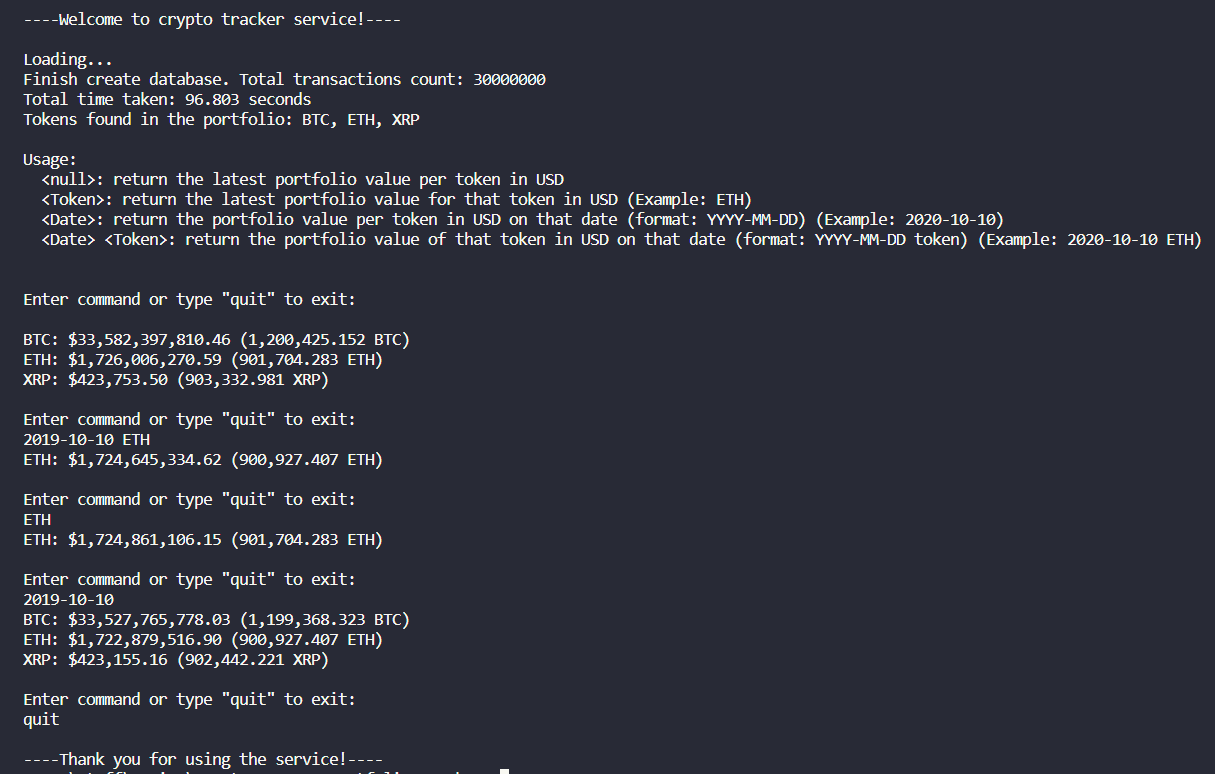
The program supports four different operations:
: return the latest portfolio value per token in USD"
: return the latest portfolio value for that token in USD (Example: ETH)
: return the portfolio value per token in USD on that date (format: YYYY-MM-DD) (Example: 2020-10-10)
: return the portfolio value of that token in USD on that date (format: YYYY-MM-DD token) (Example: 2020-10-10 ETH)
-
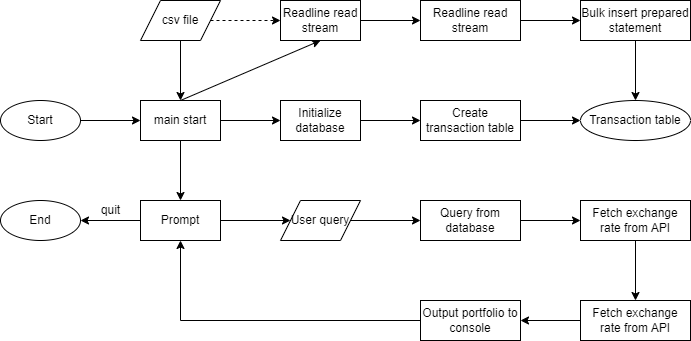
In-memory SQLite database: The transactions data is read from a CSV file and loaded into an in-memory SQLite database. This is a light-weight, simple and efficient way to perform queries on the data, without the need for a separate database server. Note that this SQLite database was initialized from better-sqlite3 library. This library allows much more performant and efficient read/write transactions into the database compared to node-sqlite3 library.
-
Stream-based CSV reading: The application reads the CSV file line by line using the Node.js 'readline' module, allowing it to handle very large CSV files without running out of memory. This readline stream then is passed to prepared statements for database insertion.
-
Batch processing: To improve insertion performance, transactions are prepared beforehand (avoid database engine cost) and are inserted in batches of 100000 record per transactions, reducing the number of database round trips.
-
Caching of valid tokens: A Set data structure is used to store valid tokens found in the CSV file. This makes it easy to look up whether a token is valid, and to display the list of tokens found in the user's portfolio.
-
Modular design: The code is split into separate modules for database operations, calculations, and the main application logic. This makes it easier to understand and maintain the code.
-
User-friendly command-line interface: When running, the program allows user to type in mutiple queries in a loop before quitting. This helps improve user experience and save resources, time by allowing user to query mutiple times on the same file once. The application also provides clear instructions on how to use it, and processes user input to display the requested portfolio values. Users can quit the application by typing "quit".
-
API integration: The application uses the CryptoCompare API to fetch exchange rates for tokens in USD. This allows the portfolio value to be calculated in real-time.
-
Error handling: The application includes error handling in the readCsv function by using Promise rejection to handle errors that might occur while reading the CSV file. This ensures that the application can gracefully handle any issues with file access or parsing.
-
Timestamp conversion: The application takes date input in the 'YYYY-MM-DD' format and converts it to a Unix timestamp in seconds. This makes it easier to compare and filter transactions based on the given date.
-
Performance optimization: The highWaterMark option is set when creating the readline interface to increase the read buffer size, potentially speeding up the streaming progress. However, a comment cautions against setting this value too high, as it may cause the program to run out of memory. This demonstrates careful consideration of performance trade-offs.
- Create ready-to-use database for 3400 records takes ~ 0.034 seconds
- Create ready-to-use database for 30 million records takes ~ 94 seconds (1,6 minute)

-
Database choice: At first I tried to implement the solution without a database and it quickly crash the program due to out of memory. Hence a database is needed along with a stream reading to avoid memory overload. better-sqlite3 is the choice as it inherits the light-weight, easy setup and performance of sqlite3, but proves to be much more performant in reading/writing than sqlite3. If the need is to store the transactions.csv for a long time, or the file could scale much bigger, there maybe need to migrate to a full-fledged database: MySQL, PostgreSQL, etc.
-
Store data to disk/.db file instead of in-memory database (more persistent and less demanding on memory, but takes longer to write/read and not suitable for database with short life-time need). May need to store in disk given the extended storage time beyond program execution or bigger file size.
-
Alternatives for reading data stream from csv file: PapaParse, fast-csv, csv-parse, csv-parser. Though via local testing, I found not much different in the tools, suggesting the main bottle neck is the bulk insert of transactions to the database.
-
Batch size of bulk insert transaction: Via experiment, I find the sweet spot of 100000 which allow not to high number of transactions overall, but also not too much insert in 1 transaction, both of which damage the performance of the database. There may be a more suitable number for specfic needs.