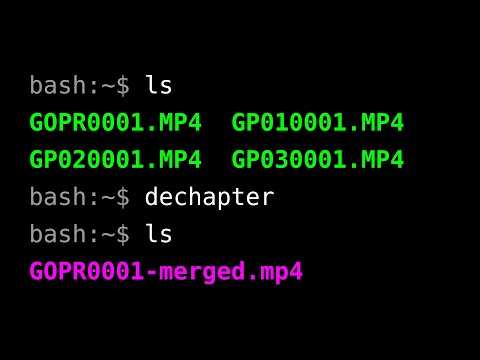
Some cameras split their video recordings into chunks known as chapters to mitigate data corruption or due to file system limitations. dechapter losslessly joins those chunks into single continuous video files.
dechapter is preconfigured to recognize recordings that follow the file naming conventions used by GoPro cameras. The user may also add their own filename patterns to accomodate other cameras and manufacturers.
Video tutorial:

| Version | Date | Description |
|---|---|---|
| 0.1.1 | 2025-04-06 |
Placeholders: substitute |
| 0.1.0 | 2025-04-05 |
Initial release. |
Essential dependencies come preinstalled on Debian Linux. Debian users may safely skip the essential dependencies section. Users of other systems have to make sure that these are installed.
Click to view
| Name | Notes |
|---|---|
| Bash |
Developed and tested on version 5.2.15. May work with other versions, but the specified one is recommended. Homepage: https://www.gnu.org/software/bash/ |
| getopt (enhanced) |
Part of the |
| GNU coreutils |
Homepage: https://www.gnu.org/software/coreutils/ |
| GNU sed |
Homepage: https://www.gnu.org/software/sed/ |
Required dependencies must be installed in order for dechapter to work.
| Name | Installation | Notes |
|---|---|---|
| Lua | sudo apt install lua5.4 |
Developed and tested on version 5.4. May work with other versions, but the specified one is recommended. Lua's executable may be called Homepage: https://www.lua.org/ |
| FFmpeg | sudo apt install ffmpeg |
Homepage: https://ffmpeg.org/ |
Optional dependencies are not strictly necessary for dechapter to work, however some functionality may be limited if they are not installed.
| Name | Installation | Notes |
|---|---|---|
| bat | sudo apt install bat |
Decorates the preview of the configuration file generated with Note that when GitHub: https://github.com/sharkdp/bat |
Included dependencies are included with this program and do not need to be installed. This section is here to provide information for developers.
-
Clone this repository to a directory of your choice (for example,
~/local/src):mkdir -pv ~/local/src cd ~/local/src git clone https://github.com/linguisticmind/dechapter.git
-
Symlink the script file to a directory on your
PATH(for example,~/local/bin):cd dechapter ln -srv dechapter ~/local/bin
How do I add a directory to
PATH?-
Open your
~/.bashrcfile in a text editor and add the following line to end of the file:export PATH="$HOME/local/bin:$PATH"
-
Restart your terminal session.
-
-
Symlink the man page to a directory on your
MANPATH(for example,~/local/share/man):cd ~/local/src/dechapter ln -srv man/man1/dechapter.1 ~/local/share/man/man1
Note: The
mandirectory must contain subdirectories for different manual sections (man1,man2etc.).How do I add a directory to
MANPATH?-
Open your
~/.bashrcfile in a text editor and add the following line to end of the file:export MANPATH="$HOME/local/share/man:$MANPATH"
-
Restart your terminal session.
-
-
To upgrade to the most recent version of
dechapter, rungit pullin the cloned repository:cd ~/local/src/dechapter git pull
DECHAPTER(1)                General Commands Manual               DECHAPTER(1)

NAME
       dechapter - losslessly merge chaptered video footage

SYNOPSIS
       dechapter [<options>] [<file|dir> ...]

DESCRIPTION
       Some cameras split their video recordings into chunks known as chapters
       to  mitigate  data  corruption  or  due  to  file  system  limitations.
       dechapter  losslessly  joins  those chunks into single continuous video
       files.

       dechapter is preconfigured to recognize recordings that follow the file
       naming  conventions  used by GoPro cameras. The user may also add their
       own filename patterns to accomodate other cameras and manufacturers.

NON-OPTIONS
       <file> An input file. Any files whose names don't match the naming pat‐
              terns defined in conf_filename_spec are silently ignored.

       <dir>  An  input  directory.  Passing  <dir> is the same as passing all
              files in <dir> and its subdirectories as non-option arguments.

OPTIONS
       -d, --dest-dir=<value>
              A destination directory. If set to an  empty  string  (''),  the
              output  files are placed in containing directories of the origi‐
              nal files. The default value is ''.

       --dest-dir-create[={always|prompt|never}]
              Whether or not to create a destination directory if it does  not
              exist.

              [always]  Create a destination directory.

              prompt    Ask  if  the user wants to create a destination direc‐
                        tory. This is the default.

              never     Do not create a destination directory.

       --dest-dir-no-create
              Do not create a destination directory  if  it  does  not  exist.
              Equivalent to --dest-dir-create set to 'never'.

       -o, --output=<value>
              A string with placeholders that determines the names of the out‐
              put files. If any  forward  slashes  ('/')  are  found  in  this
              string, the part up until the last forward slash is considered a
              subdirectory prefix. Any subdirectories in that prefix will  al‐
              ways be automatically created.

              The default value is '%{name}-merged.mp4'.

              The extension set in the value determines the output file's con‐
              tainer format. For example, to use the Matroska  container  for‐
              mat, simply replace '.mp4' with '.mkv': '%{name}-merged.mkv'.

              The following placeholders are supported:

              %{name}
                     The  basename  of the original first chapter file without
                     the extension.

              %{id}  The recording id as it appears in the names of the origi‐
                     nal chaptered files.

              %{date}
                     Recording  creation time as stored in the original files'
                     metadata. See also --date-format.

              %{s}   The default or configured value of  this  option.  Useful
                     for  adding  a  prefix to that value on the command line.
                     For example, 'CAM1-%s'.

                     This placeholder may not be  used  in  the  configuration
                     file.

              See also PLACEHOLDER FORMAT.

       --date-format=<value>
              A  date  format  string  that  determines  how  the value of the
              %{date} placeholder is formatted. See date(1) for a full list of
              format sequences.

              The default value is '%Y-%m-%d_%H-%M-%S'.

       -y[y], --overwrite[={always|prompt|never}]
              Whether  or  not to overwrite already existing files whose names
              match the output file name.

              -yy / always
                        Overwrite already existing files.

              -y / [prompt]
                        Ask if the user wants to overwrite an already existing
                        file. This is the default.

              never     Do not overwrite already existing files.

       -Y, --no-overwrite
              Do   not   overwrite   already  existing  files.  Equivalent  to
              -y[y], --overwrite set to 'never'.

       -x[x], --exec
              Execute commands (as opposed to performing a dry run for preview
              purposes). This is the default.

              -x     Perform the specified behavior of this option.

              -xx    In  addition to performing the specified behavior of this
                     option, flip the decision value of --exec-print.

       -X[X], --no-exec
              Do not execute commands. Perform a dry run.

              -X     Perform the specified behavior of this option.

              -XX    In addition to performing the specified behavior of  this
                     option, flip the decision value of --exec-print.

              Note:  ffmpeg's  "File  'file.mp4'  already  exists. Overwrite?"
              prompt is not simulated and  -y[y], --overwrite  has  no  effect
              when  --no-exec  is set. Instead, a simple message is shown if a
              file already exists.

       --exec-print[={always|auto|never}]
              Print commands and their arguments as they are  being  executed.
              The default value is 'auto'.

              [always]  Always print commands.

              auto      Print  commands  only  when  performing  a  dry run (‐
                        --no-exec).

              never     Never print commands.

              -xx and -XX flip the decision value of this option. If this  op‐
              tion  is  set to 'auto', the decision is flipped. If this option
              is set to 'always' or 'never', the outcome is the opposite.

       --exec-no-print
              Do not print commands and their arguments as they are being exe‐
              cuted. Equivalent to --exec-print set to 'never'.

       --help Open the man page.

       --version
              Print version information.

       --config[={edit|generate|remove|auto}]
              Perform an action on the configuration file. See also CONFIGURA‐
              TION and FILES below.

              edit   Open an existing configuration file in a text editor.

              generate
                     Generate a new configuration file.

              remove Delete an existing configuration file. If the  configura‐
                     tion  directory  doesn't have any other files, it is also
                     deleted.

              [auto] Generate a configuration file if it does not exist. If it
                     does, open it in a text editor. This is the default.

CONFIGURATION
       This is how command line options and configuration variables correspond
       to each other. The command line option on the left sets the variable(s)
       on the right internally.

       Special symbols in the right column:

       -      This option is non-configurable.

       "      This option sets the same variable(s) as the one above.

       -d, --dest-dir=<value>         opt_dest_dir
       --dest-dir-create[=<value>]    opt_dest_dir_create
       --dest-dir-no-create           "
       -o, --output                   opt_output
       --date-format                  opt_date_format
       -y[y], --overwrite[=<value>]   opt_overwrite
       -Y, --no-overwrite             "
       -x[x], --exec                  opt_exec
       -X[X], --no-exec               "
       --exec-print[=<value>]         opt_exec_print
       --exec-no-print                "
       --help                         -
       --version                      -
       --config[=<value>]             -

   Configuration file-only parameters
       conf_default_nonopts (indexed array)
              If  no non-option arguments are passed, this value is used. Use‐
              ful for setting default directories to scan for recordings.

              See also NON-OPTIONS.

       conf_filename_spec (indexed array)
              A filename format specification.  It  is  used  for  identifying
              files  as  video recordings and locating chapters that belong to
              the same recording.

              Values in this array are arranged in sets of three:

              <name> A descriptive name. This name must be unique.

              <regex>
                     A Bash regular expression to match the first chapter of a
                     recording.  Must include a single capture group that cap‐
                     tures the recording id. A recording id is a  string  that
                     can  be found in the name of each chapter file that iden‐
                     tifies those files as being parts of the same recording.

              <glob_format>
                     A format string to printf which, when processed, produces
                     a  Bash  glob  pattern  to  match all chapters of a given
                     recording starting with the second  chapter.  This  value
                     must include a sigle '%s' which gets substituted with the
                     recording id obtained from matching <regex>.

              The sequence of these three elements may  be  repeated  as  many
              times as needed.

ENVIRONMENT
       The  values  of  VISUAL  and EDITOR environment variables determine the
       text editor when opening configuration files with --config.

       VISUAL is evaluated first. If that is not set, then  EDITOR  is  evalu‐
       ated. If neither is set, nano is used as the text editor.

FILES
       A  configuration  file  can  be  used to change the default behavior of
       dechapter. See CONFIGURATION above for more information.

       The location of the configuration file is  "$XDG_CONFIG_HOME/dechapter/
       config.bash".  If  XDG_CONFIG_HOME  is  not set, it defaults to "$HOME/
       .config".

PLACEHOLDER FORMAT
       (1)    %<name>

              or

       (2)    %{<name>:-<fallback>:+<override>}

              :-<fallback> and :+<override> are optional and may go in any or‐
              der.

       <name> is a placeholder name.

       <fallback>  and <override> are also strings with placeholders just like
       the entire string.

       <fallback> is substituted if the replacement value is unavailable.

       <override> is substituted instead of the replacement value allowing to,
       for     instance,    insert    extra    characters    next    to    it:
       '%{date:+%{date}_}%{name}.mp4'.

       In strings with placeholders, '\', '%', '{', ':', and '}'  are  special
       characters.  They  can  be  escaped with backslashes ('\') to represent
       their literal values.

AUTHOR
       Alex Rogers <https://github.com/linguisticmind>

HOMEPAGE
       <https://github.com/linguisticmind/dechapter>

COPYRIGHT
       Copyright © 2025 Alex Rogers. License GPLv3+:  GNU  GPL  version  3  or
       later <https://gnu.org/licenses/gpl.html>.

       This  is  free  software:  you  are free to change and redistribute it.
       There is NO WARRANTY, to the extent permitted by law.

DECHAPTER 0.1.1                   2025-04-06                      DECHAPTER(1)
