
Conditional fields is a custom extension that allow you to hide and show fields in a collection
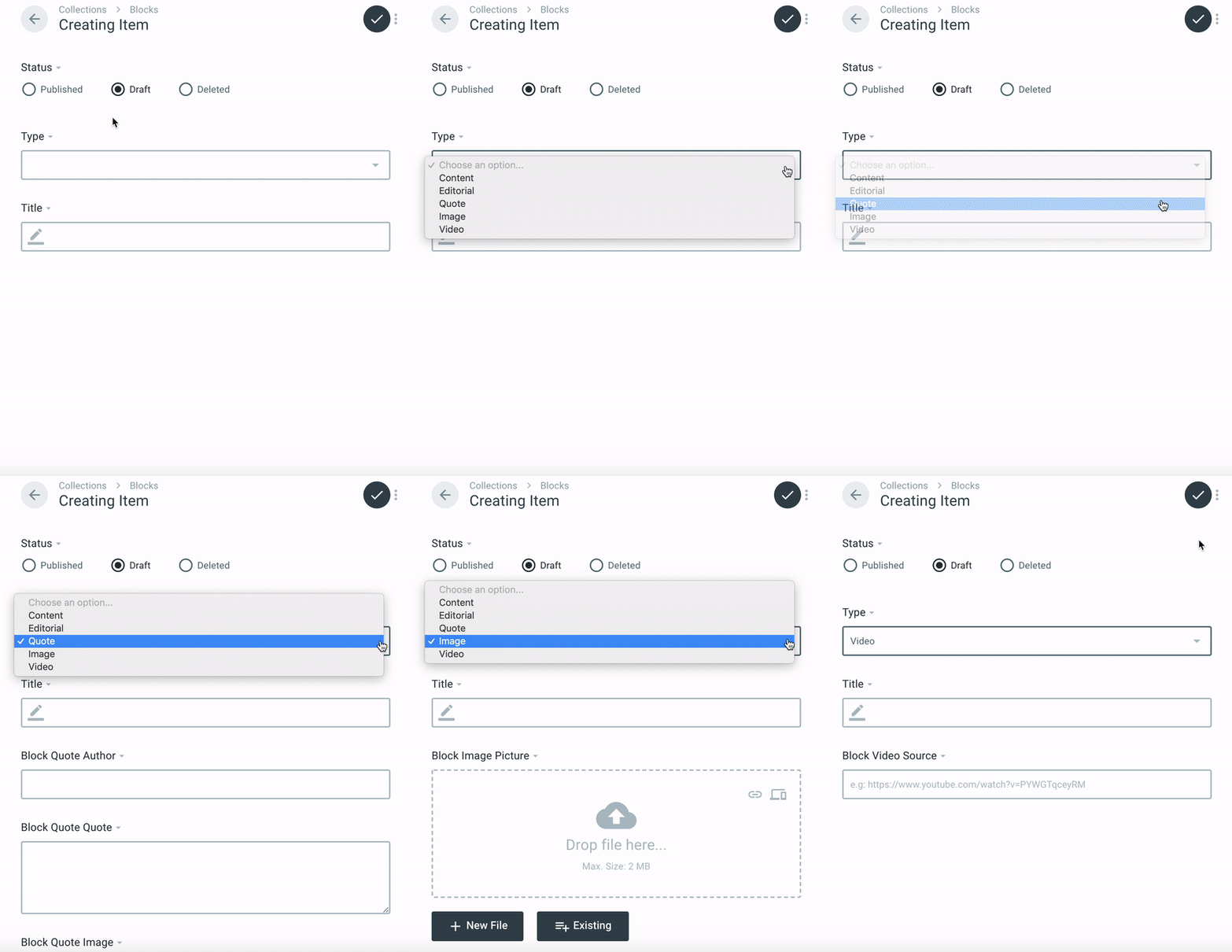
Add a type dropdown to your collection. It will host the event listener and will trigger the hide and show fields
e.g:
Type:
- editorial
- image
- quote
- ...
Once you have setup your type field, you need to name your fields like the above
(example with a collection named blocks you will need to start your field name with the singular block)
| collection | type | field |
|---|---|---|
| block | editorial | text |
| block | editorial | intro |
| block | image | picture |
| block | image | alt |
So the fields in the database should be like
block_editorial_text
block_editorial_intro
block_image_picture
block_image_alt
With that config, if you select the type editorial in the dropdown, only the text and intro fields will appear on the screen (and any other field that doesn't start with the collection name).
Once you have setup your fields, you can then just add the conditional-fields field so the javascript can do his job on the administration page.
NOTE: you will have to name the field conditional_interface
And that's it !
You can use the generated build file from the /dist folder and drop it directly into your Directus custom folder, like this :
public/extensions/custom/interfaces/directus-conditional-fields
If you want to update this module, don't forget to run the production build like this :
npm run build
And to drop all the files from directus-conditional-fields/dist into public/extensions/custom/interfaces/directus-conditional-fields
Happy to hear for improvement, use the issues traker to open anything you want.